
Ilife A4s Robotic Vacuum Cleaner User Manual
Content
ilife A4s Robotic Vacuum Cleaner: Full Product Manual and Buyer Guide
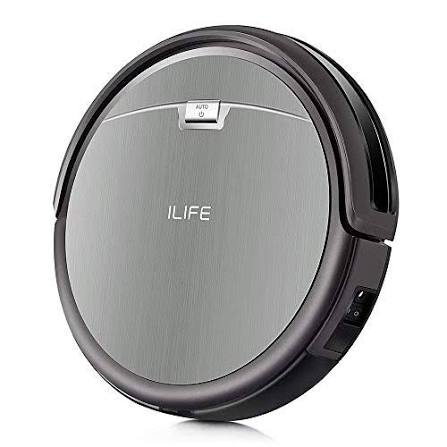
The ilife A4s Robotic Vacuum Cleaner is a budget-friendly robot vacuum designed for homeowners who want simple, automated floor cleaning without paying premium prices. It is especially appealing for hard floors, low-pile carpets, pet hair pickup, and everyday dust control in apartments, condos, and smaller homes. With a slim profile of about 3 inches tall, a lightweight body, and dual side brushes, the A4s can reach under sofas, beds, and cabinets more easily than many bulkier vacuums. Its self-charging feature, scheduled cleaning support, and long battery life make it a practical set-and-forget cleaning solution for busy users.
Core benefits of the ilife A4s Robotic Vacuum Cleaner include strong value for money, straightforward operation, and reliable edge cleaning. The design focuses on dry vacuuming rather than advanced mapping or mopping, which keeps the price lower and the controls easier to understand. Typical specifications include around 1000 Pa suction, up to 140 minutes of runtime, a 450 ml dustbin, a HEPA-style filter, and a cleaning area rated up to 200 m² in ideal conditions. Noise levels are commonly listed around 65 dB, which is moderate for a robot vacuum in this class.
As of current market listings, the ilife A4s Robotic Vacuum Cleaner usually falls in the low-to-mid budget range, roughly around $90 to $150 depending on seller, region, and bundle contents. It is still widely available through online marketplaces and retail resellers, though stock can vary because this model has been on the market for several years. This makes it a good fit for first-time robot vacuum buyers, cost-conscious households, and anyone who needs a dependable basic cleaner instead of a premium smart navigation system.
Pros and Cons of the ilife A4s Robotic Vacuum Cleaner
Pros
- Excellent value for money: The ilife A4s Robotic Vacuum Cleaner delivers core cleaning features at a much lower cost than many smart robot vacuums.
- Good edge and corner cleaning: Dual side brushes help sweep dust and debris from baseboards and room edges, which is useful in kitchens and hallways.
- Long runtime: Up to 140 minutes of cleaning is strong for a budget robot vacuum and works well for medium-sized living spaces.
- Low-profile design: The slim body can clean under furniture that taller robots may not reach.
- Simple controls: Remote control operation and automatic return to the charging dock make it easy to use for beginners.
Cons
- No advanced mapping: Unlike newer LiDAR or camera-based models, the A4s uses basic random navigation, so cleaning paths are less efficient.
- Limited smart features: It does not offer the app-driven control, room mapping, or voice assistant integration found in premium alternatives.
- Moderate carpet performance: It works best on hard floors and thin carpets, but thick rugs and deep carpet pile may reduce effectiveness.
- Basic obstacle handling: Users may need to clear cables, toys, and clutter before cleaning for best results.
- Not ideal for large, complex homes: Better alternatives exist if you want zoned cleaning, custom maps, or multi-floor memory.
For buyers comparing the ilife A4s Robotic Vacuum Cleaner with newer models, the main trade-off is price versus intelligence. Competing budget robots may offer stronger suction or app control, while premium alternatives deliver much better navigation and carpet management. Even so, the A4s remains a solid choice if the goal is basic, dependable daily cleaning at a low cost.
Customer Reviews and User Feedback Summary
Customer feedback for the ilife A4s Robotic Vacuum Cleaner is generally positive, with many users rating it around 4 out of 5 stars for everyday cleaning value. Buyers frequently praise its easy setup, quiet operation, and ability to collect dust, crumbs, and pet hair from hard floors. One common theme in testimonials is that it performs surprisingly well for the price, especially in apartments and smaller homes.
Common complaints include random navigation, occasional bumps into furniture, and the need to keep floors free of clutter before cleaning. Some users also note that it is not the best option for thick carpet or large multi-room layouts. Still, many reviewers recommend it as a practical starter robot vacuum for anyone who wants affordable automation without complicated setup. The most satisfied customers are usually those with open floor plans, laminate flooring, tile, or low-pile rugs.
Typical buyer sentiment can be summarized as: great basic cleaner, strong budget value, and best suited for simple homes rather than advanced smart-home users. For shoppers looking for an entry-level robot vacuum cleaner with dependable daily performance, the ilife A4s Robotic Vacuum Cleaner remains an easy recommendation.
Quick Answer: Is the ilife A4s Robotic Vacuum Cleaner Worth Buying?
Yes, if you want an affordable robot vacuum for hard floors, light carpet cleaning, and low-maintenance everyday use. The ilife A4s Robotic Vacuum Cleaner offers strong value, long battery life, and easy operation, but it is less suitable for users who need smart mapping, app control, or premium carpet performance.
Key Specifications at a Glance
- Suction power: about 1000 Pa
- Runtime: up to 140 minutes
- Dustbin capacity: about 450 ml
- Noise level: about 65 dB
- Height: about 7.6 cm
- Weight: about 2.2 kg
- Cleaning type: dry vacuuming
- Navigation: random pattern
- Best for: hard floors, thin carpets, pet hair, and everyday dust
Faqs
How do I set up the ilife A4s Robotic Vacuum Cleaner for the first time?
What should I do if my ilife A4s Robotic Vacuum Cleaner keeps getting stuck or stopping mid-clean?
How can I improve the cleaning performance of the ilife A4s Robotic Vacuum Cleaner on pet hair and dust?
Is the ilife A4s Robotic Vacuum Cleaner compatible with hardwood, tile, and low-pile carpets?
Why is my ilife A4s Robotic Vacuum Cleaner not charging, and how can I fix it?
How often should I clean and maintain the ilife A4s Robotic Vacuum Cleaner?
Can the ilife A4s Robotic Vacuum Cleaner handle rooms with furniture, thresholds, and narrow spaces?
What are the best troubleshooting steps if the ilife A4s Robotic Vacuum Cleaner has weak suction or poor pickup?
More ilife manuals
Leave a Comment