
Insignia NS-43D420NA20 Led TV User Manual
Content
Insignia NS-43D420NA20 LED TV Manual and Product Guide
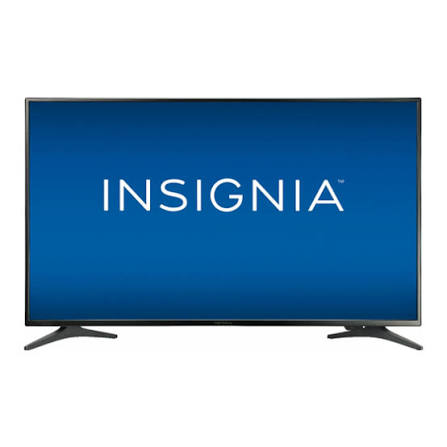
The Insignia NS-43D420NA20 LED TV is a 43-inch Full HD television designed for everyday viewing, streaming, gaming, and secondary-room entertainment. With its 1920 x 1080 resolution, 60 Hz refresh rate, and 43-inch screen size, it delivers a solid balance of clarity, simplicity, and value for users who want a dependable TV without paying premium prices. This model is especially appealing to families, apartment owners, students, and anyone looking for a practical living room or bedroom television with straightforward connectivity and easy setup.
One of the biggest advantages of the Insignia NS-43D420NA20 LED TV is its user-friendly design. It includes three HDMI inputs, a USB port, digital audio output, and a built-in digital tuner, making it easy to connect streaming devices, game consoles, soundbars, and antenna services. The TV’s direct-lit LED backlight helps maintain consistent brightness across the screen, while the 178-degree viewing angle supports comfortable viewing from multiple positions in the room. Its compact 43-inch class size also makes it a smart choice for medium-sized spaces.
As of 2026, the estimated price range typically falls between budget and mid-budget levels, depending on seller, condition, and stock availability. This model is still commonly found through online marketplaces, refurbished electronics listings, and remaining retail inventory. For shoppers comparing affordable 43-inch TVs, the Insignia NS-43D420NA20 stands out as a practical option with a reliable feature set and strong everyday performance.
Specifications for Insignia NS-43D420NA20 LED TV
- Screen size: 43 inches, ideal for bedrooms, small living rooms, and offices
- Resolution: Full HD 1920 x 1080 for crisp standard-definition and HD content
- Refresh rate: 60 Hz for smooth general viewing and casual gaming
- Panel type: Direct-lit LED with standard LED backlighting
- Viewing angle: 178°/178° for flexible room placement
- HDMI inputs: 3 ports for consoles, streaming devices, and media players
- USB port: 1 port for media playback and external storage
- Audio output: 16 W built-in speakers with digital optical support
- Other connections: RF antenna input, composite input, analog audio output, headphone jack
- Mounting: VESA-compatible 200 x 200 mm pattern
- Power: AC 100-240 V, 50-60 Hz
- Weight: About 15 lb with stand
Compared with many budget 43-inch televisions, this model emphasizes simplicity over advanced smart-TV features. It delivers reliable Full HD playback, decent audio output, and enough ports for common home entertainment setups. For users who want a basic 43-inch LED TV instead of a feature-heavy smart display, it offers a very practical spec sheet.
Detailed Description of the Insignia NS-43D420NA20 LED TV
The Insignia NS-43D420NA20 LED TV is built for straightforward performance and easy day-to-day use. Its 43-inch screen size provides a comfortable viewing area for movies, TV shows, sports, and gaming, while the Full HD resolution keeps broadcast and streaming content clear and sharp. Because it uses a direct-lit LED panel, brightness is distributed evenly enough for most common indoor settings, especially in bedrooms, dorm rooms, and smaller family spaces.
This television works well as a main TV for compact homes or as a secondary set in guest rooms, offices, or recreational spaces. The three HDMI ports are especially useful for connecting a cable box, game console, and streaming stick at the same time. Users can also connect a soundbar through the optical output for stronger audio performance. The built-in 16-watt speakers are adequate for casual use, though many buyers prefer external audio for more immersive sound.
Build quality is functional and lightweight, with a slim black frame and a practical stand design. The materials are typical of budget LED televisions, focusing on durability and value rather than premium finishes. In daily use, the interface is simple and the viewing experience is easy to manage, making the Insignia NS-43D420NA20 LED TV a dependable option for users who want hassle-free entertainment.
Setup Guide: How to Set Up the Insignia NS-43D420NA20 LED TV
- Unbox the TV carefully and place it on a flat, stable surface before plugging it in.
- Attach the stand using the included hardware, or mount the TV with a compatible 200 x 200 mm VESA bracket.
- Connect the power cord to a grounded outlet and avoid using damaged extension cords or overloaded power strips.
- Plug in HDMI devices such as a streaming box, game console, or cable receiver.
- Attach an antenna or cable line if you want to scan local broadcast channels.
- Connect audio equipment through the optical output or headphone jack if you want improved sound.
- Power on the TV and follow the on-screen prompts to select language, input, and channel settings.
- Run the channel scan to detect available over-the-air stations.
For best results, keep the TV away from heat sources and allow enough airflow around the rear panel. If a connected device does not appear, confirm the HDMI cable is firmly inserted and the correct input source is selected. If the picture looks distorted, check the source resolution and try another HDMI port. Always turn the TV off before connecting or disconnecting accessories to reduce the risk of damage.
Troubleshooting the Insignia NS-43D420NA20 LED TV
- No power: Check the outlet, power cord, and remote batteries. Try a different wall socket.
- No picture but sound is present: Verify the input source and HDMI cable connection.
- No sound: Increase volume, unmute the TV, and confirm audio output settings.
- Weak antenna reception: Reposition the antenna and run a new channel scan.
- Blurred or washed-out image: Adjust picture mode, brightness, and contrast settings.
- Device not detected: Switch HDMI ports or restart the external device.
There are no widely reported complex error codes for this model in common consumer use, so most issues are fixed through basic connection checks and settings adjustments. Preventive care includes keeping ports dust-free, using high-quality cables, and avoiding unstable power sources. Warranty coverage and support depend on the seller and purchase channel, so users should keep the receipt, serial number, and packaging information. If additional help is needed, contact the retailer’s support line or the manufacturer’s customer service through the official support channels listed with the product documentation.
Pros and Cons of the Insignia NS-43D420NA20 LED TV
Pros
- Affordable 43-inch Full HD TV with strong everyday value
- Three HDMI ports make it easy to connect multiple devices
- Simple setup and user-friendly controls
- Lightweight design for easy placement or wall mounting
- Good fit for bedrooms, dorm rooms, guest rooms, and secondary spaces
Cons
- Limited advanced features compared with newer smart TVs
- Built-in audio is adequate but not especially powerful
- Full HD resolution is solid, but not as sharp as 4K alternatives
- Picture quality is best in typical indoor lighting, not premium home theater use
For buyers focused on value for money, the Insignia NS-43D420NA20 LED TV is a sensible choice. It competes well against other budget 43-inch models that offer similar Full HD performance and port selection. Users looking for streaming apps or advanced picture processing may prefer a newer smart TV, while those who want a dependable basic display will likely appreciate this model’s simplicity.
Customer Reviews and User Feedback
Typical user feedback for the Insignia NS-43D420NA20 LED TV is generally positive, with many owners praising its affordability, compact size, and easy setup. A common rating pattern is around 4 out of 5 stars from budget-focused shoppers who want dependable performance without unnecessary extras.
“Great bedroom TV for the price. The picture is clear, and the HDMI ports made setup very easy.”
“Good value, but the speakers are only okay. I added a soundbar and it made a big difference.”
Frequent praise includes the Full HD display, multiple inputs, and lightweight frame. Common complaints usually mention average sound quality and the lack of premium smart-TV features. For shoppers who prioritize simplicity and low cost, the Insignia NS-43D420NA20 LED TV remains a practical recommendation, especially for secondary rooms or first-time TV buyers.
Faqs
How do I set up the Insignia NS-43D420NA20 LED TV for the first time?
Why is my Insignia NS-43D420NA20 LED TV not turning on, and what troubleshooting steps should I try?
What picture settings work best on the Insignia NS-43D420NA20 LED TV for movies, sports, and gaming?
Can the Insignia NS-43D420NA20 LED TV connect to streaming devices, soundbars, and game consoles?
How do I fix no sound or low sound on the Insignia NS-43D420NA20 LED TV?
What should I do if the Insignia NS-43D420NA20 LED TV screen is blank but the power light is on?
How can I improve Wi-Fi performance and streaming quality on the Insignia NS-43D420NA20 LED TV?
How do I clean and maintain the Insignia NS-43D420NA20 LED TV without damaging the screen?
More insignia manuals
Leave a Comment