
Setup: Johnson Controls S1-THXU430W Touch Screen Thermostat User Manual
Content
Johnson Controls S1-THXU430W Touch Screen Thermostat Manual
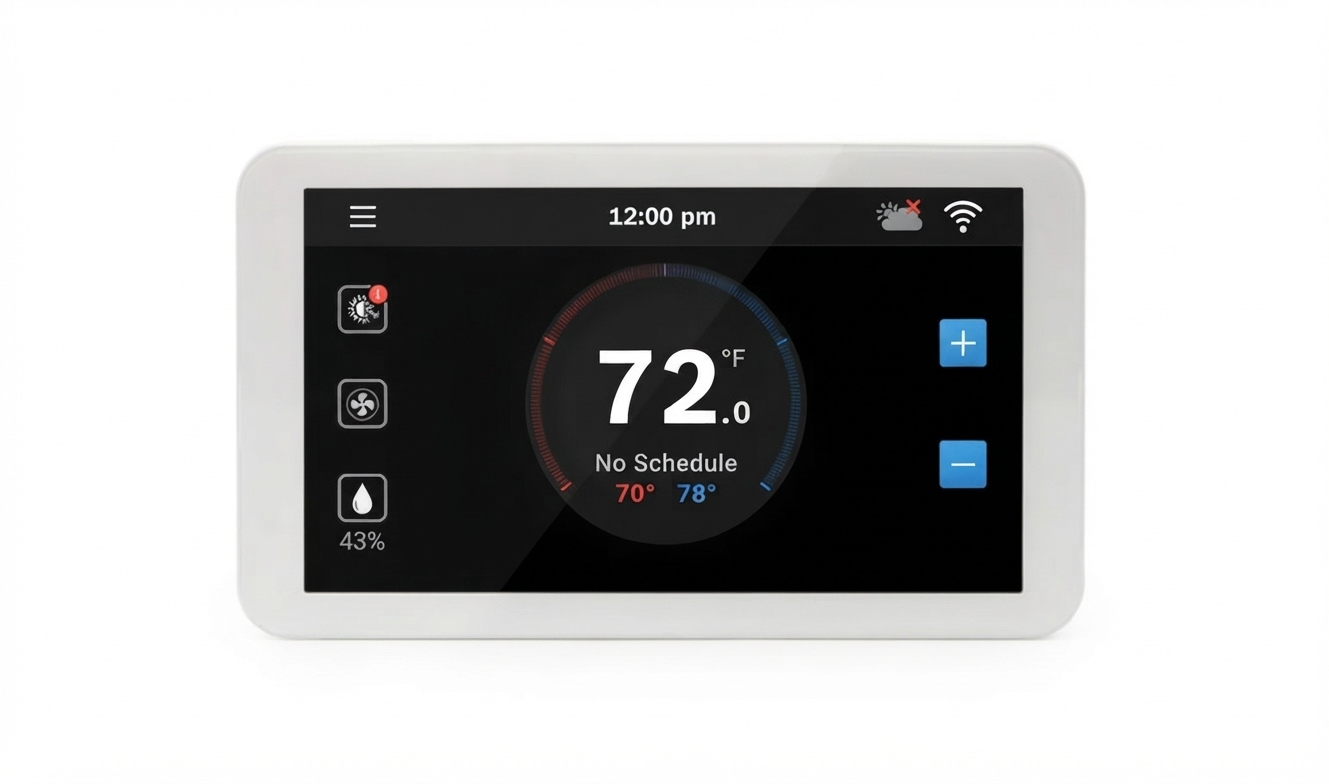
The johnson controls S1-THXU430W Touch Screen Thermostat is a premium Hx 3 touchscreen thermostat designed for advanced HVAC control in residential and light commercial systems. It combines a full-color 4.3-inch touchscreen, Wi-Fi connectivity, programmable scheduling, humidity control, and compatibility with a wide range of 24 VAC equipment. This makes it a strong fit for homeowners who want smarter climate control, HVAC contractors needing a reliable modern control interface, and property managers looking for a versatile thermostat that supports both comfort and system efficiency.
One of the biggest benefits of the johnson controls S1-THXU430W Touch Screen Thermostat is its flexibility. It supports conventional systems up to 2 heat and 2 cool stages, as well as heat pump configurations up to 4 heat and 2 cool stages. It also works with zoning systems and can serve as a main control or zone thermostat depending on the application. The touchscreen interface is easy to use, and Wi-Fi capability helps users manage temperature settings remotely and improve comfort from a smartphone or connected platform.
In current market listings, this thermostat typically falls in the premium range, with estimated pricing often landing between about $700 and $1,130 depending on the seller, supply, and package condition. Availability may vary because it is commonly sold through HVAC distributors, parts suppliers, and specialty online stores rather than general big-box retailers. For users who need a feature-rich smart thermostat with humidity control and advanced HVAC compatibility, this model offers strong value despite its higher price point.
Specifications for Johnson Controls S1-THXU430W Touch Screen Thermostat
The johnson controls S1-THXU430W Touch Screen Thermostat is built around a modern 4.3-inch color touchscreen and is intended for 24 VAC HVAC systems. It is engineered for accurate temperature control, flexible staging, and easy integration with compatible systems. Below are the key specifications and features:
- Display: 4.3-inch full-color capacitive touchscreen
- System voltage: 24 VAC
- Conventional system support: Up to 2 heat / 2 cool stages
- Heat pump support: Up to 4 heat / 2 cool stages
- Wi-Fi: Built-in wireless connectivity for remote access and control
- Humidity control: Supports humidification and dehumidification functions in compatible systems
- Programming: 7-day programmable scheduling
- System compatibility: Works with furnaces, air handlers, heat pumps, and other 24 VAC equipment
- Communication: Designed for communicating HVAC applications and zoning setups
- Temperature range: Commonly configured for standard comfort setpoint ranges in residential HVAC use
Compared with simpler programmable thermostats, this model offers more advanced HVAC control, better interface quality, and stronger integration with modern systems. Compared with lower-cost smart thermostats, it is more specialized for Johnson Controls, YORK, Luxaire, Coleman, Champion, and related equipment ecosystems, which makes it particularly valuable for compatible installations.
Troubleshooting Common Issues on the S1-THXU430W Thermostat
If the thermostat is not working correctly, most problems can be traced to wiring, power supply, network setup, or configuration errors. The johnson controls S1-THXU430W Touch Screen Thermostat requires proper 24 VAC power with both R and C connections, so a power interruption is one of the most common causes of a blank screen or unresponsive operation.
- Blank display: Check for 24 VAC power, inspect R and C wiring, and confirm the HVAC system breaker is on.
- Wi-Fi not connecting: Verify the network password, confirm the router is on 2.4 GHz Wi-Fi, and restart the thermostat and router.
- System not heating or cooling: Review wiring to ensure proper terminal connections for Y1, Y2, W1, W2, G, and O/B as applicable.
- Incorrect temperature readings: Recheck thermostat placement, avoid direct sunlight or drafts, and verify sensor calibration settings if available.
- Communication fault or error indication: Inspect the four-wire communicating connection and confirm compatibility with the connected HVAC equipment.
Preventive care includes keeping firmware current when updates are available, avoiding dust buildup around the thermostat, and confirming correct installer settings after any HVAC service. The product is commonly covered by a 5-year parts warranty in distributor documentation, though warranty terms can vary by seller and installation conditions. For support, contact the original HVAC dealer, the installing contractor, or Johnson Controls customer support through the official product documentation portal or the brand’s service network.
Pros and Cons of the Johnson Controls S1-THXU430W Touch Screen Thermostat
Pros
- Large 4.3-inch touchscreen makes daily use simple and visually clear.
- Supports advanced HVAC setups, including multi-stage and heat pump systems.
- Wi-Fi connectivity adds convenience for remote control and scheduling.
- Humidity management features improve comfort in compatible systems.
- Strong fit for Johnson Controls, YORK, Luxaire, Coleman, and related equipment.
Cons
- Higher price than many generic smart thermostats.
- Best value depends on system compatibility, so it is not ideal for every home.
- Installation may require professional HVAC knowledge, especially in communicating systems.
- Availability can be inconsistent, with pricing varying by distributor.
In value-for-money terms, this thermostat is best for users who need a feature-rich, brand-compatible control rather than a low-cost universal smart thermostat. Compared with mainstream alternatives, it is more specialized and often more expensive, but it delivers stronger integration for compatible HVAC systems and zoning applications.
Customer Reviews and User Feedback
Customer feedback for the johnson controls S1-THXU430W Touch Screen Thermostat is generally positive among buyers who need advanced HVAC compatibility. Many users give it around 4.3 out of 5 stars for its touchscreen clarity, comfort control, and system flexibility. Reviewers often praise the responsive interface, clean design, and reliable operation once installed correctly.
Common complaints usually focus on price, setup complexity, and the need for proper wiring or professional installation. One typical comment is: “The touchscreen is easy to read and the zoning features work well, but installation took more time than expected.” Another frequent theme is that the thermostat performs best when used with compatible equipment and factory-recommended configurations.
For buyers who already have a supported Johnson Controls or YORK-family HVAC system, this model is often recommended. Users seeking a budget smart thermostat may prefer a simpler alternative, but those who want advanced control and a polished interface will find strong long-term value here.
Faqs
How do I set up the johnson controls S1-THXU430W Touch Screen Thermostat for the first time?
What wiring and compatibility requirements should I check before installing the johnson controls S1-THXU430W Touch Screen Thermostat?
Why is the johnson controls S1-THXU430W Touch Screen Thermostat not turning on after installation?
How do I program schedules on the johnson controls S1-THXU430W Touch Screen Thermostat to save energy?
What should I do if the johnson controls S1-THXU430W Touch Screen Thermostat is not responding to touch?
How accurate is the temperature control on the johnson controls S1-THXU430W Touch Screen Thermostat, and how can I improve performance?
What features make the johnson controls S1-THXU430W Touch Screen Thermostat useful for everyday comfort control?
How should I clean and maintain the johnson controls S1-THXU430W Touch Screen Thermostat for long-term reliability?
More johnson controls manuals
Leave a Comment