
Setup: Kohler Mira Shower Wireless Controller User Guide
Content
Kohler Mira Shower Wireless Controller
Introduction
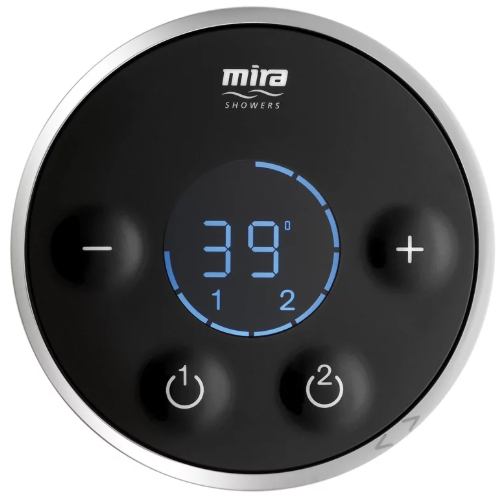
The Kohler Mira Shower Wireless Controller is a cutting-edge innovation in bathroom technology, designed to enhance your showering experience with convenience, comfort, and style. This controller is part of the Mira range by Kohler, known for its high-quality and user-friendly products. The wireless controller allows you to adjust the temperature, flow rate, and other settings of your shower without the need for physical connections, making it a perfect addition to any modern bathroom.
The product is expected to be launched in the latter half of 2023, with an estimated price range between $200 to $300, depending on the specific features and bundles available. The wireless controller is designed to be compatible with a variety of shower systems, making it versatile and easy to integrate into existing setups.
The purpose of this device is to provide a seamless and luxurious showering experience. It allows users to pre-set their preferred temperatures and flow rates, ensuring that every shower is just right. The wireless functionality also means that the controller can be installed in a convenient location, such as outside the shower enclosure, making it easy to use before stepping in.
Detailed Specifications (Key Features)
- Wireless connectivity for easy installation and use
- Temperature control with precise adjustments
- Flow rate adjustment for customized water pressure
- Multiple preset options forr different users
- Water-saving features to reduce consumption
- LED display for clear visibility of settings
- Battery-powered with long battery life
- Compact design for seamless integration into any bathroom decor
SAFETY INFORMATION
- Make sure that you fully understand how to operate this shower and make sure that it is properly maintained in accordance with the instructions given in this manual.
- Sunburn or skin conditions can increase your sensitivity to hot water. Make sure that you set the shower to a cooler temperature.
CHANGING FUNCTIONS/SETTINGS
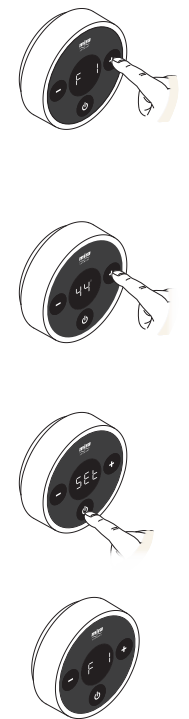
Maximum Showering Water Temperature
- Factory default “45°C”.
- Cycle menu to “F 1” and press “
 ”.
”. - Press “+” or “-” to adjust temperature. Maximum = 48°C
- Minimum = 35°C
- Press “ ” to set.
- Press “ ” to exit back to the Function Menu. See section “Exit the Function Menu”.
Eco
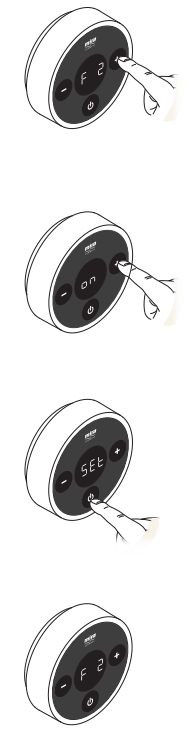
- Factory default “off”.
- Cycle menu to “F 2” and press “ ”.
- Press “+” or “-” to change the setting “on” or “off”. Press “ ” to set.
- Press “ ” to exit back to the Function Menu. See section “Exit the Function Menu”.
Warm-Up
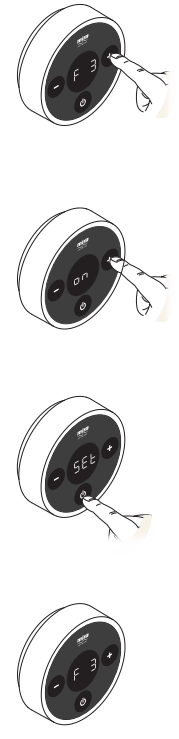
- Factory default “off”.
- Note! The function will not work with combination boilers.
- Cycle menu to “F 3” and press “ ”.
- Press “+” or “-” to change the setting “on” or “off”.
- Press “ ” to set.
- Press “ ” to exit back to the Function Menu. See section “Exit the Function Menu”.
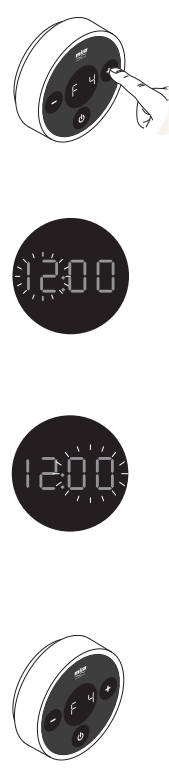
Clock Setting
- Factory default “10:00”.
- Note! It can also be activated by disconnecting and reconnecting the battery.
- Cycle menu to “F 4” and press “ ”.
- Press“-” to change the hour setting.
- Press “+” to change the minute setting.Press “ ” to set time and exit back to Function Menu. See section “Exit the Function Menu”.
Clock Display
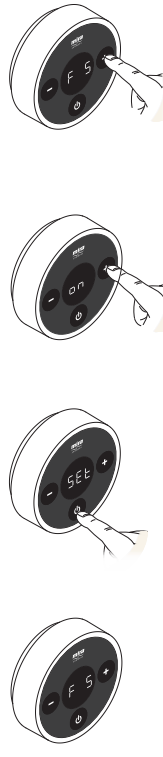
- Factory default “on”.
- Cycle menu to “F 5” and press “ ”.
- Press “+” or “-” to change the setting “on” or “off”.
- Press “ ” to set.
- Press “ ” to exit back to the Function Menu. See section “Exit the Function Menu”.
Flow Range
- For use with High Pressure/Combi Valve version only. Factory default “1 - 99”
- Cycle menu to “F 6” and press “ ”.
- “on” is displayed, press “ ” to start the shower.
- Lower limit is displayed, e.g., “L 1”. Adjust flow to the desired lower limit 1-99
- .Press “ ” to set lower limit.
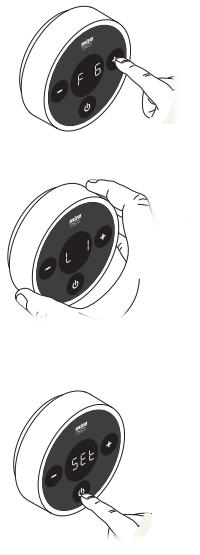
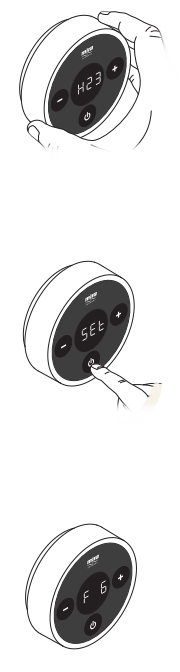
- Higher limit is displayed, e.g., “H 23”. Adjust flow to the desired higher limit 1-99. (Most plumbing systems may achieve maximum flow before 99.)
- Press “ ” to set a higher limit
- .Press “ ” to set and exit back to the Function Menu. See section “Exit the Function Menu”.
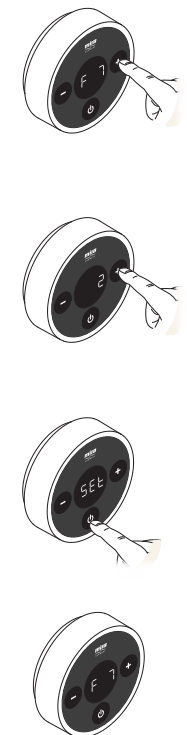
Control Frequency
- Factory default “1”.
- Cycle menu to “F 7” and press “ ”.
- Press “+” or “-” to change channel “1-3”.
- Press “ ” to set.
- Press “ ” to exit back to the Function Menu. See section “Exit the Function Menu”.
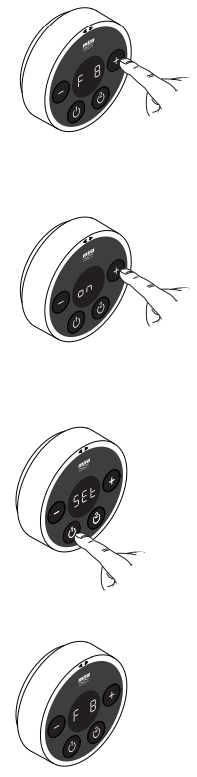
Shower Countdown Enable
- Factory default “off “.
- Cycle menu to “F 8” and press
- Press “+” or “-” to change the setting “on” or “off ”.
- Press “ 1 ” to set.
- Press “ ” to exit back to the Function Menu. See section “Exit the Function Menu”.
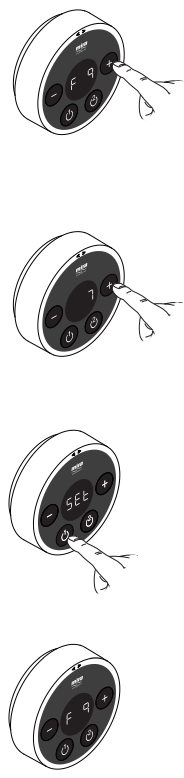
Shower Countdown Duration
- Factory default “30 minutes“.
- Cycle menu to “F 9” and press
- Press “+” or “-” to change the amount of time the shower will run before switching itself off. Adjustable between 1 - 30 minutes.
- Press “ 1 ” to set.
- Press “ ” to exit back to the Function Menu. See section “Exit the Function Menu”.
CLEANING
Many household cleaners contain abrasives and chemical substances, and should not be used for cleaning chrome-plated or plastic fittings. These finishes should be cleaned with a mild washing-up detergent or soap solution, and then wiped dry using a soft cloth.
Troubleshooting
If the controller does not turn on, check the batteries and ensure they are properly inserted. If the issue persists, replace the batteries with new ones.
If the controller is not pairing with the shower system, ensure both devices are within range and follow the pairing instructions carefully. Restart both devices if necessary.
In case of inconsistent temperature or flow rate, check reif set settings have been altered or if there is an issue with the shower system itself.
Always refer to the user manual for specific troubleshooting steps and safety precautions.
Pros & Cons
Pros:
- Convenient wireless operation
- Easy to install and use
- Multiple preset options for different users
- Energy-efficient and water-saving features
- Compact and sleek design
- Long battery life
Cons:
- Higher cost compared to traditional shower controllers
- Requires periodic battery replacement
- Potential pairing issues if not followed correctly
- Dependent on the quality of the shower system it is paired with
Customer Reviews
Customers have praised the Kohler Mira Shower Wireless Controller for its ease of use and the luxurious showering experience it provides. Many have appreciated the convenience of setting their preferred temperatures and flow rates, making every shower a pleasant experience. However, some users have reported occasional pairing issues and the need for regular battery replacements.
Most Common Complaints
Some users have reported difficulties in pairing the controller with the shower system, which can be frustrating. Others have mentioned that the battery life could be longer, especially if used frequently. Despite these minor issues, the overall satisfaction with the product remains high.
Faqs
How do I pair the Kohler Mira Shower Wireless Controller with my shower system?
What is the average battery life of the Kohler Mira Shower Wireless Controller?
Can I use the Kohler Mira Shower Wireless Controller with any shower system?
How do I adjust the temperature and flow rate using the Kohler Mira Shower Wireless Controller?
Is the Kohler Mira Shower Wireless Controller energy-efficient?
Can I save multiple pre-set settings for different users?
How do I troubleshoot common issues with the Kohler Mira Shower Wireless Controller?
Is the Kohler Mira Shower Wireless Controller easy to install?
What are the dimensions of the Kohler Mira Shower Wireless Controller?
Does the Kohler Mira Shower Wireless Controller come with a warranty?
Tags
More kohler manuals
- How to Use: Kohler ContinuousClean Technology User Manual
- Kohler RITE-TEMP Pressure Balancing Valve K-11748 | Specs & Features
- Kohler K-5665 Kitchen Sinks User Manual
- How to Operate: Kohler 20kW Home Generator 20RCA User Manual
- Kohler 1432003-2-A Cast Iron Baths User Manual
- Kohler K-R24612-CP Water Filtration System User Manual
Leave a Comment