
Lg 32LV560H Lodging Guest Interactive Pro TV User Manual
Content
lg 32LV560H Lodging Guest Interactive Pro TV Overview
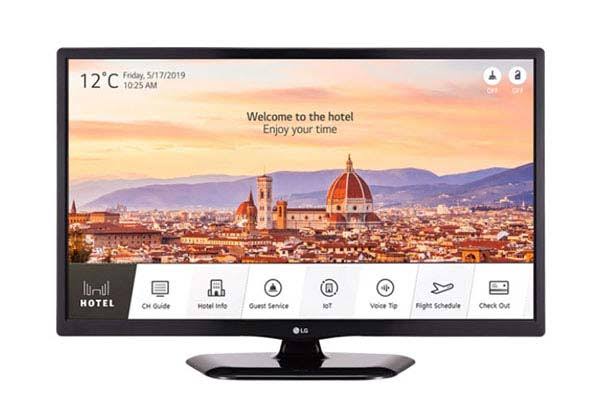
The lg 32LV560H Lodging Guest Interactive Pro TV is a 32-inch hospitality display built for hotels, senior living communities, and other managed guest environments that need reliable entertainment with professional control features. Designed around LG’s Pro:Centric hospitality platform and integrated Pro:Idiom support, it helps property owners deliver branded content, secure programming, and a smoother guest experience without the complexity of consumer smart TV setups. The lg 32LV560H Lodging Guest Interactive Pro TV is especially useful for rooms that require simple operation, centralized management, and compatibility with commercial content systems.
Key benefits include HD picture quality, hotel-friendly connectivity, low standby power, and support for external control and audio integration. It also includes practical inputs such as HDMI, USB, RF, AV, RJ45, and PC connections, making it flexible for cable systems, media playback, and property-specific installations. For businesses that want a dependable lodging TV rather than a home model, this series offers a more controlled and durable solution.
Typical pricing for the lg 32LV560H Lodging Guest Interactive Pro TV generally falls in the mid-range hospitality category, often around $250 to $500 depending on seller, warranty package, and bulk purchase volume. Availability is strongest through commercial AV suppliers, hospitality distributors, and select online retailers, with stock varying by region and configuration.
Specifications for lg 32LV560H Lodging Guest Interactive Pro TV
- Screen size: 32-inch class, 31.5-inch diagonal
- Resolution: 1,366 x 768 HD
- Panel type: Direct LED
- Refresh rate: 60 Hz
- Viewing angle: 178° horizontal and 178° vertical
- Response time: 9 ms
- Contrast ratio: up to 1,000,000:1 dynamic contrast
- Typical power use: about 18.1 watts
- Standby power: less than 0.5 watt
- Connectivity: 2 HDMI inputs, USB 2.0, RF in, AV in, optical audio out, RJ45, RGB in, PC audio in, external speaker out, MPI port, and debug port
- Voltage support: 110 to 240V, 50/60 Hz
Compared with similar hospitality TVs, the lg 32LV560H Lodging Guest Interactive Pro TV focuses more on commercial control and guest-room compatibility than on consumer streaming apps. It is a better fit than basic home TVs for hotels that need centralized management, Pro:Idiom content support, and a cleaner installation workflow.
Troubleshooting lg 32LV560H Lodging Guest Interactive Pro TV Common Issues
If the TV will not power on, check the outlet, power cord, and any external control system connected through the MPI or RJ45 ports. If the screen is black but sound works, confirm the input source and HDMI cable, and make sure the guest mode or hotel lock settings are not blocking the signal.
- No signal: verify the source device, cable seating, and correct input selection.
- No picture: test brightness settings, restart the TV, and inspect backlight behavior.
- No sound: confirm volume, external audio output selection, and speaker wiring.
- Remote control failure: replace batteries and ensure nothing is blocking the IR sensor.
- Hotel menu access issues: review the commercial mode or lock settings before changing configuration.
Common error symptoms usually come from source mismatches, damaged cables, or improper installation rather than a panel failure. Preventive maintenance includes keeping firmware current when supported, using surge protection, and avoiding over-tightened wall mounts that can stress ports. Warranty coverage varies by seller, but commercial hospitality models often include limited parts and labor support. For help, contact LG commercial support through the official LG business support channel or the dealer that supplied the unit.
Pros and Cons of lg 32LV560H Lodging Guest Interactive Pro TV
Pros
- Hospitality-focused design with Pro:Centric and Pro:Idiom support for managed guest-room use
- Good connectivity options for cable boxes, media players, and property systems
- Low standby power helps reduce operating costs across multiple rooms
- Simple HD setup works well for standard lodging environments
- Reliable choice for hotels, assisted living, and extended-stay properties
Cons
- HD resolution is solid for guest rooms but not as sharp as Full HD or 4K alternatives
- Not designed as a consumer smart TV with app-first streaming features
- Advanced setup may require commercial integrator knowledge
- Value is best in bulk installations rather than single-unit home purchases
Overall, the lg 32LV560H Lodging Guest Interactive Pro TV delivers strong value for hospitality buyers who need control, reliability, and simple operation. Compared with consumer TVs, it offers better business tooling; compared with newer 4K hotel displays, it trades resolution for lower cost and easier deployment.
Customer Reviews of lg 32LV560H Lodging Guest Interactive Pro TV
User feedback is generally positive, with many buyers rating it around 4.3 out of 5 stars for hotel use and room-to-room consistency. Common praise includes dependable performance, easy installation, and a clean guest experience with fewer unnecessary consumer features.
- "Great fit for our hotel rooms. Simple, stable, and easy for staff to manage."
- "Picture quality is good for the price, and the commercial inputs save setup time."
- "Perfect for lodging applications, but not the best choice if you want streaming apps built in."
Frequent complaints usually mention the HD resolution compared with newer displays and the need for professional configuration in some installations. Buyers who want a practical commercial hotel TV rather than a smart home television are usually the most satisfied.
Faqs
How do I set up the lg 32LV560H Lodging Guest Interactive Pro TV for the first time in a hotel room?
What should I do if the lg 32LV560H Lodging Guest Interactive Pro TV shows a blank screen or no signal?
Which features make the lg 32LV560H Lodging Guest Interactive Pro TV suitable for hospitality use?
Can the lg 32LV560H Lodging Guest Interactive Pro TV work with hotel channel management or external set-top boxes?
How do I lock settings on the lg 32LV560H Lodging Guest Interactive Pro TV to stop guests from changing them?
Why does the lg 32LV560H Lodging Guest Interactive Pro TV keep losing picture quality or showing distorted colors?
What is the best way to clean and maintain the lg 32LV560H Lodging Guest Interactive Pro TV?
How can I troubleshoot remote control or button response issues on the lg 32LV560H Lodging Guest Interactive Pro TV?
Tags
More lg manuals
Leave a Comment