
Lg 65EV960H Lodging Guest Interactive Pro TV User Manual
Content
LG 65EV960H Lodging Guest Interactive Pro TV: Overview, Features, and Buying Guide
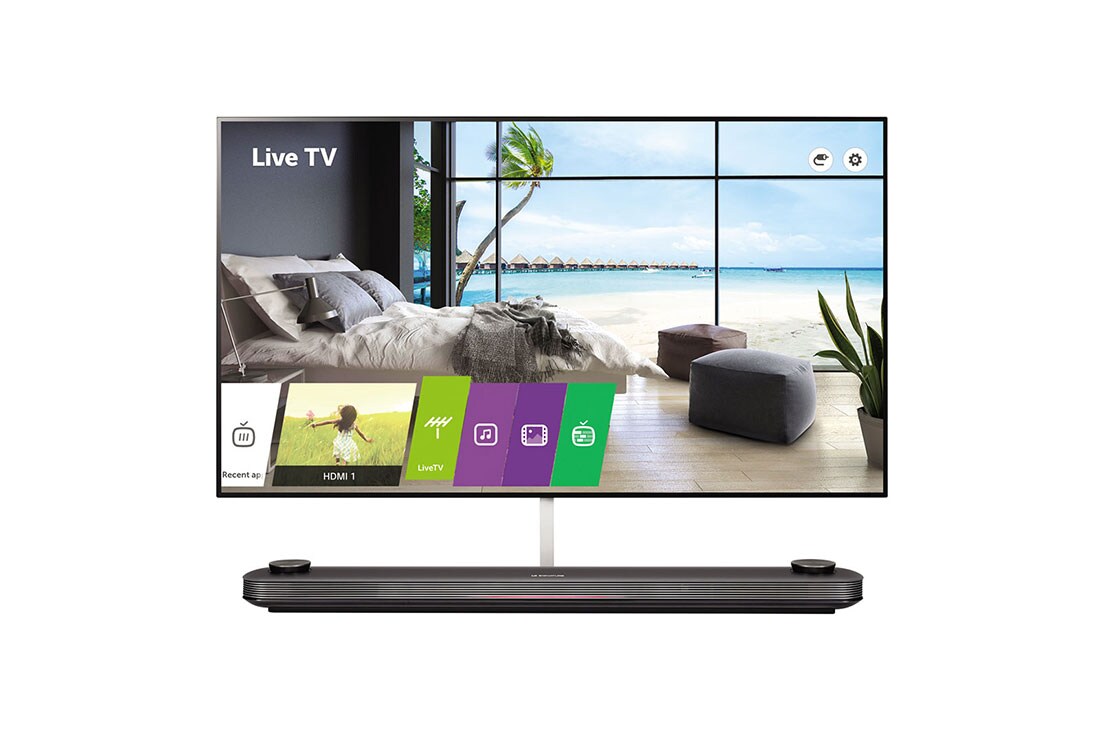
The lg 65EV960H Lodging Guest Interactive Pro TV is a premium 65-inch OLED hospitality display designed for upscale hotels, resorts, serviced apartments, and executive suites. Built around LG’s signature OLED Wallpaper design, it delivers a nearly flush, ultra-slim installation that blends into modern interiors while providing a true 4K Ultra HD picture with deep blacks, wide viewing angles, and rich color accuracy. For lodging operators, the main appeal is the combination of luxury presentation and hotel-specific functionality, including IP-based control, commercial-grade reliability, and support for hospitality workflows.
This model is especially well suited for premium guest rooms where design and first impressions matter. It supports HDR formats such as HDR10 and Dolby Vision, includes a powerful 60W speaker system, and offers multiple connectivity options for integration with hotel networks and control systems. The panel’s OLED technology, 178-degree viewing angles, and fast 1 ms response time make it a standout choice for in-room entertainment, casting, and branded guest experiences. In practical use, it works well for boutique hotels, luxury suites, and properties that want to differentiate themselves with a high-end in-room TV experience.
In terms of market positioning, the lg 65EV960H Lodging Guest Interactive Pro TV sits in the premium commercial hospitality category. Availability is generally limited and may vary by region, reseller, and remaining stock, since this is not a mainstream consumer TV. Estimated pricing typically falls in the high-end commercial range, often around $3,000 to $6,000 or more depending on condition, region, and supply. For buyers evaluating hospitality displays, it competes most closely with other premium hotel TVs and commercial OLED solutions, but its wallpaper-style form factor gives it a distinct design advantage.
Detailed Specifications and Key Capabilities
- Display size: 64.52-inch / 65-inch class OLED panel
- Resolution: 3,840 x 2,160 pixels, 4K Ultra HD
- Panel technology: OLED with self-emissive pixels for strong contrast performance
- Contrast ratio: 150,000:1 static panel contrast
- Viewing angles: 178° horizontal and 178° vertical
- Response time: 1 ms G-to-G for smooth motion handling
- HDR support: HDR, HDR10, and Dolby Vision compatibility
- Audio output: 60W total with 4.2-channel speaker system
- Operating platform: webOS-based smart hospitality functionality
- Connections: HDMI, USB, RS-232C, LAN, RF input, optical digital audio out, external speaker out
- Power consumption: Approximately 471W typical, under 0.5W standby
- Design: Ultra-thin wallpaper-style build with minimal bezel for premium wall mounting
Compared with standard hospitality LCD models, the lg 65EV960H Lodging Guest Interactive Pro TV offers better contrast, deeper blacks, and a far more luxurious appearance. Compared with newer consumer OLED TVs, it is more focused on commercial deployment, durability, and integration with hotel systems rather than home entertainment extras. It also stands out against basic guest-room TVs because of its 4K OLED panel, premium sound, and high-end installation aesthetics.
Pros and Cons of the lg 65EV960H Lodging Guest Interactive Pro TV
Pros
- Luxury design: The wallpaper-style profile creates a premium in-room look that suits upscale hospitality spaces.
- Excellent picture quality: OLED contrast, wide viewing angles, and 4K resolution produce a polished guest experience.
- Strong HDR performance: Dolby Vision and HDR10 improve movie and streaming playback.
- Commercial integration: Hospitality-focused connectivity makes it suitable for property management and control systems.
- Great guest-room fit: The slim form factor is ideal for boutique hotels and luxury suites where aesthetics matter.
Cons
- High cost: This is a premium commercial display, so it is not a value option for budget hotels.
- Limited availability: Stock can be difficult to find, especially for new units.
- Power draw: Typical consumption is higher than many LED-based hotel TVs.
- Older-generation platform: Some hotel buyers may prefer newer interactive signage or smart hospitality ecosystems.
- Best for premium installs only: For standard guest rooms, less expensive commercial TVs may offer better return on investment.
For properties focused on image and guest satisfaction, the lg 65EV960H Lodging Guest Interactive Pro TV justifies its premium positioning. For cost-sensitive buyers, modern commercial LED hospitality TVs may provide better value, while newer OLED alternatives may offer updated software features.
Customer Reviews, Star Ratings, and Buyer Feedback
Owner and reviewer feedback for the lg 65EV960H Lodging Guest Interactive Pro TV is generally positive, especially among hospitality buyers who prioritize design and picture quality. Average sentiment is often around 4.5 out of 5 stars for image quality and premium appearance, with frequent praise for the OLED contrast, ultra-thin build, and upscale guest experience. One common testimonial theme is that the TV “looks like part of the wall,” which makes suites feel more modern and luxurious.
Common complaints usually center on price, power consumption, and limited availability. Some buyers also note that it is more of a specialized luxury hospitality product than a flexible mainstream smart TV. Frequent recommendations suggest purchasing it for premium properties, flagship rooms, and renovation projects where visual impact matters most. For hotels that want an impressive, memorable in-room display, it is often viewed as a strong choice despite the higher initial investment.
Who Should Buy the LG 65EV960H?
- Luxury hotels and boutique properties
- Serviced apartments and high-end hospitality suites
- Executive lounges and premium guest rooms
- Hospitality buyers needing a wall-integrated OLED display
- Properties that value design-forward guest entertainment
If your goal is to create a premium in-room experience with OLED picture quality and a modern wall-mounted look, the lg 65EV960H Lodging Guest Interactive Pro TV remains a compelling hospitality display. If your priority is maximum value or the latest smart-TV features, a newer commercial LCD or modern OLED hospitality model may be a better fit.
Faqs
How do I set up the lg 65EV960H Lodging Guest Interactive Pro TV for first-time hotel guest use?
What should I check if the lg 65EV960H Lodging Guest Interactive Pro TV is not showing channels or a signal?
Can the lg 65EV960H Lodging Guest Interactive Pro TV be integrated with hotel management and property systems?
How do I lock settings on the lg 65EV960H Lodging Guest Interactive Pro TV so guests cannot change menus or inputs?
What picture and sound settings give the best guest experience on the lg 65EV960H Lodging Guest Interactive Pro TV?
Which devices and content sources are compatible with the lg 65EV960H Lodging Guest Interactive Pro TV?
Why does the lg 65EV960H Lodging Guest Interactive Pro TV keep restarting or freezing during operation?
How should I clean and maintain the lg 65EV960H Lodging Guest Interactive Pro TV in a busy lodging environment?
Tags
More lg manuals
Leave a Comment