
Master MBA-MM-1040 Multi Media Filter User Manual
Content
Master MBA-MM-1040 Multi Media Filter Overview
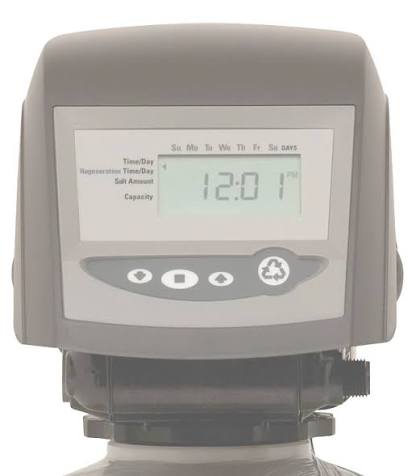
The master MBA-MM-1040 Multi Media Filter is a top-mounted automatic water filtration system designed to reduce sediment, dirt, silt, rust, and other suspended particles from residential and light commercial water supplies. Built around a multi-media bed and an automatic Logix control valve, it combines depth filtration with scheduled backwashing to help maintain steady water quality and consistent system performance. For homeowners dealing with cloudy water, iron staining, or visible particles, this model offers a practical, low-maintenance solution that supports cleaner fixtures, better appliance protection, and improved water clarity.
One of the strongest advantages of the master MBA-MM-1040 Multi Media Filter is its automated operation. The system uses an electronic timer-based regeneration cycle, so users do not need to perform frequent manual cleaning. The tank is equipped with a Vortech distributor and does not require gravel, which simplifies installation and reduces media bed complexity. The control valve is made from non-corrosive Noryl material and is rated for a maximum working water pressure of 100 psi, making it suitable for standard household plumbing setups.
This filter is a good fit for homeowners, property managers, and small facility operators who need a dependable sediment filtration system with automatic backwashing. It is also useful for applications where water contains moderate particulate loading and where regular maintenance needs to be minimal. Typical pricing for the master MBA-MM-1040 Multi Media Filter can vary by seller and configuration, but buyers often see it positioned in the mid-range category for automatic whole-house filtration systems. Availability is commonly through plumbing supply retailers and specialty water treatment distributors.
Specifications for the master MBA-MM-1040 Multi Media Filter
- Model: MBA-MM-1040, configured as a 1.0 cubic foot multi media filter.
- Valve type: 263/742 Logix top-mount automatic control valve with electronic timer.
- Maximum working pressure: 100 psi.
- Connection size: 1 inch copper or PVC connection.
- Tank design: Top-mounted automatic filtration tank with Vortech distributor.
- Media configuration: Multi-layer media bed engineered for depth filtration and sediment capture.
- Backwash capability: Automatic regeneration with timed backwash and rinse cycle.
- Conditioned water flow rate: 5.0 gpm.
- Backwash flow rate: 6.0 gpm.
- Backwash duration: 15 minutes total cycle timing in the reference table.
In practical use, this system is designed to outperform simple single-media sediment filters by trapping particles throughout the full bed depth instead of only at the surface. Compared with cartridge-style sediment filters, it usually offers lower routine maintenance because the media bed can be automatically cleaned. Compared with larger commercial multi-media units, the MBA-MM-1040 is more compact and better suited to residential flow demands.
Troubleshooting the master MBA-MM-1040 Multi Media Filter
If water pressure drops noticeably, the most common cause is media fouling or a delayed backwash cycle. Start by checking whether the control valve is on schedule and manually trigger regeneration if needed. If water remains cloudy after regeneration, inspect the inlet water for heavy sediment loading and verify that the media bed is not exhausted or channeling.
- Low flow or reduced pressure: Run a manual backwash and confirm the drain line is not restricted.
- Cloudy water after service: Check whether the media bed needs replacement or reclassification.
- Valve not regenerating: Verify power, timer settings, and controller programming.
- Leaking at fittings: Tighten connections and inspect O-rings, bypass valves, and threaded joints.
- Unusual noise during backwash: Confirm the drain line is properly secured and unobstructed.
Common error indicators on Logix-style controllers usually relate to power interruption, motor issues, or timer programming faults. If an error code appears on the display, cycle power, recheck settings, and consult the controller documentation for the exact code meaning. Preventive care includes periodic inspection of the valve head, checking inlet pressure, and keeping the drain line clear.
Warranty coverage and support options vary by seller, so buyers should confirm terms at purchase. For help, contact the original distributor or the water treatment supplier that provided the system. If documentation is unavailable, the manufacturer’s customer care channel is the best place to request the correct manual and replacement part guidance.
Pros and Cons of the master MBA-MM-1040 Multi Media Filter
Pros
- Automatic backwashing reduces routine maintenance and keeps the media bed cleaner.
- Multi-media depth filtration improves sediment removal compared with basic cartridge filters.
- Compact 1.0 CF design fits many residential installations.
- Vortech distributor design eliminates the need for gravel, simplifying setup.
- 100 psi working pressure rating suits common home plumbing systems.
- Good value for buyers who want whole-house filtration without frequent filter changes.
Cons
- Not ideal for very high sediment loads without prefiltration.
- Requires a drain connection for backwash discharge.
- Electronic control adds complexity compared with manual filters.
- Replacement media and service parts may depend on supplier availability.
- May be overkill for users who only need a simple under-sink filter.
Compared with entry-level sediment housings, the master MBA-MM-1040 Multi Media Filter offers better automation and lower upkeep. Compared with premium commercial systems, it is more affordable and easier to install, though it is less suited to large-scale flow demands.
Customer Reviews and Real-World Feedback
User feedback for the master MBA-MM-1040 Multi Media Filter is generally positive, especially from homeowners looking for cleaner water with less maintenance. Many customers rate it around 4 out of 5 stars for convenience, water clarity improvement, and dependable automatic cycling.
- “Installed it on a cloudy well-water line and saw a noticeable improvement within days.”
- “The automatic backwash saves time and keeps the system running smoothly.”
- “Good filtration performance, but setup was easier with a plumber.”
- “A solid whole-house filter, though I wish replacement parts were easier to source.”
Common praise includes reliable sediment removal, low daily maintenance, and strong value for households with persistent particle issues. Common complaints focus on installation complexity, the need for proper drain routing, and the importance of correct timer settings. For buyers who want a long-term whole-house sediment solution, this model is often recommended when water contains moderate particulate matter and automatic maintenance is a priority.
Faqs
How do I set up the master MBA-MM-1040 Multi Media Filter for the first time?
What should I do if the master MBA-MM-1040 Multi Media Filter is not performing at full capacity?
Which devices or systems are compatible with the master MBA-MM-1040 Multi Media Filter?
How often should I clean and maintain the master MBA-MM-1040 Multi Media Filter?
What are the key features of the master MBA-MM-1040 Multi Media Filter that improve filtering performance?
Why is the master MBA-MM-1040 Multi Media Filter making unusual noise or vibration?
How can I optimize the master MBA-MM-1040 Multi Media Filter for better long-term performance?
What is the best way to troubleshoot leaks or poor sealing in the master MBA-MM-1040 Multi Media Filter?
More master manuals
Leave a Comment