
Setup: Maytag 2004 Countertop Domestic Microwaves UMC1071AAB/W User Manual
Content
Introduction to Maytag 2004 Countertop Domestic Microwaves UMC1071AAB/W
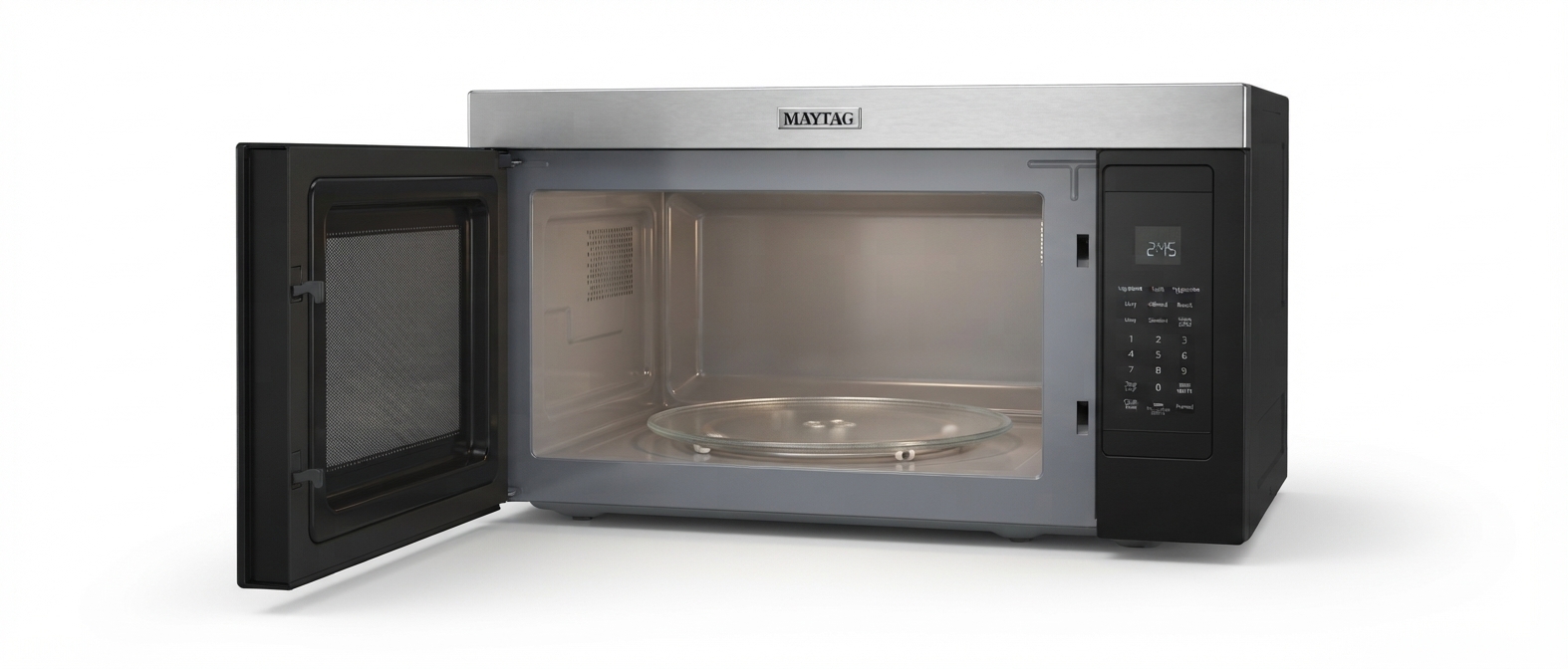
The Maytag 2004 Countertop Domestic Microwaves UMC1071AAB/W is a reliable and compact kitchen appliance designed to meet everyday cooking and reheating needs efficiently. With its user-friendly features and solid build quality, this countertop microwave is ideal for households that require a convenient, space-saving microwave solution. It combines classic Maytag dependability with practical technology, making it suitable for small to medium kitchens, dorm rooms, or office break areas.
Key benefits include multiple power levels allowing precise cooking control, easy one-touch start options, and a durable construction that ensures long-term performance. The microwave's straightforward design caters to users who want fast, consistent results without complicated controls. It is especially beneficial for busy families, single users, and anyone looking for a no-fuss, effective microwave oven.
Typically, the Maytag UMC1071AAB/W is available in classic white or black finishes, fitting seamlessly into various kitchen décors. The price range generally falls in the affordable segment, roughly between $120 and $160, depending on the retailer and availability. Though recently discontinued, it remains a noteworthy option for those who find it through secondary markets or remaining stock.
Technical Specifications of Maytag 2004 Countertop Domestic Microwaves UMC1071AAB/W
- Capacity: 0.7 cubic feet, suitable for small plates and containers
- Power Output: 700 watts providing moderate cooking power for everyday use
- Power Levels: 10 adjustable power settings to customize cooking intensity
- Control Panel: Easy Cook one-touch start buttons for quick cooking
- Turntable: Glass turntable for even cooking and easy cleaning
- Dimensions: Approximate exterior size fitting neatly on most countertops
- Weight: Lightweight design for portability
- Warranty: Backed by Maytag’s Dependable Performance warranty
The 700W power output places the UMC1071AAB/W in the entry-level performance category compared to higher wattage microwaves (e.g., 1000+ watts) which offer faster cooking times. Its smaller capacity is ideal for individuals or small meals but less suited for large dishes or family-sized portions. Compared to other Maytag models with larger capacities (up to 1.3-2.2 cu. ft.) and higher wattages, this model is more compact and budget-friendly but with moderate power and fewer advanced features.
Setup Guide for Maytag 2004 Countertop Domestic Microwaves UMC1071AAB/W
- Unpack the microwave and remove all packing materials, including protective films and tapes.
- Place the microwave on a flat, stable countertop with at least 3 inches of clearance on all sides for ventilation.
- Plug the microwave into a standard 120V electrical outlet; avoid using extension cords.
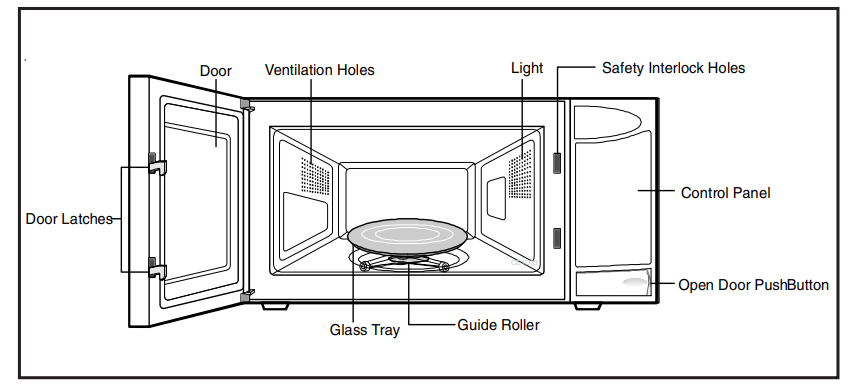
- Open the door and remove the glass turntable and roller ring; place the roller ring inside the microwave cavity, then set the glass turntable on top.
- Refer to the control panel for Easy Cook preset buttons; familiarize yourself with the numeric keypad and power level options.
- To start cooking, place food inside, close the door securely, select power level if needed, set the cooking time, and press Start.
- For configuration, use the clock and timer functions as outlined in the user manual; the microwave does not support wireless pairing or smart connectivity.
Safety Tips: Do not operate the microwave empty. Avoid using metal containers or aluminum foil inside. Keep the door seal clean and ensure the door closes properly to prevent radiation leakage.
Microwave Leakage Testing
Check for radiation leakage after servicing. Should the leakage be more than 4mW/cm2 inform Maytag immediately. After repairing or replacing any radiation safety device, keep a written record for future reference, as required by D.H.H.S. and HEW regulations. This requirement must be strictly observed. In addition, the leakage reading must be recorded on the service repair ticket while in the customer’s home.
Equipment
- Electromagnetic radiation monitor
- 600 cc glass beaker
Procedure For Measuring Radiation Leakage
Note before measuring
- Do not exceed meter full-scale deflection. Leak monitor should initially be set to the largest scale.
- To prevent false readings, the test probe should be held by the grip portion of the handle only.
- The scan speed is equal to one inch per antenna revolution or one inch per second if antenna speed is unknown.
- Areas to be checked are all door seal areas and any venting parts.
- Leakage for fully assembled oven with door normally closed ...4mW/cm2 or less.
- Leakage for a fully assembled oven (before the latch switch (primary) is interrupted) while pulling the door ... 4mW/cm2 or less.
- Pour 275 ±15 cc (9 oz ±1/2 oz) of 20 ± 5°C (68 ± 9°F) water in a beaker which is graduated to 600 cc and place the beaker in the center of oven.
- Set the radiation monitor to 2450 MHz and use it following the manufacturer’s recommended test procedure to assure correct results.
- While measuring the leakage, always use the two-inch (5 cm) spacer supplied with the probe.
- Press the start pad or turn on the timer, and with the magnetron oscillating, measure the leakage by holding the probe perpendicular to the surface being measured.
Measurement With the Outer Panel Removed
Whenever you replace the magnetron, measure for radiation leakage before the outer panel is installed and after all necessary components are replaced or adjusted. Special care should be taken in measuring around the magnetron.
Measurement With a Fully Assembled Oven
After all components, including the outer panel, are fully assembled, measure for radiation leakage around the door periphery, the door viewing window, the exhaust opening, and air inlet openings.
Record Keeping and Notification After Measurement
- After any adjustment or repair to a microwave oven, a leakage reading must be taken. Record this leakage reading on the repair ticket even if it is zero.
- A copy of the repair ticket and the microwave leakage reading should be kept by the repair facility.
Important Safety Information
The basic design of the Maytag and Amana microwave oven makes it an inherently safe device to both use and service. However, there are some precautions which should be followed when servicing the microwave oven to maintain this safety. These are as follows:
- Always operate the unit from an adequately grounded outlet. Do not operate on a two-wire extension cord.
- Before servicing the unit (if the unit is operable), perform the microwave leakage test.
- The oven should never be operated if the door does not fit properly against the seal, the hinges or hinge bearings are damaged or broken; the choke is damaged, (pieces missing, etc.); or any other visible damage can be noted. Check the choke area to ensure that this area is clean and free of all foreign matter.
- If the oven operates with the door open and produces microwave energy, take the following steps.
- Tell the user not to operate the oven.
- Contact Maytag immediately.
- Always have the oven disconnected when the outer case is removed except when making the "live" tests called for in the Service Manual. Do not reach into the equipment area while the unit is energized. Make all connections for the test and check them for tightness before plugging
- Always ground the capacitors on the magnetron filter box and H. V. Capacitor with an insulated-handle screwdriver before working in the high voltage area of the equipment compartment. Some types of failures will leave a charge in these capacitors and the discharge could cause a reflex action which could make you injure you.
Disassembly Procedures
High voltage is present at the high voltage terminal of the high voltage transformer during any cooking cycle. It is neither necessary or advisable to attempt measurement of the high voltage. Before touching any oven components or wiring, always unplug the oven from its power source and discharge the capacitor.
Door Assembly
CAUTION: A microwave leakage test must be performed anytime a door assembly is removed, replaced, disassembled, or adjusted for any reason.
Door Removal
Disconnect power to the oven and remove the outer case, see "Outer Case" procedure.
Open the oven door to gain access to the upper hinges. Remove 2 screws securing the upper hinges.
Guide the upper hinge out of the hinge cavity.
Gently maneuver the door hinge pin away from the lower hinge assembly. The lower hinge bracket should remain attached to the microwave.
NOTE: When aligning the door for assembly, fully open the door.
To place the door back on the unit, gently maneuver the lower hinge pin onto the lower hinge assembly while guiding the upper hinge assembly into the upper hinge assembly cavity. Use caution and do not allow the upper hinge assembly to separate from the upper hinge pin. Reattach the two upper hinge assembly retaining screws.
Door Disassembly
Disconnect power to oven and remove oven door, see "Door Removal" procedure.
To remove the choke cover, locate one of the plastic seatings securing the choke cover to the inner door assembly. Insert a tool near the seating and gently pry outward. Continue to work around the door casing (prying near the plastic seatings) until choke cover is completely loose. Remove the choke cover.
CAUTION
To avoid property damage, care must be taken when prying the choke cover from inner door assembly and when prying inner door assembly from door frame.
- Once the choke cover is removed, remove the inner door assembly.
- To remove the inner door assembly, carefully pry on the seatings securing the inner door assembly to the door frame. Continue to work around the door casing (prying near the plastic seatings) until the inner door assembly is completely loose. Remove the inner door assembly.
- Once the inner door assembly is removed, the door latch and spring assembly may be removed.
- When removing door latch and spring assembly, remove the spring first, then slide latch assembly up and remove.
- Reassemble in reverse order.
WARNING
To avoid the risk of electrical shock, personal injury or death, disconnect power to the oven and discharge capacitors before following any disassembly procedure.
CAUTION
A microwave leakage test must be performed anytime a door assembly is removed, replaced, disassembled, or adjusted for any reason.
Outer Case
- Disconnect power to the unit.
- Remove screws securing outer case to the unit.
- Slide outer case towards the rear of the unit, then up.
- Place outer case in a safe loacation to prevent damage.
- Reassemble in reverse order.
Control Panel
The control panel is made up of several components, such as p.c. board and touch panel.
Control Panel Removal
- Disconnect power to unit and remove outer case, see "Outer Case" procedure.
- Open microwave door.
- Remove screw securing ground strap to microwave frame.
- Remove screws located at the top and along the side of the touch panel. Remove the screw securing the ground strap, then open the door. Lift control panel up and out to release the bottom tab connections.
CAUTION: Hold the ground strap secure when removing or attaching the screw. Place the green wire under the ribbon strap.
- Place control panel on a flat surface.
- Reassemble in reverse order.
P.C. Board
The p.c. board is located on the back of the control panel near the top. This board has up to five connection plugs which control the main power, relays and the ribbon connector for the key panel.
P.C. Board Removal
Disconnect power to unit and remove outer case, see "Outer Case" procedure.
Remove control panel, see "Control Panel" procedure.
Discharge high voltage capacitor, see "High Voltage Capacitor" procedure.
Disconnect ribbon connector by sliding top part of connector upward. Once released, remove ribbon from connector by sliding side-to-side.
NOTE: Caution should be used when removing cable from connector. Ribbon cable has two holes which the connector locks the ribbon in place.5. Disconnect / mark wire connectors from P. C. Board.
Remove screws securing P. C. Board to control panel assembly.
Reassemble in reverse order.
NOTE: Do not flex P. C. Board.
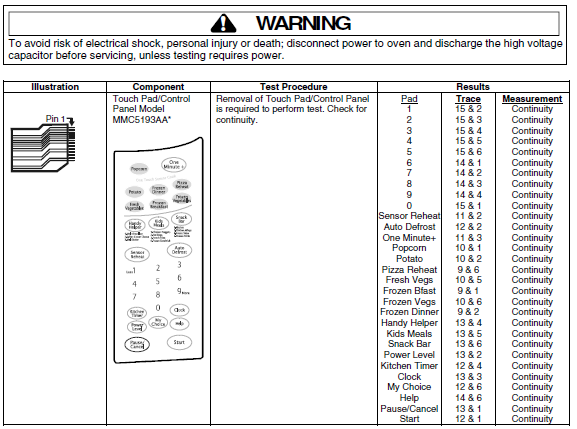
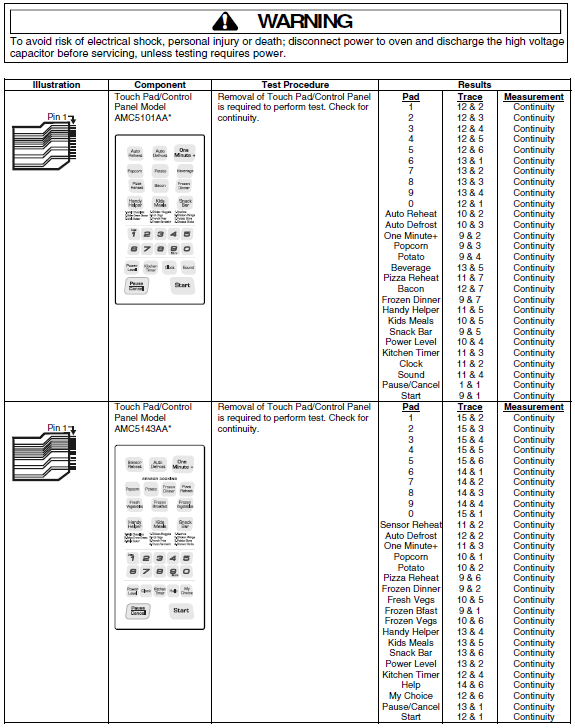
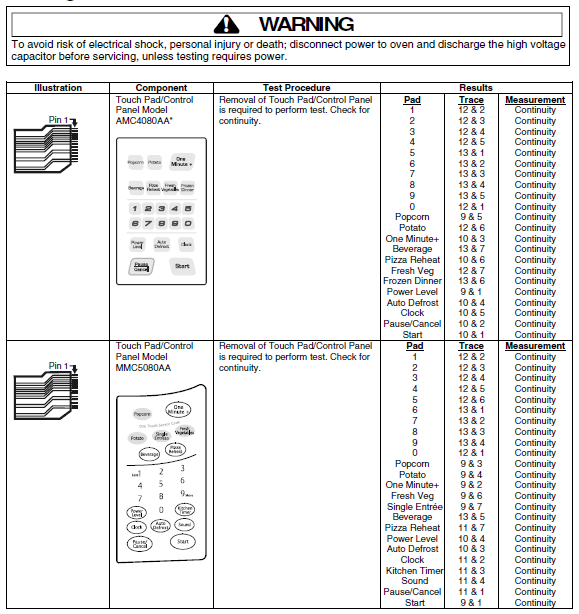
Control Key Panel
The key panel has one ribbon connection on the P. C. Board, and can be checked through a continuity test. Operations of key pad can be checked by measuring connections at end of ribbon (using high ohms scale).
Control Key Panel Removal.
Disconnect power to unit and remove outer case, see "Outer Case" procedure.
Remove control panel, see "Control Panel" procedure.
Discharge high voltage capacitor, see "High Voltage Capacitor" procedure.
Disconnect ribbon connector by sliding connector upward. Once in released position, remove ribbon from connector by sliding side-to-side.
NOTE: Caution should be used when removing cable from connector. Ribbon cable has two holes which connector locks ribbon in place.
Reassemble in reverse order.
Interlock Door Latch Switches
Primary switch is operated by top latch pawl.
Interlock Switch Removal
Disconnect power to unit and remove outer case, see "Outer Case" procedure.
Remove control panel, see "Control Panel" procedure.
Discharge high voltage capacitor, see "High Voltage Capacitor" procedure.
Test interlock switches before removing, see "Testing Procedures."
Disconnect and label wire connections.
Remove interlock switch or latch board assembly by applying pressure to both sides of the switch mounting tabs (two near the front, two near the rear).
Gently remove the switch mechanism.
Reassemble in reverse order.
CAUTION
Before replacing a blown monitor fuse, test both interlock switches, monitor switch and power relay contacts for proper operation. If the monitor fuse is blown by a failed switch operation, all switches and the printed circuit board must be replaced.
Adjusting Interlocks
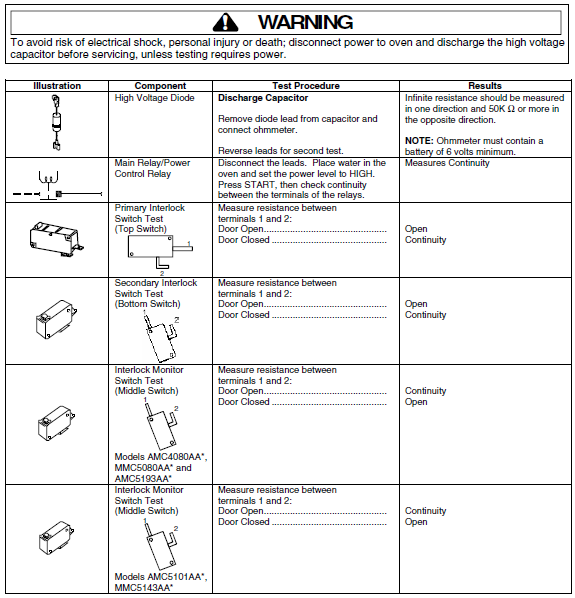
The interlock monitor, primary, and secondary switches act as a final safety switch protecting the operator from microwave energy. After adjusting the interlock monitor switches, verify they are correctly connected.
For door fit and switch operation, switch housing is adjustable.
Disconnect power to unit and remove outer case, see "Outer Case" procedure.
Remove control panel, see "Control Panel" procedure.
Loosen switch mounting screw on vertical flange.
Close oven door, move latch board upward toward the top of the oven and/or away from the door latch until gaps are less than 1/6–inch (0.5 mm).
Hold latch board securely for proper switch operation and door fit, retighten screws.
Open the oven door slowly, watching the switches. Verify switches release in the following order.
Primary interlock switch
Secondary interlock switch
Interlock monitor switch
NOTE: Adjust the latch board until all switches operate in proper sequence.
Close the oven door slowly, watching the switches. Verify switches activate in the following order.
High Voltage Capacitor
High voltage capacitor should always be discharged by shorting a terminal to a chassis ground. The capacitor has a internal "shunt" resistor, but the mechanical discharge should always be performed to avoid personal injury.
High Voltage Capacitor Removal
Disconnect power to unit and remove outer case, see "Outer Case" procedure.
Discharge the high voltage capacitor by connecting a jumper wire to the terminal of the high voltage capacitor with the diode connection. Connect the opposite end of the jumper wire to a well insulated screwdriver and touch the screwdriver to the nearest chassis ground screw.
Remove screws securing capacitor bracket.
Slide capacitor mounting bracket out of the slots and pull outward on capacitor, diode and bracket.
Reassemble in reverse order.Diode
The diode is located next to the high voltage capacitor.1. Disconnect power to unit and remove outer case, see "Outer Case" procedure.
Discharge high voltage capacitor, see "High Voltage Capacitor" procedure.
Disconnect diode wire terminal from high voltage capacitor and remove screw securing diode to ground.
Reassemble in reverse order.
Transformer
Power Transformer Removal
Disconnect power to unit and remove outer case, see "Outer Case" procedure.
Discharge high voltage capacitor, see "High Voltage Capacitor" procedure.
Disconnect and label wire leads from transformer.
From bottom of unit, access and remove screws securing transformer.
Remove transformer.
Reassemble in reverse order.
Fuse
Fuse is located in line with the power cord.1. Disconnect power to unit and remove outer case, see "Outer Case" procedure.
2. Remove and replace fuse, reassemble in reverse order.
CAUTION
Before replacing a blown monitor fuse, test the primary interlock switch, secondary interlock switch, monitor switch, and power relay contacts for proper operation. If the monitor fuse is blown by a failed switch operation all switches and printed circuit board must be replaced.
Magnetron
Magnetron is mounted to the side of the cavity.
Disconnect power to unit and remove outer case, see "Outer Case" procedure.
Discharge high voltage capacitor, see "High Voltage Capacitor" procedure.
Remove screws securing magnetron to the wave guide.
Reassemble in reverse order.
NOTE: When replacing the magnetron, the gasket must be in the correct position and in good condition.
CAUTION: During replacement of magnetron, be certain the R.F. anode gasket is in place around the anode stud.
WARNING: A microwave leakage test must be performed anytime a magnetron assembly is removed, replaced, disassembled or adjusted.
Suction Guide/Fan Motor Assembly
Suction guide assembly also consists of the latch board assembly.
Magnetron fan motor provides cool air circulation from an external air source, which provides direct cool air through air vanes surrounding the magnetron.
Disconnect power to unit and remove outer case, see "Outer Case" procedure.
Discharge high voltage capacitor, see "High Voltage Capacitor" procedure.
Disconnect wire leads from fan motor by depressing dimple on blue connectors, which releases the wire clamp securing the wire to the motor.
Remove screws securing cooling fan to oven chassis (screws accessible from the back of the unit).
Remove screws securing fan to mounting bracket.
Remove screws securing fan motor assembly to bracket.
Remove fan blade by gently forcing blade from shaft.
Reassemble in reverse order.
Gas/Humidity Sensor – MMC5080AA*,
AMC5143AA*and MMC5193AA*
The sensor is a plug-in device located on the cavity shell near the rear of the unit.
Disconnect power to unit and remove outer case, see "Outer Case" procedure.
Remove sensor retainer.
Disconnect wire terminal retaining plug.
Remove/replace sensor.
Reassemble in reverse order.
Oven Thermostat
The oven thermostat is located on the top left side of the oven cavity on models AMC5143AA* and MMC5193AA*, top right side of the oven cavity on all other models.
Thermostat is a resettable thermostat.
Disconnect power to unit and remove outer case, see "Outer Case" procedure.
Disconnect wires.
Remove screw securing oven thermostat, slide thermostat out.
Reassemble in reverse order.
Light Socket
Disconnect power to unit and remove outer case, see "Outer Case" procedure.
Disconnect wire terminal plug from light socket.
Remove light socket from air duct by pressing together the hold-downs located on the light socket bracket.
Remove light bulb.
Replace and reassemble in reverse order.
Turntable Motor
Disconnect power to oven.
Open the oven door, remove turntable, and gently pry upward on turntable shaft cover. During reassembly, locate the half-moon design on the cover, align with the shaft and genlty apply pressure.
Remove bottom plate cover by cutting metal tabs. When reinstalling use the provided screw.
Disconnect wire leads from turntable motor.
Remove screws securing turntable to the oven cavity.
Replace and reassemble in reverse order.
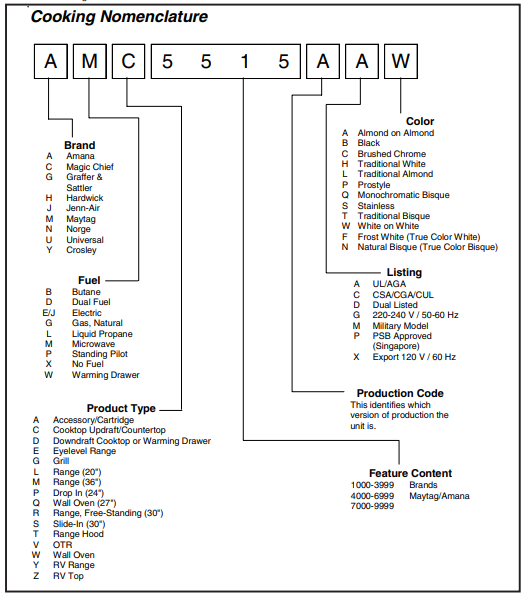
Cooking Nomenclature
Troubleshooting Common Issues with Maytag 2004 Countertop Domestic Microwaves UMC1071AAB/W
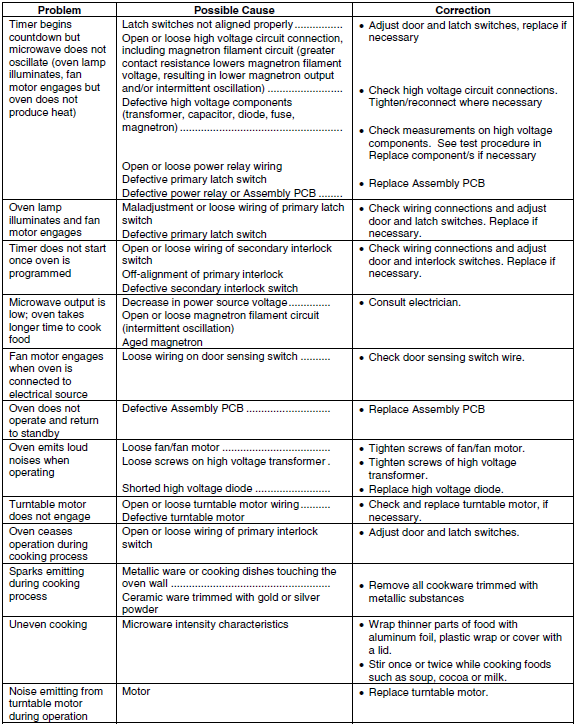
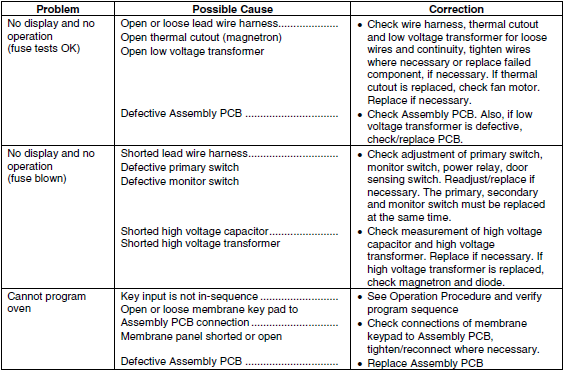
- Microwave not heating: Ensure the door is fully closed; if the issue persists, the magnetron may need replacement—contact support.
- Turntable not rotating: Check if the roller ring is correctly positioned and not obstructed.
- Control panel unresponsive: Reset by unplugging the unit for 60 seconds, then plug back in.
- Microwave stops mid-cycle: Could indicate overheating; allow it to cool and check ventilation clearance.
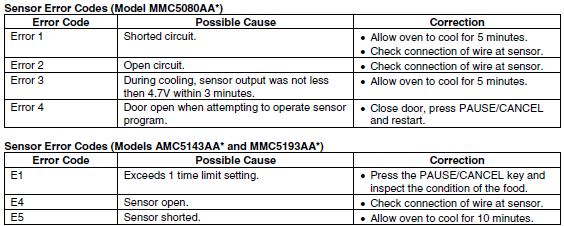
- Error codes: This model uses basic controls without complex error codes; persistent faults require professional service.
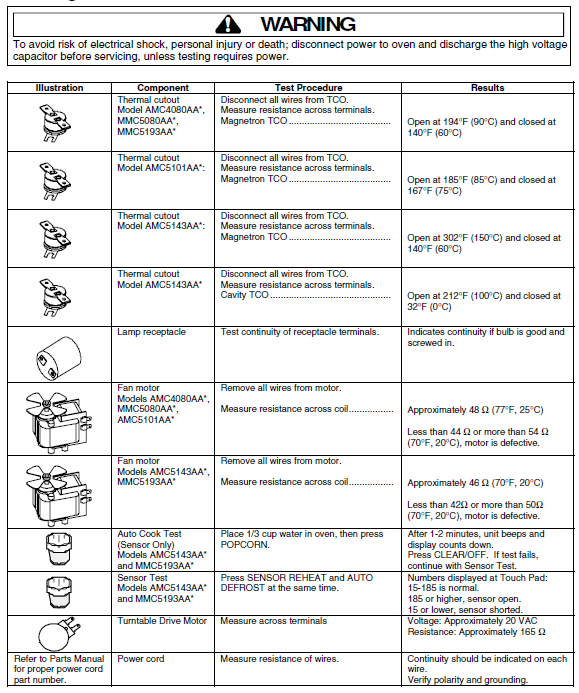
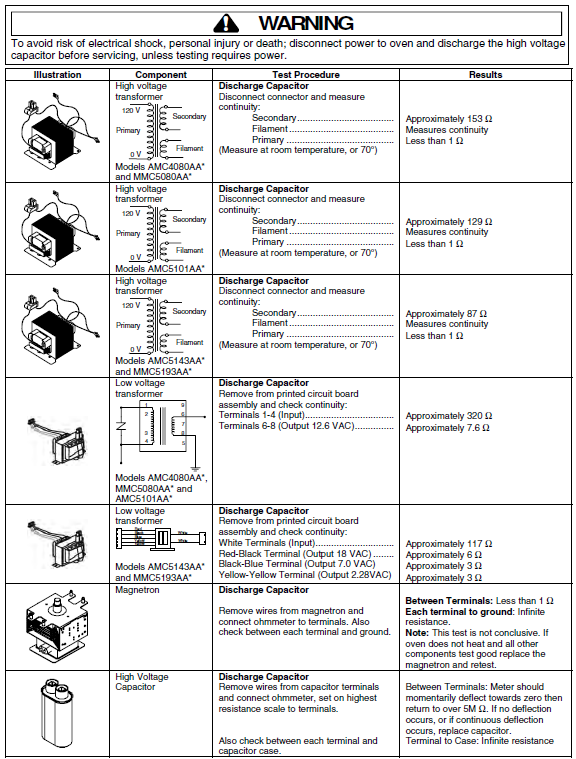
Testing Procedures
Preventive Measures: Regularly clean interior and exterior surfaces. Avoid slamming the door to maintain latch integrity. Use microwave-safe containers only.
Warranty & Support: Maytag typically provides a 1-year limited warranty covering parts and labor. For assistance, customers can contact Maytag customer service via their official website or phone support.
Pros & Cons of Maytag 2004 Countertop Domestic Microwaves UMC1071AAB/W
- Pros:
- Compact size fits well in small kitchens and limited spaces
- Multiple power levels offer flexible cooking options
- Simple, intuitive control panel with Easy Cook one-touch buttons
- Durable build consistent with Maytag’s dependable performance reputation
- Affordable price point compared to larger, high-wattage microwaves
- Cons:
- Lower power output (700W) results in longer cooking times compared to 1000W+ models
- Small 0.7 cu. ft. capacity limits food size and quantity
- No smart features or connectivity options for modern tech integration
- Discontinued status may affect availability and replacement parts
Compared to alternatives like the Maytag 1.3 cu ft microwave with 1100W power, the UMC1071AAB/W is less powerful but more budget-friendly and compact. It suits users prioritizing space and simplicity over speed and capacity.
Customer Reviews and Feedback on Maytag 2004 Countertop Domestic Microwaves UMC1071AAB/W
Users appreciate the Maytag 2004 Countertop Domestic Microwaves UMC1071AAB/W for its ease of use and reliable basic performance. Many highlight the convenience of the Easy Cook presets and a compact footprint that fits well in small kitchens or dorm rooms. Typical star ratings average around 4 out of 5, praising its straightforward operation and durable design.
Common complaints include slower cooking times due to lower wattage and limited capacity, which some users find restrictive for larger meals. A few note the absence of advanced features like sensor cooking or smart connectivity as a downside. However, most users recommend it for those seeking a simple, dependable microwave without extra bells and whistles.
Overall, this microwave is recommended for light and moderate kitchen use, especially in environments where space and budget are key considerations.
Faqs
How do I properly set up the maytag 2004 Countertop Domestic Microwaves UMC1071AAB/W for safe kitchen use?
What are common troubleshooting steps if the maytag 2004 Countertop Domestic Microwaves UMC1071AAB/W is not heating food properly?
Can I use the maytag 2004 Countertop Domestic Microwaves UMC1071AAB/W with custom cookware or non-standard containers?
How do I optimize cooking performance on the maytag 2004 Countertop Domestic Microwaves UMC1071AAB/W?
What maintenance routines should I follow to keep my maytag 2004 Countertop Domestic Microwaves UMC1071AAB/W in good condition?
What are the key features of the maytag 2004 Countertop Domestic Microwaves UMC1071AAB/W that enhance daily cooking?
How do I access the user manual and support resources for the maytag 2004 Countertop Domestic Microwaves UMC1071AAB/W?
What should I do if the maytag 2004 Countertop Domestic Microwaves UMC1071AAB/W display or control panel is unresponsive?
Tags
More maytag manuals
Leave a Comment