
Setup: Maytag Built-In Microwave Oven User Manual
Content
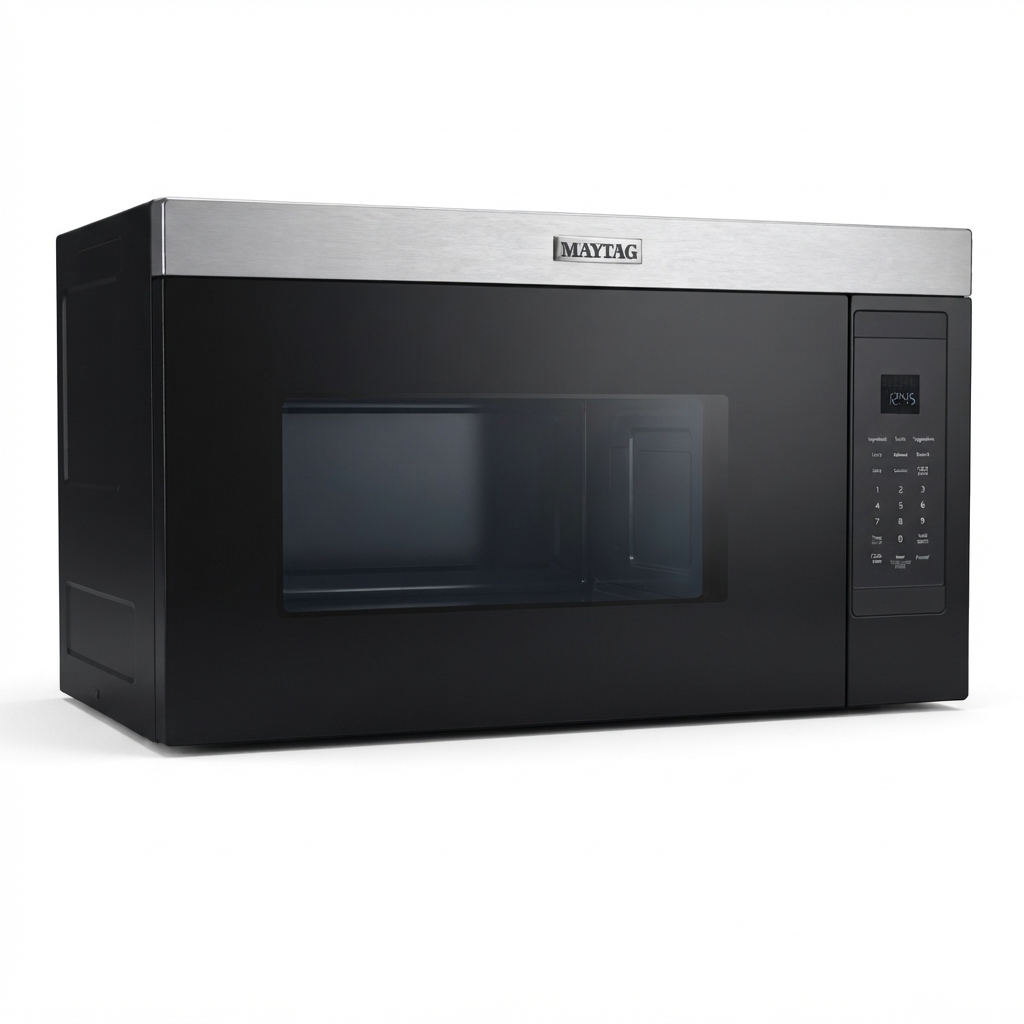
Maytag Built-In Microwave Oven
Introduction
The Maytag Built-In Microwave Oven offers a sleek, space-saving solution for modern kitchens, combining powerful cooking performance with a flush, built-in design. Designed to integrate seamlessly with standard-depth cabinetry, this microwave maximizes counter space while maintaining a sophisticated aesthetic. It targets homeowners and cooking enthusiasts who value efficiency and style, as well as those looking to enhance their kitchen’s functionality without sacrificing space.
Key benefits include a turntable-free interior that accommodates large dishes up to 13" x 9", sensor cooking for precise meal preparation, and a non-stick interior coating for easy cleaning. Its fingerprint-resistant stainless steel finish adds durability while keeping your kitchen looking pristine. This model is ideal for busy families, entertainers, or anyone who cooks frequently and appreciates convenience features such as one-touch settings and steam clean functionality.
Available through major appliance retailers, the Maytag Built-In Microwave Oven typically falls within the mid-range price bracket of approximately $400 to $600, depending on the model and features. Its availability includes online platforms and physical stores, making it accessible for a wide range of consumers seeking quality and reliability in an over-the-range microwave solution.
Technical Specifications of Maytag Built-In Microwave Oven
- Capacity: 1.1 cubic feet optimized for large dishes
- Power Output: 1,000 watts with 10 power levels for versatile cooking
- Design: Flush built-in, turntable-free for maximum interior space
- Interior Finish: Non-stick coating for easy maintenance
- Control Panel: Hidden electronic touch controls with LCD and 31 keypad options
- Cooking Features: Sensor cooking, one-touch presets like popcorn, beverage, and defrost
- Ventilation: Centrifugal blower with 300 CFM motor, three vent speeds, charcoal odor filter, and updraft ventilation with flexible vertical or horizontal duct options
- Lighting: LED interior and cooktop work surface lights
- Dimensions: Approx. 30" wide, 17.88" high, 12.75" deep
- Electrical: 120 volts, 15 amps, 60 Hz frequency
- Warranty: 10-year limited parts warranty
Compared with similar over-the-range microwaves, the Maytag model stands out for its turntable-free design that enhances cooking capacity and its integrated ventilation system optimized for kitchen air circulation, making it a robust choice for space-conscious kitchens.
Parts And Features
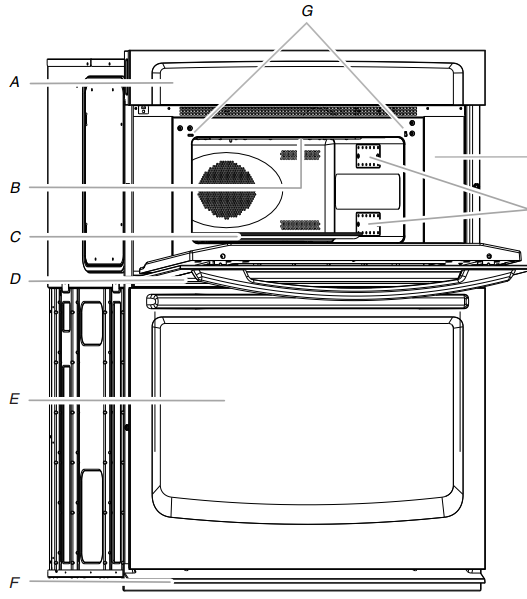
This manual covers different models. The oven you have purchased may have some or all of the items listed. The locations and appearances of the features shown here may not match those of your model.
- Electronic oven control
- Light
- Turntable
- Metal shielded window
- Lower oven (on combination models.
See separate Use and Care Guide.) - Bottom vent
- Door switch
- Model and serial number plate
- Dual microwave emission
Microwave Oven Control
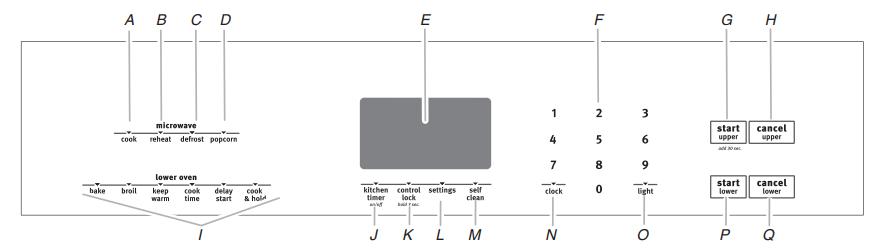
- Cook
- Reheat
- Defrost
- Popcorn
- Electronic display
- Temp/Time keypad
- Start upper
- Cancel upper
- Oven settings (lower oven)
- Kitchen timer
- Control lock
- Settings (lower oven)
- Self clean (lower oven)
- Clock
- Light
- Start lower
- Cancel lower
Microwave Oven Use
A magnetron in the microwave oven produces microwaves which reflect off the metal floor, walls and ceiling and pass through the turntable and appropriate cookware to the food. Microwaves are attracted to and absorbed by fat, sugar and water molecules in the food, causing them to move, producing friction and heat which cooks the food.
- To avoid damage to the microwave oven, do not lean on or allow children to swing on the microwave oven door.
- To avoid damage to the microwave oven, do not operate the microwave oven when it is empty.
- Baby bottles and baby food jars should not be heated in the microwave oven.
- Clothes, flowers, fruit, herbs, wood, gourds, paper, including brown paper bags and newspaper, should not be dried in the microwave oven.
- Paraffin wax will not melt in the microwave oven because it does not absorb microwaves.
- Use oven mitts or pot holders when removing containers from the microwave oven.
- Do not overcook potatoes. At the end of the recommended cook time, potatoes should be slightly firm. Let potatoes stand for 5 minutes. They will finish cooking while standing.
- Do not cook or reheat whole eggs inside the shell. Steam buildup in whole eggs may cause them to burst, requiring significant cleanup of the microwave oven cavity. Cover poached eggs and allow a standing time.
Setup Guide for Your Maytag Built-In Microwave Oven
Setting up the Maytag Built-In Microwave Oven is straightforward but requires careful adherence to safety and installation guidelines to ensure optimal performance:
- Installation: Mount the microwave flush with cabinetry above your cooktop, ensuring proper alignment with standard-depth cabinets. Use included mounting brackets and ensure secure fastening to studs.
- Duct Configuration: Choose between vertical or horizontal ducting for ventilation; connect using the rectangular 3.25" x 10" outlet as specified in the manual.
- Electrical Connection: Plug into a dedicated 120V, 15A outlet. Confirm power supply matches specifications to prevent electrical hazards.
- Control Setup: Activate the electronic touch panel and set the clock/time. Utilize presets for common foods or customize cooking power and time.
- Troubleshooting Tips: If the microwave does not start, verify power connection and door closure. For ventilation issues, confirm ductwork is clear and correctly installed.
- Safety Precautions: Avoid blocking ventilation openings. Do not operate the microwave if the door is damaged. Clean interior regularly to prevent buildup.
Troubleshooting Common Issues with the Maytag Built-In Microwave Oven
Try the solutions suggested here first in order to avoid the cost of an unnecessary service call.
Nothing will operate
- Has a household fuse blown, or has a circuit breaker tripped?
Replace the fuse or reset the circuit breaker. If the problem continues, call an electrician. - Is the appliance wired properly?
See Installation Instructions.
Display shows messages
- Is the display showing "PF," "PF id=27" or "PF id=30"?
There has been a power failure. Clear the display. For further information, see the lower oven Use and Care Guide. - Is the display showing a letter followed by a number?
Clear the display. For further information, see the lower oven Use and Care Guide. If the message reappears, call for service. See "Assistance or Service" section.
Microwave oven will not operate.
- Is the door completely closed?
Firmly close the door. - Is the electronic oven control set correctly?
See the lower oven Use and Care Guide. - On some models, is the Control Lock set?
See the lower oven Use and Care Guide. - On combination oven models, is the lower oven self- cleaning?
The upper oven will not work during the lower oven Self-Cleaning Cycle. - Is the magnetron working properly?
Heat 1 cup (250 mL) of cold water for 2 minutes at 100% cooking power. If water does not heat, call for service. See "Assistance or Service" section.
Microwave oven makes a humming noise.
This is normal and occurs when the transformer in the magnetron cycles on.
Microwave oven door looks wavy
This is normal and will not affect performance.
Turntable will not operate
- Is the turntable properly in place?
Make sure the turntable is the correct side up and is sitting securely on the turntable support. - Is the turntable support operating properly?
Remove turntable. Remove and replace turntable support. Replace turntable. Put in 1 cup (250 mL) of water, then restart oven. If it is still not working, call for service. See "Assistance or Service" section. Do not operate the oven without turntable and turntable support working properly.
Turntable rotates both directions
- This is normal and depends on motor rotation at beginning of cycle.
Display shows time countdown, but is not operating
- Is the Minute Timer in use?
See the lower oven Use and Care Guide.
Tones are not sounding.ng
- Are tones disabled?
See the lower oven Use and Care Guide.
Cooking times seem too long
- Is the cooking power set properly?
See "Cook" in "Microwave Oven Use" section. - Are large amounts of food being heated?
Larger amounts of food need longer cooking times. - Is the incoming voltage less than that specified in "Parts and Features?"
Have a qualified electrician check the electrical system of the house.
Pros & Cons of the Maytag Built-In Microwave Oven
- Pros:
- Sleek built-in design saves counter space and fits standard cabinetry flush
- Turntable-free interior increases usable cooking space for larger dishes
- Sensor cooking technology ensures meals are cooked evenly and precisely
- Non-stick interior and steam clean function simplify maintenance
- Powerful 300 CFM ventilation with multi-speed fan and odor filters
- Fingerprint-resistant stainless steel finish maintains clean appearance
- Cons:
- 1.1 cu. ft. capacity may be limiting for very large families or heavy use
- No convection or broil features, limiting cooking versatility compared to some competitors
- Touch-to-open door might be less intuitive for some users preferring a handle
- Relatively higher price point compared to basic over-the-range microwaves
Customer Reviews of the Maytag Built-In Microwave Oven
Users praise the Maytag Built-In Microwave Oven for its modern design and efficient use of space, highlighting the turntable-free interior as a major plus for reheating large casserole dishes. The sensor cooking feature receives positive remarks for accurate cooking times and consistent results. Many appreciate the quiet operation of the ventilation fan and the helpful LED lighting for cooktop visibility.
Common complaints include occasional difficulty with the touch-to-open door mechanism and limited interior capacity for larger cooking needs. Some users note the absence of convection as a drawback compared to other models in the category. Overall, the microwave holds a solid 4.1 out of 5-star rating, with recommendations focusing on those who want a reliable, built-in microwave with integrated ventilation and easy cleaning.
Faqs
How do I properly install my maytag Built-In Microwave Oven for safe and efficient use?
What should I do if my maytag Built-In Microwave Oven is not heating food?
How can I troubleshoot uneven cooking or a non-turning turntable in my maytag Built-In Microwave Oven?
What are the key features of maytag Built-In Microwave Oven that enhance cooking convenience?
Are there specific electrical or space requirements to consider before installing a maytag Built-In Microwave Oven?
How often should I clean and maintain my maytag Built-In Microwave Oven to ensure optimal performance?
What common error codes or display messages might appear on a maytag Built-In Microwave Oven, and how do I resolve them?
Why is my maytag Built-In Microwave Oven making unusual noises, and how can I fix this problem?
More maytag manuals
Leave a Comment