
Midea MAD35S1QWT-A Dehumidifier User Manual
Content
Midea MAD35S1QWT-A Dehumidifier Review: Smart Moisture Control for Large Spaces
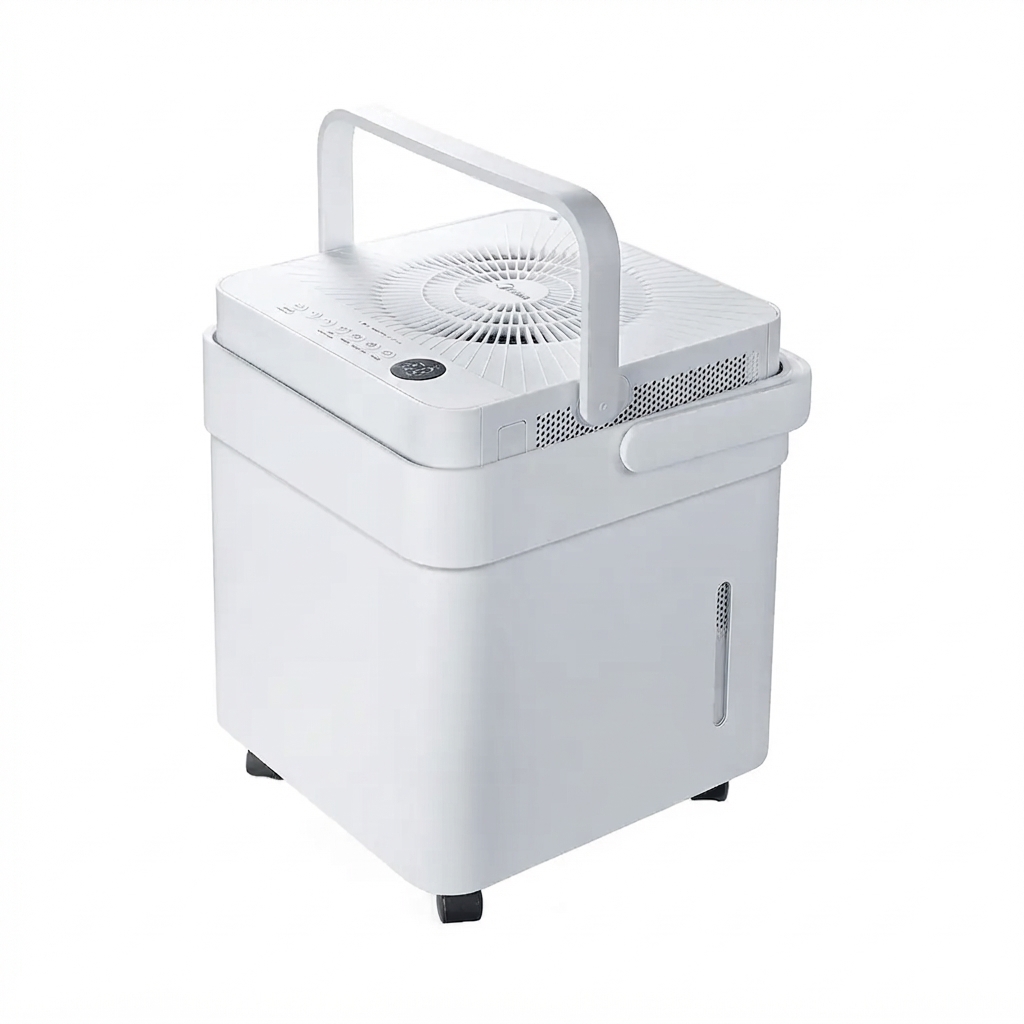
The Midea MAD35S1QWT-A dehumidifier is a smart, high-capacity model designed to help control excess humidity in basements, bedrooms, living rooms, garages, and other moisture-prone areas. With a 50-pint class capacity, Wi-Fi connectivity, voice assistant support, and a cube-style design that improves water handling and portability, it stands out as a practical solution for homeowners who want both convenience and strong moisture removal. The unit is built for large spaces up to 4,500 sq. ft., making it a solid choice for whole-home humidity control or demanding problem areas where dampness, musty odors, and condensation are persistent issues.
One of the biggest advantages of the Midea MAD35S1QWT-A dehumidifier is its smart functionality. Users can monitor and adjust settings through a smartphone app, and the unit is compatible with Amazon Alexa and Google Assistant for hands-free control. It also includes a washable filter, continuous drain option, and a removable bucket, which makes maintenance easier for everyday use. Its relatively quiet operation at around 45 dBA is another plus for living spaces and bedrooms. The estimated price range is typically around $230 to $300, depending on the retailer, promotions, and availability. It is widely available through major appliance retailers and online marketplaces.
For buyers comparing energy-efficient dehumidifiers, the Midea MAD35S1QWT-A offers a compelling mix of performance, smart features, and value. It is especially appealing for users who want a connected appliance that simplifies humidity management without requiring constant manual monitoring.
Detailed Specifications of the Midea MAD35S1QWT-A Dehumidifier
- Model: Midea MAD35S1QWT-A
- Capacity: 50 pints
- Recommended coverage area: Up to 4,500 sq. ft.
- Noise level: About 45 dBA
- Fan speeds: 2-speed operation
- Smart features: Smartphone app control, Wi-Fi ready, voice control compatibility
- Voice assistant support: Amazon Alexa and Google Assistant
- Drainage: Continuous drain supported, drain hose included
- Bucket: Removable water bucket, 16 liters
- Filter: Washable filter
- Refrigerant: R410A
- Power: 115V, standard household use
- Color: White
- Dimensions: Approximately 14.45 x 14.76 x 14.57 inches
- Weight: About 41.67 lbs
In performance terms, the Midea MAD35S1QWT-A is positioned as a compact but powerful smart dehumidifier. Compared with traditional 35-pint portable models, it offers a larger water-removal class and stronger room coverage, while its cube design helps maximize bucket capacity in a relatively small footprint. Compared with basic non-smart dehumidifiers, it adds app-based convenience and voice control, making it a more modern option for connected homes.
Pros and Cons of the Midea MAD35S1QWT-A Dehumidifier
Pros
- Strong moisture removal: Excellent for large rooms, basements, and humid climates where visible condensation or damp odors are common.
- Smart home integration: App control and voice assistant support make it easy to adjust settings remotely.
- Quiet operation: At around 45 dBA, it is quieter than many older full-size dehumidifiers.
- Flexible drainage: The included continuous drain setup reduces the need to empty the bucket frequently.
- Good value for the feature set: It combines high capacity, smart features, and energy-conscious design at a competitive price.
Cons
- Heavier than smaller units: At over 40 lbs, it may be less convenient to move between floors.
- App dependence for some users: Smart features are useful, but buyers who prefer simple manual controls may not need them.
- Not the cheapest option: Budget dehumidifiers cost less, though they usually lack its capacity and smart functions.
- Best for medium to large areas: In small rooms, the unit may be more powerful than necessary.
For value for money, the Midea MAD35S1QWT-A dehumidifier compares well against similarly priced smart dehumidifiers from brands like hOmeLabs and Frigidaire, especially if Wi-Fi control and voice compatibility matter to you. Buyers looking for a basic low-cost model may prefer a simpler alternative, but those wanting convenience and strong output will likely see better long-term value here.
Customer Reviews and Real-World Feedback on the Midea MAD35S1QWT-A
Customer feedback for the Midea MAD35S1QWT-A dehumidifier is generally very positive, with many users rating it around 4.5 out of 5 stars. Buyers frequently praise how quickly it lowers humidity in large spaces, with several noting noticeable improvements within hours of first use. A common testimonial theme is that it performs especially well in basements and damp utility rooms, where it helps reduce musty smells and condensation.
Common complaints include the unit’s weight and the fact that some users need time to learn the smart app setup. A few reviewers also mention that the bucket can require frequent emptying in very humid conditions if continuous drainage is not used. Even with these minor issues, most customers recommend the Midea MAD35S1QWT-A for households that need a reliable smart dehumidifier with strong capacity and easy maintenance.
Example user feedback often sounds like this: “It pulled a huge amount of water from my basement in the first day,” and “The app makes it easy to check humidity without walking downstairs.” For shoppers comparing smart dehumidifiers, this model is often recommended as a dependable mid-range choice with a strong balance of performance and convenience.
Faqs
How do I set up the midea MAD35S1QWT-A Dehumidifier for the first time?
Why is my midea MAD35S1QWT-A Dehumidifier not collecting water even though the room feels humid?
What does the continuous drain feature on the midea MAD35S1QWT-A Dehumidifier do?
How can I make the midea MAD35S1QWT-A Dehumidifier work more efficiently in a large room?
Why does the midea MAD35S1QWT-A Dehumidifier keep turning on and off?
How do I clean and maintain the midea MAD35S1QWT-A Dehumidifier properly?
Can the midea MAD35S1QWT-A Dehumidifier run safely in a basement or laundry room?
What should I check if the midea MAD35S1QWT-A Dehumidifier shows an error or warning light?
Tags
More midea manuals
- Midea MRT18S2AWW Top-Freezer Refrigerator User Manual
- Midea MF200D100WB Front Loading Washer Dryer User Manual
- Midea WHD-774FWE1 Top Freezer Refrigerator User Manual
- Midea Mechanical Control Series Chest Freezer MRC05M5CWW User Manual
- Midea MF200W85B Front Loading Washing Machine User Manual
- Installation: Midea MDWS-2703 Dish Washer User Manual
Leave a Comment