
Midea MF-12FT16JC 3 Speed Oscillating Table Fan User Manual
Content
midea MF-12FT16JC 3 Speed Oscillating Table Fan Review and Manual
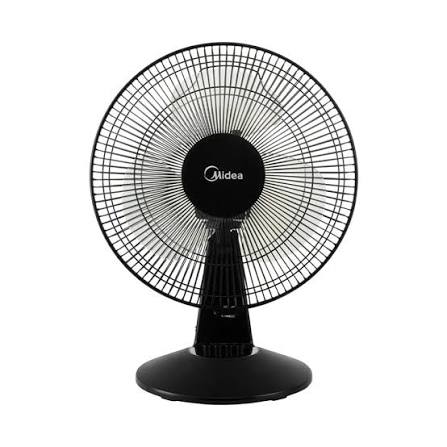
The midea MF-12FT16JC 3 Speed Oscillating Table Fan is a compact 12-inch desk fan designed for everyday cooling in bedrooms, offices, study areas, and small living spaces. With three speed settings, oscillation, and tilt adjustment, it offers simple, dependable airflow control for users who want an affordable fan without complicated features. The black finish gives it a clean, modern look that blends easily into most interiors, while the finger-proof guard and built-in safety thermal fuse add peace of mind for families and shared spaces.
This model is best suited for users who need a practical table fan for personal cooling, especially in warm climates where steady air circulation matters. The midea MF-12FT16JC 3 Speed Oscillating Table Fan is also a smart choice for students, remote workers, and households looking for a low-maintenance cooling solution with strong value for money. It is commonly available through online marketplaces and appliance retailers, with typical pricing estimated around RM65 to RM85 depending on the seller, promotions, and stock levels. In many regions, it is sold as a ready-stock item and usually includes a user manual and warranty card.
Detailed Specifications for the midea MF-12FT16JC 3 Speed Oscillating Table Fan
- Model: MF-12FT16JC
- Type: 3-speed oscillating table fan
- Blade size: 12 inches
- Blade design: 3 blades
- Speed settings: 3 levels for adjustable airflow
- Controls: Manual mechanical control
- Oscillation: Yes, for wider air distribution
- Tilt adjustment: Yes, for directional airflow
- Power consumption: 45W
- Voltage: 220-240V
- Color: Black
- Safety features: Finger-proof guard and thermal fuse
- Approximate product dimensions: 280 x 280 x 490 mm
- Approximate weight: 2.67 kg
- Warranty: 1-year general warranty
Compared with basic non-oscillating desk fans, this Midea table fan provides better room coverage and more flexible cooling. Against larger pedestal fans, it is more compact and easier to place on desks, shelves, and bedside tables, though it is not designed to cool large open spaces.
Setup Guide: How to Install and Use the midea MF-12FT16JC 3 Speed Oscillating Table Fan
1. Unpack the fan carefully and check that the base, guard, blades, and manual are included.
2. Place the fan on a stable, flat surface away from curtains, loose papers, and water sources.
3. If assembly is required, attach the base and fan head according to the manual, then secure all screws firmly.
4. Make sure the guard is locked properly before connecting the fan to a power outlet.
5. Use the control knob or buttons to select speed 1, 2, or 3 depending on airflow needs.
6. Adjust the tilt angle to direct air where it is needed most, and turn on oscillation for wider coverage.
7. After use, switch the fan off before unplugging it from the wall.
Safety precautions are essential: do not touch the blades while the fan is running, keep it out of reach of small children, and avoid operating the unit in damp or wet areas. The fan is intended for indoor use only. If the fan does not start, check the power connection, outlet condition, and whether the guard and blade assembly are seated correctly.
Troubleshooting the midea MF-12FT16JC 3 Speed Oscillating Table Fan
- Fan does not turn on: Check the plug, outlet, and power switch. Try another socket if needed.
- Fan runs but no airflow: Confirm that the blades are installed correctly and are not blocked by dust or packaging material.
- Oscillation not working: Make sure the oscillation control is engaged and the fan head is not obstructed.
- Unusual noise or vibration: Tighten loose screws, clean the blade assembly, and place the fan on a level surface.
- Weak airflow: Select a higher speed setting and clean the guard and blades regularly.
- Overheating: Turn the fan off, unplug it, and allow it to cool. The thermal fuse is designed to improve safety if overheating occurs.
This model does not typically use digital error codes, so most issues are resolved through basic inspection and cleaning. Preventive maintenance helps extend lifespan: wipe dust from the grille, avoid continuous exposure to moisture, and store the fan in a dry place when not in use. For support, use the retailer’s warranty channel or the brand’s customer service contact listed on the warranty card or product packaging.
Pros and Cons of the midea MF-12FT16JC 3 Speed Oscillating Table Fan
Pros
- Affordable price point makes it a strong value-for-money option.
- Three-speed control gives useful airflow flexibility for different room conditions.
- Oscillation helps distribute air across a wider area than fixed-head fans.
- Compact 12-inch size fits desks, bedside tables, and small rooms easily.
- Safety features such as the finger-proof guard and thermal fuse add confidence.
- Simple mechanical operation is easy for all age groups to use.
Cons
- Not ideal for large rooms or spaces that need powerful long-range airflow.
- Manual controls offer fewer convenience features than remote-controlled fans.
- No advanced timer, smart app, or digital display functions.
- Plastic construction is functional but less premium than higher-end alternatives.
For buyers comparing compact cooling options, this model is a better choice than many entry-level no-name fans because it balances safety, airflow, and reliability. It is less feature-rich than premium table fans, but for everyday use it delivers solid performance at a budget-friendly cost.
Customer Reviews of the midea MF-12FT16JC 3 Speed Oscillating Table Fan
Customer feedback for the midea MF-12FT16JC 3 Speed Oscillating Table Fan is generally positive, with many users praising its strong airflow, easy setup, and compact size. Common ratings are typically around 4 out of 5 stars, especially from buyers looking for a practical fan for bedrooms and home offices.
- “Good airflow for the price and very easy to assemble.”
- “Quiet enough for night use and fits well on my desk.”
- “Oscillation works well, but I wish it had a remote control.”
- “Solid budget fan with decent build quality and safe guard design.”
Frequent praise includes value for money, ease of use, and dependable cooling. Common complaints focus on the lack of advanced features and the desire for quieter operation at higher speed settings. For shoppers who want a straightforward fan with reliable everyday performance, this model is an easy recommendation.
Frequently Asked Questions About the midea MF-12FT16JC 3 Speed Oscillating Table Fan
Is the midea MF-12FT16JC 3 Speed Oscillating Table Fan good for small rooms? Yes, it is well suited for bedrooms, study rooms, and offices because its oscillation and tilt help spread air efficiently.
Does it consume a lot of electricity? No, the fan uses about 45W, which makes it economical for regular daily use.
Is it safe for homes with children? The finger-proof guard and thermal fuse improve safety, but supervision is still important around any fan.
What is the best use case? It works best as a personal cooling fan for desks, bedside tables, and compact indoor spaces.
Faqs
How do I assemble the midea MF-12FT16JC 3 Speed Oscillating Table Fan for first-time use?
What should I do if the midea MF-12FT16JC 3 Speed Oscillating Table Fan does not turn on?
How do I use the oscillation and tilt features on the midea MF-12FT16JC 3 Speed Oscillating Table Fan?
Why is the midea MF-12FT16JC 3 Speed Oscillating Table Fan making unusual noise or vibration?
What room size is the midea MF-12FT16JC 3 Speed Oscillating Table Fan best suited for?
How can I get stronger airflow from the midea MF-12FT16JC 3 Speed Oscillating Table Fan?
How do I clean and maintain the midea MF-12FT16JC 3 Speed Oscillating Table Fan safely?
Is the midea MF-12FT16JC 3 Speed Oscillating Table Fan compatible with standard home power outlets?
Tags
More midea manuals
Leave a Comment