
How to Connect your Device: Midea MSmartHome Air Conditioner and Dehumidifier User Manual
Content
Introduction: Midea MSmartHome Air Conditioner and Dehumidifier Overview
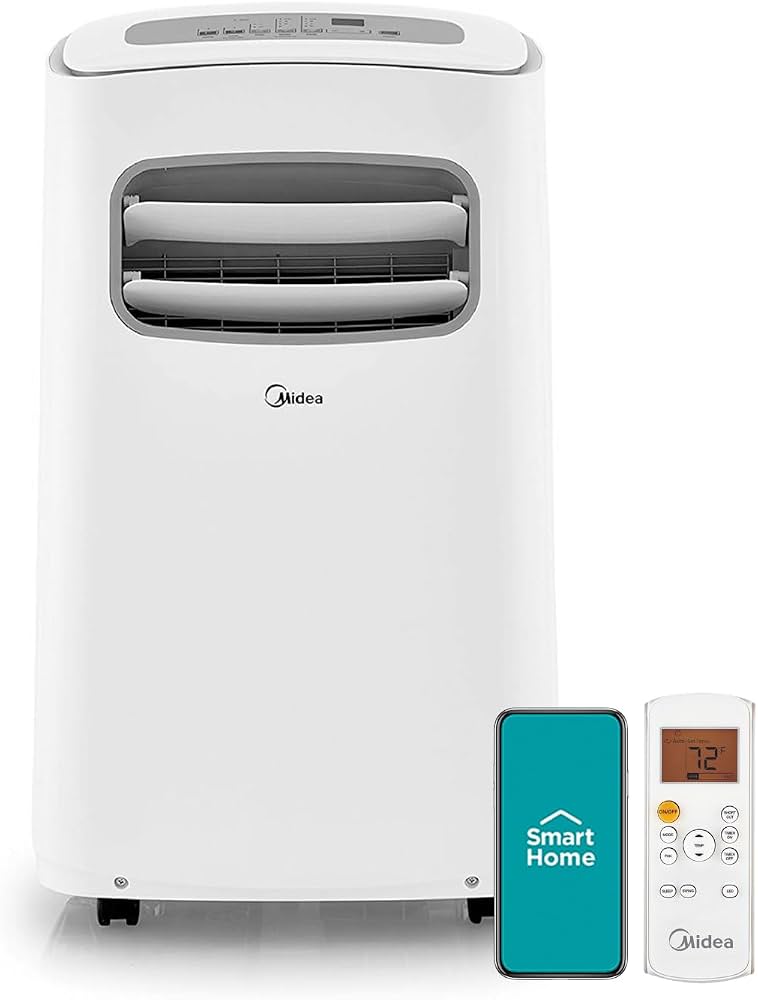
The Midea MSmartHome Air Conditioner and Dehumidifier is a smart climate-control solution designed for users who want cooling, moisture removal, and app-based convenience in one appliance. It is especially useful for apartments, bedrooms, home offices, basements, and medium-sized living spaces where temperature and humidity control matter equally. With Wi‑Fi connectivity, remote control access, and compatibility with the MSmartHome app, this product stands out for its easy automation and everyday practicality. The combination of air conditioning and dehumidifying functions makes it a flexible choice for humid climates, seasonal weather changes, and households that need quick comfort without complex setup.
One of the biggest advantages of the Midea MSmartHome Air Conditioner and Dehumidifier is its ability to simplify room management. Instead of buying separate devices, users can rely on one system for cooling, fan circulation, and moisture reduction. This makes it appealing to budget-conscious buyers, first-time smart-home users, and anyone searching for a compact, energy-efficient home comfort appliance. It is also a strong fit for renters because many models are portable or easy to install compared with traditional HVAC systems.
Estimated pricing typically falls in the mid-range category, often between $300 and $700 depending on BTU rating, dehumidification capacity, and smart features. Availability is generally strongest through major retailers, online marketplaces, and Midea’s official product channels. For shoppers comparing a smart portable air conditioner, a dehumidifier with app control, or a dual-function cooling device, this model is positioned as a practical and modern option.
Specifications: Key Features and Performance Details
- Product type: Smart air conditioner and dehumidifier combination with app control.
- Connectivity: Wi‑Fi enabled for remote operation through the MSmartHome app.
- Control options: App control, onboard electronic controls, and typical remote access features.
- Operating modes: Cooling, dehumidifying, fan mode, and continuous moisture removal on supported models.
- Voltage: Commonly 115V for North American versions.
- Dehumidifier performance: Smart dehumidifier models in the range may remove 22 to 50 pints per day, depending on configuration.
- Coverage: Smaller units are suitable for around 1,500 sq. ft., while larger dehumidifier variants can serve bigger rooms and basements.
- Noise level: Typically designed for home use with moderate sound output, especially in fan and low-compressor modes.
- Drainage: May include manual bucket drainage, continuous drain support, or pump-assisted drainage on select models.
- Refrigerant: Varies by model, with newer units often using modern low-impact refrigerants.
Compared with traditional non-smart air conditioners and standalone dehumidifiers, the Midea MSmartHome Air Conditioner and Dehumidifier offers better convenience, better app-based scheduling, and more flexible day-to-day control. It is less expensive than a full HVAC upgrade and more versatile than a single-purpose appliance.
Setup Guide: How to Install and Connect the Midea MSmartHome Air Conditioner and Dehumidifier
Start by placing the unit on a flat, stable surface with adequate airflow around the intake and exhaust vents. Keep the appliance away from walls, curtains, and heat sources. Before powering on, make sure the drain system is secured and the filters are properly installed.
- Unpack the device and inspect it for shipping damage.
- Install any required hose, window kit, or drainage accessories.
- Plug the unit into a grounded outlet that matches the rated voltage.
- Power on the appliance and select your preferred operating mode.
- Download the MSmartHome app on your smartphone.
- Enable Wi‑Fi pairing mode on the device and follow the app prompts.
- Connect the unit to a stable 2.4 GHz home network.
- Test cooling, dehumidifying, and fan functions after setup is complete.
For configuration, adjust temperature, fan speed, humidity target, timer, and scheduling options through the app or physical controls. If pairing fails, restart the router, confirm the unit is in pairing mode, and move the phone closer to the appliance during setup. Safety precautions include keeping the unit dry during installation, avoiding extension cords when possible, and never blocking the air vents.
Troubleshooting: Common Problems, Error Codes, and Fixes
If the unit does not power on, check the outlet, power cord, and circuit breaker first. If cooling seems weak, clean the air filter, close doors and windows, and verify that the room size matches the appliance capacity. If dehumidifying is ineffective, make sure the ambient humidity is high enough for operation and confirm that the drain bucket or hose is not blocked.
- Wi‑Fi pairing failure: Reset the network connection, use a 2.4 GHz router band, and retry pairing from the app.
- Water full or drainage alert: Empty the tank, reconnect the drain hose, or inspect the pump if equipped.
- Weak airflow: Clean or replace the filter and clear dust from vents.
- Unusual noise: Check for loose parts, improper leveling, or blocked fan movement.
- Short cycling: Reduce heat load, close openings, and verify mode settings.
Some models display humidity, tank, or communication alerts rather than advanced numeric error codes. Preventive maintenance includes cleaning filters regularly, keeping coils unobstructed, and draining the system before long storage. Warranty support is usually available through Midea’s customer service channels and authorized service providers. Buyers should keep the model number, serial number, and proof of purchase ready when requesting help.
Pros & Cons: Honest Midea MSmartHome Air Conditioner and Dehumidifier Review
Pros
- Combines cooling and dehumidifying in one convenient appliance.
- Smart app control adds scheduling, remote access, and easier daily use.
- Good value for users who want modern features without premium pricing.
- Helpful for humid rooms, basements, apartments, and small home offices.
- More flexible than buying separate devices for climate and moisture control.
Cons
- Performance depends heavily on room size and installation quality.
- Wi‑Fi setup may take extra effort for first-time users.
- Some models require regular drainage and filter cleaning.
- Not as powerful as a full-size central cooling system.
- May be less ideal for very large open-plan areas.
Overall, the Midea MSmartHome Air Conditioner and Dehumidifier offers strong value for money if the goal is convenient smart control and practical everyday comfort. It compares well with other mid-range smart cooling appliances, especially for users who want app-based control and moisture removal in one unit.
Customer Reviews: What Buyers Say About the Midea MSmartHome Air Conditioner and Dehumidifier
Customer feedback is generally positive, with many buyers praising the easy app control, solid cooling performance, and useful dehumidification function. Average sentiment often lands around 4 out of 5 stars, especially among users in humid regions and apartment settings.
- Common praise: “The app makes it easy to adjust settings from another room.”
- Common praise: “Works well for both cooling and taking moisture out of the air.”
- Common complaint: “Wi‑Fi setup took a few tries before it connected.”
- Common complaint: “It needs regular maintenance to keep airflow strong.”
Many users recommend it for bedrooms, offices, and damp rooms where a traditional fan is not enough. Frequent issues usually involve drainage, filter maintenance, or initial pairing, but most buyers still consider it a smart purchase for the price. For shoppers looking for a balanced mix of comfort, convenience, and smart-home features, the Midea MSmartHome Air Conditioner and Dehumidifier is a practical and purchase-worthy option.
Faqs
How do I set up midea MSmartHome Air Conditioner and Dehumidifier for the first time?
Why is my midea MSmartHome Air Conditioner and Dehumidifier not connecting to Wi-Fi?
What should I do if midea MSmartHome Air Conditioner and Dehumidifier is cooling poorly?
How does the dehumidifier mode work on midea MSmartHome Air Conditioner and Dehumidifier?
Is midea MSmartHome Air Conditioner and Dehumidifier compatible with Alexa or Google Assistant?
How can I reduce noise from midea MSmartHome Air Conditioner and Dehumidifier at night?
How often should I clean and maintain midea MSmartHome Air Conditioner and Dehumidifier?
Why does midea MSmartHome Air Conditioner and Dehumidifier keep shutting off unexpectedly?
More midea manuals
- Midea Single Door Series Upright Freezer MDRU385MTE46
- Midea MU138SWARIRC1 Upright Freezer User Manual
- Midea Mounted Freezer Series MRT18D2BST Refrigerator User Manual
- Midea MRB19B7AST Bottom-Freezer User Manual
- Installation: Midea MDWS-2703 Dish Washer User Manual
- Midea WHS-772FWESS1 Upright Freezer User Manual
Leave a Comment