
Midea RG51B Remote Controller User Manual
Content
midea RG51B Remote Controller: Complete Product Manual and Buyer Guide
Introduction
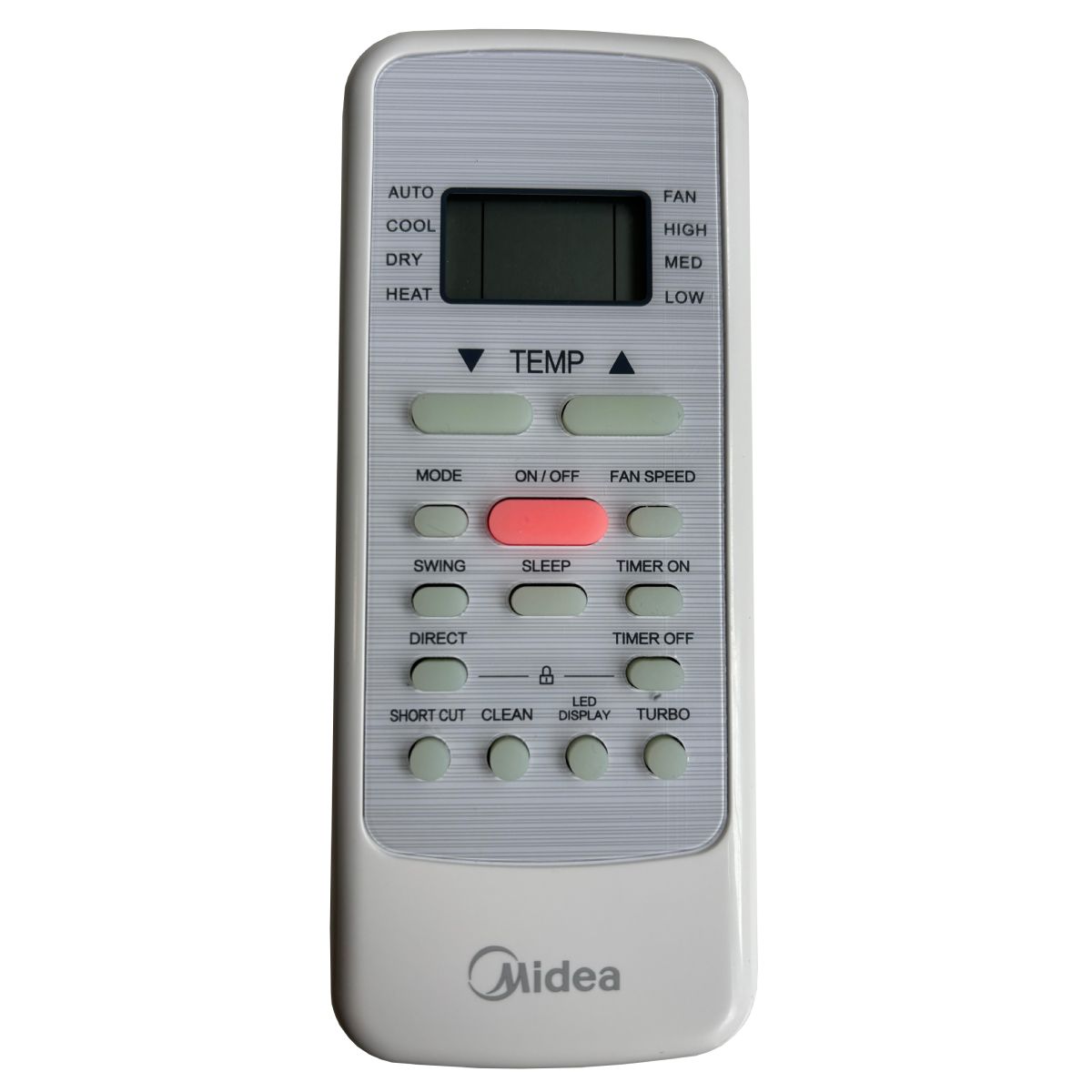
The midea RG51B Remote Controller is a compact infrared replacement remote designed for compatible Midea air conditioners and selected OEM-matched units. Built for straightforward operation, it gives users quick access to essential AC functions such as power, mode selection, temperature adjustment, fan speed, swing, and timer control. For homeowners, renters, property managers, and HVAC technicians, it offers a practical solution when an original remote is lost, damaged, or no longer working properly.
One of its biggest advantages is ease of use. In most compatible systems, the remote is ready to operate after inserting batteries, with no complicated pairing or code entry required. Its IR-based design supports dependable control from standard room distances, making it ideal for bedrooms, living rooms, offices, and hotel rooms. The RG51B series is especially useful for users who want a low-cost replacement without sacrificing core functionality.
Typical pricing for the midea RG51B Remote Controller usually falls in the budget-to-midrange category, often around $10 to $25 depending on seller, condition, and whether it is an original or compatible replacement. Availability is generally good through appliance parts retailers, online marketplaces, and AC accessory stores. For anyone seeking a simple, affordable, and widely compatible Midea air conditioner remote, the RG51B remains a reliable choice.
Specifications
- Model family: RG51B, including variants such as RG51B(2)/E and RG51B(1)/EU1
- Compatibility: Midea air conditioners and select OEM-compatible models
- Power source: 2 x AAA or R03/LR03 dry batteries
- Rated voltage: 3.0V DC
- Signal type: Infrared remote control
- Typical operating range: Up to 8 meters in open indoor spaces
- Operating temperature: Approximately -5°C to 60°C
- Main functions: Power, mode, temperature, fan speed, swing, timer, sleep, and display control
- Design: Lightweight handheld plastic remote with standard button layout
Compared with universal AC remotes, the RG51B usually offers better out-of-box compatibility and a more familiar layout for Midea users. Compared with higher-end smart remotes, it lacks Wi-Fi, app control, and voice assistant support, but it is faster to set up and more affordable. For basic everyday air conditioner control, its performance is strong and dependable.
Setup Guide: How to Use the Midea RG51B Remote Controller
Setting up the midea RG51B Remote Controller is usually simple. Begin by opening the battery compartment and inserting two fresh AAA batteries, making sure the polarity matches the symbols inside the compartment. Once powered, point the remote toward the indoor AC unit’s infrared receiver and press the power button. In many compatible units, the system will respond immediately with no pairing required.
Use the mode button to cycle through cooling, heating, dry, fan, and auto settings if your air conditioner supports them. Adjust temperature with the up and down keys, then choose fan speed and swing direction as needed. For timer features, set the desired on/off time directly from the remote menu. If buttons seem unresponsive, replace the batteries first and confirm the remote is aimed directly at the receiver.
Safety tip: keep the remote dry, avoid dropping it, and do not mix old and new batteries. Remove batteries if the remote will not be used for a long period. If the AC does not respond, check for obstructions, weak batteries, or a mismatch between the remote model and the unit.
Troubleshooting
- Remote does not work: Replace batteries, clean the battery contacts, and confirm correct polarity.
- Air conditioner not responding: Move closer to the indoor unit and aim directly at the IR sensor.
- Buttons feel stuck or delayed: Clean the keypad gently and avoid moisture exposure.
- Display is blank: Batteries may be drained or installed incorrectly.
- Wrong functions appear: The remote may be incompatible with your specific Midea AC model.
Common error-type issues usually come from compatibility rather than the remote itself. If the unit beeps inconsistently or ignores commands, verify that your air conditioner is listed for the RG51B family. Preventive care includes storing the remote in a cool, dry location and replacing batteries before they fully drain. Most replacements are covered by seller warranty terms, so check your purchase record for support windows, return policies, or exchange options. For help, contact the retailer or the appliance parts supplier where the remote was purchased.
Pros & Cons
Pros
- Simple plug-and-play operation with many compatible Midea AC units
- Affordable replacement option for lost or damaged remotes
- Clear button layout that is easy to learn
- Good IR range for typical room use
- Reliable basic control for temperature, mode, fan speed, and timer
Cons
- No Wi-Fi, app, or smart-home integration
- Compatibility is limited to supported models
- Depends on line-of-sight infrared operation
- May lack advanced features found in premium universal remotes
For value for money, the midea RG51B Remote Controller performs well as a direct replacement. It is usually a better choice than a generic universal remote if your priority is quick setup and familiar operation. However, users who want smart features or broad multi-brand support may prefer a universal or app-based alternative.
Customer Reviews
Average user feedback for the RG51B style replacement remote is generally positive, with many buyers rating it around 4 to 5 stars for ease of use and affordability. Customers often praise the immediate responsiveness, simple installation, and accurate control of Midea air conditioners. One common testimonial theme is: “Inserted the batteries and it worked right away.”
Frequent complaints include limited compatibility, the absence of batteries in some packages, and occasional confusion over model variants. Some users also mention that the remote works only when pointed directly at the indoor unit. Overall, it is a strong purchase recommendation for anyone needing a practical replacement for a compatible Midea AC system, especially when fast setup and low cost matter most.
Frequently Asked Questions
- Does the RG51B remote need programming? Most compatible versions do not require programming or pairing.
- What batteries does it use? Typically two AAA batteries.
- How far does it work? Up to about 8 meters in normal indoor conditions.
- Is it a universal remote? No, it is designed mainly for compatible Midea air conditioners and selected equivalents.
Faqs
How do I set up the midea RG51B Remote Controller for the first time?
What should I do if my midea RG51B Remote Controller is not working properly?
Which air conditioner models are compatible with the midea RG51B Remote Controller?
What buttons and features does the midea RG51B Remote Controller include?
How do I use the timer function on the midea RG51B Remote Controller?
Why is the midea RG51B Remote Controller showing commands but the air conditioner does not respond?
How can I optimize performance when using the midea RG51B Remote Controller?
How should I maintain and care for the midea RG51B Remote Controller?
More midea manuals
- Midea M2O-18FN8-Q Split-Type Air Conditioner User Manual
- Midea MPPDB Series Portable Air Conditioner User Manual
- Midea Energy Star & Entry Tier Series Split-Type Room Air Conditioner User Manual
- Midea W11330506 Front-Loading Washer User Manual
- Midea EasyFit II Series VRF Outdoor Unit User Manual
- Midea MLH27N4AWWC Front Loading Washer User Manual
Leave a Comment