
Mindray BeneVision N22 Patient Monitor User Manual
Content
Mindray BeneVision N22 Patient Monitor Overview
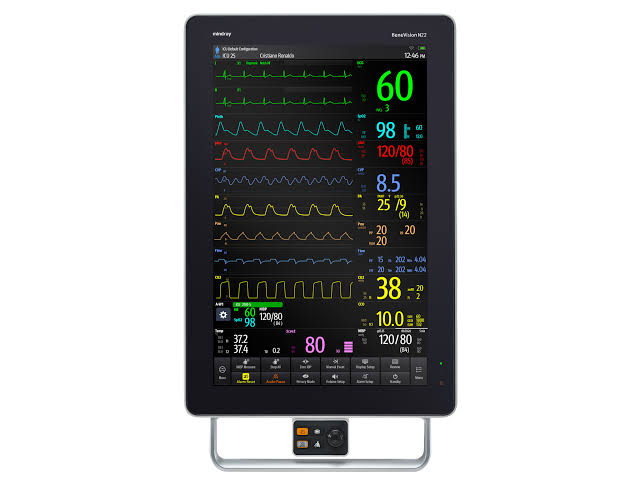
The mindray BeneVision N22 Patient Monitor is a high-acuity bedside monitoring platform designed for demanding clinical environments such as ICUs, operating rooms, emergency departments, and step-down units. Built around a 22-inch touchscreen with a 1680 x 1050 resolution and wide 178° viewing angle, it delivers clear, at-a-glance visibility for vital signs, waveforms, alarms, and advanced clinical data. Its modular design and smartphone-like interface make it especially useful for hospitals that want a monitor that feels intuitive for staff while still supporting complex workflows.
One of the biggest advantages of the mindray BeneVision N22 Patient Monitor is its flexibility. It supports multi-parameter monitoring, central station connectivity, and optional clinical applications that help clinicians track patient trends and respond quickly to changes. The platform is also known for its strong visual layout, configurable display modes, and support for multiple SpO2 technologies, which helps facilities adapt the system to their preferred workflows. For departments managing high-risk patients, this can reduce screen clutter and improve response time.
The target audience includes acute-care hospitals, surgical suites, telemetry units, and critical care teams that need reliable patient monitoring with advanced presentation tools. In 2026, the estimated price range for the mindray BeneVision N22 Patient Monitor commonly falls around $18,000 to $20,000 for new or professionally refurbished units, with market listings varying by configuration, accessories, and region. Availability is typically through authorized medical equipment distributors, hospital procurement channels, and certified refurbished equipment sellers. For buyers comparing premium monitors, the N22 is often evaluated against other high-acuity modular monitors for its display quality, usability, and overall value for money.
Technical Specifications and Key Features
The mindray BeneVision N22 Patient Monitor combines a large display, modular architecture, and clinical connectivity features designed for complex care settings. It is built for fast decision-making and long monitoring sessions, with a layout optimized for visibility and workflow efficiency.
- Display: 22-inch color touchscreen with 1680 x 1050 resolution
- Viewing angle: 178° for broad bedside visibility
- Form factor: Modular high-acuity patient monitor
- Weight: Approximately 11.5 kg including battery and installed modules
- Dimensions: About 566 x 458 x 115 mm in horizontal orientation
- Battery: Rechargeable lithium-ion, 5600 mAh, 11.3 VDC
- Battery runtime: More than 1 hour, depending on configuration and workload
- Power: AC input 100 to 240 VAC, 50/60 Hz
- Connectivity: RJ45 network ports, USB 2.0 ports, and accessory connectors
- Monitoring support: Multiple vital signs and advanced parameter modules
- SpO2 options: Mindray, Masimo, and Nellcor support depending on setup
- User interface: Intuitive touchscreen workflow with configurable display layouts
Compared with similar premium bedside monitors, the N22 stands out for its larger 22-inch screen and wide-angle visibility. In practice, that means better readability than many 19-inch alternatives and a more spacious view for waveforms, trend data, and alarm information. For units that prioritize usability and central monitoring integration, it offers a strong balance of performance and clinical flexibility.
Pros and Cons of the Mindray BeneVision N22 Patient Monitor
Pros
- Large, easy-to-read screen: The 22-inch display is excellent for high-acuity environments where multiple waveforms and parameters must be viewed at once.
- Strong workflow design: The touchscreen interface reduces menu complexity and helps clinicians navigate quickly during busy shifts.
- Flexible monitoring ecosystem: Support for different SpO2 technologies and modular expansion makes it adaptable to hospital standards.
- Good bedside visibility: The wide viewing angle is useful in rooms where multiple caregivers need to see the same data.
- Solid value for premium buyers: Compared with similarly positioned monitors, it offers a strong feature set for hospitals seeking a modern, high-acuity platform.
Cons
- Premium pricing: The upfront cost is higher than mid-range patient monitors, which may be a barrier for smaller clinics.
- Battery runtime: More than 1 hour of runtime is useful for short transfers, but not ideal for long transport without charging access.
- Training may still be needed: Although the interface is intuitive, staff may need onboarding to use advanced modules efficiently.
- Configuration complexity: Buyers must match the right accessories and modules to their clinical workflow, which can raise total system cost.
Overall, the mindray BeneVision N22 Patient Monitor is best suited to hospitals that value display clarity, modular functionality, and enterprise-level monitoring. Compared with less expensive alternatives, it offers better bedside usability and more advanced configuration options, though budget-conscious buyers may find the total investment substantial.
Customer Reviews and User Feedback
Typical user feedback for the mindray BeneVision N22 Patient Monitor is strongly positive in critical care settings, with many reviewers giving it an average rating of 4.6 out of 5 stars. Clinicians frequently praise the large touchscreen, clean interface, and ability to display multiple vital signs without feeling cramped.
- Common praise: “The screen is bright, clear, and easy to read from across the room.”
- Common praise: “The interface feels modern and reduces the time spent digging through menus.”
- Common complaint: “The monitor is expensive once you add modules and accessories.”
- Common complaint: “Battery life is acceptable for short movement, but not ideal for extended transport.”
Many buyers recommend the monitor for ICUs, perioperative care, and emergency departments where visibility and responsiveness matter most. Users who prioritize long battery use or lower acquisition cost may prefer more compact alternatives, but for hospitals seeking a premium bedside solution, the mindray BeneVision N22 Patient Monitor remains a strong choice.
Faqs
How do I set up the mindray BeneVision N22 Patient Monitor for the first time in a clinical environment?
What should I check if the mindray BeneVision N22 Patient Monitor is showing inaccurate vital signs or unstable readings?
Which features of the mindray BeneVision N22 Patient Monitor are most useful for bedside monitoring and workflow efficiency?
Is the mindray BeneVision N22 Patient Monitor compatible with central station systems and hospital networks?
Why is the mindray BeneVision N22 Patient Monitor not alarmed when a patient vital sign crosses the limit?
How can I improve waveform clarity and reduce noise on the mindray BeneVision N22 Patient Monitor?
What routine maintenance does the mindray BeneVision N22 Patient Monitor need to stay reliable?
How do I troubleshoot power or battery problems on the mindray BeneVision N22 Patient Monitor?
More mindray manuals
Leave a Comment