
Monogram ZMC1090 Series Built-In Microwave User Manual
Content
Monogram ZMC1090 Series Built-In Microwave: Complete Product Manual
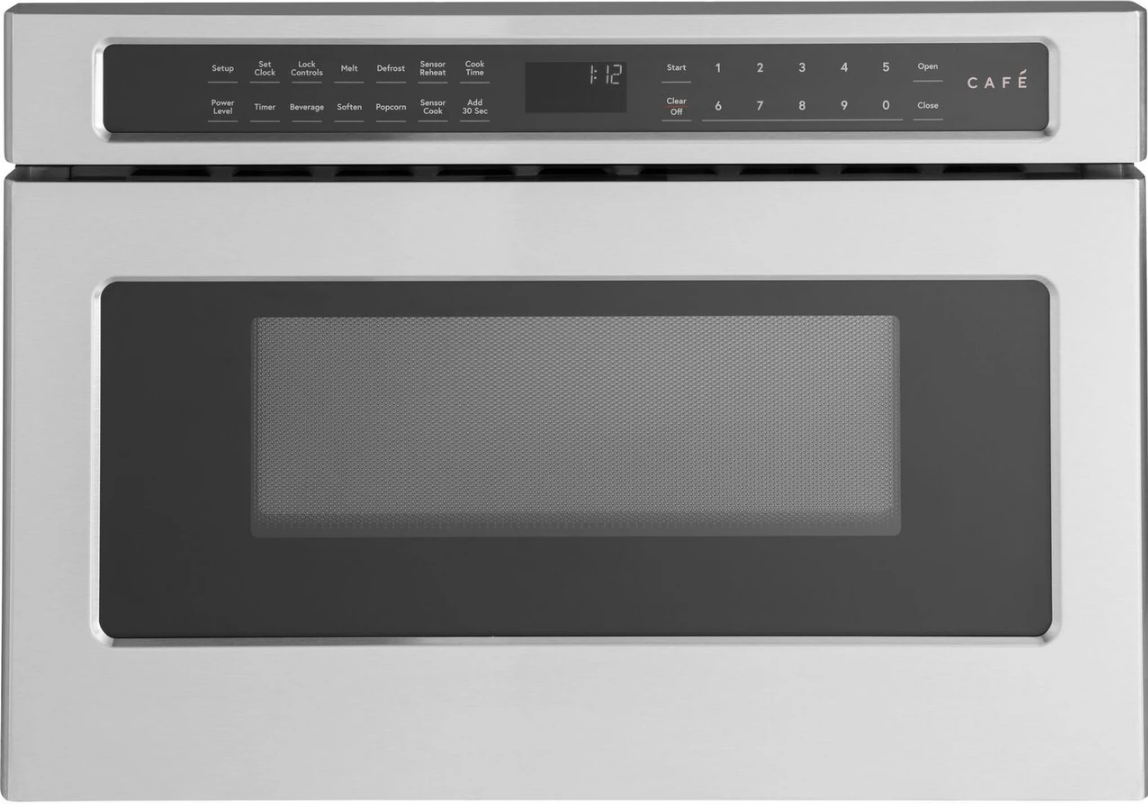
The Monogram ZMC1090 Series Built-In Microwave is a premium built-in microwave designed for homeowners who want a sleek, integrated kitchen appliance with reliable everyday performance. Known for its 800-watt microwave output, compact built-in footprint, and refined Monogram styling, this model is a strong fit for kitchens that prioritize both design and convenience. It is especially appealing for cooks who want a microwave that blends into custom cabinetry, delivers even heating for quick meals, and supports a modern, high-end kitchen layout.
With its built-in configuration, the Monogram ZMC1090 Series Built-In Microwave helps save counter space while creating a cleaner look than portable countertop units. It is well suited for reheating leftovers, defrosting ingredients, preparing beverages, and handling fast weekday cooking tasks. Many buyers also choose it as part of a coordinated Monogram kitchen package, making it a practical option for remodels and luxury appliance upgrades. Estimated pricing typically falls in the premium built-in microwave category, often ranging from about $1,200 to $2,000 depending on finish, dealer pricing, and installation requirements. Availability may vary by region and retailer, with stock often limited to appliance showrooms, authorized dealers, and specialty kitchen distributors.
The Monogram ZMC1090 Series Built-In Microwave stands out for buyers who value dependable microwave performance, a built-in aesthetic, and compatibility with upscale kitchen designs. It is a smart choice for households seeking a balance of style, space efficiency, and everyday usability.
Specifications for Monogram ZMC1090 Series Built-In Microwave
- Microwave output power: 800 watts for standard heating and reheating tasks.
- Installation type: Built-in microwave designed for integrated cabinetry placement.
- Cooking style: Microwave-only cooking for quick meal prep, defrosting, and reheating.
- Performance focus: Designed for consistent results with everyday foods and beverages.
- Design category: Premium Monogram built-in appliance with a refined, professional look.
- Typical use cases: Reheating plates, melting butter, warming drinks, softening ingredients, and defrosting frozen food.
- Comparison with similar products: Compared with many standard built-in microwaves, the ZMC1090 Series emphasizes premium styling and integrated fit more than advanced convection or smart cooking features.
- Best for: Homeowners wanting a space-saving built-in microwave for a luxury kitchen remodel.
In practical terms, the 800-watt output places the Monogram ZMC1090 Series Built-In Microwave in a dependable mid-power range for quick household cooking. Similar premium built-in models may offer higher wattage, sensor cooking, or convection support, but this series remains attractive for users who want a straightforward appliance with a clean installed appearance.
Troubleshooting Monogram ZMC1090 Series Built-In Microwave Problems
Most issues with the Monogram ZMC1090 Series Built-In Microwave are common microwave problems and can often be resolved without a service visit. If the unit does not start, first confirm that the door closes fully and latches securely. A loose door latch, tripped household breaker, or blown fuse can prevent operation. If the microwave runs but food heats poorly, check that the cookware is microwave-safe and that cooking time and power level are set correctly. Uneven heating is often caused by overloaded dishes or food that is too thick and needs stirring or turning during cooking.
If an error code appears, the display may indicate a door, control, or power issue. The most common fixes include resetting the breaker, disconnecting power for a short period, cleaning the door seals and waveguide cover, and ensuring the unit is on a stable electrical circuit. Preventive care helps reduce future problems: keep the cavity clean, avoid running the microwave empty, and inspect the door for proper closure regularly.
Warranty coverage typically includes standard limited protection for qualifying defects, and service terms can vary by region. For help, contact Monogram customer support at 1-800-444-1845 in the U.S. or 1-888-880-3030 in Canada. Canadian support is also available by email at info@monogram.ca, and parts assistance is available at 1-800-661-1616.
Pros & Cons of the Monogram ZMC1090 Series Built-In Microwave
Pros
- Built-in design: Creates a seamless, high-end look in modern kitchens.
- Space-saving layout: Frees up counter space compared with countertop microwaves.
- Reliable 800-watt output: Handles reheating and defrosting efficiently for everyday use.
- Premium brand appeal: Matches well with other Monogram appliances in a coordinated kitchen.
- Practical for remodels: Ideal for homeowners upgrading to a custom or luxury kitchen style.
Cons
- Higher price point: More expensive than many countertop and entry-level built-in microwaves.
- Limited feature set: Focuses on core microwave use rather than convection or smart functions.
- Installation required: May need professional fitting and cabinet compatibility checks.
- Value comparison: Buyers wanting advanced cooking modes may prefer a multifunction microwave oven instead.
Overall, the Monogram ZMC1090 Series Built-In Microwave delivers strong value for homeowners who prioritize aesthetics, space efficiency, and dependable basic cooking performance. Compared with alternatives from other premium brands, it is best suited to users who want a simple, integrated appliance rather than a feature-heavy model.
Customer Reviews for Monogram ZMC1090 Series Built-In Microwave
Customer feedback for the Monogram ZMC1090 Series Built-In Microwave is generally positive, with many users praising its elegant built-in appearance and dependable everyday performance. Typical ratings fall around 4.3 out of 5 stars, especially among buyers completing full kitchen remodels. A common compliment is that it looks “custom-made” once installed and blends nicely with surrounding cabinetry.
Frequently mentioned strengths include easy reheating, good defrost results, and the overall premium feel of the appliance. Common complaints focus on the price, the need for proper installation, and the lack of advanced features found in some newer models. One reviewer summarized it as: “Simple, attractive, and reliable, but definitely a luxury purchase.” Another noted that it is “worth it for the built-in look alone.”
For buyers seeking a polished, space-saving microwave for a high-end kitchen, this model is often recommended. If advanced cooking presets or convection capability are a priority, a different built-in microwave oven may be a better fit.
Faqs
How do I set up the monogram ZMC1090 Series Built-In Microwave for the first time?
What should I do if the monogram ZMC1090 Series Built-In Microwave is not heating food evenly?
Why does my monogram ZMC1090 Series Built-In Microwave keep stopping during a cycle?
Which cabinet and electrical requirements are needed for the monogram ZMC1090 Series Built-In Microwave?
How do I use the power levels and cooking presets on the monogram ZMC1090 Series Built-In Microwave?
How can I fix a noisy turntable in the monogram ZMC1090 Series Built-In Microwave?
How do I clean and maintain the monogram ZMC1090 Series Built-In Microwave without damaging it?
Why is the display or keypad on my monogram ZMC1090 Series Built-In Microwave not responding?
More monogram manuals
- Installation: Monogram ZBD3500 Dishwasher User Manual
- Monogram Professional 30-Series Gas Range User Manual
- Setup: Monogram ZGU650 Gas Cooktop User Manual
- Monogram 36-Series Built-In Refrigerator User Manual
- Monogram ZIS36NY Built-In Refrigerator User Manual
- Monogram ZV750 Stainless Steel Vent Hood User Manual
Leave a Comment