
Setup & Features: Noco Genius 1 Smart Battery Charger 04092024B User Manual
Content
noco Genius 1 Smart Battery Charger 04092024B: Complete Product Manual and Buying Guide
Introduction
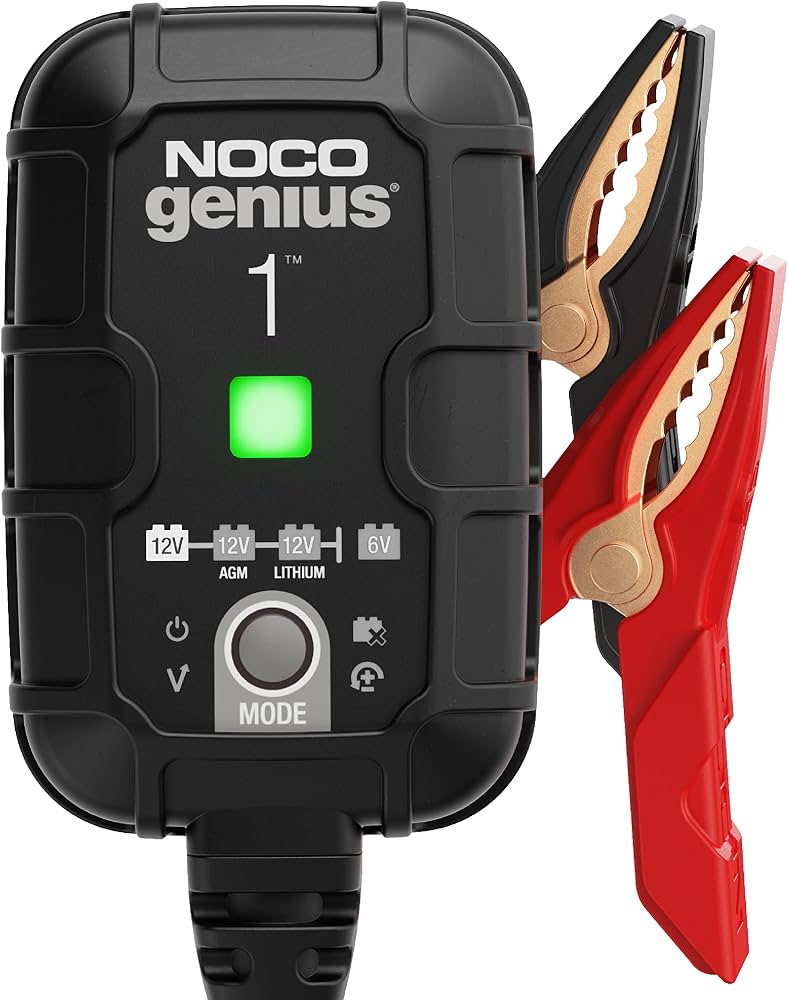
The noco Genius 1 Smart Battery Charger 04092024B is a compact, fully automatic 1-amp charger, maintainer, trickle charger, and battery desulfator designed for everyday battery care. It supports 6V and 12V lead-acid batteries as well as lithium iron phosphate batteries, making it a versatile option for cars, motorcycles, lawn equipment, ATVs, boats, and seasonal vehicles. Its smart charging logic automatically adjusts to battery type and condition, helping extend battery life while reducing the risk of overcharging.
One of the biggest advantages of the NOCO Genius 1 is its user-friendly design. It includes spark-proof connections, reverse polarity protection, temperature compensation, and an IP60-rated enclosure for added durability. The charger also offers multiple charging modes, including standard 12V, 12V AGM, 12V lithium, 6V, and Force Mode for deeply discharged batteries. That makes it especially useful for users who need a reliable battery maintainer for long-term storage or occasional use.
This smart battery charger is ideal for DIY owners, hobbyists, mechanics, RV users, and anyone who needs a safe, low-maintenance charging solution. The estimated price range is typically around $30 to $50 USD, depending on retailer and availability. The noco Genius 1 Smart Battery Charger 04092024B is widely available through automotive retailers, online marketplaces, and NOCO dealers.
Specifications for noco Genius 1 Smart Battery Charger 04092024B
- Input voltage: 100-240VAC or 120-240VAC, 50-60Hz
- Output: 6V / 12V smart charging
- Charging current: 1 amp
- Maximum power: 15W
- Battery capacity: Up to 30Ah for charging; maintains all battery sizes
- Supported battery types: Wet, Gel, MF, SLA, VRLA, AGM, EFB, Calcium, and LiFePO4
- Protection rating: IP60
- Protection features: Spark-proof, reverse polarity protection, overcharge protection
- Operating modes: Standby, 12V, 12V AGM, 12V Lithium, 6V, Force Mode
- Low-voltage detection: 1V
- Temperature range: Designed for broad ambient use with temperature compensation
- Warranty: 3-year limited warranty
Compared with similar entry-level smart maintainers, the NOCO Genius 1 stands out for its lithium compatibility, Force Mode recovery option, and premium safety protections. It is slower than higher-amp models such as 2A or 5A chargers, but it is better suited to maintenance and small-battery charging than fast recovery jobs.
Setup Guide: How to Use the NOCO Genius 1 Smart Battery Charger
Before connecting the charger, verify that the battery voltage matches the selected mode. For 6V batteries, choose the 6V setting. For standard 12V batteries, use 12V mode, and for AGM batteries, choose 12V AGM. For lithium batteries, select 12V Lithium. If the battery is deeply discharged, Force Mode may be required.
- Place the charger in a dry, ventilated area away from fuel, sparks, and moisture.
- Connect the positive clamp to the battery positive terminal.
- Connect the negative clamp to the battery negative terminal or chassis ground.
- Plug the charger into a suitable AC outlet.
- Press the mode button to select the correct battery type.
- Confirm the indicator lights show proper charging status.
If the charger does not begin charging, recheck the battery connections and ensure the battery voltage is above the low-voltage detection threshold. Avoid using the charger on damaged, frozen, or leaking batteries. Never mix up polarity, and always keep the charger away from flammable vapors.
Troubleshooting the NOCO Genius 1 Battery Charger
Most issues with the noco Genius 1 Smart Battery Charger 04092024B are related to incorrect connections, battery condition, or mode selection. If the charger shows no charging activity, confirm that the AC outlet works and the clamps are firmly attached. If the reverse polarity indicator appears, disconnect immediately and reconnect the clamps correctly.
- No lights or no power: Check outlet power, cable condition, and plug seating.
- Battery not charging: Verify correct voltage mode and battery compatibility.
- Flashing error or fault indication: Inspect for reversed clamps, damaged battery, or unstable battery voltage.
- Battery too low to detect: Use Force Mode only if the battery is known to be safe and compatible.
- Charging stops early: The battery may already be fully charged or nearing end of life.
Preventive care includes storing the charger in a dry place, keeping the connectors clean, and matching the correct mode to the battery chemistry. The product is backed by a 3-year limited warranty, and support is available through NOCO customer service at support@no.co or the official NOCO support line for your region.
Pros & Cons of the noco Genius 1 Smart Battery Charger 04092024B
Pros
- Supports 6V, 12V, AGM, and lithium batteries for wide compatibility
- Compact, lightweight, and easy to store in a garage or vehicle kit
- Smart charging helps reduce overcharging and improves battery maintenance
- Force Mode is useful for deeply discharged batteries
- Strong safety features make it beginner-friendly
- Good value for owners of motorcycles, powersports equipment, and seasonal vehicles
Cons
- 1-amp output is slow for larger batteries or fast recovery needs
- Not ideal for heavy-duty automotive shop use where higher amperage is preferred
- Best suited for maintenance and small batteries rather than rapid charging
- Price can be slightly higher than basic chargers with fewer features
Compared with budget alternatives, the NOCO Genius 1 offers better protection, smarter charging logic, and broader battery support. For users who want a dependable maintainer rather than a high-speed charger, it provides strong value for money.
Customer Reviews of the NOCO Genius 1 Smart Battery Charger
Customer feedback for the NOCO Genius 1 is generally positive, with many users giving it around 4.5 out of 5 stars. Buyers often praise its compact size, simple operation, and ability to keep batteries healthy during storage. One common comment is that it works especially well for motorcycles, riding mowers, and backup batteries.
Frequent complaints usually focus on charging speed, since the 1-amp output is not designed for rapid charging. Some users also note that very dead batteries may require careful setup or Force Mode. Overall, it is a strong recommendation for users who want a reliable smart battery charger for maintenance, long-term battery care, and small battery applications.
Frequently Asked Questions
What is the noco Genius 1 Smart Battery Charger 04092024B used for? It is used to charge, maintain, and desulfate 6V and 12V batteries, including lead-acid and LiFePO4 types.
Is it safe for motorcycle batteries? Yes, it is commonly used for motorcycle and powersports batteries because of its low 1-amp output and smart charging controls.
Does it work with lithium batteries? Yes, it supports 12V lithium iron phosphate batteries when the proper mode is selected.
Is it worth buying? Yes, if the goal is safe battery maintenance, long-term storage charging, and compatibility with multiple battery chemistries.
Faqs
How do I set up noco Genius 1 Smart Battery Charger 04092024B for the first time?
Why is my noco Genius 1 Smart Battery Charger 04092024B not charging the battery?
What battery types are compatible with noco Genius 1 Smart Battery Charger 04092024B?
How do I know when noco Genius 1 Smart Battery Charger 04092024B has finished charging?
Can noco Genius 1 Smart Battery Charger 04092024B recover a dead battery?
What is the best way to optimize charging performance with noco Genius 1 Smart Battery Charger 04092024B?
How should I maintain and store noco Genius 1 Smart Battery Charger 04092024B?
What should I check before using noco Genius 1 Smart Battery Charger 04092024B on a motorcycle or small vehicle?
More noco manuals
- Noco Sport GB20 Lithium-ion Battery Jump Starter User Manual
- Noco 1-Amp Battery Charger GENIUS1 User Guide
- Noco BOOST XL Lithium-Ion Jump Starter GB50 User Manual
- Noco Smart Battery Charger GENIUS5 User Guide
- Noco BOOST PLUS Lithium-Ion Jump Starter GB40 User Manual
- How to Use: Noco Jump Starter GeniusS2 User Guide
Leave a Comment