
Numark KMX02 Professional Karaoke Mixing Station User Manual
Content
Numark KMX02 Professional Karaoke Mixing Station Review and Manual
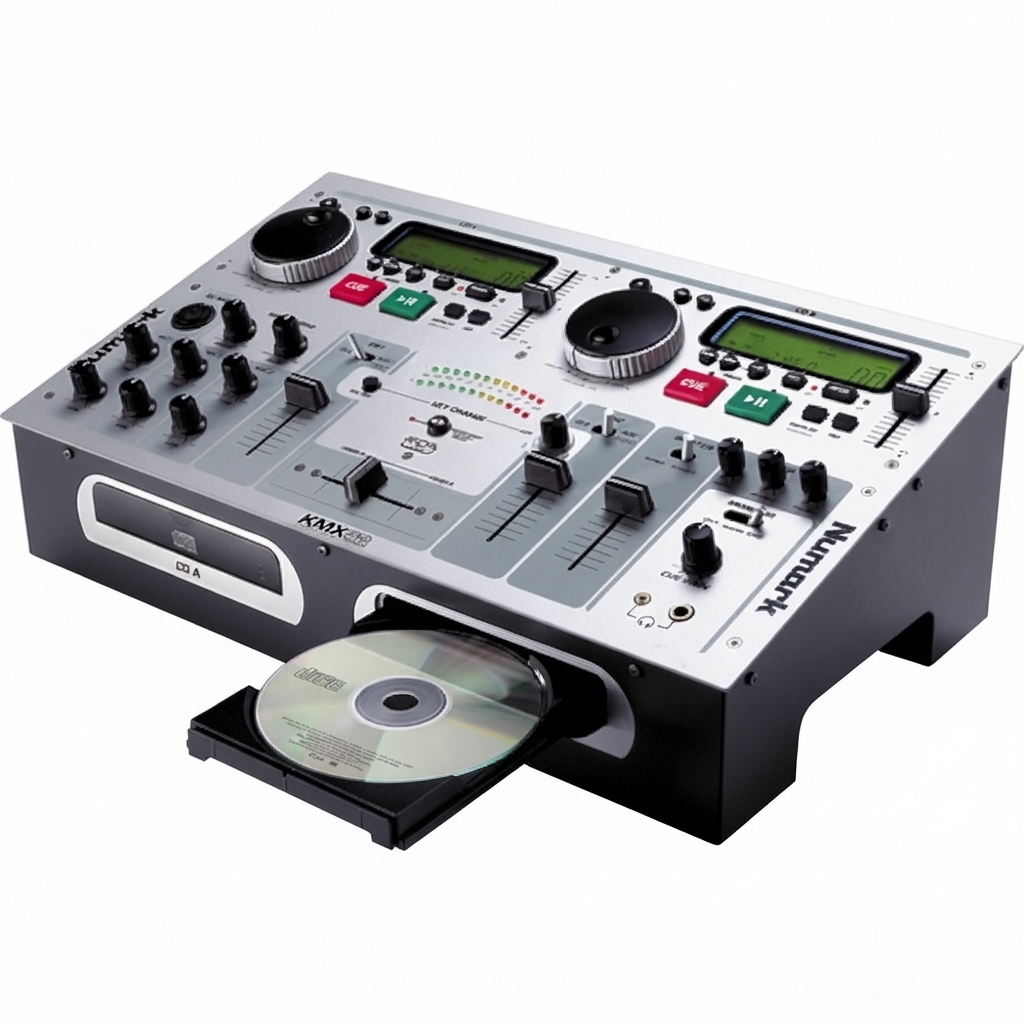
The numark KMX02 Professional Karaoke Mixing Station is an all-in-one karaoke and DJ solution built for users who want a dual-deck CD+G player, mixer, and microphone control in one rugged unit. It combines karaoke playback with traditional DJ-style mixing, making it a practical choice for bars, clubs, mobile entertainers, and home karaoke setups that need a compact, professional-grade system. Its standout features include three microphone inputs, tone and echo controls, composite video outputs for lyric graphics, and pitch control for beat matching and key adjustment.
This model is especially appealing to karaoke hosts and venue operators who want a single machine that can handle both standard audio CDs and karaoke CD+G discs. The key change function is useful for matching songs to different vocal ranges, while the dual-deck design makes it easier to queue tracks and keep performances flowing. The front-loading layout and integrated mixer also reduce setup time compared with separate players and external mixing gear. The numark KMX02 Professional Karaoke Mixing Station is now discontinued, so most buyers will find it on the used or refurbished market rather than new retail shelves.
Estimated pricing typically falls in the $75 to $250 range for used units, depending on condition, accessories, and whether the player has been fully tested. Rare listings or mint-condition units can sell for more, while units sold as-is may be cheaper. Availability is mostly limited to resale platforms, liquidation listings, and specialty used audio sellers.
Specifications for the Numark KMX02 Professional Karaoke Mixing Station
- Model: KMX02A dual front-loading CD player with integrated mixer
- Power: DC 12V, 1.5A to 3.0A depending on documentation version
- Dimensions: 445 mm W x 258 mm D x 156 mm H
- Weight: 5.4 kg
- Media support: Audio CDs and CD+G karaoke discs
- Microphone inputs: 3 mic inputs with tone control
- Video outputs: 2 switch-controlled composite video outputs for lyric graphics
- Pitch control: ±8% and ±16% pitch control for tempo adjustment and beat matching
- Key control: Key Change knob for shifting songs in half-step increments without changing tempo
- Audio performance: Master output greater than +16 dBV at 100 kOhm load; headphones greater than +3 dBV at 32 ohm load
- Channel separation: More than 65 dB at 1 kHz
- EQ response: Low-frequency cut/boost around 70 Hz and standard mixer tone shaping
Compared with simpler karaoke mixers, the numark KMX02 Professional Karaoke Mixing Station offers far more integration because it includes both playback decks and a full mixer in one chassis. Compared with modern all-digital karaoke systems, it is more hardware-focused and built around physical discs, but it remains attractive for users who prefer tactile controls and legacy CD+G libraries.
Pros and Cons of the Numark KMX02 Karaoke Mix Station
Pros
- All-in-one design: Combines dual CD playback and mixing, reducing the need for separate equipment.
- Three mic inputs: Ideal for hosts, duets, and group karaoke sessions.
- Key change and pitch control: Helpful for vocal flexibility and DJ-style transitions.
- CD+G support: Compatible with karaoke discs and lyric graphics on external displays.
- Solid value on the used market: Often priced lower than assembling a comparable multi-component rig.
Cons
- Discontinued product: New units are no longer widely available.
- Older disc-based format: Not ideal for users who rely on USB, Bluetooth, or streaming.
- Mixed build-quality feedback: Some users report wear-related issues because many units are vintage.
- Limited modern connectivity: Fewer contemporary input options than newer karaoke mixers.
For buyers who already own CD+G libraries, the numark KMX02 Professional Karaoke Mixing Station can still be a strong value. For users seeking wireless playback or app-based karaoke, a newer digital alternative may be a better fit.
Customer Reviews and User Feedback
User sentiment for the KMX02 is mixed, with many owners praising the feature set but criticizing reliability on older units. Average review scores commonly land around 1.5 to 3 out of 5 stars depending on the retailer and condition of the unit.
- Praise: “Great concept and excellent feature set for karaoke nights.”
- Praise: “The mic controls and key change function make it easy to host singers with different vocal ranges.”
- Complaint: “Older units can have transport or tray issues after years of use.”
- Complaint: “Build quality varies a lot because most units are used or refurbished.”
- Recommendation: Best for collectors, karaoke hosts, and buyers who need a disc-based all-in-one station rather than a modern streaming setup.
Shoppers should prioritize tested units with working decks, stable microphone inputs, and verified video output. The numark KMX02 Professional Karaoke Mixing Station remains appealing for its karaoke-first design, but condition matters more than brand name when buying today.
Frequently Asked Questions About the Numark KMX02
Is the Numark KMX02 still worth buying?
Yes, if you use CD+G karaoke discs and want an integrated mixer with multiple microphone inputs. It is less suitable for streaming-first users.
Does it work with modern TVs?
It uses composite video outputs, so many modern TVs may need an adapter or converter.
Who is it best for?
It is best for karaoke hosts, small venues, and home users who want a dedicated disc-based karaoke station with manual control.
Faqs
How do I set up the numark KMX02 Professional Karaoke Mixing Station for the first time?
What should I do if the numark KMX02 Professional Karaoke Mixing Station has no sound output?
Which devices are compatible with the numark KMX02 Professional Karaoke Mixing Station?
How can I reduce microphone feedback on the numark KMX02 Professional Karaoke Mixing Station?
What are the most useful features of the numark KMX02 Professional Karaoke Mixing Station for home karaoke?
How do I get the best sound quality from the numark KMX02 Professional Karaoke Mixing Station?
Why is the numark KMX02 Professional Karaoke Mixing Station producing distorted or crackling audio?
How should I clean and maintain the numark KMX02 Professional Karaoke Mixing Station?
More numark manuals
Leave a Comment