
Numark Ttx Premium Usb Turntable User Manual
Content
Numark TTX Premium USB Turntable Review and Owner’s Manual Guide
Introduction
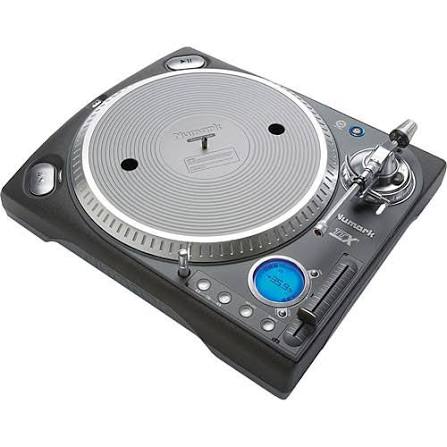
The Numark TTX Premium USB Turntable is a professional direct-drive DJ deck designed for performance, scratching, vinyl playback, and digital archiving. Built around a high-torque 16-pole, 3-phase motor, it delivers fast start-up, stable speed control, and the kind of responsive feel that DJs expect for club use, battle mixing, and turntablism. Its standout feature is the integrated USB output, which lets you transfer vinyl records to a computer without needing a separate audio interface, making it a practical choice for collectors and content creators who want to preserve their record libraries in digital form.
This model also stands out for its interchangeable straight and S-shaped tonearm options, adjustable torque settings, variable pitch control up to ±50%, and quartz-locked stability. Those features make the Numark TTX Premium USB Turntable especially appealing to scratch DJs, mobile performers, studio users, and vinyl enthusiasts who want precision and customization. The unit supports 33, 45, and 78 RPM playback, expanding its usefulness for both modern records and older shellac releases. Typical market pricing varies widely because the model is discontinued, but used and refurbished units often appear in the approximate $200 to $500 range depending on condition, accessories, and seller reputation. Availability is mainly through resale marketplaces, second-hand audio dealers, and occasional remaining stock from specialty retailers. For users searching for a rugged, feature-rich USB turntable with professional DJ controls, the Numark TTX Premium USB Turntable remains a compelling option.
Specifications for Numark TTX Premium USB Turntable
- Drive system: Direct drive, 16-pole, 3-phase motor for fast response and high torque.
- Speed options: 33.33, 45, and 78 RPM for standard vinyl and archival playback.
- Start time: Approximately 0.2 seconds from 0 to 33.33 RPM.
- Platter: Dampened aluminum die-cast low-friction design for smooth rotation.
- Pitch range: ±8%, ±10%, ±20%, and ±50% for performance mixing and beat matching.
- Torque settings: Adjustable low, medium, and high torque levels for different DJ styles.
- Brake system: 9-step electronic servo brake for controlled stop behavior.
- Wow and flutter: Less than 0.15% WRMS for stable playback.
- Rumble: -58 dB unweighted, -79 dB weighted for reduced noise.
- Outputs: Stereo RCA phono/line output and USB 1.1 digital audio output.
- Tonearm: Interchangeable straight and S-shaped arm compatibility.
- Dimensions: 370 x 460 x 135 mm; weight: 12.6 kg.
- Power use: 65 watts.
- Comparison: Compared with lighter USB turntables, the Numark TTX Premium USB Turntable offers stronger torque, broader pitch control, and more DJ-focused customization, while some newer models may offer easier plug-and-play software support.
Troubleshooting the Numark TTX Premium USB Turntable
If the platter will not spin, check the power cable, outlet, and rear power switch first. If the turntable powers on but audio is weak or distorted, confirm whether the output selector is set correctly for phono or line mode. A common USB capture issue is a computer not recognizing the deck; in that case, reconnect the USB cable, test a different port, and verify the audio input settings in your recording software. If speed drifts or pitching sounds unstable, clean the pitch fader and reset the pitch control to center so quartz lock can engage properly.
Although the unit does not commonly display modern numeric error codes, users may encounter functional symptoms such as no USB input, unstable torque, or inconsistent start behavior. Preventive care includes keeping the tonearm balanced, using a clean slipmat, avoiding dust buildup around controls, and storing the deck in a dry environment. For support, check the seller’s warranty terms if the unit is used or refurbished, since manufacturer coverage may no longer be standard for older stock. If assistance is needed, contact the retailer, authorized audio service center, or Numark support through the official Numark website support channel. Always have the serial number, purchase details, and a clear description of the fault ready when requesting help.
Pros and Cons of the Numark TTX Premium USB Turntable
Pros
- High-torque direct drive makes it excellent for scratching, cueing, and rapid starts.
- USB recording is ideal for digitizing vinyl without extra hardware.
- Wide pitch range supports creative performance techniques.
- Interchangeable tonearm options add flexibility for different DJ workflows.
- Robust build quality and 12.6 kg weight help reduce vibration during play.
- Strong value on the used market for DJs who want pro-level control at a lower price.
Cons
- Discontinued status means availability is limited to second-hand or remaining stock.
- USB 1.1 is older technology and slower than modern interfaces for some workflows.
- It can be heavier and less convenient to move than newer entry-level USB turntables.
- Replacement parts may be harder to source compared with current models.
- Compared with newer alternatives, software bundling and digital integration may feel dated.
For DJs who prioritize torque, pitch control, and customization, the Numark TTX Premium USB Turntable offers excellent performance. For users who mainly want simple home listening, a newer consumer USB turntable may be easier to own and maintain.
Customer Reviews and Real-World Feedback
User feedback for the Numark TTX Premium USB Turntable is generally positive, with many owners praising its strong motor, quick startup, and solid performance for scratching. Common ratings cluster around 4 to 4.5 stars from DJ-focused users who value durability and control. One frequent comment is that the deck feels “built for serious mixing,” while another common compliment is the adjustable torque, which makes it adaptable for different performance styles. Vinyl archivists also appreciate the USB output for easy record transfer.
Common complaints include the age of the USB standard, occasional motor or pitch-fader wear on older units, and the challenge of finding clean replacement parts. Some buyers recommend it highly only if the unit has been well maintained or recently serviced. For anyone shopping for a professional USB turntable with strong performance and a vintage DJ legacy, this model remains a smart buy when the price is right.
Faqs
How do I set up the numark Ttx Premium Usb Turntable for the first time?
Why is the numark Ttx Premium Usb Turntable not spinning when I press start?
How do I connect the numark Ttx Premium Usb Turntable to a computer for USB recording?
What should I do if the numark Ttx Premium Usb Turntable is producing humming or buzzing noise?
Is the numark Ttx Premium Usb Turntable compatible with DJ mixers, powered speakers, and recording software?
How can I optimize scratch performance on the numark Ttx Premium Usb Turntable?
What are the most common numark Ttx Premium Usb Turntable setup mistakes to avoid?
How should I clean and maintain the numark Ttx Premium Usb Turntable for long-term use?
Tags
More numark manuals
Leave a Comment