
Setup & Pairing: Occiam C16 Earbuds User Manual
Content
Occiam C16 Earbuds
Introduction
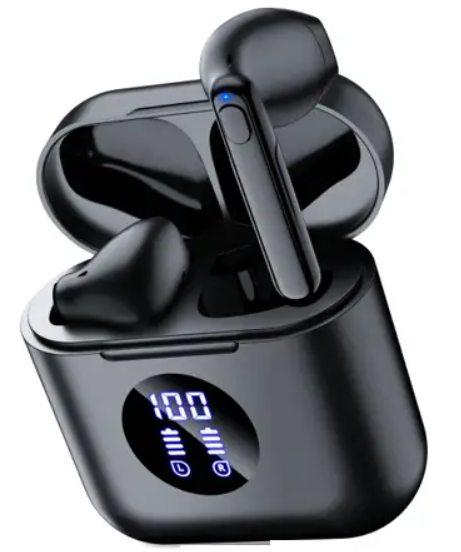
The occiam C16 Earbuds offer an exceptional blend of high-fidelity sound quality, ergonomic design, and cutting-edge wireless technology, crafted for music enthusiasts and active users alike. Equipped with Bluetooth 5.3, these earbuds provide seamless connectivity and a stable wireless range of up to 10 meters, ensuring freedom of movement without compromising audio performance. Their IPX7 waterproof rating makes them ideal for workouts, outdoor activities, and everyday use, tolerating sweat and rain with ease.
Designed with 13mm drivers, the occiam C16 delivers powerful stereo sound featuring crisp mid-tones and clear treble, enhancing the listening experience across genres. The lightweight earbuds weigh approximately 3.5 grams each, promoting extended comfort during prolonged wear. With intuitive touch controls, users can effortlessly manage calls, music playback, and voice assistants, making these earbuds suitable for busy professionals, fitness enthusiasts, and casual listeners.
Priced competitively at around $39.99, the occiam C16 provides excellent value, combining advanced features like wireless charging and a robust 500mAh charging case that supports up to 64 hours of total playback. Widely available through major online retailers, they offer a budget-friendly yet feature-rich alternative to premium wireless earbuds.
Specifications
Charging Case
- Batter Capacity: 500mAh
- Type-C Cable Charging: approx 2H
- Weight: approx 47g
- Size: 56.2 50 25.9mm
- Wireless Charging: Support
Earbud (each)
- Model Name: C16
- Protocol: HSP/HFP/A2DP/AVRCP
- Transmission Distance: 10m/33ft (If the are no obstructions, the range could be as far as 33 feet.)
- Earbud Battery: 3.7V 40mAh
- Earbud Charging Time: approx 1.5H
- Earbud Weight: approx 3.5g/PC
Compared to similar earbuds in the $30-$50 range, the occiam C16 stands out for its IPX7 waterproofing and extended battery life, providing a balance of durability and long usage time suitable for daily commuters and fitness users.
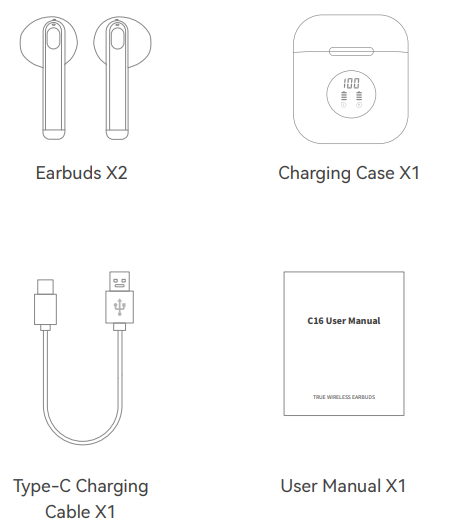
Packing List
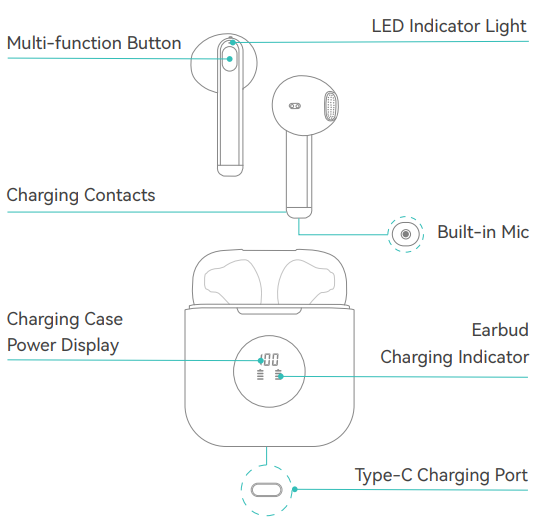
Product Overview
Bluetooth Connection
Step 1
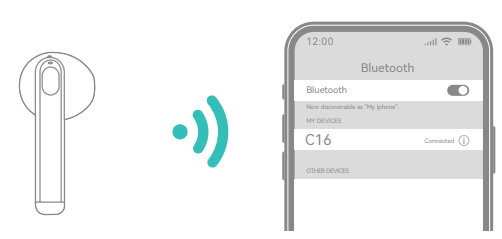
Open the lid of the charging casand e, two earbuds will automatically power on and enter pairing mode.
Step 2
Activate Bluetooth setting on your phone, search "C16", then click to connect.
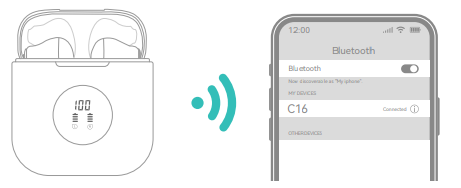
After the first connection, the earbuds will automatically connect to your phone when you open the charging case.
Single Mode
- When on dual mode, put one earbud into the charging case.
- Only take one earbud out of the charging case and connect it.
Pair with Other Device
- C16 Wireless Earbuds have a memory function, which usually auto-connects with the last paired device.
- Thus, if you want to pair them with another device, you should disconnect "C16" from the last paired device, AND forget the pairing record on the last device.
- Then try to connect it to a new device, and it should work properly.
Factory Restore Setting
When should I reset?
- When only one side plays music.
- When you can't use both two earbuds together.
- When both earbuds fail to pair with each other or experience connection-related issues.
How to reset?
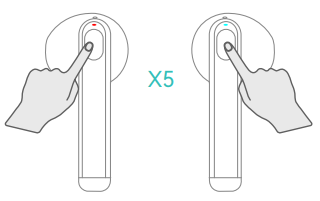
- In the connected state﹙the earbuds are not in the charging case), press 5 times on both earbuds simultaneously.
- The LED indicators of the twin earbuds flash red and blue light 5 times quickly, meanwhile,, you’ll hear a voice prompt“di” “power off”.(That means the reset was successful, and the pairing record with the last paired device was cleared.)
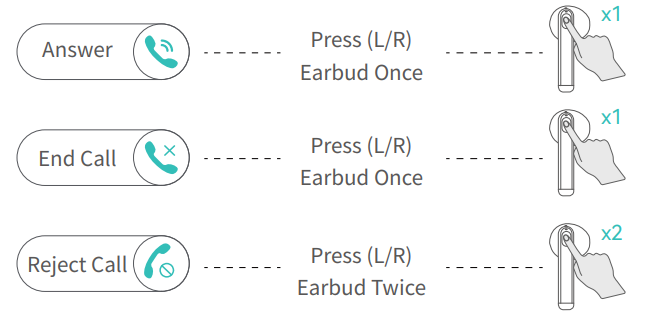
Incoming Call
Voice Assistance

Music Mode
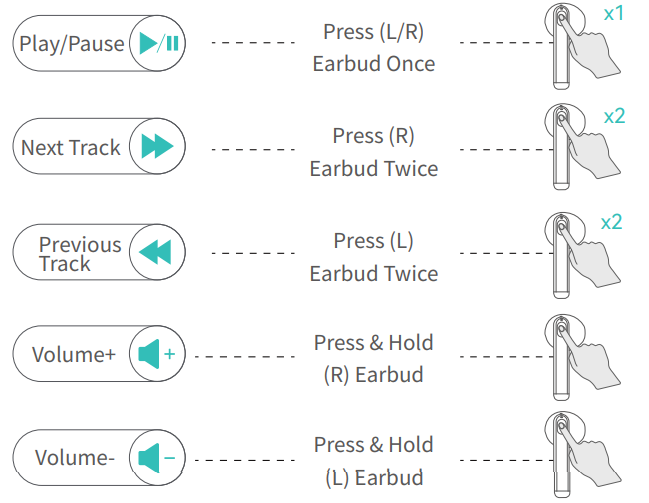
Note: when the minimum or maximum volume is reached, you hear the voice prompt “di ”.
Charging Case
Battery Indicator of Charging Case
The display will light up to show the remaining power of the charging case when you open the lid, then go off after 10 seconds. The number will flash when being charged, and will be "100" when fully charged, and will stay on until the power supply is cut off.
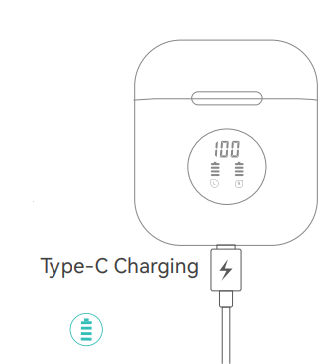
Battery Indicator of Earbuds
Put the earbuds back into the case to chthemrbuds. The earbud charging Indicator on the case will flash from 1st grid to 4th grid repeatedly when charging, and will turn off after fully charging.
Features with NTC temperature control protection, C16 earbuds will not charge if the temperature reaches 45 degrees or higher. (Charging case will automatically protect itself in that case.) It is recommended to stop charging (or disconnect wireless charging) first, and recharge after the temperature drops below 45 degrees.
Troubleshooting Guide for occiam C16 Earbuds
- Problem: Earbuds not charging
Solution: Ensure the temperature is below 45°C,, as NTC temperature control protection prevents charging above this limit. Clean charging contacts and reset earbuds by placing them back in the case properly[7]. - Problem: Connectivity issues or audio dropouts
Solution: Re-pair the earbuds by forgetting the device in Bluetooth settings and reconnecting. Keep devices within 10 meters with minimal obstructions. - Problem: One earbud is not working
Solution: Check battery levels and charge case connections. Reset the earbuds and pair them again. - Error Codes: No specific error codes reported; indicator lights assist in diagnosing battery and pairing status.
- Preventive Measures: Avoid exposure to extreme heat, keep earbuds and case clean, and use the provided Type-C cable for charging.
Warranty and customer support are typically available through the retailer or official Occiam channels. For technical assistance, users can contact Occiam support via their website or authorized distributors.
Pros & Cons of Occiam C16 Earbuds
- Pros:
- High-quality 13mm drivers deliver clear, immersive stereo sound
- IPX7 waterproof rating is ideal for active lifestyles
- Long battery life with 8 hours of playtime plus 64 hours with the charging case
- Wireless charging capability adds convenience
- Lightweight and comfortable for extended wear
- Stable Bluetooth 5.3 connection with a solid range
- Cons:
- No active noise cancellation (ANC), ambient noise may be noticeable
- Touch controls can sometimes be overly sensitive or unresponsive
- The microphone quality is adequate but not studio-grade for calls
- Limited color options compared to competitors
Overall, the Occiam C16 earbuds offer excellent value for money, especially for users prioritizing battery life and water resistance. Alternatives with ANC and higher-end audio may cost significantly more.
Customer Reviews and Feedback on occiam C16 Earbuds
Users consistently praise the Occiam C16 Earbuds for their impressive sound quality and comfort at an affordable price point. Many highlight the earbuds’ ability to maintain a stable Bluetooth 5.3 connection and appreciate the waterproof design during workouts and outdoor use. Typical star ratings average around 4 out of 5, reflecting general satisfaction.
Common complaints include occasional touch control sensitivity issues and the absence of noise cancellation, which some users find limiting in noisy environments. Microphone quality receives mixed feedback, with some users noting it is sufficient for casual calls but not for professional use. Despite these minor drawbacks, recommendations to purchase are frequent, especially for those seeking durable, budget-friendly wireless earbuds with long battery life.
Faqs
How do I pair occiam C16 Earbuds with my smartphone for the first time?
Why won’t my occiam C16 Earbuds charge in the case?
How do I check the battery level of occiam C16 Earbuds and the charging case?
Are occiam C16 Earbuds compatible with iPhones and Android devices?
How do I clean and maintain occiam C16 Earbuds for optimal performance?
Can I use just one occiam C16 Earbud at a time for calls or music?
How do I reset occiam C16 Earbuds if they aren’t connecting or working properly?
What should I do if the sound quality of occiam C16 Earbuds is muffled or distorted?
Tags
More occiam manuals
Leave a Comment