
Setup & Pairing: Occiam C16 True Wireless Stereo Earphones User Manual
Content
Occiam C16 True Wireless Stereo Earphones
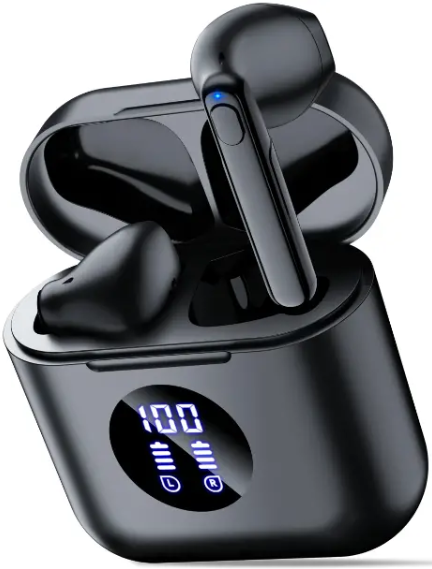
Introduction
The occiam C16 True Wireless Stereo Earphones offer a compelling blend of advanced technology and user-friendly design, delivering high-fidelity sound with the freedom of wireless connectivity. These earbuds are equipped with Bluetooth 5.3, ensuring stable and efficient wireless transmission up to 10 meters, making them ideal for active users, commuters, and casual listeners alike. Their IPX7 waterproof rating means they can withstand sweat and rain, making them perfect companions for workouts, outdoor adventures, or daily use.
Designed with a sleek, ergonomic form factor and lightweight construction (about 3.5g per earbud), the C16 earphones provide all-day comfort and secure fit. Users benefit from touch controls for managing calls, music playback, and voice assistant activation without reaching for their devices. The charging case supports both Type-C wired charging and wireless charging, with a battery capacity of 500mAh, delivering up to 48 hours of combined playback time.
Priced competitively at around $39.99, the occiam C16 True Wireless Stereo Earphones are readily available via major online retailers, including Amazon. They cater to tech-savvy listeners looking for affordable yet premium wireless earbuds with robust features such as temperature control protection, LED battery indicators, and rich bass sound quality. Whether for work calls, music sessions, or fitness routines, the C16 offers versatile performance at an attractive price point.
Specifications of occiam C16 True Wireless Stereo Earphones
- Bluetooth Version: 5.3 with HSP/HFP/A2DP/AVRCP protocols for seamless audio and call quality
- Battery Life: Earbuds provide up to 8 hours of continuous playtime; charging case extends total playback to approximately 48 hours
- Charging Case Capacity: 500mAh with Type-C fast charging (~2 hours) and wireless charging support..
- Earbud Battery: 3.7V 40mAh each; charging time approximately 1 to 1.5 hours
- Water Resistance: IPX7 rating, suitable for sweat and water exposure
- Range: Up to 10 meters (33 feet) effective wireless transmission
- Weight: Earbuds approx. 3.5g each; charging case approx. 47g
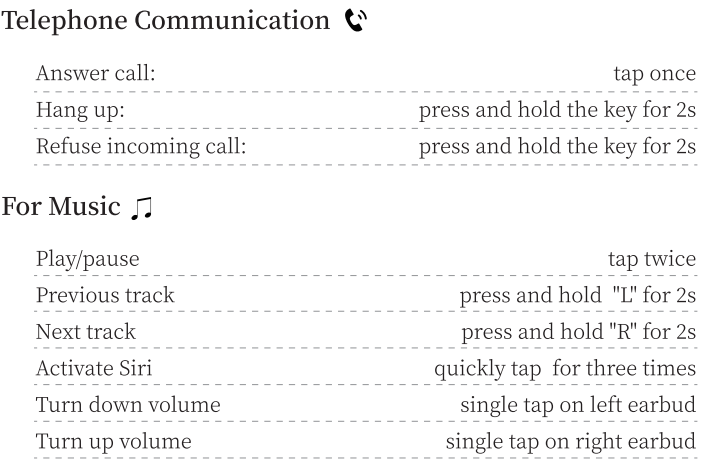
- Controls: Touch control for play/pause, call management, track switching, volume adjustment, and voice assistant activation
- Additional Features: NTC temperature control protection prevents charging above 45°C, LED battery indicators on the n charging case and earbuds
Compared to similar wireless earbuds in the sub-$50 range, the C16 stands out with its IPX7 waterproofing and wireless charging capability, features often found in higher-priced models, providing excellent value for money.
Table of Product Contents
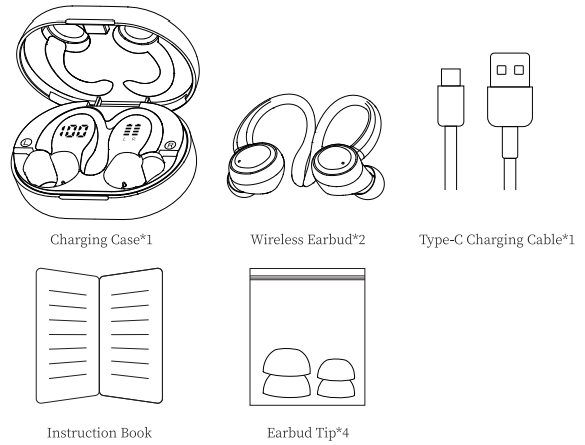
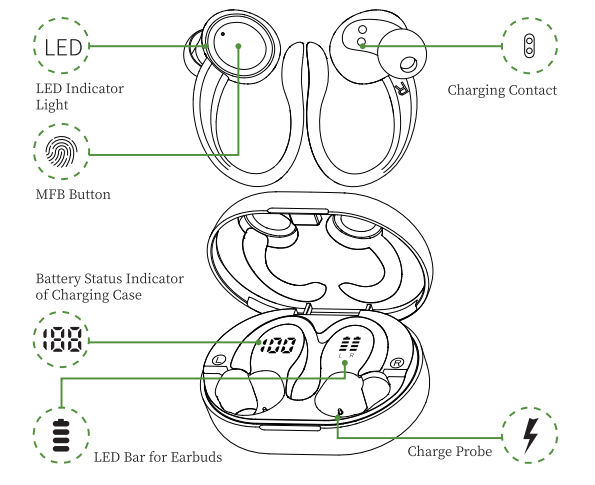
Fetures
How do I pair two headphones with my phone?
Please make sure both the earbuds and the charging case are fully charged before first use.
- Step1
- Take both earbuds out of the charging case an, and both earbuds will power on and start pairing automatically
- (If the earbuds are not connected to your device for more than 5 minutes, the earbuds will automatically turn off .
- Press the MFB button for about 3 seconds to manually turn on the earbuds when prompted "Power on".)
- The indicator light of one earbud will flash red and green alternately, and the indicator light of the other earbud will slowly flash green when paired successfully.
- Step2
- Enable the Bluetooth pairing mode on your phone device, search and select "Cl6" to connect.
- (You should hear a voice prompt "Connected" when wearing earbuds.)
If the indicator light of ear earbud is off, it means the phone is connected
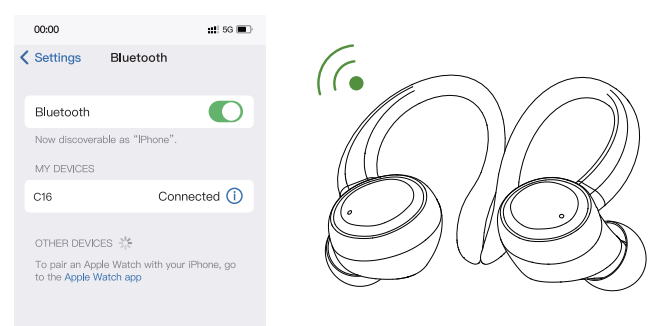
Automatic connection
By default, the earhuds will connect to the last paired phone automatically when powered on.
Prompt
- If you have any problem pairing the two earbuds with your phone, put the earbuds back in the charging case and repeat the above steps.
- These earbuds can be used not only together, but also individually
If you want to use a single e earbud, just take one earbud out of the case and connect it to your phone. When using two earbuds, manually turn off one earbud or put one back in the charging case, and you'll be able to use the other one earbud alone.
Functions
Charging
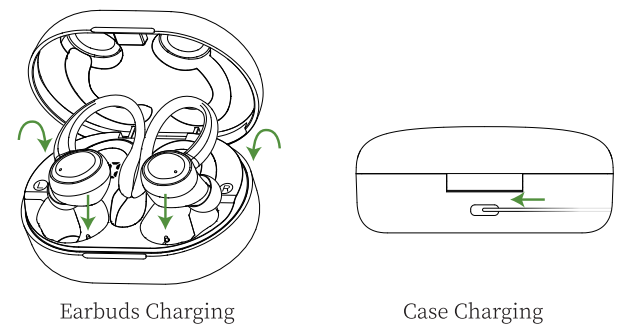
Earbuds Charging
- The earbuds will only be charged when you place them in the charging slots correctly.
- (You can charge the charging case and the earbuds at the same time, or you can charge the charging case first and then the earbuds.)
- When the earbuds are charging in the charging case, the digital display bar of the case will keep blinking and turn off when the earphones are fully charged.
- The indicator light will show red while charging.
- The charging case will stop charging automatically, and the indicator light on the eearbuds will go out when fully charged.
Case Charging
- There is a Type-C USB charging cable in the package. Please use it to charge the case directly. During charging, the digital display will flash and display the battery level in real time. When fully charged, the number shows 100.
Charging Alerts
- After using it for a long period of time, due to the oxidation of the magnet connector, the earbuds might not be charged or even turned on.
- You can fix this problem by cleaning the magnet connectors on the earbuds and charging case with an alcohol wipe
- Put the earbuds in the charging case, and he earbuds will turn off immediately,, and the charging case will start to charge automatically.
- The earbuds will connect to the last paired phone automatically.
Storage and Maintenance
- If the earbuds have not been used for more than 3 months, we recommend that you charge them.
- Please use a charger approved by the CC (Federal Communications Commission).
- Children aged 12 and under require adult supervision.
- Do not expose the earbuds to high or low temperatures, and do not use the earbuds during a thunderstorm.
- Avoid free fall or violent shock to the device. Keep the device away from sources of fire and do not place the device in water.
Troubleshooting Occiam C16 True Wireless Stereo Earphones
- Problem: Earbuds not charging.
Solution: Check if the earbuds or case temperature exceeds 45°C; wait for cooling before charging again due to built-in NTC temperature control protection. - Problem: One earbud is not connecting or playing audio.
Solution: Reset earbuds by placing them back in the case, ensuring both are properly seated; re-pair with your device if needed. - Problem: Poor Bluetooth connection or audio dropouts.
Solution: Keep devices within 10 meters without obstacles; avoid interference from other wireless devices. - Error Codes: No specific error codes; LED indicators flash to signal battery status or charging issues.
- Preventive Measures: Avoid exposing earbuds to extreme heat or moisture beyond the IPX7 rating; charge with recommended cables and chargers only.
- Warranty & Support: Typically includes a limited warranty; contact Occiam customer service or retailer for assistance via the official website or purchase platform.
Activation & Warranty
No reason to return or exchange within 30 days, and provide after-sales service within 180 days. Please activate via email below within 15 days. cassandraphil160@ginail.com
Pros & Cons of occiam C16 True Wireless Stereo Earphones
Pros
- Excellent Battery Life: Up to 8 hours per charge, with 48 hours total using the charging case.
- Waterproof Design: IPX7 rating suitable for intense workouts and outdoor use.
- Wireless & Type-C Charging: Flexible charging options, including wireless charging support.
- Affordable Price: Priced around $39.99, offering features commonly seen in higher-end models.
- Stable Bluetooth 5.3: Ensures reliable connectivity and andlow-latencyy audio.
Cons
- Volume Limits: Volume control has audible prompts at minimum and maximum, which some users find intrusive.
- Fit Sensitivi ty: The Lightweight design may not fit securely for all ear shapes.
- Limited Advanced Features: Does not include active noise cancellation or customizable EQ settings.
Customer Reviews of occiam C16 True Wireless Stereo Earphones
Users praise the occiam C16 True Wireless Stereo Earphones for their clear sound quality and impressive battery life, often highlighting the convenience of wireless charging and waterproof build. Many reviewers rate these earbuds 4 to 4.5 stars out of 5, noting excellent value for the price.
Common compliments include a comfortable fit during workouts and responsive touch controls. Some customers mention occasional connectivity issues or the need for better volume control finesse. Overall, buyers recommend the C16 for budget-conscious consumers seeking reliable, feature-rich wireless earbuds for daily use.
Faqs
How do I set up occiam C16 True Wireless Stereo Earphones for the first time?
Why won’t my occiam C16 True Wireless Stereo Earphones connect to my phone?
Can I use occiam C16 True Wireless Stereo Earphones with non-Bluetooth devices?
How do I control music and calls with occiam C16 True Wireless Stereo Earphones?
What does the battery indicator on the occiam C16 charging case mean?
How do I clean and maintain occiam C16 True Wireless Stereo Earphones?
Why do my occiam C16 True Wireless Stereo Earphones stop charging?
How long does the battery last on occiam C16 True Wireless Stereo Earphones?
More occiam manuals
Leave a Comment