
Philips NeoPix-550 Smart Home Projector User Manual
Content
Philips NeoPix-550 Smart Home Projector: Complete Product Manual and Review
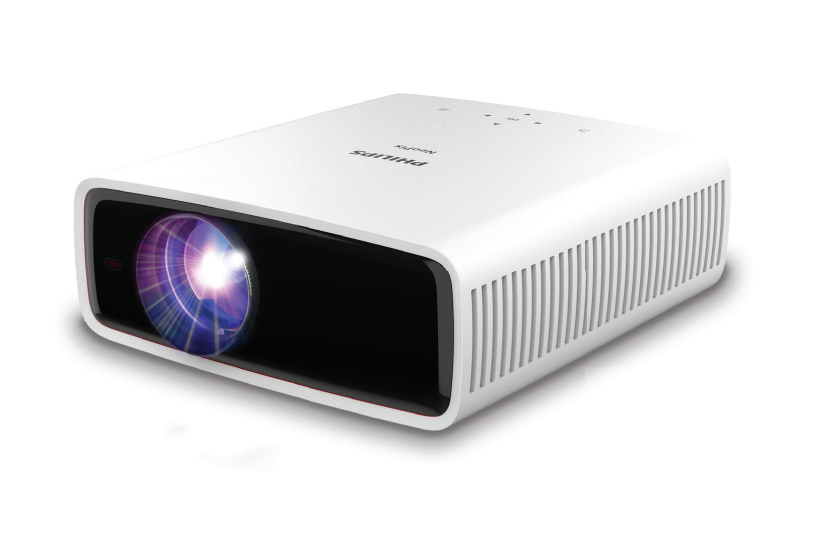
The Philips NeoPix-550 Smart Home Projector is a Full HD home entertainment projector built for users who want a simple, flexible big-screen setup without moving to a bulky TV. It delivers 1920 x 1080 resolution, 500 ANSI lumens of brightness, a 3000:1 contrast ratio, and a screen size of up to 100 inches, making it a practical choice for movie nights, streaming, casual gaming, and presentations in dim rooms. With LED light source longevity rated at over 30,000 hours, it is designed for long-term use and low maintenance.
This smart home projector is especially appealing to apartment owners, families, and first-time projector buyers who want easy connectivity and modern convenience. The Philips NeoPix-550 Smart Home Projector supports dual-band Wi-Fi, Bluetooth 4.2, HDMI, USB-A, USB-C, and a 3.5 mm audio output, giving users multiple ways to connect streaming devices, laptops, game consoles, and external speakers. It also includes manual focus, digital keystone correction, four-corner correction, and digital zoom to help fine-tune the image in different room setups.
For searchers comparing home cinema projectors, the Philips NeoPix-550 Smart Home Projector sits in the mid-range value category. Estimated pricing typically falls in the roughly $500 to $800 range depending on retailer, region, and bundle options, with availability varying across online electronics stores and Philips reseller channels. It is best suited for bedrooms, living rooms, and casual media spaces where convenience matters more than ultra-high brightness.
Pros and Cons of the Philips NeoPix-550 Smart Home Projector
Pros
- Full HD image quality: Native 1080p resolution makes movies, sports, and streaming content look sharp on screens up to 100 inches.
- Good connectivity: HDMI, USB-A, USB-C, Wi-Fi, and Bluetooth make it easy to connect almost any modern device.
- Long LED lifespan: The LED light source is rated for over 30,000 hours, which reduces replacement costs.
- Flexible setup tools: Manual focus, digital keystone, and four-corner correction help improve alignment in real rooms.
- Built-in audio: Dual 7W speakers are useful for casual viewing without requiring external sound immediately.
- Solid value for money: It offers a balanced feature set for buyers who want a smart home projector without paying premium cinema-model prices.
Cons
- Brightness is limited: 500 ANSI lumens is best for dark or lightly lit rooms, not bright daytime viewing.
- Not a premium theater projector: Users seeking deeper blacks, higher brightness, or larger-than-100-inch screens may prefer stronger alternatives.
- Manual focus only: Setup takes a little more effort than fully automatic models.
- Integrated speakers are decent, not exceptional: Many users will still want a soundbar or external speaker for a fuller home cinema experience.
- Better alternatives exist for bright rooms: Comparable projectors from other brands may offer higher lumen ratings or more advanced smart features at a similar price.
Overall, the Philips NeoPix-550 Smart Home Projector is a strong buy for users prioritizing convenience, portability, and image clarity in darker spaces, but not for those who need high-brightness performance in all lighting conditions.
Customer Reviews for Philips NeoPix-550 Smart Home Projector
Customer feedback for the Philips NeoPix-550 Smart Home Projector is generally positive, with many users giving it around 4 out of 5 stars for ease of use, image sharpness, and room-to-room flexibility. Buyers often praise the crisp Full HD picture, simple setup options, and useful wireless connectivity for streaming content from laptops and phones.
Common complaints mention that brightness is average for the price and that the built-in speakers are acceptable but not powerful enough for a true cinema feel. Some users also note that the best results come from a darkened room and a properly sized screen. A typical testimonial theme is: “Great picture in the evening and easy to connect, but I added external speakers for better sound.”
For most shoppers, this projector is recommended if the goal is an affordable smart home projector for movies, series, and casual gaming. If the main priority is bright-room performance or premium audio, it may be better to compare it with higher-lumen home theater projectors before buying.
Philips NeoPix-550 Smart Home Projector: Key Specifications at a Glance
- Resolution: 1920 x 1080 Full HD
- Brightness: 500 ANSI lumens
- Contrast ratio: 3000:1
- Maximum screen size: up to 100 inches
- Throw ratio: 1.43:1
- Light source: LED with 30,000+ hour lifespan
- Connectivity: HDMI, USB-A, USB-C, Wi-Fi, Bluetooth, 3.5 mm audio out
- Speakers: 2 x 7W integrated speakers
- Image adjustment: manual focus, digital keystone, four-corner correction, digital zoom
Who Should Buy the Philips NeoPix-550 Smart Home Projector?
The Philips NeoPix-550 Smart Home Projector is ideal for users who want a practical home entertainment projector with reliable everyday performance. It is a smart choice for streaming fans, families, and casual gamers who mainly watch in dark or controlled lighting. It is also a good option for anyone looking for a projector with modern ports, wireless support, and easy setup tools in a compact home-friendly design.
If you want a portable projector for movie nights, a secondary media display, or an affordable entry into home cinema, this model offers a strong mix of convenience and image quality. If your space is bright or you want a more advanced theater setup, consider a higher-brightness alternative instead.
Faqs
How do I set up philips NeoPix-550 Smart Home Projector for the first time?
Why is my philips NeoPix-550 Smart Home Projector image blurry or not focused correctly?
What devices are compatible with philips NeoPix-550 Smart Home Projector?
How can I improve Wi‑Fi streaming performance on philips NeoPix-550 Smart Home Projector?
What should I do if philips NeoPix-550 Smart Home Projector has no sound or low volume?
How do I optimize picture quality on philips NeoPix-550 Smart Home Projector in a bright room?
What maintenance does philips NeoPix-550 Smart Home Projector need to keep it working well?
How do I fix overheating or sudden shutdowns on philips NeoPix-550 Smart Home Projector?
More philips manuals
Leave a Comment