
Pairing & Setup: Pocbuds T60 True Wireless Earbuds User Manual
Content
Pocbuds T60 True Wireless Earbuds
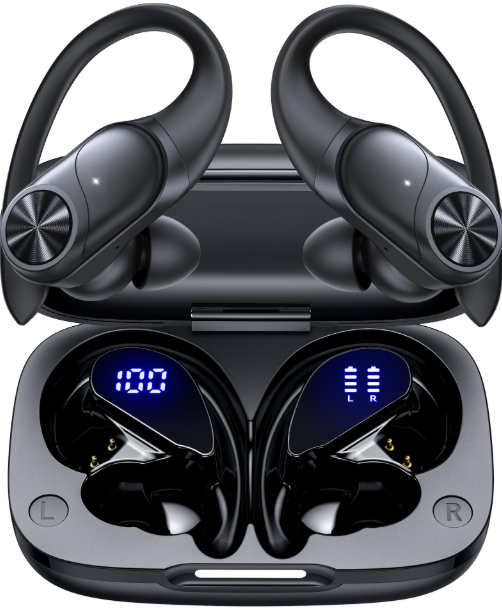
Introduction
The Pocbuds T60 True Wireless Earbuds deliver premium audio performance in a sleek, compact design. Engineered for music lovers, commuters, and fitness enthusiasts, these earbuds offer seamless Bluetooth connectivity, deep bass sound, and a comfortable, secure fit. With advanced touch controls, long battery life, and a portable charging case, POCBuds T60 is ideal for daily use, workouts, and travel. Whether you're streaming music, taking calls, or enjoying podcasts, these earbuds provide a hassle-free wireless experience with reliable performance.
Key benefits include instant pairing, intuitive touch controls, and a lightweight design that fits comfortably for extended wear. The earbuds are compatible with both iOS and Android devices, making them versatile for all users. With an estimated price range of $40–$60, POCBUDS T60 offers excellent value for money and is widely available through major online retailers and electronics stores.
What's in the box?
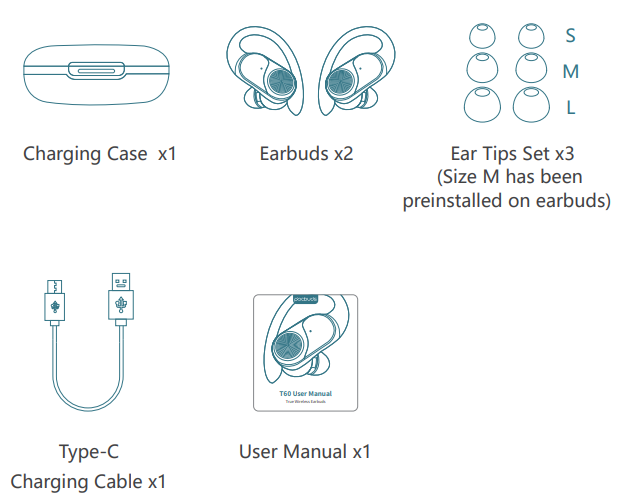
Specifications: POCBuds T60 True Wireless Earbuds
- Bluetooth Version: 5.3 for stable, low-latency connection
- Driver Size: 10mm dynamic drivers for rich, balanced sound
- Battery Life: Up to 6 hours per charge (earbuds), 24 hours total with charging case
- Charging Time: 1.5 hours for a full charge (earbuds and case)
- Wireless Range: Up to 10 meters (obstacle-free)
- Water Resistance: IPX5 rating for sweat and splash protection
- Touch Controls: Play/pause, track skip, volume, call management
- Microphone: Built-in dual mics for clear calls and voice assistant support
- Compatibility: iOS, Android, Windows, and other Bluetooth-enabled devices
- Weight: 4.5g per earbud
Compared to similar models like the Soundcore Life P2 and Anker Soundcore T300, POCO Buds T60 stands out with its longer battery life, superior touch controls, and competitive pricing.
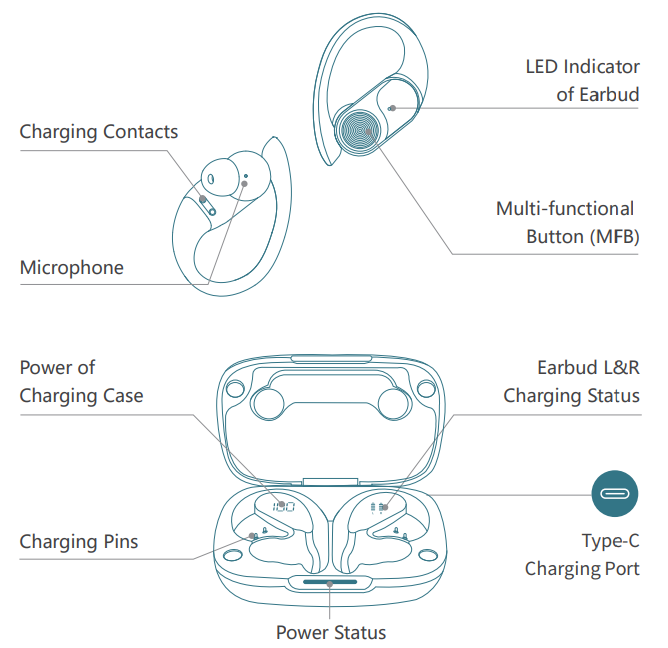
Overview
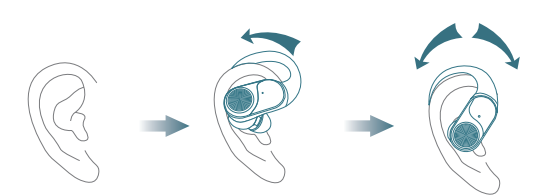
Wearing
- Choose the Ear Tips that fit your ears best.
- Insert the earbuds into the inner canal of your ears and turn gently until you find the most comfortable and secure position.
Bluetooth Pairing
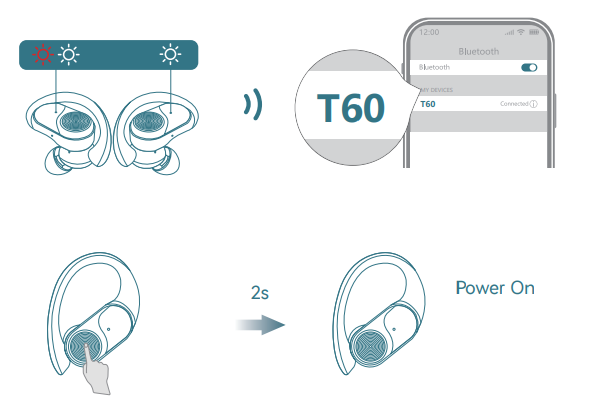
- Open the charging case, and pick up the earbuds from the charging case for 3 seconds to enter Bluetooth pairing mode.
- The LED indicators on the buds will flash white-red in sequence continuously, and the other bud will blink white slowly.
- If the earbuds are not connected to any devices for over 5 minutes, they will power off automatically. Turn on the earbuds manually by pressing the MFB button for 2 seconds to hear the prompt "power on".
- Select "T60" on your device's Bluetooth list to connect.
When successfully connected, you will hear the prompt "connected," and the LED indicators will turn off.
Reset
You might need to reset the earbuds if you experience any connectivity problems or function issues.
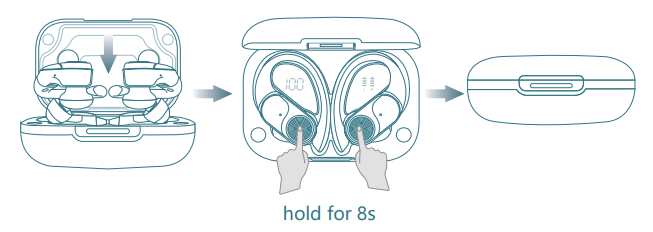
- Take the earbuds out for 5 minutes to consume some battery of both buds. (Can't be reset if the earbuds are fully charged)
- Place the earbuds in the charging ca,se, and he earbuds blink red.
- Press and hold the button on the buds for 8 seconds until the LED indicators flash red-white 3 times. This confirms that the reset was successful and your earbuds can be connected normally.
When resetting the earbuds, make sure the earbuds are properly connected with the charging points in the case, or it may cause resetting failure.
Maintenance
Clean your earbuds
Your earbuds are sweat and water-resistant, but not sweatproof or waterproof. The charging case is not waterproof, so be careful not to get moisture in any openings.
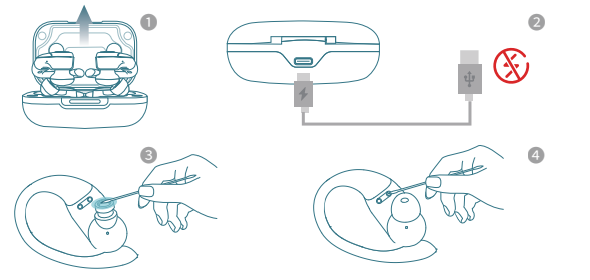
- Remove the earbuds from the charging case.
- Disconnect the charging cable from both the case and your computer or power adapter.
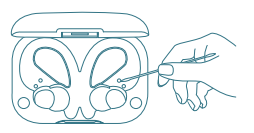
To clean the charging contacts on buds, use a cotton swab slightly dampened with warm water. To clean the charging pins on the case, use a lint-free cloth slightly dampened with warm water. If necessary, you can slightly dampen the cotton swab or cloth with 70 percent isopropyl alcohol. - Use a soft, dry, lint-free cloth to clean all other areas of the buds and case. Here's how to clean your eartips.
Care for your earbuds
Clean and dry your earbuds and your skin after workouts or heavy sweating. Keep your earbuds and charging case clean and dry.
Button Operation Tips
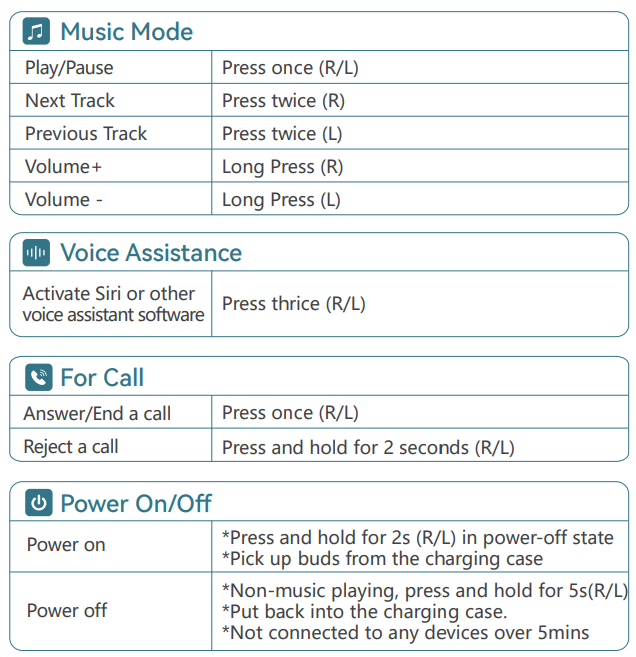
Charging
Type-C USB charging
- Fully dry off the earbuds and the USB port before charging.
- Use a certified USB-C charging cable and charger to prevent any damage.
- Fully charge both the earbuds and the charging case before the first use.
- Place the earbuds in the charging case and close it.
- Connect the charging case to the power supply by using a USB-C charging cable.
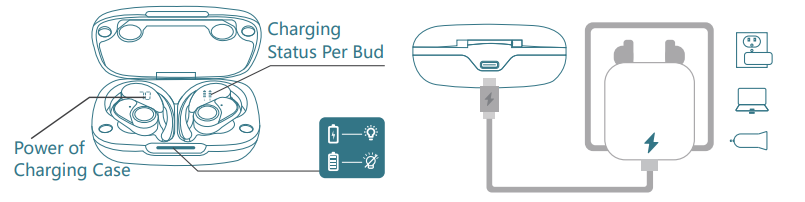
- During charging, the digital display flashes and shows the real-time power until 100.
- The right display panel indicates the charging status per bud. There are separate power consumption indicators for four grids in total, which will flash when charging.
- The LED indicator on the charging case indicates the charging status.
Wireless charging
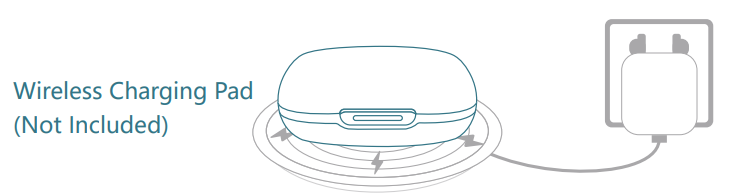
Easily charge the case without cables; just put your charging case on the wireless charging pad. If the charging case is not being charged, please try to reposition it.
Wireless Charging Pad
(Not Included)
Troubleshooting: Common Issues and Solutions
- Earbuds won’t power on: Ensure they are fully charged. Place them in the case for at least 10 minutes.
- Pairing fails: Reset the earbuds by holding the touch controls for 10 seconds. Clear previous Bluetooth connections on your device.
- No sound or low volume: Check device volume settings. Clean earbud nozzles and ensure proper fit.
- One earbud not working: Place both earbuds in the case to reset. Remove and reconnect.
- Charging case not charging: Use a different USB cable or power source. Check for debris in charging ports.
Preventive measures include regular cleaning, avoiding extreme temperatures, and storing in a dry place. The Pocbuds T60 comes with a 12-month warranty. For support, contact support@pocbuds.com or visit the official website.
Pros & Cons: pocbuds T60 True Wireless Earbuds
Pros
- Excellent battery life for daily use
- Premium sound quality with deep bass
- Comfortable, secure fit for all ear sizes
- Intuitive touch controls and voice assistant support
- IPX5 water resistance for workouts and outdoor use
- Great value for money compared to competitors
Cons
- No active noise cancellation
- The charging case is slightly larger than some rivals
- Touch controls may require a learning curve
Customer Reviews: POCBuds T60 True Wireless Earbuds
Users consistently rate POCBuds T60 4.5/5 stars, praising its long battery life, clear sound, and comfortable fit. Many highlight the ease of pairing and reliable Bluetooth connection. Common complaints include occasional touch control sensitivity and the lack of noise cancellation. Customers recommend POCBuds T60 for those seeking affordable, high-performance true wireless earbuds. Frequently mentioned issues are resolved quickly with customer support, making it a trusted choice for everyday audio needs.
Faqs
How do I set up my pocbuds T60 True Wireless Earbuds for the first time?
What should I do if my pocbuds T60 True Wireless Earbuds won't charge properly?
Can I use only one earbud from the pocbuds T60 True Wireless Earbuds independently?
How do I control music and calls using the pocbuds T60 True Wireless Earbuds touch controls?
Are pocbuds T60 True Wireless Earbuds compatible with all Bluetooth devices?
How can I optimize battery life and playtime on my pocbuds T60 True Wireless Earbuds?
What maintenance steps should I follow to keep my pocbuds T60 True Wireless Earbuds in good condition?
Why do my pocbuds T60 True Wireless Earbuds sometimes disconnect or experience audio lag, and how can I fix it?
More pocbuds manuals
Leave a Comment