
Poly Voyager 5200 Series Bluetooth headset User Manual
Content
Poly Voyager 5200 Series Bluetooth Headset: Complete Product Manual and Buyer’s Guide
Introduction
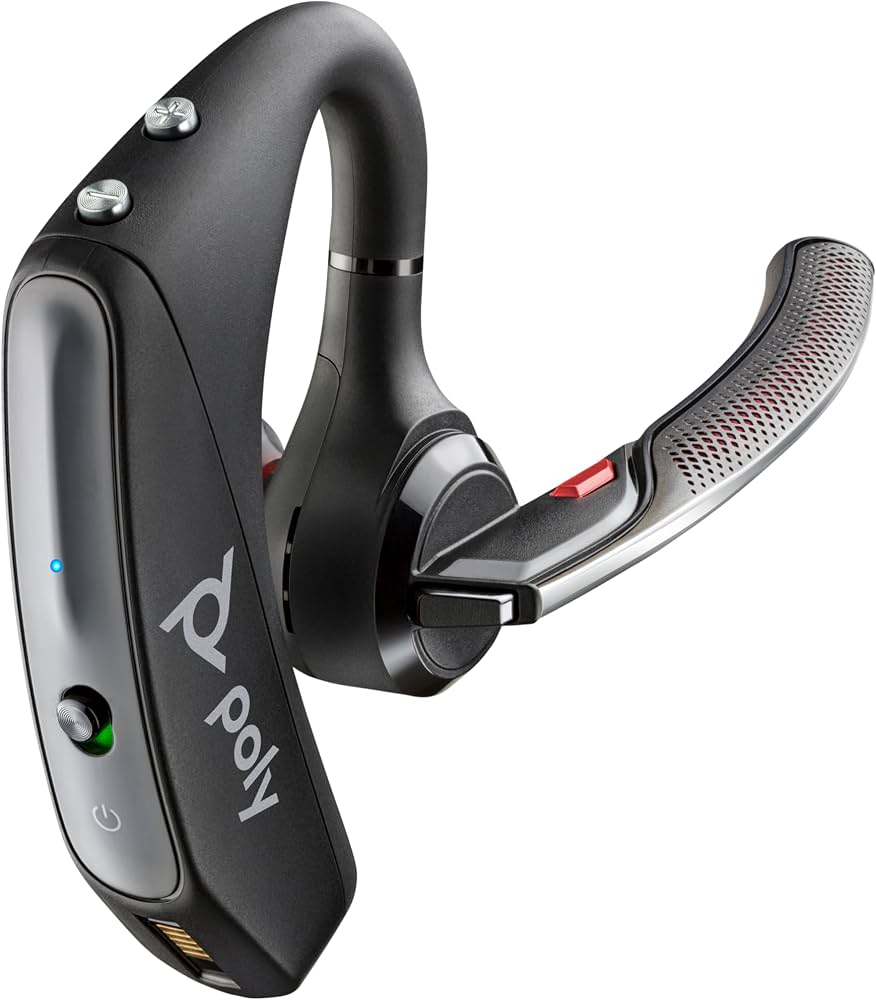
The poly Voyager 5200 Series Bluetooth headset is a premium mono wireless headset designed for professionals who need clear calls, reliable mobility, and all-day convenience. Built for mobile workers, remote teams, sales representatives, drivers, and anyone who spends significant time on phone calls, it stands out for its strong noise reduction, wind-blocking performance, and lightweight behind-the-ear design. The headset uses Poly’s signature audio technologies to help your voice stay intelligible in busy offices, outdoor environments, and on the go.
One of the biggest advantages of the poly Voyager 5200 Series Bluetooth headset is its practical balance between comfort and performance. It supports multipoint pairing, so you can stay connected to two devices at once, such as a smartphone and a laptop. It also offers up to 7 hours of talk time, around 9 days of standby time, and Bluetooth range up to 98 feet in supported configurations. That makes it especially useful for users who move between desks, vehicles, and meeting spaces throughout the day.
Expected pricing typically falls in the mid-range premium category, with common street prices roughly between $90 and $260 depending on the version, adapter bundle, and retailer. Availability remains strong through major online and office-equipment stores, with UC and office variants sold in many markets. For users looking for a dependable Bluetooth headset for calls, the poly Voyager 5200 Series Bluetooth headset remains one of the most recognizable options in its class.
Specifications: Poly Voyager 5200 Series Bluetooth Headset Features and Performance
- Headset type: Mono in-ear Bluetooth headset with behind-the-ear design.
- Bluetooth version: Bluetooth 5.0 on newer UC configurations; earlier versions were originally released with Bluetooth 4.1.
- Connectivity: Multipoint support for two devices simultaneously.
- Talk time: Up to 7 hours per charge.
- Standby time: Up to 9 days.
- Wireless range: Up to 98 feet, or 30 meters, in supported environments.
- Microphones: Triple-mic array with noise reduction and wind-canceling design.
- Audio features: Digital signal processing, echo cancellation, sidetone, and adaptive audio tuning.
- Compatibility: Works with smartphones, tablets, and computers; UC models are commonly paired with a USB adapter for desktop use.
- Controls: Call answer/end, mute, volume, redial, and voice assistant support on many versions.
- Weight: About 20 grams, making it light enough for extended wear.
Compared with similar single-ear Bluetooth headsets, the Voyager 5200 series is known for stronger wind rejection and better voice clarity than many basic office models. It competes with other premium business headsets by prioritizing call quality over music playback, making it a better fit for voice-first users than general-purpose earbuds.
Pros and Cons of the Poly Voyager 5200 Series Bluetooth Headset
Pros
- Excellent call clarity: The triple-mic system and wind-canceling design make it a strong choice for outdoor calls, driving, and open offices.
- Comfortable lightweight build: At about 20 grams, it is easy to wear for long work sessions without feeling bulky.
- Strong business features: Multipoint pairing, voice assistant support, and UC compatibility make it practical for hybrid work.
- Reliable battery life: Up to 7 hours of talk time is enough for most workdays, especially if the headset is charged between calls.
- Good value for voice users: While not cheap, it delivers premium call-focused performance that can justify the price for frequent callers.
Cons
- Not ideal for music: As a mono headset, it is designed for communication rather than immersive audio or entertainment.
- Battery is average for the price: Competing wireless earbuds may offer more total listening time, though often with weaker call pickup.
- Premium cost: The price can feel high compared with entry-level Bluetooth headsets.
- Single-ear design: Users who want stereo sound or longer music sessions may prefer true wireless earbuds or over-ear alternatives.
For professionals who need dependable calling performance, the poly Voyager 5200 Series Bluetooth headset offers strong value. For users who want a headset for both meetings and media, alternatives such as stereo Bluetooth headsets or full wireless earbuds may be more versatile.
Customer Reviews: What Users Say About the Poly Voyager 5200 Series Bluetooth Headset
Customer feedback is generally positive, with many users giving the headset around 4.5 out of 5 stars for call quality and comfort. Buyers frequently praise the noise reduction, especially the wind-blocking performance during outdoor use and commuting. One recurring testimonial theme is that the headset makes voices sound clearer on both ends of the call, even in busy environments.
Common complaints usually focus on battery life, premium pricing, and the fact that it is a mono headset rather than a music-focused device. Some users also mention that the fit may take a little adjustment at first. Overall, reviewers who prioritize business calls tend to recommend it strongly, while casual users sometimes prefer cheaper or more versatile alternatives. For anyone shopping for a professional Bluetooth headset, the poly Voyager 5200 Series Bluetooth headset is often described as a reliable buy for frequent callers.
Final Verdict
The poly Voyager 5200 Series Bluetooth headset is a well-built, call-focused wireless headset that excels in noisy environments and mobile work scenarios. Its combination of strong voice pickup, multipoint connectivity, and lightweight comfort makes it a practical choice for professionals who spend most of the day on calls.
If you need a premium Bluetooth headset for business communication, the Voyager 5200 remains one of the most trusted options in the market. If you want a device mainly for music, gaming, or all-day multimedia use, a different headset style may be a better fit.
Faqs
How do I set up the poly Voyager 5200 Series Bluetooth headset for the first time?
Why is my poly Voyager 5200 Series Bluetooth headset not pairing with my phone or laptop?
How do I get the best microphone quality from the poly Voyager 5200 Series Bluetooth headset?
What devices are compatible with the poly Voyager 5200 Series Bluetooth headset?
How can I improve battery life on the poly Voyager 5200 Series Bluetooth headset?
What should I do if the poly Voyager 5200 Series Bluetooth headset sounds low, muffled, or distorted?
How do I clean and maintain the poly Voyager 5200 Series Bluetooth headset safely?
Which features of the poly Voyager 5200 Series Bluetooth headset help reduce noise during calls?
More poly manuals
Leave a Comment