
Poly Voyager Focus 2 UC Series Bluetooth Headset User Manual
Content
Poly Voyager Focus 2 UC Series Bluetooth Headset Review and Manual
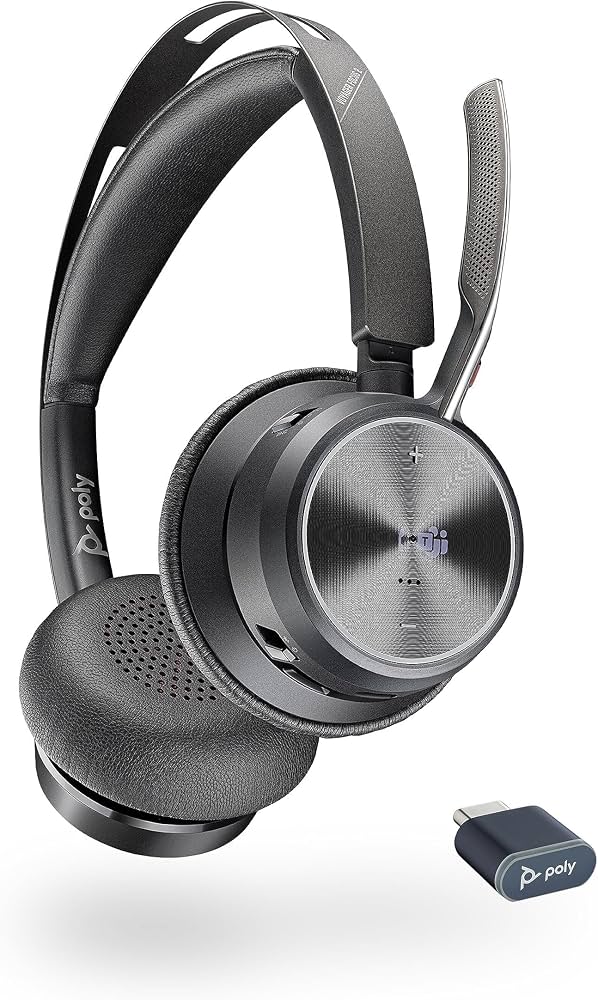
The poly Voyager Focus 2 UC Series Bluetooth Headset is a premium stereo wireless headset designed for professionals who need clear calls, reliable connectivity, and all-day comfort. Built for hybrid work, customer support, video meetings, and office productivity, it combines active noise canceling, a boom microphone, and multipoint Bluetooth connectivity in one business-ready package. The UC model is especially popular with users who switch between a PC, Mac, and mobile phone throughout the day.
This headset stands out for its strong voice performance, 3-level ANC, and long battery life, making it a practical choice for busy work environments. It supports popular meeting platforms and is widely used for Zoom, Microsoft Teams, and general softphone calls. The Voyager Focus 2 UC also offers a wired audio-over-USB option, which helps extend usability when the battery runs low. For users who want a dependable Bluetooth headset for professional communication, it delivers a strong mix of portability, comfort, and audio clarity.
Price typically falls in the mid-to-premium range, often around $180 to $235 depending on the bundle, USB adapter type, and whether a charging stand is included. Availability is generally good through major retailers, office equipment stores, and enterprise hardware suppliers. If you are searching for a headset that balances comfort, call quality, and work-focused features, the poly Voyager Focus 2 UC Series Bluetooth Headset is a strong contender.
Specifications for Poly Voyager Focus 2 UC Bluetooth Headset
- Bluetooth version: Bluetooth 5.1 with class 1 wireless connectivity
- Wireless range: up to 50 m / 164 ft in typical UC use
- Battery life: up to 19 hours of talk time, with longer listening time depending on ANC mode
- Charging time: about 2 hours for a full charge
- Microphone: noise-canceling boom mic with office-focused voice pickup
- Audio features: active noise canceling with multiple ANC levels
- Connectivity: supports Bluetooth plus USB dongle or USB-C/USB-A adapter options
- Multipoint pairing: connects to two devices at once and can remember multiple paired devices
- Weight: about 175 grams, helping reduce fatigue during long work sessions
- Compatibility: PC, Mac, and mobile devices for unified communications
Compared with entry-level wireless headsets, the poly Voyager Focus 2 UC Series Bluetooth Headset offers stronger ANC, better wireless range, and more polished voice performance. Against similar office headsets, it competes closely with premium models from Jabra and Bose, but its business-focused software support and comfortable dual-ear design make it especially appealing for call-heavy users.
Pros and Cons of the Poly Voyager Focus 2 UC Series Bluetooth Headset
Pros
- Excellent call clarity for meetings, remote work, and customer support
- Comfortable for long sessions thanks to the lightweight over-ear design
- Strong active noise canceling for open offices and home environments
- Reliable multipoint connectivity for switching between laptop and phone
- Good battery life for a full workday and beyond
- Useful USB audio mode for wired fallback and extended use
Cons
- Premium pricing may be high for casual users
- Best features are most valuable in professional office workflows, not entertainment use
- ANC and software features can feel excessive if you only need basic Bluetooth audio
- Some users may prefer a lighter on-ear or single-ear alternative for all-day wear
For value for money, the headset makes the most sense for frequent callers and hybrid workers. If you only need occasional headset use, a less expensive alternative may be enough. For users comparing business headsets, the poly Voyager Focus 2 UC Series Bluetooth Headset is stronger than many budget models, though premium rivals may offer slightly different comfort profiles or companion apps.
Customer Reviews and User Feedback on the Poly Voyager Focus 2 UC Series Bluetooth Headset
Most customer feedback points to a strong overall experience, with many users praising the headset’s comfort, microphone quality, and dependable Bluetooth connection. Common ratings cluster around 4 to 4.5 stars for business use, especially among remote workers and professionals who spend hours on calls. Users often describe the sound as crisp and the ANC as effective in reducing office noise and background distractions.
Frequent complaints usually involve the price, occasional setup confusion with adapters, and the fact that some users want even stronger noise isolation. A typical testimonial theme is: “Great for meetings all day, easy to wear, and my voice comes through clearly.” Another common comment is: “Worth it if you take calls constantly, but probably too much headset for casual use.”
Purchase recommendation: choose this model if call quality, comfort, and workday reliability matter most. If you need a Bluetooth headset for professional conferencing, the poly Voyager Focus 2 UC Series Bluetooth Headset remains one of the most practical premium options in its class.
Best Use Cases for the Poly Voyager Focus 2 UC Bluetooth Headset
- Hybrid and remote work
- Zoom, Microsoft Teams, and web conferencing
- Customer support and sales calls
- Focused work in noisy offices
- Switching between laptop and mobile calls
Frequently Asked Questions
Is the Poly Voyager Focus 2 UC good for all-day use?
Yes. Its lightweight design, padded earcups, and long battery life make it suitable for extended office sessions and frequent calling.
Does the headset work with both PC and mobile devices?
Yes. It supports Bluetooth and USB-based connectivity, so it works well with computers and smartphones.
Is it worth the price?
Yes for professionals who take calls regularly. The performance, comfort, and call clarity justify the cost better than basic consumer headsets.
Faqs
How do I set up the poly Voyager Focus 2 UC Series Bluetooth Headset for the first time on a laptop or desktop?
Why is my poly Voyager Focus 2 UC Series Bluetooth Headset not connecting to Bluetooth, and how can I fix it?
Can the poly Voyager Focus 2 UC Series Bluetooth Headset switch between a phone and a computer during calls?
How do I improve microphone clarity on the poly Voyager Focus 2 UC Series Bluetooth Headset in noisy environments?
What should I do if the poly Voyager Focus 2 UC Series Bluetooth Headset sounds muffled or the volume is too low?
Is the poly Voyager Focus 2 UC Series Bluetooth Headset compatible with Zoom, Microsoft Teams, and other UC platforms?
How do I maximize battery life on the poly Voyager Focus 2 UC Series Bluetooth Headset?
How should I clean and maintain the poly Voyager Focus 2 UC Series Bluetooth Headset for long-term use?
More poly manuals
Leave a Comment