
Rca RT3908 LED Television User Manual
Content
RCA RT3908 LED Television Manual: Setup, Features, Pros, Cons, and Buyer Guide
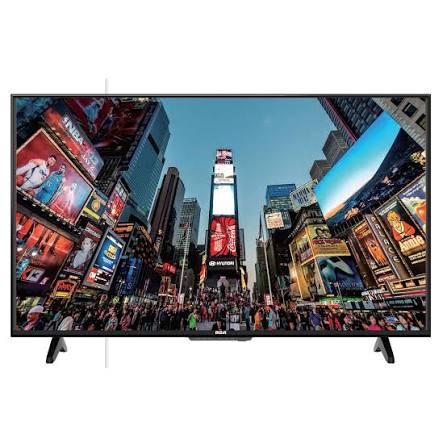
The RCA RT3908 LED Television is a budget-friendly 39-inch HDTV designed for everyday viewing in bedrooms, apartments, guest rooms, dorms, and secondary living spaces. This RCA LED TV is best known for its simple setup, compact footprint, and practical feature set that covers streaming devices, cable boxes, game consoles, and over-the-air antenna use. The RT3908 is commonly listed as a 39-inch 720p LED TV, making it a solid option for viewers who want a straightforward television without the complexity or cost of a premium smart TV.
For shoppers looking for an affordable RCA 39-inch TV, the RT3908 typically falls into the low-cost entry-level category, often appearing on the secondhand market around the lower-end budget range and, when originally sold new, positioned as a value television rather than a premium model. Availability is mostly through resale, clearance stock, or older inventory, since this model is no longer a current flagship release. Its main appeal is simplicity: plug in a source, connect the antenna or HDMI device, and start watching. That makes the RCA RT3908 LED Television especially suitable for first-time TV buyers, secondary room setups, and users who prioritize price and ease of use over advanced smart features.
How to Set Up the RCA RT3908 LED Television
Start by placing the TV on a stable surface and attaching the stand securely, or use a compatible wall mount if you prefer a cleaner installation. Leave enough ventilation space around the back and sides to prevent overheating. Next, connect the power cord directly to a grounded outlet and avoid using damaged extension cords or overloaded power strips.
For signal setup, connect an antenna to the coaxial input for over-the-air channels, or use HDMI for a cable box, streaming stick, Blu-ray player, or game console. If you are using external audio, connect speakers or a sound system through the available audio output options. Turn on the television and follow the on-screen setup menu to select language, time zone, input source, and channel scan settings. If you are pairing a universal remote, confirm that the remote supports RCA TV codes and test power, volume, and input functions after programming.
If the picture does not appear, check the input source first, then confirm HDMI cable seating, antenna connection, and power status. Safety tip: keep liquids away from the set, never block ventilation openings, and avoid moving the TV while it is powered on.
RCA RT3908 LED Television Pros and Cons
Pros
- Affordable value for money, especially for buyers seeking a basic 39-inch LED television.
- Simple user interface and easy setup, which is ideal for non-technical users.
- Compact size fits bedrooms, kitchens, dorm rooms, and guest spaces.
- Works well with streaming devices, cable boxes, and gaming consoles through HDMI.
- Good entry-level option compared with more expensive smart TVs that include features many users may not need.
Cons
- 720p resolution is less sharp than Full HD or 4K alternatives.
- Fewer advanced features than newer smart televisions, including app ecosystems and voice assistants.
- Sound quality is generally basic, so many users prefer an external soundbar.
- As an older model, availability is inconsistent and often limited to resale listings.
- Not the best choice for buyers who want premium picture processing or modern gaming features.
Compared with newer budget smart TVs, the RCA RT3908 LED Television stands out for affordability and simplicity, but it gives up resolution and advanced connectivity. For users who only need a dependable screen for casual viewing, it remains a practical pick.
Customer Reviews of the RCA RT3908 LED Television
Customer feedback for the RCA RT3908 LED Television is generally positive among budget shoppers, with many users praising its value, lightweight design, and easy installation. A common rating pattern is around 4 out of 5 stars for buyers who want a basic TV for a bedroom or spare room. Typical praise includes comments like, “Perfect for my guest room,” and “Works great with my streaming stick.”
Common complaints usually focus on the 720p resolution, modest built-in speakers, and the lack of modern smart-TV extras. Some users also mention that picture quality is best suited for casual viewing rather than cinematic use. A fair purchase recommendation would be: buy it if you need an inexpensive, dependable LED television for everyday watching, but consider a newer Full HD model if sharper detail and richer sound matter more.
Who Should Buy the RCA RT3908 LED Television?
The RCA RT3908 LED Television is a good fit for budget-conscious shoppers, renters, students, and anyone setting up a secondary TV. It is also a sensible choice for families who want a low-cost screen for a kid’s room, garage, or vacation property. If you want a simple television with easy setup and dependable basic performance, this RCA LED TV delivers strong everyday value.
Faqs
How do I set up the rca RT3908 LED Television for the first time?
Why is my rca RT3908 LED Television not turning on, and what should I check first?
How do I improve picture quality on the rca RT3908 LED Television?
Can the rca RT3908 LED Television connect to a streaming device, game console, or soundbar?
What should I do if the rca RT3908 LED Television has no sound but the picture works?
How do I scan for channels on the rca RT3908 LED Television using an antenna?
What are the best maintenance tips to keep the rca RT3908 LED Television working well?
How can I reduce lag or improve performance on the rca RT3908 LED Television?
Tags
More rca manuals
Leave a Comment