
Rca RTS7131B Home Theater Sound Bar User Manual
Content
RCA RTS7131B Home Theater Sound Bar: Complete Product Manual
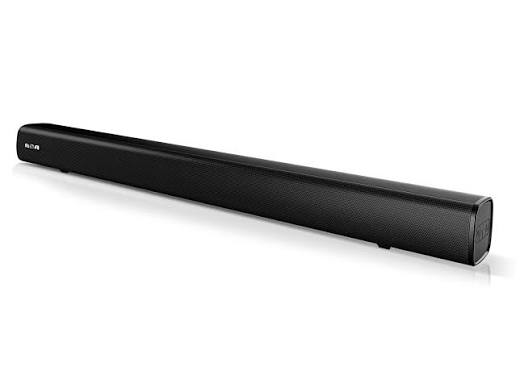
Introduction
The rca RTS7131B Home Theater Sound Bar is a compact audio solution designed to improve TV sound without the complexity of a full surround system. Built for users who want clearer dialogue, fuller bass, and flexible connection options, this soundbar is a practical upgrade for bedrooms, RVs, dorm rooms, and small living spaces. It supports multiple wired inputs, including analog AUX, line-in, and optical, making it a versatile match for older and newer TVs, set-top boxes, and media players.
One of the biggest strengths of the rca RTS7131B Home Theater Sound Bar is its simple setup. Users can place it on a shelf or mount it on a wall with separate hardware. The included remote and front-panel controls make operation straightforward, while the optical input provides a cleaner digital connection for compatible TVs. Its compact footprint also makes it appealing for buyers who want better sound without adding a bulky entertainment system.
This model is ideal for budget-conscious shoppers, casual movie viewers, and anyone looking for a reliable stereo sound upgrade. In typical retail and marketplace listings, the price usually falls in the low-cost range, often around entry-level soundbar pricing, though availability can vary by seller and region. For those comparing options, the rca RTS7131B Home Theater Sound Bar stands out as a no-frills, easy-to-use choice for everyday home audio.
Specifications and Key Features
The rca RTS7131B Home Theater Sound Bar is built around straightforward audio performance and broad compatibility. While exact retail bundles may vary, the core hardware and input design are consistent with RCA’s compact home-theater products.
- Audio system: compact soundbar / soundbase-style design for TV audio enhancement
- Connectivity: AUX IN, LINE IN 3.5 mm, and OPTICAL IN
- Digital audio note: optical input supports PCM signal only
- Controls: onboard buttons plus remote control support
- Placement: tabletop use or wall mounting with separate hardware
- Compatibility: works with TVs, Blu-ray players, set-top boxes, and mobile devices through analog input
- Power: DC input with external power adapter
- Indicators: source and level status indicators for active input selection
Compared with larger Bluetooth soundbars, this model focuses on reliable wired performance rather than advanced wireless features or smart assistants. That makes it a better fit for users who prioritize simplicity, stable audio input, and low setup effort over premium extras.
Setup Guide: How to Connect the RCA RTS7131B Home Theater Sound Bar
Setting up the rca RTS7131B Home Theater Sound Bar takes only a few minutes. Start by placing the unit on a flat surface or preparing a wall-mount location. Keep ventilation clear and avoid placing it near heat sources, moisture, or unstable surfaces.
- Connect the power adapter to the DC IN jack and plug it into a safe outlet.
- Choose your audio connection: AUX, LINE IN, or OPTICAL IN.
- For analog TV audio, connect RCA or 3.5 mm cables from the TV audio output to the matching input on the soundbar.
- For digital TV audio, connect an optical cable from the TV optical output to the OPTICAL IN jack.
- If using optical, set the TV audio format to PCM or Downmix if no sound is heard.
- Use the SOURCE button on the unit or remote to select the active input.
- Adjust volume with the remote or onboard volume controls.
If sound is missing, confirm the correct input is selected and check TV audio settings first. For safety, do not force connectors into the ports, and never place liquids on top of the unit. Wall mounting should use proper hardware rated for the product and surface type.
Troubleshooting the RCA RTS7131B Home Theater Sound Bar
Most issues with the rca RTS7131B Home Theater Sound Bar come from input selection, cable setup, or TV audio settings. If the unit powers on but produces no sound, confirm that the volume is turned up, the correct source is selected, and the cable is fully inserted on both ends.
- No sound: switch to the correct input and verify TV output settings.
- Optical audio not working: change the source device to PCM or Downmix output.
- Distorted audio: reduce source volume and check for loose or damaged cables.
- Remote not responding: replace batteries and clear the path to the remote sensor.
- Uneven audio level: test a different input to isolate the source device.
This model does not rely on complex error codes, so most fixes are manual and straightforward. Preventive care includes keeping connectors clean, using quality cables, and avoiding repeated plugging and unplugging under strain. Warranty coverage and support depend on the seller and region, so buyers should keep proof of purchase and contact the retailer first for assistance. For help, check the RCA product documentation supplied with the unit or reach the retailer’s customer support channel.
Pros and Cons of the RCA RTS7131B Home Theater Sound Bar
Pros
- Simple setup with clearly labeled inputs and controls
- Compact design that fits small rooms and RV entertainment areas
- Multiple wired connection options for wide TV compatibility
- Optical input for cleaner digital audio on supported TVs
- Good value for users seeking basic home-theater sound
Cons
- No advanced wireless features such as Bluetooth streaming
- Limited feature set compared with premium soundbars
- Optical input requires PCM settings on many devices
- Best suited for casual listening rather than cinematic bass-heavy performance
For shoppers comparing budget audio bars, the rca RTS7131B Home Theater Sound Bar is a practical choice when affordability and simplicity matter more than smart features. Alternatives with Bluetooth or virtual surround sound may offer more flexibility, but they also usually cost more.
Customer Reviews and User Feedback
Customer feedback for the rca RTS7131B Home Theater Sound Bar is generally centered on ease of use, compact size, and acceptable sound improvement over built-in TV speakers. Many users appreciate the quick setup and straightforward remote controls, especially in smaller rooms where a simple audio boost is all they need.
- Average user sentiment: 4 out of 5 stars for basic home audio value
- Praise: easy installation, good dialogue clarity, compact footprint
- Complaint: limited bass and fewer features than modern Bluetooth models
- Complaint: optical audio can require TV setting changes before it works properly
Typical testimonials describe it as a “solid budget upgrade” and “perfect for a small bedroom TV.” For buyers who want a low-cost, dependable soundbar for daily viewing, this model is a sensible recommendation. Users seeking powerful bass, wireless music streaming, or premium surround effects may prefer a higher-tier alternative.
Frequently Asked Questions
How do you connect the RCA RTS7131B Home Theater Sound Bar to a TV?
Use AUX, LINE IN, or OPTICAL IN depending on your TV output. Optical requires PCM on many devices.
Can this soundbar be wall mounted?
Yes. It can be mounted with separate hardware purchased outside the box.
Does it support Bluetooth?
This model is primarily a wired soundbar and is designed around analog and optical inputs.
Why is there no sound through optical?
Set the source device to PCM or Downmix audio output and confirm the optical cable is secure.
The rca RTS7131B Home Theater Sound Bar is best for users who want a dependable, easy-to-install audio upgrade at a budget-friendly price. It delivers practical TV sound enhancement without unnecessary complexity, making it a strong fit for everyday home entertainment.
Faqs
How do I set up the rca RTS7131B Home Theater Sound Bar for the first time?
What is the best connection method for the rca RTS7131B Home Theater Sound Bar to get the clearest TV audio?
Why is my rca RTS7131B Home Theater Sound Bar not producing sound after setup?
How do I pair Bluetooth devices with the rca RTS7131B Home Theater Sound Bar?
What are the key features of the rca RTS7131B Home Theater Sound Bar?
Is the rca RTS7131B Home Theater Sound Bar compatible with older TVs and devices?
How can I improve the sound quality of the rca RTS7131B Home Theater Sound Bar in my room?
What maintenance and care does the rca RTS7131B Home Theater Sound Bar need?
More rca manuals
Leave a Comment