
Setup: Remington 7 in 1 Cordless Epilator EP7035 User Manual
Content
Remington 7 in 1 Cordless Epilator EP7035
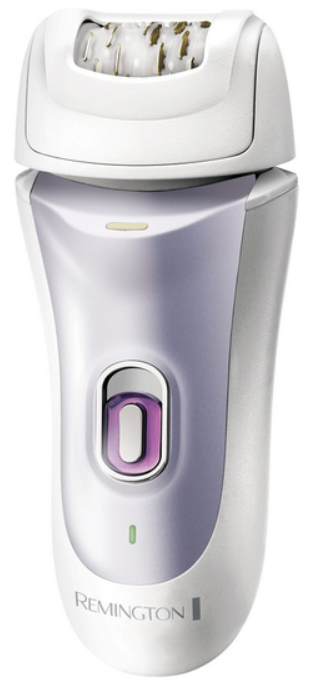
Introduction
The Remington 7 in 1 Cordless Epilator EP7035 is a versatile and efficient hair removal device designed to provide smooth, long-lasting results for various skin types. This all-in-one grooming tool offers a comprehensive solution for hair removal and skin care, combining seven different attachments to address different body areas and needs. Its cordless design ensures ease of use and portability, making it perfect for busy individuals who desire salon-quality results at home or on the go.
Key benefits include advanced anti-slip tweezer technology that removes hair as short as 0.5 mm for up to four weeks of smooth skin, two speed settings for customized comfort, and a precision light that illuminates fine hairs for thorough hair removal. Additional attachments such as a massage cap help reduce discomfort, while other tools cater to sensitive zones like the bikini line and face.
Targeted at women seeking an effective, painless, and multi-functional epilator, it suits those wanting a professional grooming experience without frequent salon visits. The product is priced competitively within the mid-range market, approximately between $60 and $90, and is widely available through online retailers and beauty supply stores.
Specifications of the Remington 7 in 1 Cordless Epilator EP7035
- Tweezer Technology: 40 anti-slip tweezers for precise and effective hair removal.
- Hair Removal Length: Removes hair from as short as 0.5 mm.
- Operating Time: Up to 40 minutes of cordless use after a full charge.
- Speed Settings: Two adjustable speeds to suit different skin sensitivities.
- Attachments: 7 tools including an epilator head, shaver, trimmer cap, massage cap, facial cap, and bikini comb for versatile grooming.
- Precision Light: Illuminates fine hairs for better visibility and thorough removal.
- Wet & Dry Use: Fully waterproof for use in the shower or bath, enhancing comfort and convenience.
- Charging: Cordless with a rechargeable lithium battery for portable use.
Compared with similar epilators, the EP7035 stands out by offering multiple attachments and a longer battery life, combined with a competitive price point and ergonomic design for effortless hair removal across the body.
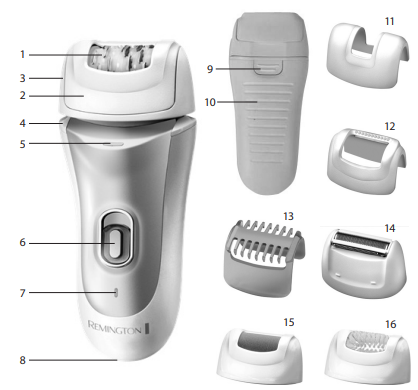
Key Features
- Tweezers
- Perfect Angle Cap
- Removable & Washable Head
- Pivoting Head
- Precision Light
- On/Off Switch - 2 Speeds
- Low Battery/Charging Indicator Light
- Power Inlet
- Head Release Button
- Anti-Slip Grip
- Detail Cap
- Massage Cap with Aloe Vera
- Bikini Comb
- Shaver Head
- Pedicure Head
- Exfoliating Brush Head
- Cleaning Brush (not shown)
- Beauty Bag (not shown)
- Power Adaptor (not shown)
Instructions For Charging
- Always ensure that your epilator and charger are properly charging.
- Before using your Remington epilator for the first time, charge for 4 hours for initial use and for every charge thereafter. One full charge allows 40 minutes of cordless usage time.
- Ensure the product is switched off and attach the mains adaptor to the epilator.
- The charging indicator will illuminate green while charging
- Charge for the time indicated above.
- The epilator will be fully charged when the green light goes off.
- Use the product until the battery is low. This is indicated by a red indicator light.
- Note: This product is for cordless use only. The epilator cannot be turned on while it is charging. Do not try to use the epilator while it is plugged into the mains.
- Your epilator cannot be overcharged; however, if the product is not going to be used for an extended period (2-3 months), unplug it from the mains and store. it
- Fully recharge your epilator when you want to use it again.
Instructions For Use
- This epilator is suitable for wet or dry use and may be used in the shower.
- This epilator is for cordless use only.
Useful Tips
- When using an epilator for the first time, it is best to try it on a small area to get used to the process of epilation.
- The optimum length for hair removal is between 2- 5 mm. Epilation is easier and more comfortable.
- Take a warm bath or shower before epilating and exfoliate to remove dead skin cells. This will make your skin more pliable, making the epilation process less uncomfortable.
- Epilate in the evening so that any possible reddening can disappear overnight.
- After use, you can use a body cream or aloe lotion to soothe the skin and reduce skin irritation.
- Exfoliate regularly to avoid ingrown hair.
Dry Use
- Before epilating, make sure that the skin is clean, dry and free from creams or oils. Rub the skin in the area to be epilated to lift short hairs to optimise hair removal.
- Turn the epilator on to the desired speed:
- LOW is recommended for fine hair.
- HIGH is recommended for coarse hair or stronger hair growth.
- Using your free hand, hold the skin taut to make the hairs stand upright.
- Position the epilator flat so that the tweezers are at a 900 angle and flat against the skin. The Perfect Angle Cap will ensure the optimum tweezing angle (Diagram A).
- Using small circular motions, slowly and gently glide the epilator over the skin. This circular motion is the most effective method and makes the process less uncomfortable. Alternatively, guide the epilator in a slow, continuous movement against the hair growth (Diagram B).
- Repeat within each area until all the unwanted hair is removed.
- After epilating, turn the epilator off.
ARM/LEG EPILATION: (Diagram C)
- Epilate from the lower arm/leg and slowly move upwards. To epilate behind the elbow/knee, keep the arm/leg straight to stretch the skin.
UNDERARMS AND BIKINI: (Diagram D and E)
- Please be aware that these areas are particularly sensitive. However, this sensitivity will reduce after repeated usage. For more comfort, ensure that the skin is held taut and that the hair is at the optimum length of 2- 5 mm.
- If it has been an extended period of time since you have removed hair, trim the hair with the Bikini Comb Attachment before epilation.
- It is recommended to use LOW speed or detail cap for these sensitive areas.
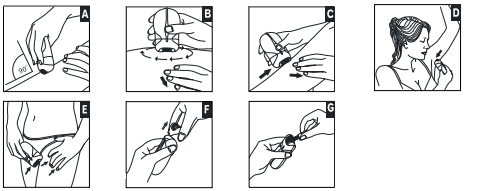
FACIAL EPILATION
- Use the detail cap.
- Place the epilator at a 900 angle to the skin and move the epilator head in a circular motion.
Setup Guide for Remington 7 in 1 Cordless Epilator EP7035
- Charge the device fully: Connect the charger to the epilator and plug it into a power source. Allow approximately 1.5 hours for a full charge before first use.
- Choose the appropriate attachment: Select the desired head—such as the epilator for legs or the trimmer for sensitive areas—and click it firmly into place.
- Switch on and select speed: Power on using the control button and select either low or high speed depending on your comfort and hair thickness.
- Use the precision light: Position the epilator so the light highlights fine hairs for thorough removal.
- Perform hair removal: Move the device slowly against the direction of hair growth with gentle pressure.
Troubleshooting tips: If the device doesn’t start, ensure it is fully charged. Clean the tweezers regularly to prevent hair clogging. Avoid using the epilator on broken or irritated skin. Always dry hands before handling the device.
Safety precautions: Keep out of reach of children. Avoid direct contact with eyes. Do not use on moles or varicose veins. Use the device only as intended and discontinue use if irritation occurs.
Troubleshooting the Remington 7 in 1 Cordless Epilator EP7035
- Device won’t power on: Ensure the epilator is charged. Try recharging fully and check the power button for debris.
- Reduced epilation efficiency: Clean the tweezer head thoroughly of trapped hairs using the included cleaning brush.
- Unusual noises or vibrations: Detach and reattach the head to ensure proper fitting. Avoid forcing attachments.
- Error codes: The product typically does not display error codes, but persistent malfunction may require contacting customer support.
- Preventive measures: Regularly clean attachments, avoid water exposure during charging, and store in a dry place.
The Remington 7 in 1 Cordless Epilator EP7035 comes with a standard warranty covering manufacturing defects. For support, customers can contact Remington’s official helpline or access online resources and manuals.
Pros & Cons of the Remington 7 in 1 Cordless Epilator EP7035
- Pros:
- Multi-functional with 7 attachments for full body grooming versatility.
- Long-lasting battery life enabling 40 minutes of cordless use.
- Effective anti-slip tweezer technology removes very short hairs.
- Wet and dry capability increases convenience and reduces discomfort.
- Integrated precision light enhances hair visibility for thorough removal.
- Cons:
- May cause mild discomfort for first-time epilator users, especially on sensitive areas.
- Charging time could be improved compared to some competitors.
- Attachments can be small and require careful cleaning and storage.
Overall, the Remington 7 in 1 Cordless Epilator EP7035 offers excellent value for money, especially for users seeking a comprehensive hair removal system with added skin care tools. It compares favorably against single-function epilators and models with shorter battery life
Customer Reviews of the Remington 7 in 1 Cordless Epilator EP7035
Users frequently praise the epilator’s cordless convenience and effective hair removal, noting up to four weeks of smooth skin with consistent use. The variety of attachments is appreciated for addressing different body parts, particularly the bikini and facial areas. Many highlight the soothing massage cap for minimizing irritation during epilation.
Common complaints include initial discomfort during use and the need for regular cleaning of the tweezer head. Some users found the charging time a bit long but felt it was acceptable given the performance.
Overall, customer ratings often range around 4 out of 5 stars, with recommendations for those looking for a reliable, multi-purpose epilator. Many suggest it as a great alternative to salon waxing due to cost savings and convenience.
Faqs
How do I set up the remington 7 in 1 Cordless Epilator EP7035 for first-time use?
What should I do if my remington 7 in 1 Cordless Epilator EP7035 stops working or won’t turn on?
Can I safely use the remington 7 in 1 Cordless Epilator EP7035 on wet skin or in the shower?
What is the best way to clean and maintain the remington 7 in 1 Cordless Epilator EP7035 after use?
How do I optimize hair removal performance with the remington 7 in 1 Cordless Epilator EP7035?
Are the different attachments of the remington 7 in 1 Cordless Epilator EP7035 compatible with each other?
What should I do if the tweezers on my remington 7 in 1 Cordless Epilator EP7035 are not spinning or are jammed?
How often should I replace or service parts of the remington 7 in 1 Cordless Epilator EP7035 to maintain its performance?
More remington manuals
- How to Use: Remington Corded Epilator EP7010 User Manual
- Setup: Remington 4 in 1 Epilator EP7020 Owner Manual
- Remington Cordless Bikini Trimmer BKT4000 User Manual
- Setup: Remington 5-in-1 Cordless Epilator EP703 User Manual
- Setup: Remington I Light Pro - IPL Hair Removal IPL6500 User Manual
- How to Use: Remington i-LIGHT Luxe IPL Hair Removal IPL8500 User Manual
Leave a Comment