
How to Use: Remington i-LIGHT Luxe IPL Hair Removal IPL8500 User Manual
Content
Remington i-LIGHT Luxe IPL Hair Removal IPL8500
Introduction
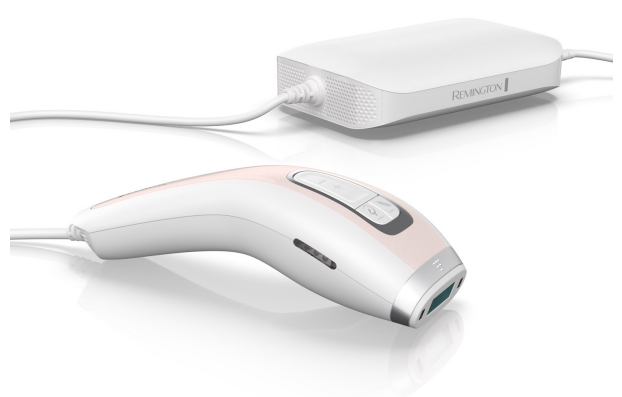
The Remington i-LIGHT Luxe IPL Hair Removal IPL8500 is a cutting-edge, professional-grade at-home hair removal device designed to deliver long-lasting smoothness by harnessing Intense Pulsed Light (IPL) technology. Offering efficient and gentle hair reduction, it is ideal for users seeking a pain-free alternative to traditional waxing or shaving. Its unique integrated skin tone sensor ensures personalized treatments by automatically adjusting the light intensity, making it safe and effective for various skin tones within recommended ranges.
This device is perfect for both men and women who want to target unwanted hair on the body and face, including sensitive areas like the bikini line. With three operating modes—Power, Sensitive, and Express—it caters to different skin sensitivities and treatment speeds, providing customizable convenience. The IPL8500 comes with body and precision treatment caps to easily access both large and hard-to-reach areas.
Priced competitively in the mid to high range of home IPL devices, the Remington I LIGHT Luxe IPL Hair Removal IPL8500 is widely available through online retailers and specialty beauty stores. Its combination of advanced features, safety mechanisms, and ease of use makes it a compelling choice for those wanting salon-quality results at home.
Specifications of Remington i-LIGHT Luxe IPL Hair Removal IPL8500
- Technology: Intense Pulsed Light (IPL) for permanent hair reduction
- Power Output: Maximum 6 Joules per pulse, adjusted automatically via skin tone sensor
- Skin Tone Sensor: Integrated to detect and adapt power to user’s skin tone for safe treatment
- Operating Modes:
- Power Mode (Full Power) for maximum energy and faster results
- Sensitive Mode for delicate or sensitive skin areas
- Express Mode for rapid flashing, reducing treatment time
- Treatment Caps: Body and precision caps for versatile use
- Flash Rate:
- Power Mode: ~1 flash every 3 seconds
- Sensitive Mode: Slower flashes
- Express Mode: Flashes less than 1 second apart
- Safety Features:
- Skin contact sensor prevents accidental flashing
- UV filter protects skin during treatment
- Power Supply: Corded with power pack for consistent energy delivery
Compared to other IPL devices, the IPL8500’s integrated skin tone detection and multiple modes provide a safer and more customized treatment experience, making it suitable for a wide range of users seeking professional results at home.
Key Features
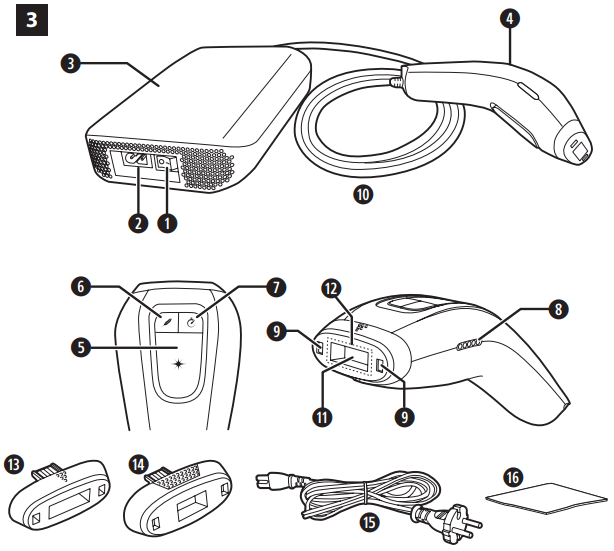
- Power Switch
- Power Inlet
- Power Pack
- Hand Piece
- Power Mode Flash Button
- Sensitive Mode Flash Button
- Express Mode Flash Button
- LED Indicator Lights
- Skin Tone Tester
- Hand Piece Cord
- Flash Window
- Skin Contact Sensors
- Body Treatment Cap
- Precision Treatment Cap
- Power Cord
- Lint-Free Cloth
- Storage Pouch (Not Shown)
Setup Guide for Remington I-LIGHT Luxe IPL Hair Removal IPL8500
- Unbox the IPL8500 and ensure all accessories are present: device with handpiece, power adaptor, body and precision caps, cleaning cloth, and storage bag.
- Attach the desired treatment cap (body or precision) to the handpiece securely.
- Plug in the power adaptor and connect the device to a power outlet; the LED indicators will light up.
- Turn on the device by pressing the power button; the integrated skin tone sensor will automatically test your skin when you place the treatment window flat against it.
- Select the operating mode:
- Power Mode is the default for maximum intensity.
- Press and hold Sensitive or Express Mode buttons to switch modes, confirmed by illuminated LEDs.
- Firmly place the flash window on the skin area to be treated and press the flash button to emit a pulse.
- Move to adjacent skin areas and repeat the process, ensuring no overlap or missed spots.
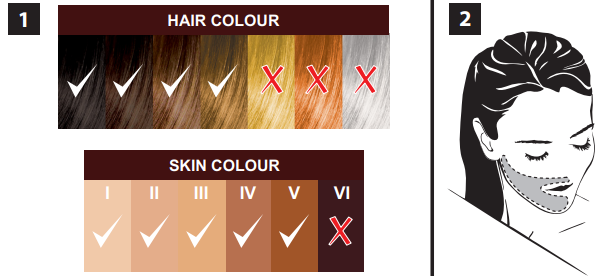
Safety Precautions: Do not use on tanned, sunburned, or dark skin tones beyond the device's recommended range to avoid burns or skin damage. Avoid flashing near tattoos, moles, or sensitive areas such as eyes. Always wear protective eyewear when recommended.
Troubleshooting Tips: If the device emits low-power flashes with warning beeps, it may indicate unsuitable skin tone or improper skin contact; reposition the device and retest.
FAMILIARISE YOURSELF WITH YOUR i-LIGHT
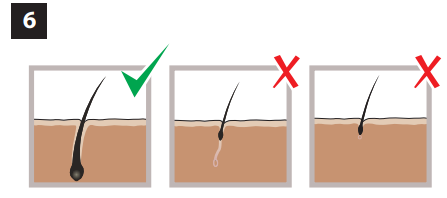
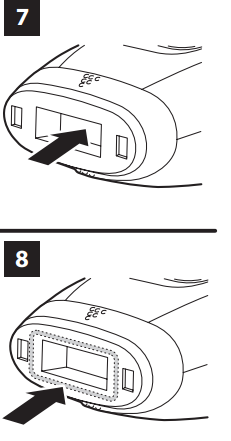
Flash Window with built-in UV filter (Fig 7)
- WARNING: always inspect the Flash Window before use to ensure there is no damage to the lens.
- WARNING: always clean the Flash Window before use with the lint-free cloth provided to ensure there is no oil or debris on the lens.
Skin Contact Sensors (Fig 8)
This safety mechanism prevents accidental flashing. The device will not flash unless both Skin Contact Sensors are in full contact with the skin.
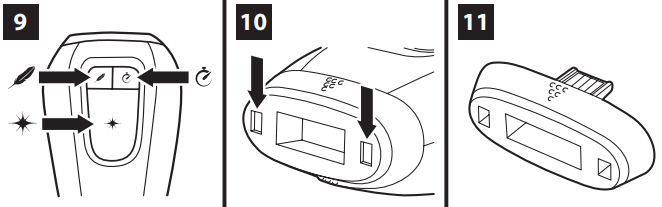
Power Mode, Sensitive Mode and Express Mode (Fig 9)
The Power Mode, Sensitive Mode and Express Mode buttons are all located on the handpiece.
Skin Tone Tester (Fig 10)
Will only allow usage on suitable skin tones.
Attachments
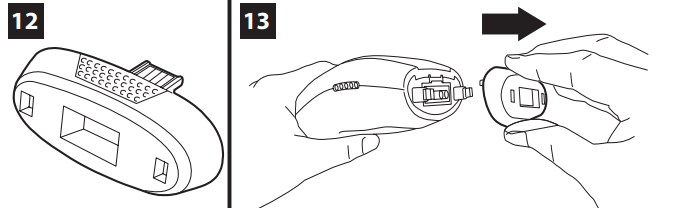
- Body Treatment Cap for large areas below the neck (Fig 11).
- Precision Treatment Cap for smaller female facial areas such as cheek, sideburn, chin, neck area and above the lips. It can also also be used on other smaller areas such as the underarms and bikini area (Fig 12).
Attachment Release (Fig 13)
- Grasp the cap at the positions indicated and firmly pull straight out to release the treatment cap.
- When replacing the cap, magnets will assist in aligning the treatment cap into position.
Troubleshooting Common Issues & Support for Remington IPL8500
- Device not flashing: Ensure full skin contact. Clean the flash window if dirty. Check power connection.
- Warning beeps and red lights: Skin tone too dark or device not properly placed. Test on a lighter skin area or adjust position.
- Device powers off unexpectedly: Confirm power supply is stable. Avoid using near water.
- Error codes: Refer to user manual codes; common errors include overheating or sensor faults.
Preventive Measures: Regularly clean the flash window, avoid use on prohibited skin types, and follow recommended treatment intervals to maintain device longevity.
Remington offers a standard warranty on the IPL8500, typically covering 1-2 years depending on region. For further assistance, users can contact Remington customer support via their official website or authorized retailers.
Pros & Cons of Remington I-LIGHT Luxe IPL Hair Removal IPL8500
Pros
- Integrated skin tone sensor enhances safety and treatment accuracy.
- Three customizable modes cater to different skin sensitivities and treatment speeds.
- Precision and body caps allow versatile application on various body areas.
- Efficient hair reduction with fewer sessions compared to basic IPL devices.
- Strong customer support and warranty coverage.
Cons
- Not suitable for very dark or deeply tanned skin tones.
- Corded design may limit mobility during treatment compared to cordless alternatives.
- Initial cost is higher than some entry-level IPL models.
- Requires consistent usage over weeks for optimal results.
Overall, the Remington I LIGHT Luxe IPL Hair Removal IPL8500 offers strong value for home users seeking a reliable, safe, and customizable IPL hair removal device, outperforming many competitors in safety features and versatility.
Customer Reviews and Feedback on Remington IPL8500
Users commonly praise the IPL8500 for its effective hair reduction and painless experience, often highlighting the convenience of multiple modes and the skin tone sensor’s accuracy. Many report noticeable results after 3-4 treatments with continued improvement.
Some frequent complaints include the device’s cord restricting movement, and the need for patience as results develop gradually. A few users mention sensitivity during initial sessions despite the Sensitive Mode option.
On average, customers rate the product around 4.5 out of 5 stars, recommending it for those committed to consistent use and who fit within the device’s skin tone guidelines. Testimonials emphasize its ease of use and professional-quality results at home.
Faqs
How do I set up the remington I LIGHT Luxe IPL Hair Removal IPL8500 for first-time use?
What should I do if the remington I LIGHT Luxe IPL Hair Removal IPL8500 is not flashing or working correctly?
Can the remington I LIGHT Luxe IPL Hair Removal IPL8500 be used on all skin tones and hair colors?
How do I choose and adjust energy levels on the remington I LIGHT Luxe IPL Hair Removal IPL8500 for optimal hair removal?
What maintenance is required to keep the remington I LIGHT Luxe IPL Hair Removal IPL8500 functioning properly?
How can I troubleshoot if the remington I LIGHT Luxe IPL Hair Removal IPL8500’s skin tone sensor does not activate?
What special features does the remington I LIGHT Luxe IPL Hair Removal IPL8500 offer for face and body hair removal?
How should I optimize my treatment sessions with the remington I LIGHT Luxe IPL Hair Removal IPL8500 for best results?
More remington manuals
- Setup: Remington 5-in-1 Cordless Epilator EP703 User Manual
- Setup: Remington I Light IPL Hair Removal IPL6780 User Manual
- Setup: Remington 4 in 1 Epilator EP7020 Owner Manual
- Setup: Remington Ultimate Bikini Trimmer Kit WPG4035 User Manual
- Setup: Remington 7 in 1 Cordless Epilator EP7035 User Manual
- Remington Cordless Ladyshaver WDF4840 User Manual
Leave a Comment