
Setup: Remington I Light Essential IPL Hair Removal IPL6250 User Manual
Content
Remington I Light Essential IPL Hair Removal IPL6250
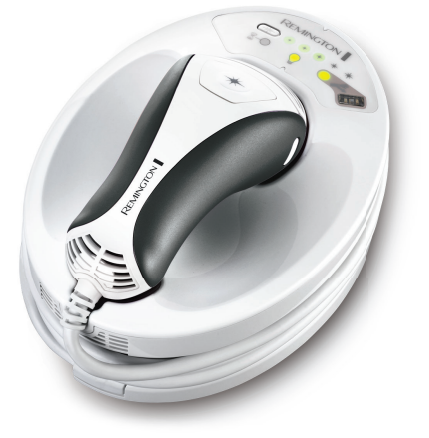
Remington I Light Essential IPL Hair Removal IPL6250
Introduction
The Remington I Light Essential IPL Hair Removal IPL6250 is a clinically proven, at-home hair removal system that uses advanced Intense Pulsed Light (IPL) technology to deliver long-lasting, smooth results. Designed for both men and women, this device is ideal for those seeking a cost-effective, permanent hair reduction solution without the hassle of frequent salon visits. The IPL6250 features a 50% larger treatment window (3 cm²), allowing for faster coverage and more efficient sessions. With five adjustable energy settings and a built-in skin sensor, it ensures safe and effective use for fair to medium skin tones.
Key benefits include permanent hair reduction in just three treatments, a comfortable ergonomic design, and FDA clearance for safety. The Remington I Light Essential IPL6250 is perfect for targeting smaller body areas like the face, underarms, and bikini line, making it a versatile choice for everyday grooming. While newer models are now available, the IPL6250 remains a popular option for those seeking reliable performance at a competitive price. Estimated retail price ranges from $150 to $200, though availability may be limited as newer models have replaced it in many markets.
Specifications: Remington I Light Essential IPL Hair Removal IPL6250
- Technology: Intense Pulsed Light (IPL) with PROPULSE™
- Treatment Window: 3 cm² (50% larger than previous models)
- Flash Rate: 3 seconds per flash
- Energy Settings: 5 adjustable levels
- Skin Sensor: Built-in for safe use on fair to medium skin tones
- Power Source: Mains-powered (plug-in)
- Attachments: Body and facial attachments for targeted treatment
- Certifications: FDA cleared, CE certified
- Lamp Lifetime: Up to 100,000 flashes (varies by usage)
- Weight: Lightweight, ergonomic design
Compared to similar devices like the Remington IPL6500 and IPL6750, the IPL6250 offers a slightly smaller treatment window and fewer flashes, but remains a solid choice for smaller areas and budget-conscious users.
Setup Guide: Remington I Light Essential IPL Hair Removal IPL6250
Setting up your Remington I Light Essential IPL Hair Removal IPL6250 is simple and straightforward:
- Unbox the device and ensure all components are present: main unit, power cord, body attachment, facial attachment, and user manual.
- Plug the device into a standard electrical outlet.
- Select the appropriate attachment for your treatment area (body or face).
- Turn on the device and select your desired energy level using the control panel.
- Place the skin sensor against your skin to ensure compatibility.
- Begin treatment by pressing the flash button and moving the device across the treatment area.
Key Features
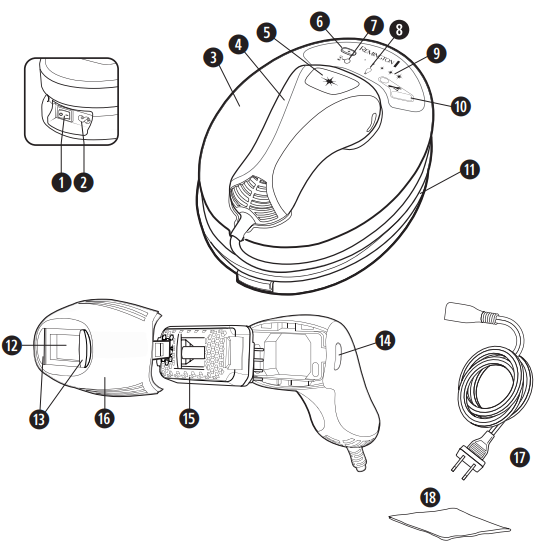
- Power Switch
- Power Inlet
- Base Unit
- Hand Piece
- Flash Button
- Energy Level Selection Button
- Cool Down Mode Indicator
- Bulb Status Indicator Display
- Energy Level Indicator
- Skin Tone Sensor
- Hand Piece Cord
- Flash Window
- Skin Contact Sensors
- Attachment Release Buttons
- Bulb
- Body Attachment
- Power Cord
- Lint Free Cloth
Familiarise Yourself With Your i-Light
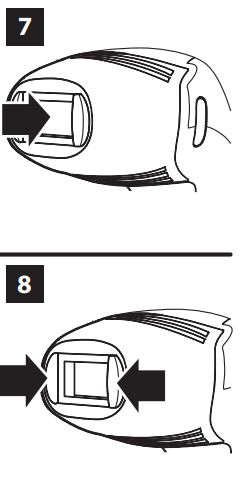
Flash Window with built-in UV skin protection (Fig. 7)
WARNING: always inspect the Flash Window before use to ensure there is no damage to the lens. WARNING: always clean the Flash Window before use with the lint-free cloth provided to ensure there is no oil or debris on the lens.
Skin Contact Sensors (Fig. 8)
This safety mechanism prevents accidental flashing. The device will not flash unless both Skin Contact Sensors are in full contact with the skin.
Flash Button
The Flash Button is located on the hand piece. This is used to activate a flash.
Skin Tone Sensor
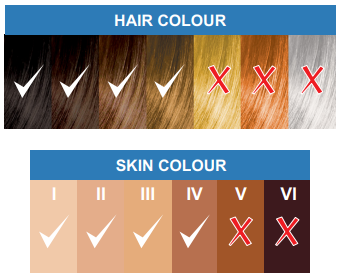
Will only allow usage on suitable skin tones.
Troubleshooting Tips: If the device does not flash, ensure the skin sensor is properly placed and the power cord is securely connected. Always use the device on clean, dry skin for best results.
Safety Warnings: Do not use on dark or tanned skin, near the eyes, or on broken skin. Always follow the manufacturer’s instructions for safe operation.
Preparing for Use
Check Your Skin Tone
- Consult the skin and hair chart at the front of this manual to ensure your skin is in the suitable range and your hair colour is susceptible to treatment with i-LIGHT.
- Place the skin of your intended treatment area onto the skin sensor – ensure the skin is touching the sensor (Fig. 9).
- If your skin is suitable, you will hear a ‘beep’ and the i-LIGHT will switch on.
- If your skin is unsuitable, you will hear a ‘buzz’ and the i-LIGHT will remain switched off.
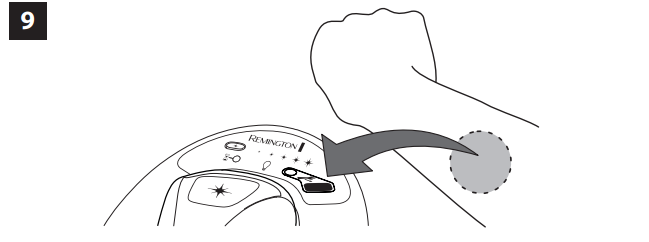
Note: You must use the skin sensor on each body part you wish to treat.
Prepare Your Skin For Treatment
- Ensure the area to be treated is clean and free from oils, deodorants, perfume, make-up, lotions and creams. Shave the hair from the area to be treated, and ensure the skin is clean and dry.
- For facial use, you may prefer to trim the hair. If trimming, the hair must be trimmed to less than 0.5mm.
- Never use wax, epilation, tweezers or other methods that remove the hair from the root as IPL is not effective if the hair has been pulled out.
Prepare the i-Light for Use
- Unwrap the handpiece cord from the i-LIGHT base and rest the handpiece back on the base unit.
- Ensure the power switch on the base unit is OFF.
- Connect the power cord to the i-LIGHT base unit at the power inlet.
- Connect the power cord to the wall outlet. Turn the power switch ON.
Selecting The Energy Level
- The i-LIGHT is equipped with 5 energy levels. Level 1 is the lowest setting and level 5 is the highest setting.
- TIP: For the most effective results, always use the highest energy level that does not cause discomfort on the skin.
- To determine the energy level being used, observe the number of lights illuminated on the Energy Level Display.
- Your i-LIGHT will automatically be set to Energy Level 1 each time the device is powered ON. To change the level, press the Energy Level Selection Button.
Test The i-Light On Your Skin.
- Before your first full treatment, test the i-LIGHT on a small patch of skin and wait 24 hours to ensure there are no adverse reactions.
- Start at energy level 1.
- Place the i-LIGHT , against your skin so the Flash Window is flush with the skin surface.
- Ensure the Skin Contact Sensors are fully engaged and the Bulb Status Indicator Display is illuminated green.
- Press the Flash Button to deliver a flash.
- Mild to moderate discomfort is normal. If a flash delivered at Energy Level 1 feels tolerable, increase to Energy Level 2. Move the device to a different spot and flash the i-LIGHT one more time. Repeat this process until you find the setting that feels right for you.
- Wait 24 hours and then look at the test area. If the skin appears normal, proceed with your first full treatment at the energy level you determined is right for you.
- NOTE: You must test the device on each area of the face or body you wish to treat.
Troubleshooting: Remington I Light Essential IPL Hair Removal IPL6250
- Always read these instructions fully before using i-LIGHT.
- Refer to this troubleshooting guide if you experience any problems with i-LIGHT, as this section addresses the most common problems you could encounter with i-LIGHT. If you have followed the instructions in this section and continue to experience problems, please contact the Remington® Service Centre for further assistance.
The power switch is ON, but the unit is not working
- Make sure the unit is plugged into a working electrical outlet.
Try switching to a different outlet. The unit appears to have cracks or is broken.
- Do not use if the unit is damaged. If you have concerns about using the unit, discontinue use and contact the Remington® Service Centre for further assistance.
I have switched the unit ON, but I cannot change the Mode.
- Try resetting the unit by turning it off and waiting several seconds before turning it back on.
- The Bulb Status Indicator Light turns green but the unit does not flash when the button is pressed.
- Make sure the Skin Contact Sensor is in full contact with the skin.
- Try resetting the unit by turning it off and waiting several seconds before turning it back on.
There is a strange smell
- Be sure the area is completely shaved before treatment.
The treated areas become red after treatment
- This is normal and the redness should subside. If not, try using a lower energy level.
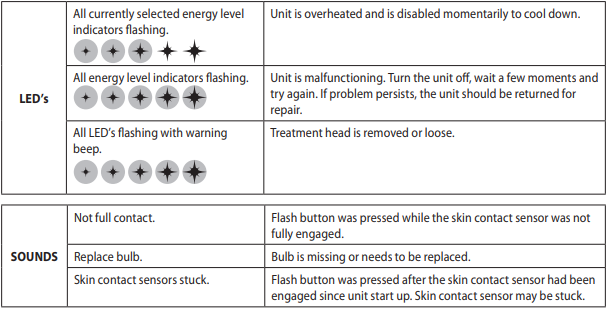
- Be Aware: If the unit is used over an extended period of time, the unit might automatically disable momentarily (estimated 40 seconds) to cool down. Once the unit has cooled down, it will be ready to use again
Preventive Measures: Clean the device after each use and store in a dry place. Avoid using on sensitive or irritated skin.
Warranty & Support: The Remington I Light Essential IPL Hair Removal IPL6250 typically comes with a 1-year manufacturer’s warranty. For support, contact Remington customer service or visit their official website.
Pros & Cons: Remington I Light Essential IPL Hair Removal IPL6250
Pros
- Permanent hair reduction in just three treatments
- 50% larger treatment window for faster coverage
- 5 adjustable energy settings for personalized comfort
- Built-in skin sensor for safe use
- FDA cleared and CE certified
- Lightweight and ergonomic design
Cons
- Slower sessions for larger areas like legs
- Limited availability as newer models replace it
- Not suitable for dark or tanned skin
- Requires mains power (not cordless)
Value for money is high for those targeting smaller areas, but consider newer models for whole-body treatment.
Customer Reviews: Remington I Light Essential IPL Hair Removal IPL6250
Users consistently praise the Remington I Light Essential IPL Hair Removal IPL6250 for its ease of use, comfort, and noticeable hair reduction results. Many highlight the device’s effectiveness on smaller areas like the face and underarms, with several reporting smoother skin after just a few sessions. Common complaints include the slow treatment time for larger areas and the device’s limited availability. Average star rating is 4.2 out of 5, with reviewers recommending it for those seeking a reliable, at-home hair removal solution. Frequent mentions include the device’s durability and the convenience of the built-in skin sensor.
Faqs
How do I set up the remington I Light Essential IPL Hair Removal IPL6250 for first-time use?
What should I do if the remington I Light Essential IPL Hair Removal IPL6250 is not flashing or working properly?
Can the remington I Light Essential IPL Hair Removal IPL6250 be used on all skin and hair types?
How often should I use the remington I Light Essential IPL Hair Removal IPL6250 for optimal hair removal results?
What are the key safety features of the remington I Light Essential IPL Hair Removal IPL6250?
How can I maintain and clean my remington I Light Essential IPL Hair Removal IPL6250 device?
What should I do if the remington I Light Essential IPL Hair Removal IPL6250 causes skin irritation?
Does the remington I Light Essential IPL Hair Removal IPL6250 require replacement parts or bulbs?
More remington manuals
- Remington Compact Control HPL IPL3500 User Manual
- Setup: Remington I Light Prestige IPL Hair Removal User Manual
- Remington I-Light IPL Hair Removal IPL2000 User Manual
- Setup: Remington I Light Pro - IPL Hair Removal IPL6500 User Manual
- Setup: Remington 5-in-1 Cordless Epilator EP7030 User Manual
- Remington Cordless Bikini Trimmer BKT4000 User Manual
Leave a Comment