
Setup: Rewire Security DB1 Advanced 4G GPS Tracker User Manual
Content
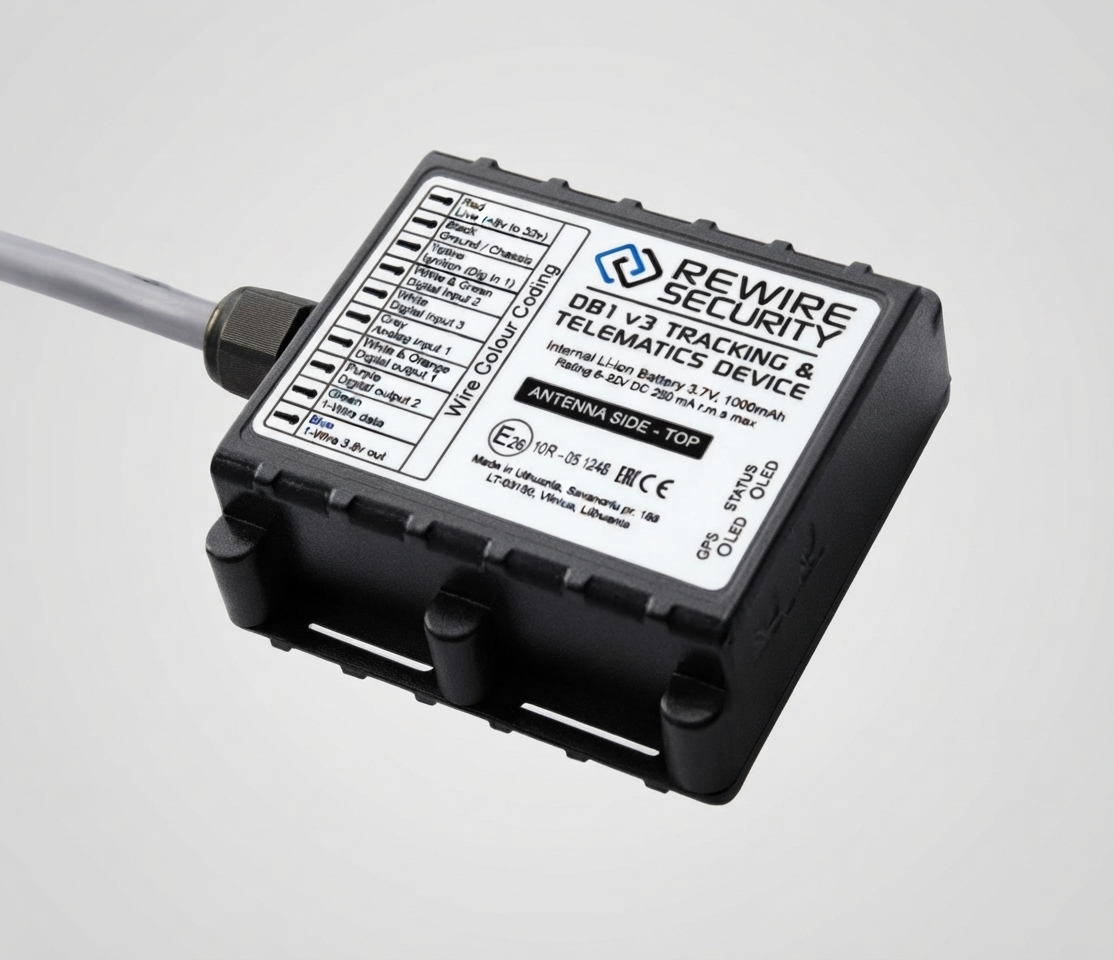
rewire security DB1 Advanced 4G GPS Tracker
Introduction
The rewire security DB1 Advanced 4G GPS Tracker is a cutting-edge tracking device designed for real-time location monitoring with superior connectivity and precision. Engineered for both personal and professional use, this tracker offers unmatched reliability through its advanced 4G LTE network compatibility, ensuring fast data transmission and extensive coverage even in remote areas. Its compact size and robust design make it ideal for vehicle tracking, asset protection, fleet management, and personal safety applications.
Key benefits include ultra-accurate GPS positioning, enhanced security features such as geofencing and tamper alerts, and seamless integration with mobile and web platforms for convenient monitoring. The rewire security DB1 supports multi-mode communication (4G, GSM) to maintain connection stability and boasts a long-lasting battery life that reduces maintenance frequency.
This product targets fleet operators, logistics companies, car owners, and individuals who require reliable tracking with detailed data insights. The device is especially useful for theft prevention, route optimization, and asset recovery. Priced competitively in the range of $80 to $120, it is widely available through authorized resellers and online marketplaces.
Technical Specifications of the rewire security DB1 Advanced 4G GPS Tracker
- Network: 4G LTE Cat.1, backward compatible with 3G and GSM networks
- GPS Accuracy: Up to 5 meters under clear sky conditions
- Positioning Systems: GPS, GLONASS, and BeiDou support
- Dimensions: Compact form factor, approximately 90×45×20 mm
- Weight: Around 80 grams for unobtrusive installation
- Power Supply: Built-in rechargeable battery with 7-10 days standby; supports 9-90V vehicle power input
- Connectivity: 4G LTE, GSM fallback, Wi-Fi-assisted GPS
- Features: Real-time tracking, geo-fencing, overspeed alerts, vibration/tamper alarms, remote engine cut-off (optional)
- Water/Dust Resistance: IP67 rated for all-weather durability
- Platform Compatibility: iOS and Android mobile apps, web portal with map integration
Compared to similar products, the rewire security DB1 Advanced 4G GPS Tracker offers superior network speed and connectivity reliability with its 4G capabilities, outpacing many older 3G-based trackers. Its multi-constellation GNSS support enhances tracking accuracy and speed of location fix, making it ideal for professional fleet management where precision and uptime are critical.
Setup Guide for rewire security DB1 Advanced 4G GPS Tracker
LOCATE THE IMEI NUMBER.
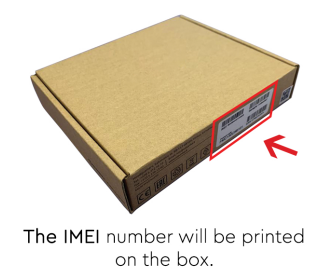
- If you are an existing user, log in to your GPSlive account and continue to step number 5.
- If you have purchased a device witha subscription (service top-up), continue to the reverse of this guide.
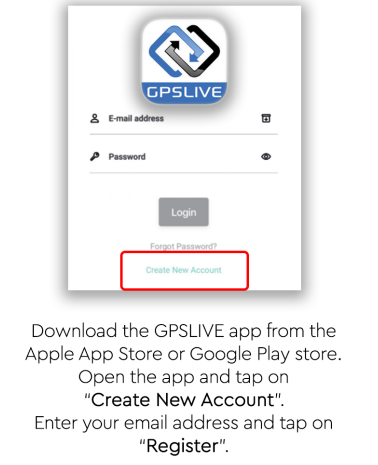
REGISTER YOUR ACCOUNT
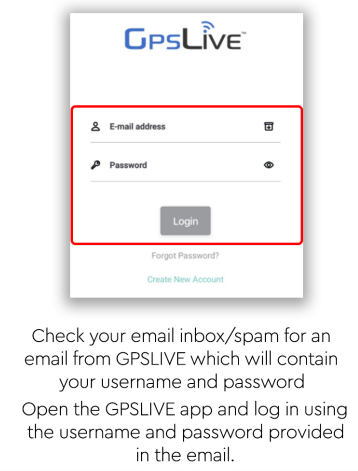
ACCESS YOUR ACCOUNT
SELECT YOUR INTERFACE
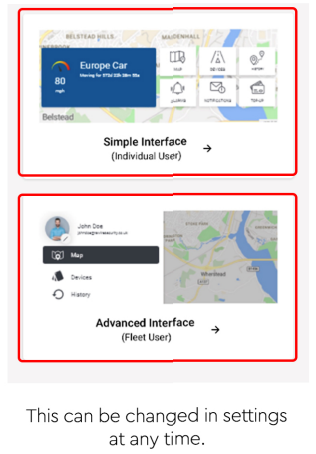
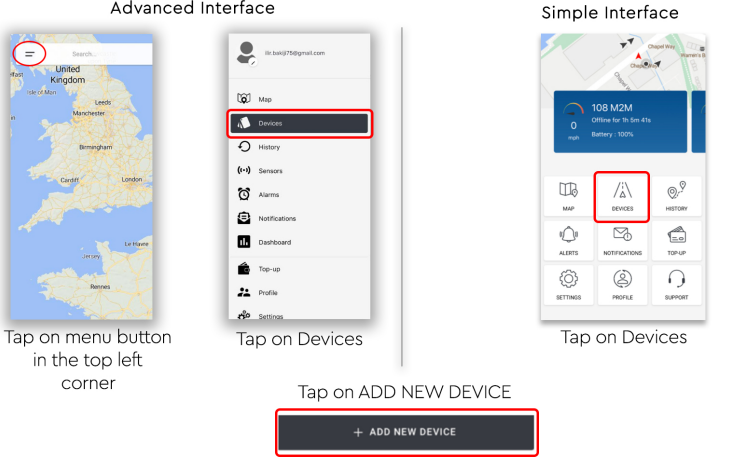
ADD YOUR DEVICE
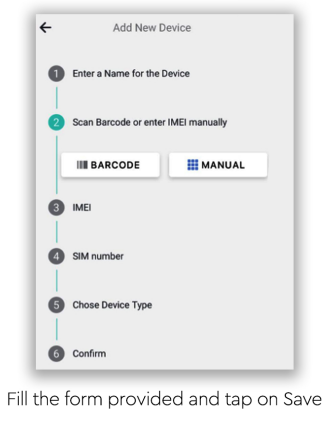
FILL THE FORM PROVIDED
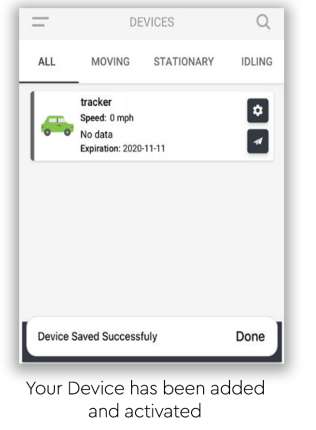
SAVE YOUR DEVICE
Installation
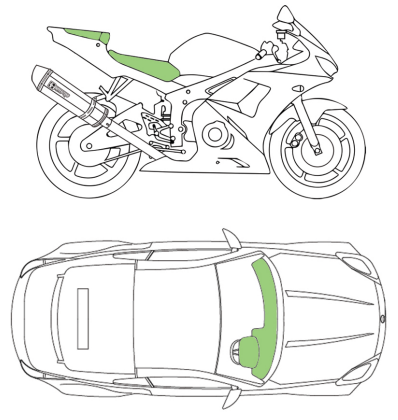
- The device should be installed with the sticker side facing u,p as this is where the directional GPS receiver is located. If possible, avoid installing the device behind thick metal surfaces, es as this will degrade the satellite signal strength.
(e,.g. inside the engine bay or the boot) - Ideal installation places are under the front dashboard or behind the glove box. (See illustrations below)
- If you only require GPS location-related tracking information, simply connect the RED - Power and BLACK - Ground cables only. The Input and output wires are for the optional extra accessories and will not affect the main operation of the device.
LED Lights
- GPS LED: Solid green - Indicates that your device is searching for the GPS signal. Once the GPS connection is established, this LED light will start flashing.
- Status LED: Flashing status LED light indicates that your tracker has power and is operational.
Wiring Socket Pinout
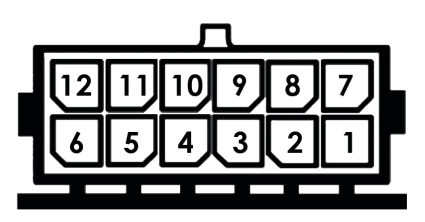
- RED: Permanent live power (positive). Supports from 1 Ov up to 30v DC
- Grey: Analog input. Can be used to measure the exact live voltage of an external device. (e.g., Generator, aux. batter, y, etc.)
- White: Analog input 2: Same as above
- White/Green: Digital Input 2: Digital inputs are used for monitoring positive signals from external sources such as switches, tailgate lift, external alarms, sirens, etc. A Digital input has only two states (1 = On, 0 = Off)
- Yellow: Digital input 1: Dedicated digital input for ignition detection. Must be connected to the ignition switch or an accessory that receives power from the ignition. (e.g., stereo)
- White/Blue: LVCAN - TX: Dedicated for optional LVCAN canbus adapter only.
- Black: Ground/Earth/chassis
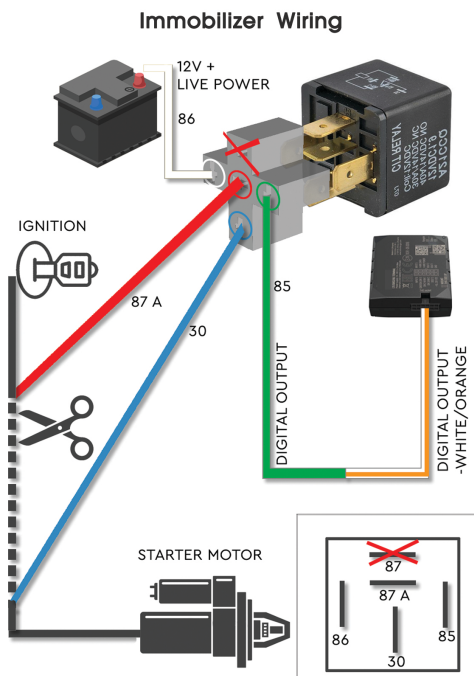
- White/Orange: Digital Output 1: Negative signal output, can be controlled by using the "send command" section of GPSLive. Normally used witha relay for controlling external devices. (e.g. starter motor , I engine cut-off.
- Purple: Digital output 2: Same as above
- Blue: 1-Wire power: Provides 3.8v power output for optional 1-wire sensors.
- Green: 1-Wire data: Data input for optional 1-wire sensors.
- White/Yellow: LVCAN - RX: Dedicated for optional LVCAN canbus adapter only.
Immobilizer Wiring
Troubleshooting for rewire security DB1 Advanced 4G GPS Tracker
- Problem: No GPS signal
Solution: Move the tracker to an open sky area and restart the device. Check for antenna damage. - Error Code 101 (No Network): SIM inactive or no coverage
Fix: Confirm SIM activation and 4G compatibility, repositionthen device for better cellular reception. - Device not powering on: Battery depleted or wiring incorrect
Fix: Charge the device fully or check the vehicle power connections. - Delayed location updates: Network congestion or low GPS signal
Fix: Adjust tracking interval settings for faster refresh.
Preventive measures include regular firmware updates via the app, ensuring SIM plan validity, and periodic battery maintenance if used in standalone mode. The product comes with a standard 12-month warranty covering hardware defects. For technical support, customers can contact rewire security’s dedicated helpdesk via email at support@rewiresecurity.com or call their 24/7 hotline at +1-800-555-DB1.
Pros & Cons of rewire security DB1 Advanced 4G GPS Tracker
Pros
- High-precision GPS: Multi-constellation support ensures accurate tracking under diverse conditions.
- Robust 4G connectivity: Faster data transmission and wider network coverage than older models.
- Comprehensive alert system: Includes geofence alarms, overspeed, vibration, and tamper detection.
- Compact, weatherproof design: IP67 rating enables reliable outdoor and vehicle use.
- Easy integration: Compatible with iOS/Android apps and web portals for versatile monitoring.
Cons
- Installation complexity: Requires professional wiring for optimal vehicle installation to enable advanced features.
- Price point: Slightly higher cost than basic 3G trackers, which may deter budget-conscious buyers.
- Battery life: While adequate, intensive use of 4G can reduce standalone battery runtime.
Overall, the rewire security DB1 Advanced 4G GPS Tracker offers excellent value for money given its extensive feature set and network performance, making it a competitive choice against alternatives like the iTrack Micro GPS and YB04 models.
Customer Reviews of rewire security DB1 Advanced 4G GPS Tracker
Users consistently praise the rewire security DB1 Advanced 4G GPS Tracker for its accurate real-time tracking and reliable 4G connectivity, with many noting improved fleet management efficiency. The device has garnered an average rating of 4.5 out of 5 stars across major retail platforms.
Common praises include the intuitive mobile app interface and quick alert notifications. Some customers mention initial setup can be challenging without professional help, and a few report occasional GPS signal drops in heavily obstructed urban areas. Overall, most reviewers recommend the tracker for businesses and individuals seeking dependable asset security, emphasizing its robust build and feature-rich design.
Faqs
How do I properly set up the rewire security DB1 Advanced 4G GPS Tracker for the first time?
What should I do if the rewire security DB1 Advanced 4G GPS Tracker is not sending location updates?
Can the rewire security DB1 Advanced 4G GPS Tracker send alerts for speeding or unauthorized vehicle use?
Is the rewire security DB1 Advanced 4G GPS Tracker compatible with all vehicle types and voltage systems?
How can I optimize the battery usage and signal accuracy of the rewire security DB1 Advanced 4G GPS Tracker?
What maintenance is required to keep the rewire security DB1 Advanced 4G GPS Tracker functioning reliably?
Can I remotely immobilize my vehicle using the rewire security DB1 Advanced 4G GPS Tracker in case of theft?
How do I set up geofence zones and what practical uses do they have with the rewire security DB1 Advanced 4G GPS Tracker?
More rewire security manuals
- Setup: Rewire Security DB1 Lite GPS Tracker User Manual
- Setup: Rewire Security DB1 Advanced GPS Tracker Instruction Guide
- Setup: Rewire Security DB2 GPS Tracker User Manual
- Usage: Rewire Security DB3 Plug Play GPS Tracker User Manual
- Usage: Rewire Security Spytrack Nano V2 Tracker User Manual
- Setup: Rewire Security DB4 Car Lighter GPS Tracker User Manual
Leave a Comment