
How to Use: Robot Roomba Combo j7+ User Manual
Content
Introduction to the robot Roomba Combo j7+
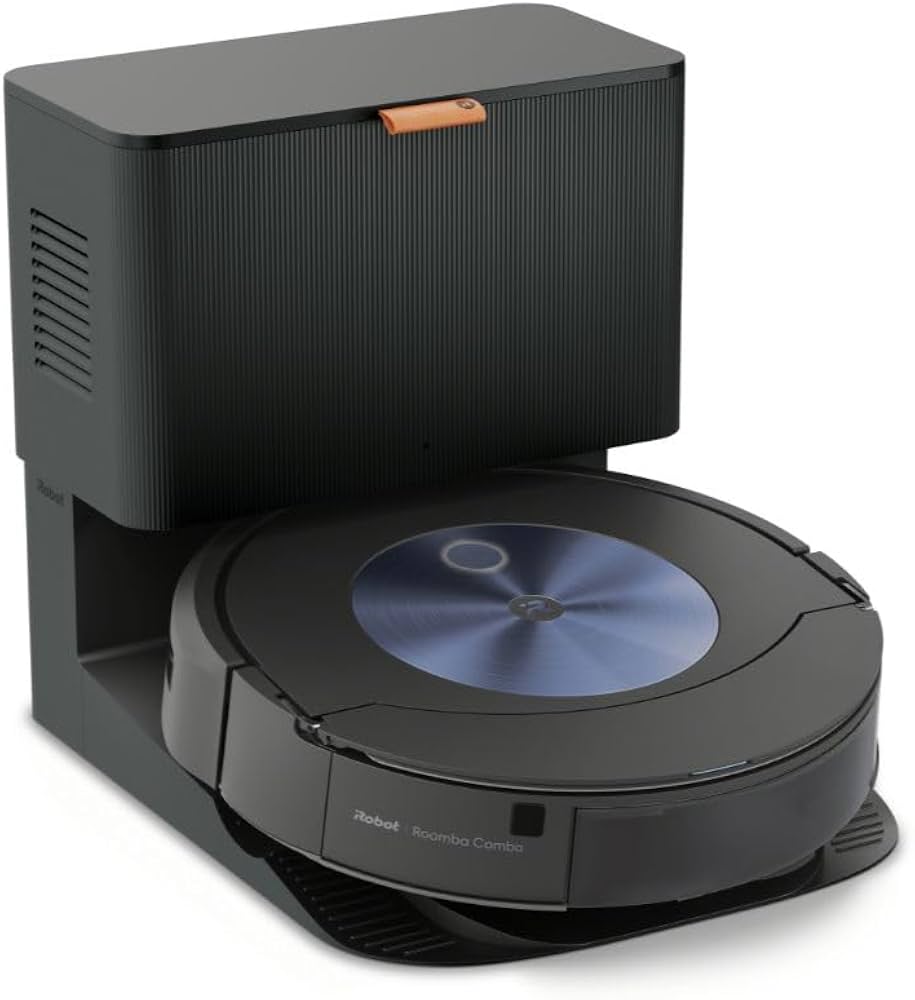
The robot Roomba Combo j7+ is a premium 2-in-1 robot vacuum and mop designed for homes that want powerful everyday cleaning with minimal effort. It combines strong vacuuming, intelligent obstacle avoidance, and a retractable mopping system that lifts away from carpet automatically, making it especially useful for mixed-floor homes with hardwood, tile, and area rugs. Its standout feature is the fully retractable mop arm, which lets the robot switch from vacuuming to mopping without dragging a wet pad across carpets. The included Clean Base Automatic Dirt Disposal also adds convenience by emptying the robot’s bin for hands-free maintenance.
This model is a strong fit for pet owners, busy families, apartment dwellers, and anyone looking for smart floor care with app-based control and voice assistant support. It uses precision navigation, room mapping, scheduled cleaning, custom keep-out zones, and smart mopping controls to make cleaning routines more efficient. The robot Roomba Combo j7+ is positioned as a high-end smart cleaning solution, with a typical price range around $800 to $1,100 depending on sales, retailer bundles, and regional availability. It is widely sold through major electronics retailers and the manufacturer’s store, though pricing can fluctuate significantly during promotions.
For users searching for a robot vacuum mop with self-emptying convenience, reliable carpet detection, and obstacle recognition, the robot Roomba Combo j7+ remains one of the most recognizable options in the premium category.
Specifications for Roomba Combo j7+: detailed technical overview
- Type: 2-in-1 robot vacuum and mop with self-emptying dock
- Robot dimensions: approximately 13.3 inches wide and 3.4 inches high
- Weight: about 7.35 to 7.49 pounds
- Battery: lithium-ion, designed for extended whole-home cleaning cycles
- Navigation: smart mapping with camera-based obstacle detection
- Cleaning system: dual rubber brushes, edge-sweeping brush, and power-lifting suction
- Mopping system: retractable mop pad that lifts clear of carpet
- Dust disposal: Clean Base Automatic Dirt Disposal with bagged auto-empty system
- Bin capacity: roughly 0.4 liters onboard
- Runtime: up to about 180 minutes in ideal conditions
- Connectivity: Wi-Fi app control, Alexa, Google Assistant, and Siri support
- Best for: carpet, hardwood, laminate, tile, and mixed-surface homes
Compared with the standard Roomba j7+, the Combo j7+ adds mopping capability and a larger internal bin design for liquid cleaning solution. Against newer premium robot vacuums, it stands out for its retractable mop architecture, but it does not automatically refill or drain water like some advanced competitors. For shoppers who want the best robot vacuum and mop combination with self-emptying convenience, it remains a competitive premium option.
Setup guide: how to install and connect the robot Roomba Combo j7+
Start by placing the Clean Base on a flat surface against a wall with enough clearance on both sides and in front. Plug in the dock, install the included bag, and charge the robot before first use. Next, download the companion app, create an account, and follow the on-screen pairing steps to connect the robot to your home Wi-Fi network. A 2.4 GHz network is typically the most reliable choice for setup and stable smart-home control.
After pairing, run an initial mapping clean so the robot can learn your floor plan. Use the app to name rooms, create cleaning schedules, set no-go zones, and choose vacuum-only or vacuum-and-mop modes. When using the mopping function, attach the pad and fill the solution reservoir as instructed. Make sure rugs and low carpets are detected properly before the first full cleaning cycle.
Safety tip: remove cords, small toys, loose pet waste, and fragile items from the floor before starting. Do not use the mopping function on unsealed wood or surfaces that can be damaged by moisture. If pairing fails, restart both the robot and router, then try setup again closer to the dock.
Troubleshooting Roomba Combo j7+: common problems and solutions
If the robot does not charge, check the dock alignment, clean the charging contacts, and confirm the power outlet is working. If it misses rooms or cleans in an uneven pattern, run a new mapping session and make sure doors are open during the learning cycle. If the mop pad does not lift on carpet, inspect the mop arm area and confirm the latest firmware is installed.
- Charging issue: clean contacts, reseat the robot, and verify dock power
- Wi-Fi connection problem: reconnect on 2.4 GHz, restart router, and re-pair the device
- Poor suction: empty the bin, replace the filter, and clear brush debris
- Wet carpet concern: confirm carpet detection is enabled and inspect mop assembly
- Stuck error: remove obstructions, check wheels and brushes, then restart
For preventive care, empty debris from the dock area, wash or replace pads regularly, and clean the brushes weekly if you have pets. Firmware updates can improve navigation and obstacle detection, so keep the robot connected to the app. Warranty coverage and support are typically available through the manufacturer, authorized retailers, and online customer service channels. If additional help is needed, use the official support portal, in-app help tools, or retail customer service for purchase-specific assistance.
Pros and cons of the robot Roomba Combo j7+
Pros
- Retractable mop design protects carpets and rugs better than many hybrid robot vacuums
- Strong obstacle avoidance helps it clean around cords, shoes, and pet items
- Self-emptying dock reduces daily maintenance and is ideal for busy households
- Excellent smart mapping and room targeting for customized cleaning
- Good fit for mixed-floor homes with both hard floors and carpets
- Voice assistant compatibility adds convenience for hands-free control
Cons
- Premium price makes it less attractive for budget shoppers
- Mopping system is effective for maintenance cleaning, not heavy scrubbing
- Water handling is more limited than on some all-in-one dock competitors
- App setup and mapping can take time during the first few runs
- Performance is excellent, but value depends on whether mopping is used often
Compared with lower-priced robot vacuums, the robot Roomba Combo j7+ offers better automation, smarter carpet protection, and a more polished hands-off experience. Against newer premium alternatives, it remains compelling for users who prioritize obstacle avoidance and a self-emptying base over advanced water management.
Customer reviews: what users say about the Roomba Combo j7+
User feedback is generally positive, with many owners giving it around 4 to 4.5 stars for convenience, obstacle avoidance, and strong everyday cleaning. Common praise focuses on how well it avoids pet toys, picks up hair, and transitions between vacuuming and mopping without soaking carpets. One frequent testimonial theme is that it feels like a true low-maintenance upgrade for hard floors and mixed-surface homes.
Common complaints include the high price, occasional app quirks, and the fact that the mopping system is best for routine upkeep rather than deep cleaning. Some users also note that the dock and accessories take up more space than a standard robot vacuum setup. Overall, it is often recommended for buyers who want a premium robot vacuum mop with smart mapping, self-emptying convenience, and reliable daily cleaning performance.
Faqs
How do I set up robot Roomba Combo j7+ for the first time?
Why is robot Roomba Combo j7+ not connecting to Wi-Fi during setup?
How does robot Roomba Combo j7+ detect carpets and switch cleaning modes?
What should I do if robot Roomba Combo j7+ keeps missing spots or cleaning in a messy pattern?
Can robot Roomba Combo j7+ vacuum and mop at the same time on mixed floors?
How do I maintain the robot Roomba Combo j7+ mop pad and dust bin for better performance?
What battery and docking issues are common with robot Roomba Combo j7+?
Is robot Roomba Combo j7+ compatible with smart home assistants and voice control?
Tags
More robot manuals
Leave a Comment