
Setup & Pairing: Sceptre C25 LED Monitor User Manual
Content
Sceptre C25 LED Monitor
Introduction
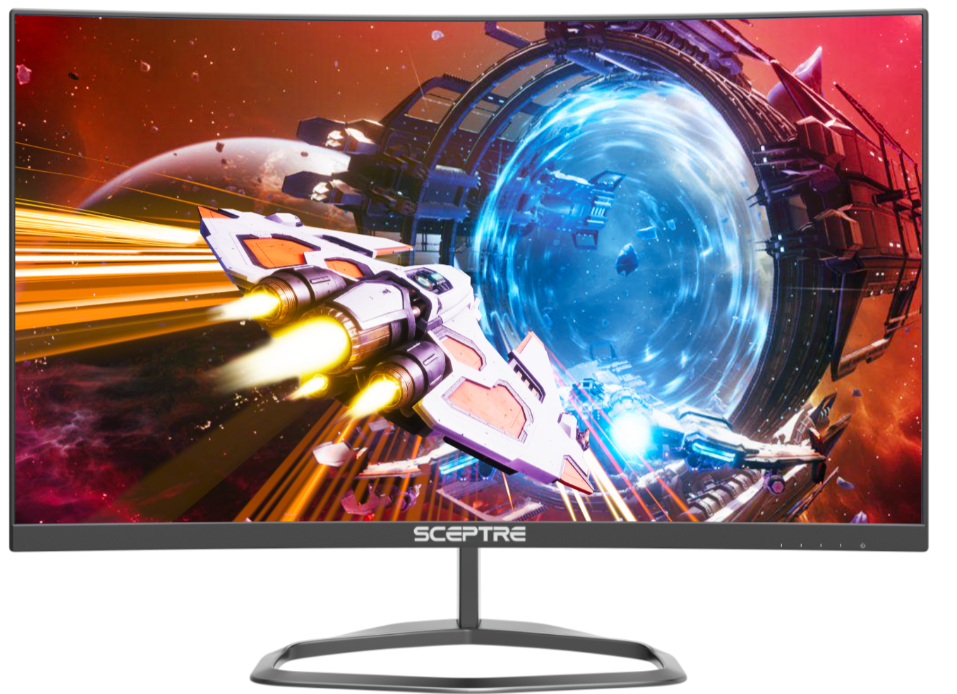
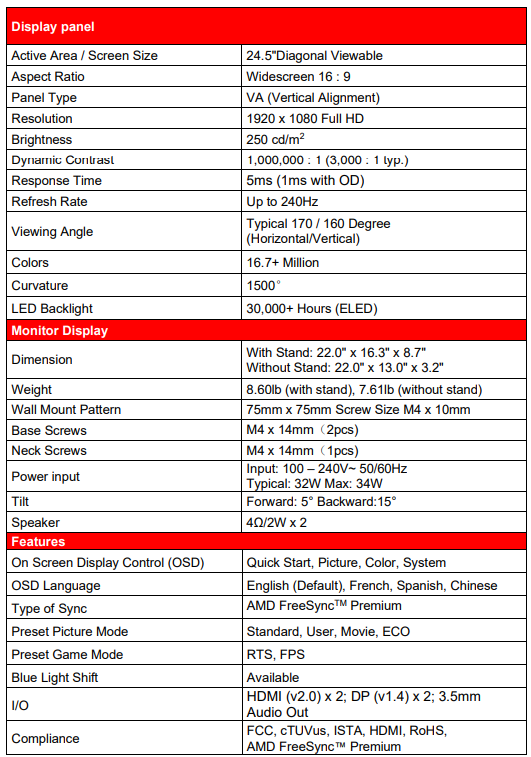
The **Sceptre C25 LED Monitor**, specifically the C255B-FWT240 model, is a high-performance gaming monitor designed to deliver exceptional visual quality and immersive experience. With a 24.5-inch VA panel, it offers a Full HD resolution of 1920 x 1080 pixels, ensuring crisp and detailed visuals. The monitor's 240Hz refresh rate, combined with a 1ms response time (with overdrive), makes it ideal for fast-paced games, providing a smooth and responsive experience. The 1500R curvature enhances immersion, while AMD FreeSync Premium ensures seamless gameplay by reducing screen tearing. This monitor is perfect for gamers and multimedia enthusiasts seeking high-quality visuals without breaking the bank.
Targeted at budget-conscious gamers, the Sceptre C25 LED Monitor offers excellent value for its price, which typically falls within the $200-$300 range. It is widely available at major retailers like Walmart. The integrated speakers provide convenience, though external audio setups are recommended for optimal sound quality.
Installation
Installing the Monitor Stand Assembly
- Take the monitor with packing foam out of the box. Lay the monitor screen facing down on a table with the monitor still resting on the packing foam. Obtain the display base and attach it to the display neck. While the neck is attached to the base, insert, and tighten 2 base screws to the bottom of the base.
- Install the assembled stand to the back of the monitor and screw in the 1 neck screws to secure the stand to the monitor.
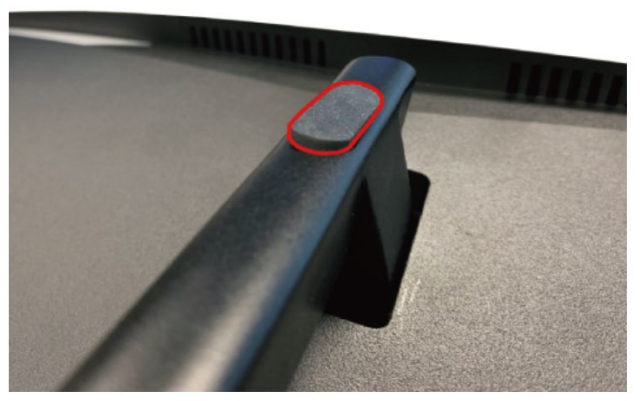
- Insert the rubber cover to the back of the neck.
- To finalize your installation of the display, please read the following:
- If you are placing the display on a stand, we would recommend using a display safety strap (not included) to minimize the possibility of the display toppling over.
- Securely install all screws and connections.


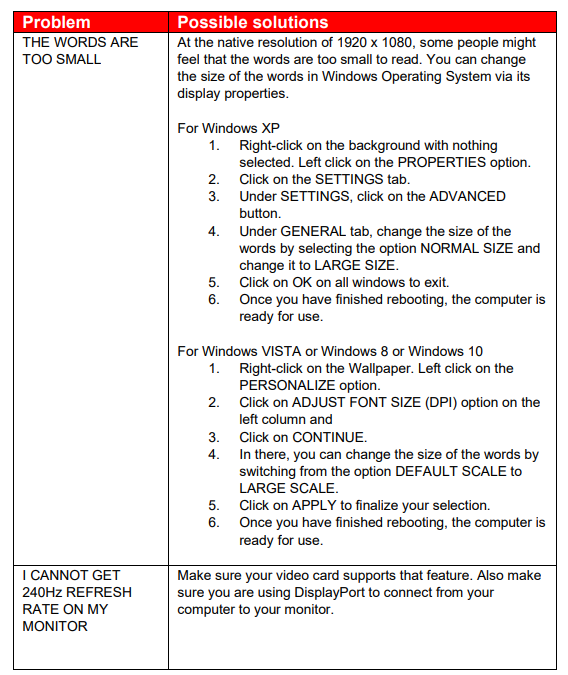
Troubleshooting
Specification
LIMITED PRODUCT WARRANTY
- Please read this warranty card carefully. It is a “ONE-YEAR LIMITED WARRANTY” on parts and labor (90 days for commercial use) and is only valid when purchased from an Authorized Reseller, only on the new and non-refurbished product, and available to customers in the Continental US, Alaska, Hawaii, and Puerto Rico. See below for the SCEPTRE Extended Service warranty.
- SCEPTRE’s Responsibility
SCEPTRE units purchased from an authorized SCEPTRE US Reseller in the United States and that are used in the fifty (50) United States or Puerto Rico and Canada are warranted to be free from manufacturing defects in materials and workmanship for a period of one (1) year from the date of their original retail purchase (or a period of ninety (90) days for commercial use). If the unit fails to conform to this warranty, we will service the units using new or refurbished parts. In the event that the part required for replacement is no longer in production and/or is obsolete, SCEPTRE will repair or replace the unit with similar or like parts of equal value. If a similar or like part is not available, a charge may be incurred to the owner for any upgraded parts substituted. - Service Labor
During a period of one (1) year from the effective warranty date (or a period of ninety (90) days for commercial use), SCEPTRE will provide, when needed, service labor to repair a manufacturing defect at its designated Service Center. To obtain warranty service in the United States, you must first call our Customer Support at (800) 788-2878. The determination of service will be made by SCEPTRE Customer Support. PLEASE DO NOT RETURN YOUR UNIT TO SCEPTRE WITHOUT PRIOR AUTHORIZATION. - Parts
New or remanufactured parts will be used for repairs by SCEPTRE at its designated Service Center for one (1) year (or ninety (90) days for commercial use) from the effective warranty date. Such replacement parts are warranted for the remaining portion of the original warranty period. - Service
During the one (1) year (or ninety (90) days for commercial use) warranty period, SCEPTRE will, at its option and sole discretion, repair or replace defective parts, including replacement of the entire Panel. The Customer will be required to ship the unit to the Service Center indicated at the time Customer Support is contacted to make the necessary repairs. You are responsible for all transportation charges to the service facility. SCEPTRE is not responsible for the de-installation or reinstallation of the unit.
Packaging and Shipping Instruction
When you send the product to an authorized SCEPTRE service facility, you must use the original carton box and packing material or an equivalent as designated by SCEPTRE. If you no longer have them, please contact Sceptre’s Customer Support. - Not Covered
This warranty does not cover the following: cosmetic defects; damage, malfunctions, or failures resulting from shipping or transit accidents, abuse, misuse, operation contrary to furnished instructions, operation on incorrect power supplies, operation with faulty associated equipment, modification, alteration, improper servicing, tampering and or, damage from fire, water, lightning, power surges, abnormal environmental conditions, or other acts of nature; normal wear and tear (SCEPTRE reserves the right to determine “wear and tear” on any and all products); unsatisfactory visual or audio performance not caused by a manufacturing defect; or displays on which the serial number has been removed or defaced.
Pros and Cons of the Sceptre C25 LED Monitor
Pros
- High Refresh Rate and Fast Response Time: Offers a 240Hz refresh rate and 1ms response time, ideal for fast-paced games and reducing motion blur.
- Immersive Experience: The 1500R curved design enhances viewing angles and immersion in games and movies.
- AMD FreeSync Premium: Eliminates screen tearing for smoother gameplay with compatible graphics cards.
- Value for Money: Provides high-quality gaming features at a budget-friendly price.
Cons
- Audio Quality: Built-in speakers are basic; external audio setups are recommended for better sound.
- Stand Flexibility: The stand is not highly adjustable, which might limit positioning options.
- Color Accuracy: While it covers 99% of the sRGB color gamut, it may not be ideal for professional color-critical work.
Customer Reviews and Feedback
Customers praise the Sceptre C25 LED Monitor for its high refresh rate and curved display, which enhance gaming and multimedia experiences. However, some users note that the built-in speakers are lacking and not ideal for immersive audio. Overall, it is well-regarded for its value and performance in the budget gaming segment.
Common complaints include the need for external speakers and limited stand adjustability. However, the monitor's high refresh rate and AMD FreeSync capabilities make it a popular choice among gamers seeking a cost-effective option.
Star ratings typically range from 4 to 4.5 out of 5, with many users recommending it for casual gaming and multimedia use.
Faqs
How do I properly set up the sceptre C25 LED Monitor for the first time?
What should I do if the sceptre C25 LED Monitor screen is flickering or showing display issues?
Can I use the sceptre C25 LED Monitor with both HDMI and DisplayPort for 240Hz refresh rate?
What are the main gaming features of the sceptre C25 LED Monitor that enhance performance?
How do I reduce eye strain when using the sceptre C25 LED Monitor for long gaming sessions?
Is the sceptre C25 LED Monitor compatible with Mac and Linux devices?
How do I maintain and clean my sceptre C25 LED Monitor to ensure longevity?
What troubleshooting steps should I take if the sceptre C25 LED Monitor is not displaying any image?
Tags
More sceptre manuals
Leave a Comment