
How to Use: Sharper Image IONIC COMFORT QUADRA AIR PURIFIER Instruction Guide
Content
Sharper Image IONIC COMFORT QUADRA AIR PURIFIER
Introduction
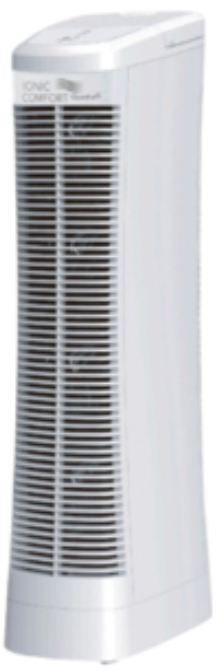
The sharper image IONIC COMFORT QUADRA AIR PURIFIER offers an effective solution for improving indoor air quality through advanced ionic technology. Designed as a sleek, tower-style purifier, it provides fresher, cleaner air by neutralizing airborne pollutants such as dust, pollen, smoke, and pet dander. Ideal for medium-sized rooms up to 100 square feet, this air purifier is perfect for bedrooms, offices, and living spaces where clean air enhances comfort and health.
Key benefits include whisper-quiet operation, energy-efficient performance, and easy maintenance with no need for replacement filters. The IONIC COMFORT QUADRA stands out with its tall, space-saving design and the ability to emit negative ions that attract and remove airborne particles effectively. Its modern white finish complements any room décor, making it a practical and stylish addition to your home or workspace.
With an estimated price range of around $315, often found discounted from a higher retail value, the purifier is widely available online via the Sharper Image official store and major retailers. Its combination of affordability, performance, and distinctive ionic technology makes it highly attractive for allergy sufferers and those seeking to reduce indoor air contaminants naturally.
FEATURES AND CONTROLS
SET-UP AND OPERATION
Unpack the unit and make sure that any and all tape and protective wrap is removed from the unit.
IMPORTANT:
REMOVE AND DISCARD THE FOAM-PACKING BLOCK FROM UNDER THE FILTER DOOR.
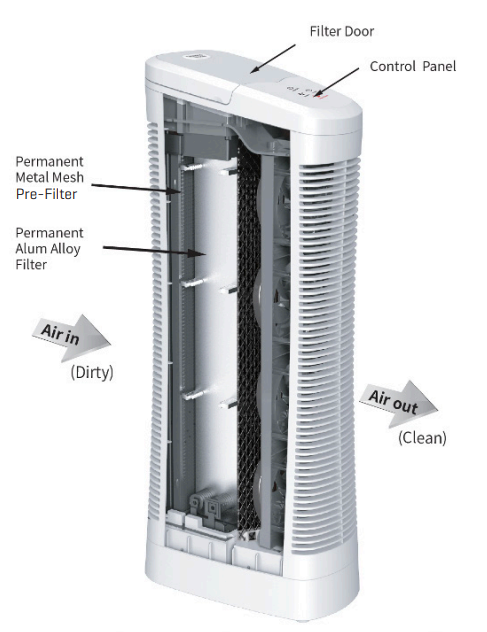
Place the unit on a level floor, keeping it a minimum of 24” (60cm) away from any walls, furniture or appliances. Position the unit so that your clean air flows toward your desired area.
IMPORTANT:
ENSURE THAT THE AIR INTAKE GRILL AND AIR EXIT GRILL ARE NOT BLOCKED.
CONTROL PANEL / OPERATING THE UNIT
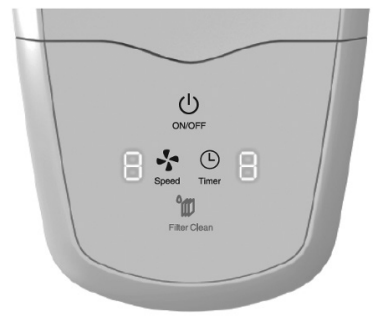
- Plug the power cord into an energized electrical wall outlet.
- Press the Power button to turn the unit on. The Power button will illuminate when on.
- Select your desired fan speed by pressing the Speed button until you reach the ideal
speed. The Speed levels are 1 to 9. - Select your desired time by pressing the Timer button until you reach the ideal time. The setting options are 1 to 9 hours.
- Press the Power button again to turn the unit off.
- The white LED lights on the control panel will turn off automatically after 30 seconds. They will reappear when any button is pressed again. Note that the power icon will remain lit when the unit is on.
FILTER CLEANING REMINDER
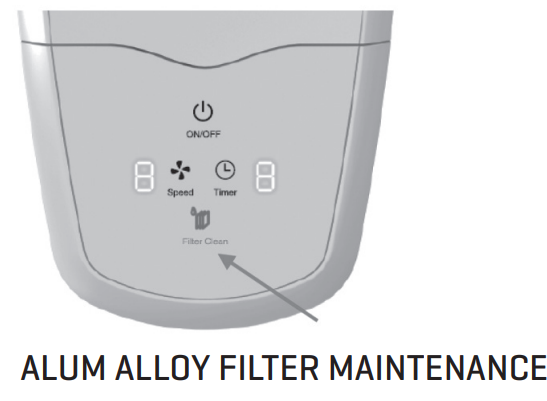
The Check Filter LED Light illuminates to alert you when the Alum Alloy Filter needs to be checked for cleaning. The light is programmed to illuminate after 90 days of use.
To extinguish the light:
- Press the Power button once to turn the unit off.
- Next, hold down the Filter Clean button for 5 seconds. You will see the Check Filter light flash for 3 seconds. The timer is now reset for 90 days.
CAUTION!
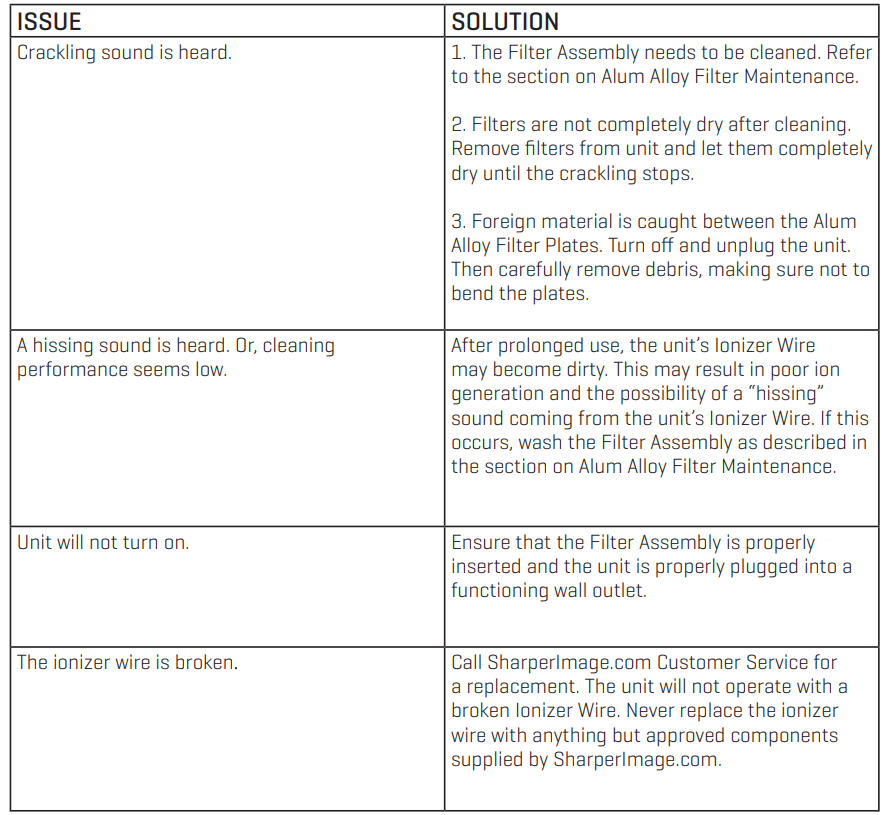
- The Ionizer Wire may break if pressure is applied to it. Be careful when handling or cleaning.
- NEVER insert a wet Filter into the unit. Doing so may permanently damage the electrical components.
It may be necessary to clean the Filter more or less frequently depending on the air quality in your environment. Your Alum Alloy Filter Assembly may be machine washed in your dishwasher or manually in your sink. Please follow these steps to clean the
Alum Alloy Filter Assembly
- Press the Power button to turn the unit off.
- Unplug the unit from the receptacle outlet.
- Open the Filter Door and remove the Alum Alloy Filter Assembly by firmly gripping the filter handle and pulling the assembly out of the unit.
DISHWASHER CLEANING
Remove the Honeycomb Pre-Filter from the bottom of the Alum Alloy Filter Assembly and place both components on the bottom rack of your dishwasher. Wash the filters as you would dishes. If you find that the filter’s Alum Alloy Filter Plates do not get clean with one wash cycle, increase the wash cycle time or wash the filters for a second time. Note that some phosphate-free dishwasher detergents can cause staining to the aluminum filter-frame. Staining will not affect performance. If in doubt, use water-only cleaning or clean in the sink. The normal dishwasher drying cycle should be an effective drying time.
NOTE: Do not allow the dishwasher rack to bend the Alum Alloy Filter Plates or break the Ionizer Wire. Care must be taken when positioning in the dishwasher. Your air purifier will not function properly if the Alum Alloy Plates touch each other or the Ionizer wire breaks.
SINK CLEANING
Remove the Honeycomb Pre-Filter from the Alum Alloy Filter Assembly and place both components in your sink. Rinse to remove large debris. Submerge both filters in warm water that contains standard dish washing soap. Allow the filters to soak for at least 15 minutes, Drain the sink and then rinse the filters with cold water.
NOTE: You may use a small-headed scrub brush to clean stubborn residue between the Alum Alloy Plates or Honeycomb Pre-Filter. However, take care not to bend the Alum Alloy Plates or apply pressure to the Ionizer Wire. - Allow the Alum Alloy Filter and Honeycomb Pre-Filter to dry completely before inserting them back into the unit. They can be dried either in the dishwasher or allowed to air dry. Typically, evaporative air drying can take 12 to 24 hours, depending on humidity and temperature.
- Install the Honeycomb Pre-Filter back into the bottom of the Alum Alloy Filter Assembly. Don’t worry: both ends are the same, so it can be inserted either way. Never operate the unit without the Honeycomb Pre-Filter.
- Insert the cleaned and dried Alum Alloy Filter Assembly back into your unit.
- If you have reinstalled the Alum Alloy Filter Assembly after cleaning and drying, and hear “crackling” after turning it on, your filter is still wet. Turn the unit off, remove the Filter Assembly and allow it to dry longer.
TROUBLESHOOTING
Specifications and Features of the Ionic Comfort Quadra Air Purifier
- Dimensions: 11.8 inches (L) x 7.3 inches (W) x 28.4 inches (H)
- Weight: Approximately 16.1 lbs
- Filtration Technology: Ionic ionizer system generating negative ions to cleanse air
- Coverage Area: Suitable for rooms up to 100 square feet
- Design: Tower-style, compact footprint for easy placement
- Noise Level: Quiet operation ideal for bedrooms and offices
- Power Consumption: Energy-efficient with low wattage consumption, contributing to ENERGY STAR standards
- Maintenance: No replacement filters required; simple cleaning process
Compared to traditional HEPA air purifiers, the Sharper Image Ionic Comfort Quadra emphasizes ionization rather than physical filtration, offering a quieter and lower-maintenance alternative. While HEPA models may cover larger spaces, this product excels in compact areas with effective particle neutralization and odor reduction.
Pros & Cons of the Sharper Image Ionic Comfort Quadra Air Purifier
Pros
- Effective Air Cleaning: Ionization helps capture dust, smoke, and allergens efficiently in small to medium rooms.
- Low Maintenance: No filters to replace, reducing ongoing costs and hassle.
- Quiet Operation: Suitable for nighttime use without disturbance.
- Compact, Stylish Design: Fits easily into tight spaces with an attractive, modern look.
- Energy Efficient: Consumes low power, making it economical over long-term use.
Cons
- Limited Coverage: Best suited for rooms up to 100 sq ft, which may not suffice for larger areas.
- Ionization Drawbacks: Some users report mild ozone generation, which may not be ideal for sensitive individuals.
- Less Effective on Particulates than HEPA: Unlike HEPA filters, ionizers do not physically trap particles, which could reduce effectiveness against certain pollutants.
- Price Point: At around $315, it may be pricier than some basic purifiers without ion technology.
Customer Reviews and User Feedback on Ionic Comfort Quadra Air Purifier
Users commonly praise the sharper image IONIC COMFORT QUADRA AIR PURIFIER for its silent operation and ease of use, highlighting noticeable improvements in air freshness and reduction of odors in small rooms. Many appreciate the low maintenance without costly filter replacements. Star ratings often average around 4 out of 5 stars, reflecting general satisfaction.
However, some customers mention a mild ozone smell during initial use and recommend running the unit in well-ventilated areas. A few note that the purifier is less effective for larger spaces or heavy smoke conditions compared to HEPA filter alternatives. Despite these issues, many reviewers recommend this product for allergy relief and general air quality improvement in compact environments.
Purchase recommendations emphasize its value for users seeking quiet, filter-free air purification with ionic technology, especially for bedrooms and small offices.
Faqs
How do I set up the sharper image IONIC COMFORT QUADRA AIR PURIFIER for the first time?
What should I do if the sharper image IONIC COMFORT QUADRA AIR PURIFIER is not turning on or responding?
Can the sharper image IONIC COMFORT QUADRA AIR PURIFIER effectively reduce allergens and odors in large living spaces?
How do the 9 variable fan speeds on the sharper image IONIC COMFORT QUADRA AIR PURIFIER improve air purification?
Is the sharper image IONIC COMFORT QUADRA AIR PURIFIER easy to maintain, and how often should I clean it?
Does the sharper image IONIC COMFORT QUADRA AIR PURIFIER operate quietly enough for bedroom use?
Are there any special power requirements or electrical compatibility issues with the sharper image IONIC COMFORT QUADRA AIR PURIFIER?
What troubleshooting steps can I take if the air purifier's fan speed controls are unresponsive on the sharper image IONIC COMFORT QUADRA AIR PURIFIER?
More sharper image manuals
- How to Use: Sharper Image AIRBAR TOWER FAN User Manual
- How to Use: Sharper Image Rechargeable Wine Opener with Wine Opener User Guide
- How to Use: Sharper Image FLY01 FITNESS HIGH-VELOCITY FITNESS FAN User Manual
- How to Use: Sharper Image Wine Bottle Combination Locks set User Manual
- Usage & Charging: Sharper Image GO 4 RECHARGEABLE HANDHELD FAN User Manual
- Setup & Usage: Sharper Image Star Wars Waffle Maker DWM-SRW-DST User Manual
Leave a Comment