
How to Use: Sharper Image AIRBAR TOWER FAN User Manual
Content
Sharper Image AIRBAR TOWER FAN
Introduction
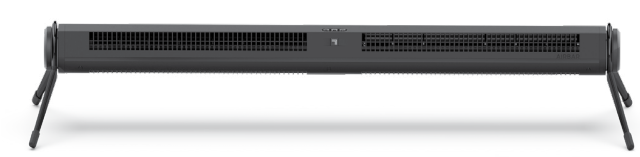
The Sharper Image AIRBAR TOWER FAN is a versatile, compact cooling solution designed for both home and office environments. This innovative fan converts easily between a low-profile Airbar and a space-saving tower fan, offering flexible use in small to medium-sized spaces. Its sleek design complements modern interiors while delivering powerful airflow, making it ideal for desks, bedrooms, or personal workspaces.
Key benefits include a quiet, energy-efficient DC motor, three adjustable speed settings, and a full-range tilt feature that allows precise airflow direction. The fan also features touch-sensitive controls and a 360-degree pivoting head, providing effortless comfort customization. Its USB power option enhances portability and convenience, allowing it to run from laptops, power banks, or USB adapters.
Targeted at individuals seeking a compact, quiet fan with flexible positioning and modern aesthetics, the AIRBAR TOWER FAN suits students, professionals, and small apartment dwellers alike. It is especially useful for personal cooling in confined spaces where larger fans are impractical.
The sharper image AIRBAR TOWER FAN is typically available at major retailers and online stores, with an estimated price range between $30 to $60, depending on the model and features included. Its affordability, combined with multi-functionality,y makes it a compelling choice for budget-conscious buyers.
ASSEMBLY
No tools required.
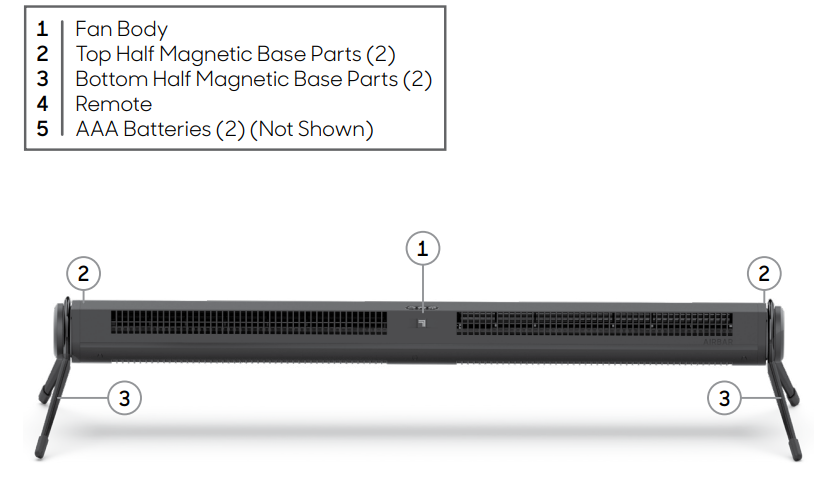
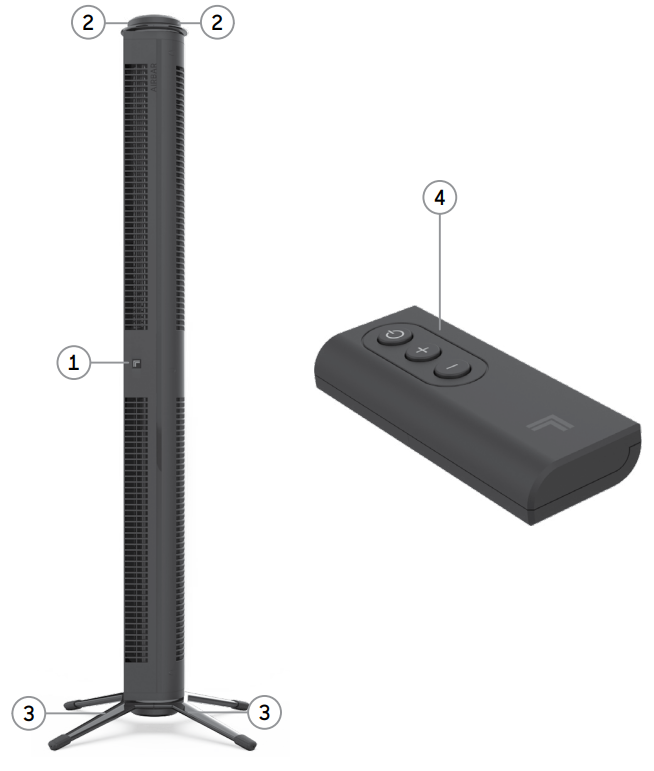
The AXIS 32/42 can be used in one of two orientations: horizontal or vertical.
For HORIZONTAL orientation:

- Lay the fan body horizontally.
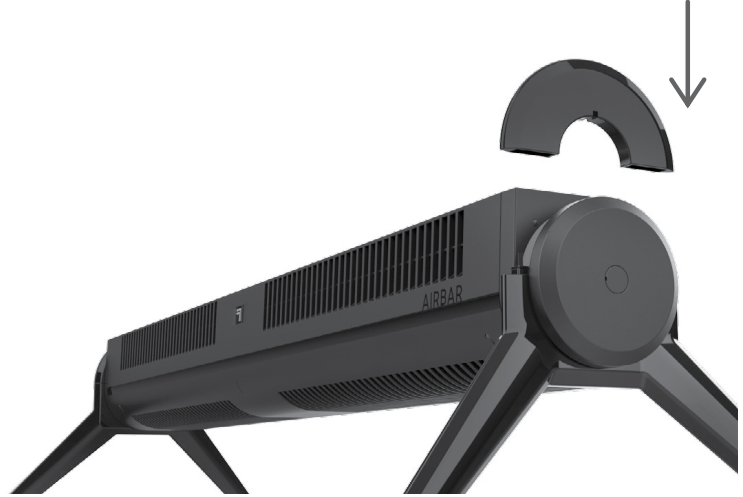
- Install the 2-bottom-half magnetic base parts, one on each end of the fan body. Take care to align the notch on each bottom base part with the notch on the fan body.
- Install the 2 top half magnetic base parts. Again, take care to align the notches on the base parts with the notches on the fan body. When properly installed, the top and bottom base parts will magnetically click into place.
For VERTICAL orientation:

- Lay the fan body horizontally.
- Locate the power cord. This will be the bottom of the product in the vertical orientation.
- Install the 2 bottom half magnetic base parts to the bottom of the fan head (the end with the power cord). Take care to align the notch on each bottom base part with the notches on the fan body.
- Install the 2 top half magnetic base parts on the other end of the fan head. Again, take care to align the notches on the base parts with the notches on the fan body. When properly installed, the base parts will magnetically click into place.
- Lift the product to vertical orientation to use.
CLEANING & STORAGE
Your fan will need regular cleaning. The fan has no user-serviceable parts inside and cannot be opened for cleaning. Never clean the product in any manner other than as instructed in this owner's guide.
- Power off and unplug the unit before cleaning.
- Dust or wipe the fan with a damp cloth.
- Use the brush attachment on your household vacuum cleaner to vacuum any accumulated dust.
During the off-season or after extended periods of non-use, you may choose to store your fan. To ensure the long life of the product, it is recommended to store your fan by following these instructions:
- Unplug the power cord and bundle loosely.
- Cover, or place back in retail carton if available. This prevents the fan from accumulating dust over time.
- Store the an in a cool and dry location.
TROUBLESHOOTING
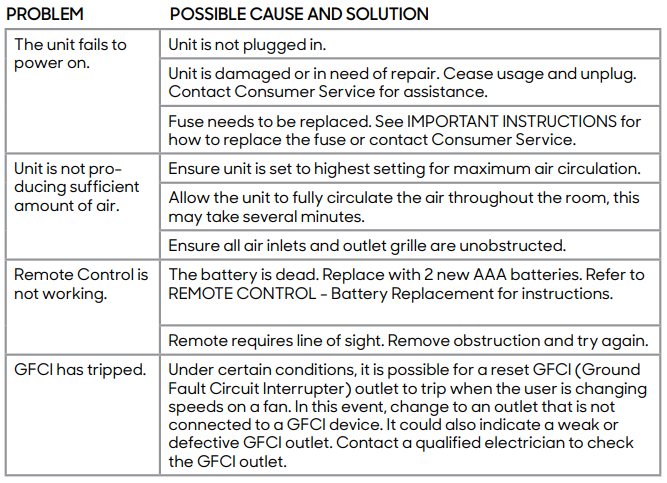
WARRANTY
If you’re not satisfied with this product, let us know.
- Vornado Air, LLC warrants to the original consumer or purchaser that this Sharper Image® Fan (“Product”) is free from defects in material or workmanship for a period of two (2) years from the date of purchase. If any such defect is discovered within the warranty period, Vornado, at its discretion, will repair or replace the Product at no cost.
- For warranty or repair service: Call 833-800-8669 or email help@sihomecomfort.com to obtain a Return Authorization (“RA”) form. Please have or include your Product’s model number and serial number, as well as your name, address, city, state, zip code , and phone number when contacting Vornado for warranty service. To file a contactless warranty claim, visit sihomecomfort.com/contact.
- After receiving the RA form, ship your Product to: Vornado Air LLC, Attn: Warranty & Repair,r 415 East 13th Street, et Andover, KS 67002. For your convenience, please have your model number and serial number when contacting Vornado with service inquiries.
- To assure proper handling, packages must be clearly marked with the RA number. Packages not clearly marked with the RA number may be refused at the receiving dock. Please allow 1-2 weeks for repair and return of your Product after the product has been received.
- Repairs not covered by the warranty or outside the warranty period will require a fee to cover the cost of materials, labor, handling, and shipping. \
- This warranty does not apply to defects resulting from abuse of the Product, modification, alteration, mishandling, improper maintenance, commercial use,e or repair or service of the Product by anyone other than Vornado; damages which occur in shipment or are attributed to acts of God. Improper product use, which includes using an external device that alters or converts the voltage or frequency of electricity, or shipping a Vornado product to a country not intended for us,e will void all warranties. Any unauthorized product modification, repair by unauthorized repair center, or use of non-approved replacement parts is not recommended, ed and any consequences will not be covered by support services or product warranties. The product warranty will be honored only on models that are being used in the country intended.
- REPAIR OR REPLACEMENT AS PROVIDED UNDER THIS WARRANTY IS THE EXCLUSIVE REMEDY OF THE CONSUMER. VORNADO SHALL NOT BE LIABLE FOR ANY INCIDENTAL OR CONSEQUENTIAL DAMAGES FOR BREACH OF ANY EXPRESS OR IMPLIED WARRANTY ON THIS PRODUCT. EXCEPT TO THE EXTENT PROHIBITED BY APPLICABLE LAW, ANY IMPLIED WARRANTY OF MERCHANTABILITY OR FITNESS FOR A PARTICULAR PURPOSE ON THIS PRODUCT IS LIMITED IN DURATION TO THE DURATION OF THIS WARRANTY. Some states do not allow the exclusion or limitation of incidental or consequential damages, or allow limitations on how long an implied warranty lasts, so the above limitations or exclusions may not apply to you. This warranty gives you specific legal rights, and you may have other rights that vary from state to state. The manufacturer assumes no responsibility for damage caused by failure to follow these instructions or improper product use. Any such actions will invalidate the product warranty.
- All company names and product names are trademarks of their respective owners. © All rights reserved. All technical information, data, and instructions for the installation, connection, and operation contained in these instructions for use correspond to the latest available information at the time of printing. The contents of this manual may differ slightly from the actual product. Observe any additional supplements.
- ©2022 Vornado Air LLC, Andover, Kansas 67002 USA.
- Specifications subject to change without notice.
- Sharper Image® name and logo are registered trademarks.
- Manufactured, marketed, and distributed under license by Vornado Air LLC, Andover, Kansas 67002.
- Manufactured in China.
- Sharper Image® Distributed under license by Vornado Air LLC, Andover, Kansas 67002.
Specifications of the Sharper Image AIRBAR TOWER FAN
- Fan Type: Convertible USB Desktop Tower fan and Airbar
- Dimensions: Approx. 13" height (Airbar mode), 3.76" width, 4.5" depth
- Weight: Approximately 0.9 lbs, lightweight and portable
- Power Source: USB powered with AC adapter option
- Speed Settings: 3 levels for customizable airflow
- Motor: Energy-efficient, quiet DC motor
- Controls: Touch-sensitive buttons; some models include a remote control
- Airflow Features: 360-degree pivoting head with full-range tilt
- Noise Level: Quiet operation suitable for office and bedroom use
- Additional Features: Converts between tower fan and airbar modes without tools
- Warranty: Typically includes a 1-year limited warranty
Compared to similar USB-powered desktop fans, the Sharper Image AIRBAR TOWER FAN stands out with its tool-free mode conversion, pivoting head, and integrated quiet DC motor, offering a higher degree of customization and comfort than many basic models.
Pros & Cons of the Sharper Image AIRBAR TOWER FAN
- Pros:
- Compact, lightweight design ideal for desktops and small spaces
- Versatile conversion between Airbar and tower fan without tools
- Quiet, energy-efficient DC motor suitable for night use
- Three speed settings for tailored airflow intensity
- 360-degree pivoting head with full-range tilt enhances comfort
- USB power supports portability and flexible power sources
- Affordable price offering good value for money
- Cons:
- Limited fan size restricts use to personal or small-area cooling
- No built-in thermostat or timer functions
- Some models lack a remote control, reducing convenience
- May not be as powerful as larger tower fans for whole-room cooling
- USB power requirement can limit placement to near a USB port or adapter
Customer Reviews and Feedback on the Sharper Image AIRBAR TOWER FAN
Users generally praise the sharper image AIRBAR TOWER FAN for its quiet operation, easy mode conversion, and compact footprint. Many highlight its suitability for desks and small rooms, appreciating the customizable airflow with three speed settings and tilt adjustment. The USB power feature receives positive remarks for enhancing portability and use with laptops or power banks.
Common criticisms include the fan's limited cooling capacity for larger spaces and the absence of a remote control on some models, which users find less convenient. A few customers noted that the touch controls can be sensitive, requiring careful operation.
Overall, the fan earns an average rating of approximately 4 out of 5 stars, with frequent recommendations for personal use and small office setups. Buyers looking for a compact, quiet, and versatile fan often endorse it as a practical and affordable option.
Faqs
How do I assemble the sharper image AIRBAR TOWER FAN for the first time?
What should I do if the sharper image AIRBAR TOWER FAN is not turning on?
How do I convert the sharper image AIRBAR TOWER FAN from a tower fan to an Airbar?
Can I use the sharper image AIRBAR TOWER FAN with a USB power source?
How do I maintain the sharper image AIRBAR TOWER FAN for optimal performance?
What are the key features that make the sharper image AIRBAR TOWER FAN different from other fans?
How often should I replace the batteries in the remote control of the sharper image AIRBAR TOWER FAN?
Is the sharper image AIRBAR TOWER FAN suitable for use in large rooms?
More sharper image manuals
- How to Use: Sharper Image FLY01 FITNESS HIGH-VELOCITY FITNESS FAN User Manual
- How to Use: Sharper Image IONIC COMFORT QUADRA AIR PURIFIER Instruction Guide
- Usage & Charging: Sharper Image GO 4 RECHARGEABLE HANDHELD FAN User Manual
- How to Use: Sharper Image Rechargeable Wine Opener with Wine Opener User Guide
- How to Use: Sharper Image PORTAL WINDOW FAN Instruction Guide
- How to Use: Sharper Image Wine Bottle Combination Locks set User Manual
Leave a Comment