
How to Use: Sharper Image PORTAL WINDOW FAN Instruction Guide
Content
Sharper Image PORTAL Window Fan
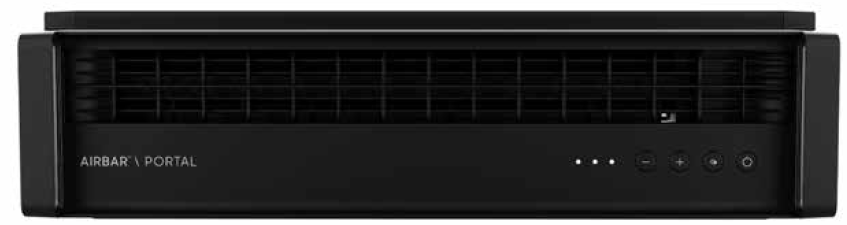
Introduction
The sharper image PORTAL WINDOW FAN is a sleek, modern cooling solution designed to enhance indoor air circulation with minimal noise and maximum versatility. Featuring an ultra-slim profile of just 6.5 inches, this window fan fits windows up to 38 inches wide using an innovative modular block system, preserving window visibility while delivering powerful airflow.
Key benefits include its electronically reversible airflow, allowing users to easily switch between drawing fresh air inside or exhausting stale air outside with a simple push-button control. This makes it ideal for various spaces such as bedrooms, kitchens, and bathrooms, offering both cooling and ventilation capabilities. Its weather-resistant design ensures durability and reliable performance through different seasons.
Targeted towards homeowners and renters looking for compact, efficient window cooling options, the PORTAL Window Fan is perfect for small to medium rooms where quiet operation and flexible airflow direction are essential. With three speed settings and a whisper-quiet motor, it balances performance with comfort.
The sharper image PORTAL WINDOW FAN typically retails in the price range of approximately $90 to $100, widely available through retailers including Best Buy, Walmart, and specialty home comfort stores.
PRODUCT INFORMATION
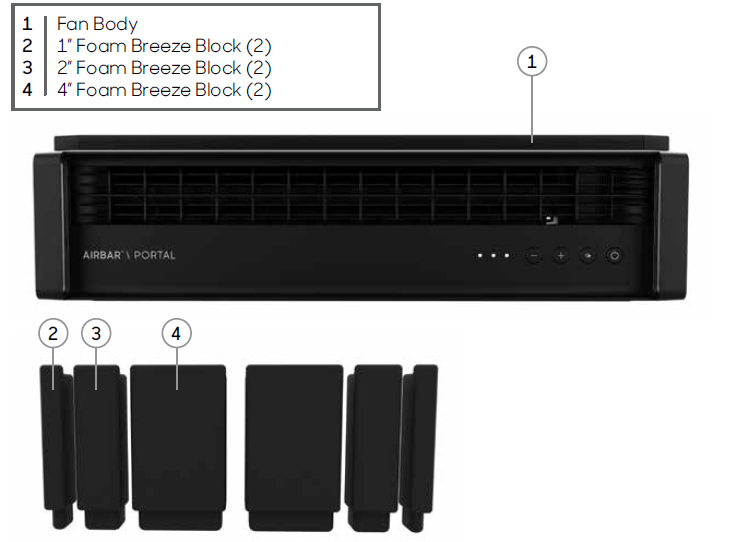
Your product includes the following:
- Fan Body
- 1” Foam Breeze Block (2)
- 2” Foam Breeze Block (2)
- 4” Foam Breeze Block (2)
Technical Specifications and Features of the Sharper Image PORTAL Window Fan
- Model Number: FA1-0135-06
- Fan Type: Window-mounted fan with reversible exhaust
- Dimensions: 23.9" width × 6.5" height × 6.1" depth
- Weight: Approximately 6.9 pounds
- Fan Diameter: 22 inches
- Speed Settings: 3 speeds (Low, Medium, High) with push-button controls
- Airflow Direction: Electronically reversible for intake or exhaust modes
- Power Consumption: Approximately 32 watts
- Power Source: 120V plug-in with 8-foot power cord and fused polarized plug
- Installation: Fits windows up to 38" wide with a modular block system for secure mounting
- Design: Weather-resistant housing with draft-preventing seals and minimal noise operation
- Warranty: 2-year manufacturer’s warranty covering parts and labor
Compared to other window fans, the PORTAL model stands out for its low profile, reversible motor, and quiet operation, making it a strong competitor among compact window fans designed for residential use.
INSTALLATION
WARNING—To reduce the risk of fire, electrical shock,, and injury to persons, observe the following:
- This product is intended for window installation only. Only use with product controls facing indoors (not exposed to elements). Do not use this product in a manner other than indicated by the manufacturer in the window installation instructions below.
- Pull back and secure all curtains and draperies and place this product away from tablecloths, blankets, and other fabrics, since they may be drawn into the fan, damage the motor,, and/or cause a fire.
- No part of this product (the appliance, power cord, plug, packaging, etc.) should be placed near furnaces, fireplaces, stoves, or other high-temperature heat sources. Do not use this product on an uneven or unstable surface.
- The power cord and plug cannot come into contact with water. Do not use this product on wet surfaces. Do not use this product in a bathtub or shower,, or position the product where it may fall into a bathtub, laundry, swimming pool,, or other water container.
- Do not run the cord under carpeting. Do not cover the cord with throw rugs, runners, or similar coverings. Do not route the cord under furniture or appliances. Arrange the cord away from the traffic area and where it will not be tripped over. The cord should not hang over the edges of counters or be placed where it can be crimped or closed in doors. Place the appliance near an easily accessible outlet so the product can be unplugged quickly during an emergency.
User Servicing Instructions
- Using the product controls, turn off the appliance.
- Grasp the plug (not the cord) and disconnect from the outlet.
- Risk of Fire. Replace fuse only with a 2.5 Amp, 125 Volt fuse as approved by Consumer Service. For an authorized replacement fuse, please contact Consumer Service.
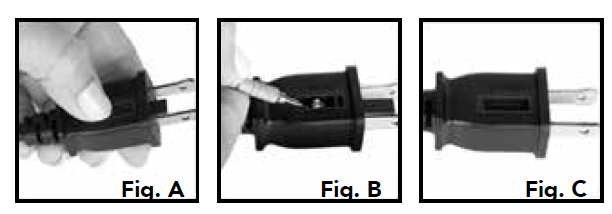
- Once the replacement is received, use a small flat-head screwdriver to slide open the fuse cover (located on the plug) (See next page, Fig. A).
- Remove the fuse by using the screwdriver to gently lift each end of the fuse (See next page, Fig. B).
- Install the replacement fuse by using the screwdriver to gently push each metal end of the fuse into the receptacle one at a time. Do not push on the center of the fuse—it is fragile and may break.
- Slide the fuse cover closed using the screwdriver. When closed, the cover should fit completely in the plug. No part of the cover should stick out (See next page, Fig. C).
- Plug your appliance into the outlet and turn the power on.
- If the replacement fuse blows, a short-circuit may be present, and the product should be discarded or returned to an authorized service facility for examination and/or repair.
CONTROLS
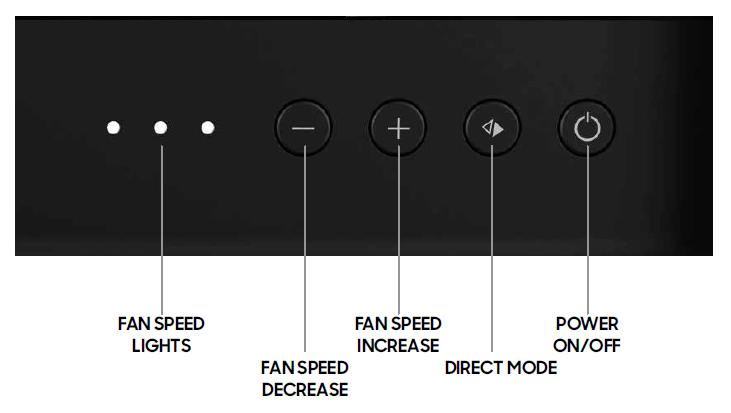
- Press (
 ) to power the unit ON or OFF.
 - Select desired speed by pressing - or +. There are three (3) speeds: LOW, MEDIUM, HIGH. Speed is indicated by the number of Fan Speed Lights illuminated.
- Press (
 ) to change from direct airflow to exhaust. Touch the button again to change from exhaust to direct airflow.
TROUBLESHOOTING
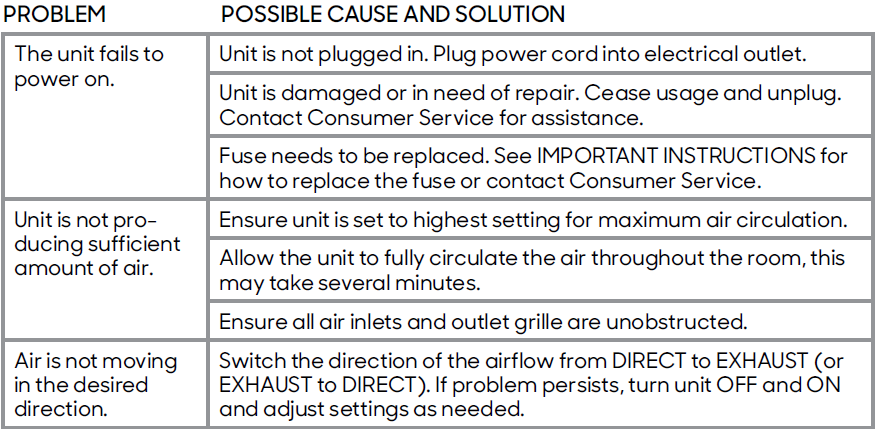
ACCESSORIES
To order replacement foam blocks, please contact Sharper Image consumer service at: 833.800.8669 | sihomecomfort.com | help@sihomecomfort.com
WARRANTY
- If you’re not satisfied with this product, let us know.
- Vornado Air, LLC warrants to the original consumer or purchaser that this Sharper Image® Fan (“Product”) is free from defects in material or workmanship for a period of two (2) years from the date of purchase. If any such defect is discovered within the warranty period, Vornado, at its discretion, will repair or replace the Product at no cost.
- For warranty or repair service: Call 833-800-8669 or email help@sihomecomfort.com to obtain a Return Authorization (“RA”) form. Please have or include your Product’s model number and serial number, as well as your name, address, city, state, zip
code,, and phone number when contacting Vornado for warranty service. To file a contactless warranty claim, visit sihomecomfort.com/contact. - After receiving the RA form, ship your Product to: Vornado Air LLC,, Attn: Warranty & Repair, 415 East 13th Street,, Andover, KS 67002. For your convenience, please have your model number and serial number when contacting Vornado with service inquiries.
- To assure proper handling, packages must be clearly marked with the RA number. Packages not clearly marked with the RA number may be refused at the receiving dock. Please allow 2-3 weeks for warranty service and return of your Product after the Product is received.
- This warranty does not apply to defects resulting from abuse of the Product, modification, alteration, mishandling, improper maintenance, commercial use, or repair or service of the Product by anyone other than Vornado; damages that occur in shipment or are attributed to acts of God. Improper product use, which includes using an external device that alters or converts the voltage or frequency of electricity, or shipping a Vornado product to a country not intended for use,, will void all warranties.
- Any unauthorized product modification, repair by an unauthorized repair center, or use of non-approved replacement parts is not recommended, and any consequences will not be covered by support services or product warranties.
- The product warranty will be honored only on models that are being used in the country intended. REPAIR OR REPLACEMENT AS PROVIDED UNDER THIS WARRANTY IS THE EXCLUSIVE REMEDY OF THE CONSUMER. VORNADO SHALL NOT BE LIABLE FOR ANY INCIDENTAL OR CONSEQUENTIAL DAMAGES FOR BREACH OF ANY EXPRESS OR IMPLIED WARRANTY ON THIS PRODUCT.
- EXCEPT TO THE EXTENT PROHIBITED BY APPLICABLE LAW, ANY IMPLIED WARRANTY OF MERCHANTABILITY OR FITNESS FOR A PARTICULAR PURPOSE ON THIS PRODUCT IS LIMITED IN DURATION TO THE DURATION OF THIS WARRANTY.
- Some states do not allow the exclusion or limitation of incidental or consequential damages, or allow limitations on how long an implied warranty lasts, so the above limitations or exclusions may not apply to you. This warranty gives you specific legal rights, and you may have other rights that vary from state to state. The manufacturer assumes no responsibility for damage caused by failure to follow these instructions or improper product use. Any such actions will invalidate the product warranty.
- All company names and product names are trademarks of their respective owners. © All rights reserved. All technical information, data, and instructions for the installation, connection, and operation contained in these instructions for use correspond to the latest available information at the time of printing. The contents of this manual may differ slightly from the actual product. Observe any additional supplements.
Pros & Cons of the Sharper Image PORTAL Window Fan
Pros
- Quiet Operation: Runs whisper-quiet across all three speed settings, ideal for bedrooms and offices.
- Reversible Airflow: Easily switch between fresh air intake and exhaust modes electronically, enhancing versatility.
- Sleek & Compact Design: Slim 6.5-inch height preserves window visibility and aesthetics.
- Easy Installation: Modular block system fits a wide range of window sizes up to 38 inches without complex setup.
- Weather-Resistant: Durable construction suitable for seasonal use, with draft-proof seals included.
- Value for Money: Priced competitively around $90-$100 with a solid 2-year warranty and reputable customer service.
Cons
- No Remote Control: Requires manual operation at the unit, lacking the wireless convenience found in some alternatives.
- Limited to Small/Medium Rooms: Not designed for whole-house ventilation or very large spaces.
- No Timer Function: Absence of a programmable timer may be inconvenient for some users seeking automatic shut-off.
- Non-Oscillating: Fixed airflow direction, which may limit air distribution in larger areas.
Customer Reviews and Feedback on the Sharper Image PORTAL Window Fan
The sharper image PORTAL WINDOW FAN enjoys a strong reputation among users, with an average rating of 4.3 out of 5 stars based on over 100 reviews. Customers frequently praise its quiet operation and sleek, unobtrusive design that blends well with modern home aesthetics. Many highlight the convenience of the reversible airflow feature, which adds significant value for year-round ventilation needs.
Common praises include the fan's solid build quality, ease of installation, and effective airflow even at lower speeds. The 8-foot power cord and weather-resistant design are also noted as user-friendly features.
Some users report minor issues such as the absence of a remote control and wish for a timer function, but these are generally considered minor given the product’s performance and price point. A few reviews mention that the fan is best suited for smaller rooms and may not provide sufficient airflow for larger spaces.
Overall, the product is recommended especially for those seeking a quiet, versatile window fan with reversible airflow and a compact profile, offering excellent value in its category.
Faqs
How do I correctly install the Sharper Image PORTAL Window Fan in my window?
What should I do if my Sharper Image PORTAL Window Fan does not power on?
How do I use the reversible exhaust feature on the Sharper Image PORTAL Window Fan?
Is the Sharper Image PORTAL Window Fan suitable for all window types and sizes?
How can I optimize the performance and airflow of my Sharper Image PORTAL Window Fan?
What maintenance steps are recommended to keep the Sharper Image PORTAL Window Fan running smoothly?
Can the Sharper Image PORTAL Window Fan be safely used in rainy or humid conditions?
Does the Sharper Image PORTAL Window Fan come with a warranty and customer support?
More sharper image manuals
- How to Use: Sharper Image PROFILE WINDOW FAN User Manual
- Usage & Charging: Sharper Image GO 4 RECHARGEABLE HANDHELD FAN User Manual
- How to Use: Sharper Image REFRESH 01 FIT-ANYWHERE PERSONAL FAN User Manual
- How to Use: Sharper Image FLY01 FITNESS HIGH-VELOCITY FITNESS FAN User Manual
- How to Use: Sharper Image AIRBAR USB TOWER DESK FAN Instruction Guide
- How to Use: Sharper Image AIRBAR TOWER FAN User Manual
Leave a Comment