
How to Use: Sharper Image AIRBAR USB TOWER DESK FAN Instruction Guide
Content
Sharper Image AIRBAR USB Tower Desk Fan
Introduction
The Sharper Image AIRBAR USB Tower Desk Fan is a versatile and compact cooling solution designed to enhance personal comfort in small spaces such as offices, dorm rooms, and home workstations. This innovative fan uniquely converts from a low-profile "Airbar" to a space-saving tower fan without requiring any tools, offering flexible airflow options tailored to your needs. Its USB power compatibility allows for convenient use with laptops, power banks, or any USB adapter, making it ideal for on-the-go cooling or desktop use.
Equipped with three quiet speed settings controlled by soft-touch buttons and a 360-degree pivoting head with full-range tilt, the fan delivers personalized airflow while maintaining a low noise footprint. Its energy-efficient DC motor ensures powerful airflow while minimizing power consumption, making it an eco-friendly choice for continuous use. The fan's sleek black design complements any workspace, combining functionality with modern aesthetics.
Tailored for professionals, students, and anyone seeking quiet, portable cooling, the Sharper Image AIRBAR USB Tower Desk Fan is especially effective in small rooms or cubicle environments where space is limited but comfort is essential. Generally priced between $20 and $40, it offers an affordable yet high-quality alternative to larger conventional fans and is widely available through major retailers both online and in-store.
ASSEMBLY
No tools required.
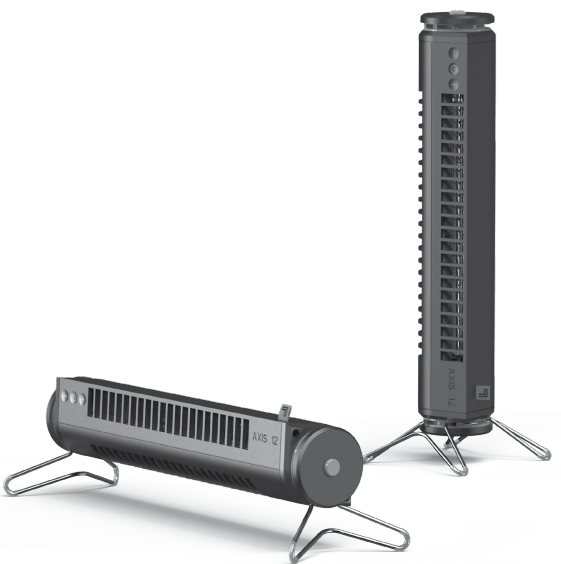
The AXIS 12 can be used in one of two orientations: horizontal or vertical. One leg comes preinstalled on the product.
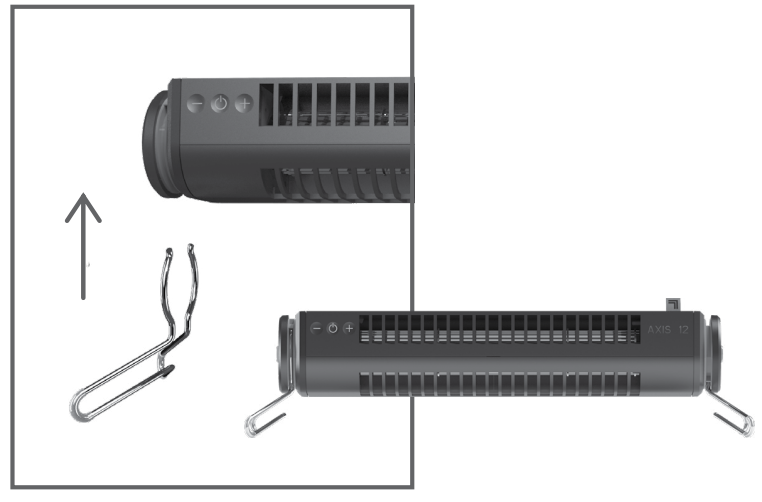
HORIZONTAL
For horizontal orientation, install the leg in the opposite end of the tower as shown.
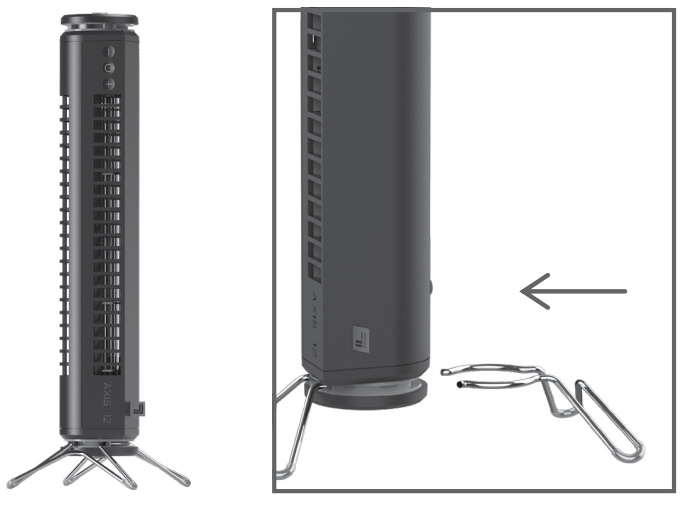
VERTICAL
For vertical orientation, install the leg in the same end of the tower as shown.
CLEANING & STORAGE
Your fan will need regular cleaning. The fan has no user serviceable parts inside and cannot be opened for cleaning. Never clean the product in any manner other than instructed in this owner's guide.
- Power off and unplug the unit prior to cleaning.
- Dust or wipe the fan with a damp cloth.
- Use the brush attachment on your household vacuum cleaner to vacuum any accumulated dust.
Note: The motor is permanently lubricated and requires no oiling.
During the off-season or after extended periods of non-use, you may choose to store your fan. To ensure long life of the product, it is recommended to store your fan by following these instructions:
- Unplug AC adapter and bundle cord loosely.
- Cover, or place back in retail carton if available. This prevents fan from accumulating dust over time.
- Store fan in cool and dry location.
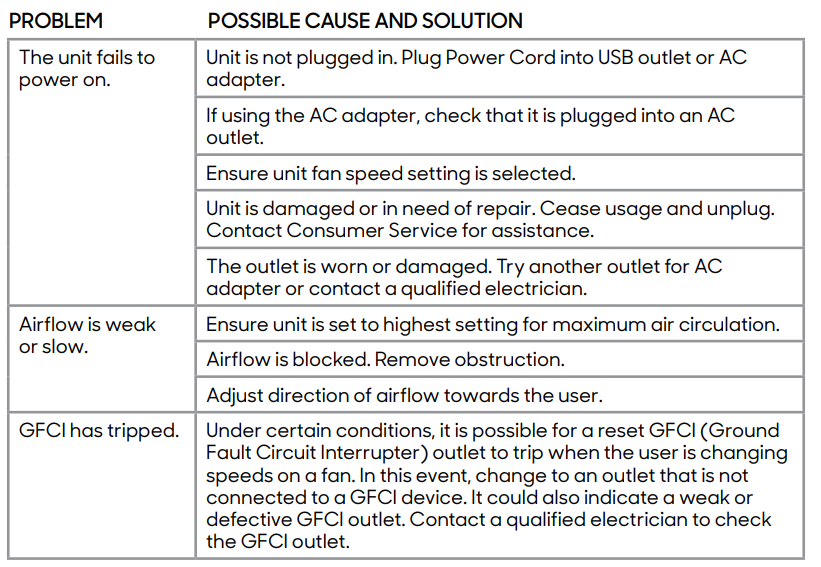
TROUBLESHOOTING
WARRANTY
If you’re not satisfied with this product, let us know.
- Vornado Air, LLC warrants to the original consumer or purchaser this Sharper Image® Fan (“Product”) is free from defects in material or workmanship for a period of one (1) year from the date of purchase. If any such defect is discovered within the warranty period, Vornado, at its discretion, will repair or replace the Product at no cost.
- For warranty or repair service: Call 833-800-8669 or email help@sihomecomfort.com to obtain a Return Authorization (“RA”) form. Please have or include your Product’s model number and serial number, as well as your name, address, city, state zip code and phone number when contacting Vornado for warranty service.
- After receiving the RA form, ship your Product to: Vornado Air LLC Attn: Warranty & Repair 415 East 13th Street Andover, KS 67002. For your convenience, please have your model number and serial number when contacting Vornado with service inquiries.
- To assure proper handling, packages must be clearly marked with the RA number. Packages not clearly marked with the RA number may be refused at the receiving dock. Please allow 1-2 weeks for repair and return of your Product after the Product is received.
- Repairs not covered by the warranty or outside the warranty period will require a fee to cover the cost of materials, labor, handling and shipping.
- This warranty does not apply to defects resulting from abuse of the Product, modification, alteration, mishandling, improper maintenance, commercial use or repair or service of the Product by anyone other than Vornado; damages which occur in shipment or are attributed to acts of God. Improper product use, which includes using an external device that alters or converts the voltage or frequency of electricity, or shipping a Vornado product to a country not intended for use will void all warranties. Any unauthorized product modification, repair by unauthorized repair center, or use of non-approved replacement parts is not recommended and any consequences will not be covered by support services or product warranties. The product warranty will be honored only on models that are being used in the country intended.
- REPAIR OR REPLACEMENT AS PROVIDED UNDER THIS WARRANTY IS THE EXCLUSIVE REMEDY OF THE CONSUMER. VORNADO SHALL NOT BE LIABLE FOR ANY INCIDENTAL OR CONSEQUENTIAL DAMAGES FOR BREACH OF ANY EXPRESS OR IMPLIED WARRANTY ON THIS PRODUCT. EXCEPT TO THE EXTENT PROHIBITED BY APPLICABLE LAW, ANY IMPLIED WARRANTY OF MERCHANTABILITY OR FITNESS FOR A PARTICULAR PURPOSE ON THIS PRODUCT IS LIMITED IN DURATION TO THE DURATION OF THIS WARRANTY
- Some states do not allow the exclusion or limitation of incidental or consequential damages, or allow limitations on how long an implied warranty lasts, so the above limitations or exclusions may not apply to you. This warranty gives you specific legal rights, and you may have other rights that vary from state to state. The manufacturer assumes no responsibility for damage caused by failure to follow these instructions or improper product use. Any such actions will invalidate the product warranty.
- All company names and product names are trademarks of their respective owners. © All rights reserved. All technical information, data, and instructions for the installation, connection, and operation contained in these instructions for use correspond to the latest available information at time of printing. The contents of this manual may differ slightly from the actual product. Observe any additional supplements.
- ©2021 Vornado Air LLC, Andover, Kansas 67002 USA.
- Specifications subject to change without notice.
- Sharper Image® name and logo are registered trademarks.
- Manufactured, marketed and distributed under license by Vornado Air LLC, Andover, Kansas 67002.
- Manufactured in China.
- U.S. Patents Pending.
- Sharper Image® Distributed under license by Vornado Air LLC, Andover, Kansas 67002.
Detailed Specifications of the Sharper Image AIRBAR USB Tower Desk Fan
- Dimensions: 13.03 inches (height) x 3.76 inches (width) x 4.5 inches (depth)
- Weight: Approximately 0.9 lbs (400 grams)
- Power Source: USB powered (compatible with USB ports, power banks, and AC adapters)
- Motor Type: Energy-efficient DC motor for quiet but powerful airflow
- Speed Settings: 3 levels, adjustable via soft touch button controls
- Airflow Control: 360-degree pivoting head with full-range tilt for targeted cooling
- Noise Level: Operates quietly, suitable for quiet environments such as offices or bedrooms
- Power Consumption: Low wattage around 2.6 watts, energy-saving operation
- Cord Length: 6 feet USB cable for flexible placement
- Warranty: 1 year manufacturer warranty
Compared to similar USB-powered desktop fans, the AIRBAR stands out for its convertible design, providing both tower and low-profile airflow modes without extra assembly. Its quiet DC motor offers a noticeable advantage over traditional AC fans that tend to be noisier and less energy efficient.
Pros & Cons of the Sharper Image AIRBAR USB Tower Desk Fan
Pros
- Convertible Design: Easily switches between a space-saving Airbar and a tower fan, enhancing versatility for different desk setups.
- Quiet Operation: The DC motor runs with minimal noise, ideal for work, study, or sleep environments.
- USB Compatibility: Can be powered via USB ports, power banks, or USB adapters, making it highly portable and convenient.
- Adjustable Airflow: Three speed settings and a 360-degree pivoting head with tilt allow personalized comfort.
- Energy Efficient: Low power consumption helps save energy while delivering effective cooling.
- Compact & Lightweight: Small footprint and light weight of less than 1 pound make it easy to move.
Cons
- Limited Coverage: Best suited for small spaces; may not effectively cool larger rooms.
- No Remote Control: Lack of remote limits convenience compared to some competitors.
- Build Material: Primarily plastic construction, which may affect durability over long-term heavy use.
- Absence of Oscillation: The fan head pivots but does not oscillate side-to-side, reducing room coverage slightly.
Overall, the Sharper Image AIRBAR USB Tower Desk Fan represents excellent value for money in its category, combining portability and quiet, efficient cooling. While it lacks some advanced features found in pricier models, its blend of performance and convenience makes it a strong contender for personal desk cooling solutions.
Customer Reviews of the Sharper Image AIRBAR USB Tower Desk Fan
Users consistently praise the Sharper Image AIRBAR USB Tower Desk Fan for its quiet performance and flexible design. Many highlight the ease of switching between Airbar and tower modes and appreciate the energy-efficient motor that keeps noise levels low, even at higher speeds. The soft-touch controls and responsive tilt function also receive positive mentions.
Common complaints include the fan’s limited cooling capacity for larger spaces and lack of remote control. Some users report a slight humming noise in a few units, although this appears to be isolated rather than widespread. Overall, the fan averages a 4 out of 5-star rating across major retail platforms, with recommendations focused on users needing quiet, compact cooling in small personal spaces.
Many reviewers recommend this fan for office desks, small bedrooms, or dorm rooms where space and noise level are critical factors. Its affordability and USB power compatibility make it a popular choice for those seeking convenient, portable cooling.
Faqs
How do I set up the sharper image AIRBAR USB TOWER DESK FAN for first-time use?
What can I do if my sharper image AIRBAR USB TOWER DESK FAN is not turning on or responding?
How do I switch between Airbar and Tower modes on the sharper image AIRBAR USB TOWER DESK FAN?
Can the sharper image AIRBAR USB TOWER DESK FAN be used with any USB power source like laptops or power banks?
What are the main features of the sharper image AIRBAR USB TOWER DESK FAN that enhance its performance?
How do I clean and maintain my sharper image AIRBAR USB TOWER DESK FAN to ensure long-lasting performance?
Is the sharper image AIRBAR USB TOWER DESK FAN noisy when operating at high speeds?
What should I consider if the sharper image AIRBAR USB TOWER DESK FAN has weak airflow or reduced performance?
More sharper image manuals
- Setup & Usage: Sharper Image PURIFY 9 AIR PURIFIER Instruction Manual
- How to Use: Sharper Image REFRESH 01 FIT-ANYWHERE PERSONAL FAN User Manual
- Usage: Sharper Image ULTRASONIC HUMIDIFIER Owner Guide
- How to Use: Sharper Image PROFILE WINDOW FAN User Manual
- How to Use: Sharper Image RISE OSCILLATING TOWER FAN User Guide
- How to Use: Sharper Image PORTAL WINDOW FAN Instruction Guide
Leave a Comment