
How to Use: Sharper Image RISE OSCILLATING TOWER FAN User Guide
Content
Sharper Image RISE OSCILLATING TOWER FAN
Introduction
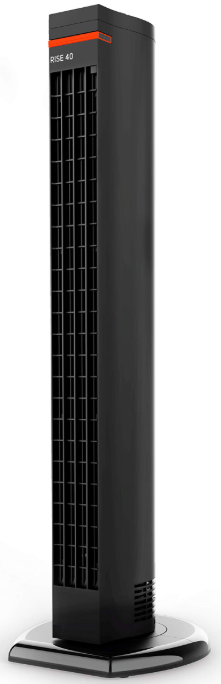
The sharper image RISE OSCILLATING TOWER FAN is a sleek, high-performance cooling solution designed to enhance indoor comfort with style and convenience. Standing nearly 39 inches tall, this tower fan combines modern aesthetics with powerful airflow, making it ideal for cooling living rooms, bedrooms, or office spaces ranging from 100 to 300 square feet. Its smooth oscillation feature ensures even air distribution across the room, while four adjustable speed settings allow users to customize airflow intensity based on personal preference or environmental needs.
Unique selling points include a remote control with a magnetic storage slot for easy accessibility, an energy-saving timer adjustable between 3 to 12 hours, and an integrated carry handle for effortless portability. The electronic push-button controls contribute to a user-friendly experience, enhancing daily usability without the hassle of complex settings.
Targeted towards individuals seeking a combination of style, function, and energy efficiency, this tower fan is perfect for homeowners, renters, and office workers who desire quiet, effective cooling without bulky equipment. Priced approximately between $90 and $130, it is readily available through major retailers such as Target, Macy’s, and Lowe’s, offering excellent value with a two-year limited warranty for added peace of mind.
PRODUCT INFORMATION
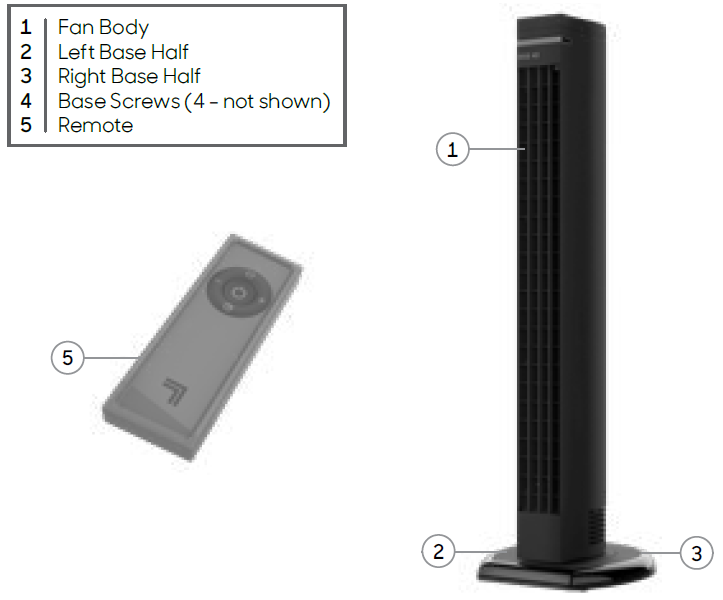
Your product includes the following:
- Fan Body
- Left Base Half
- Right Base Half
- Base Screws (4 - not shown)
- Remote
Technical Specifications and Features of the Sharper Image RISE OSCILLATING TOWER FAN
- Dimensions: 38.8" Height x 12.3" Width x 12" Depth
- Weight: 9.8 lbs, making it lightweight and portable
- Power Source: Electric with a 6-foot power cord and 120V, 60Hz operation
- Speed Settings: 4 adjustable speeds for tailored airflow
- Oscillation: Smooth 80-degree oscillation for broad air coverage
- Airflow Performance: Up to 391 CFM on high speed, 220 CFM on low
- Noise Level: Ranges from 45 dB (low) to 53 dB (high), ensuring quiet operation
- Timer: Energy-saving adjustable timer with 3, 6, 9, or 12-hour settings
- Controls: Electronic push-button interface with included remote featuring magnetic storage
- Additional Features: Integrated carrying handle and ETL safety certification
- Warranty: 2-year limited warranty
Compared to similar tower fans, the Sharper Image RISE offers a competitive blend of quiet performance, multiple speed options, and convenient remote control storage, all packaged in a refined, painted finish. Its airflow capacity and oscillation angle position it favorably among mid-range oscillating tower fans.
INSTALLATION
WARNING: To reduce the risk of fire, electrical shock, and injury to persons, observe the following:
- Place this product away from curtains, draperies, tablecloths, and other fabrics, since they may be drawn into the fan, damage the motor, and/or cause a fire.
- No part of this product (the appliance, power cord, plug, packaging, etc.) should be placed near furnaces, fireplaces, stoves,, or other high-temperature heat sources. Do not use this product in a window, on an uneven or unstable surface, or near water.
- The appliance, power supply, power cord,, and plug cannot come into contact with water. Do not use this product on wet surfaces. Do not use this product in a bathtub or shower,, or position the product where it may fall into a bathtub, laundry, swimming pool, or other water container. Do not use this product outdoors or expose it to weather or elements.
- Do not run the cord under carpeting. Do not cover the cord with throw rugs, runners, or similar coverings. Do not route cord under furniture or appliances. Arrange the cord away from the traffic area and where it will not be tripped over. The cord should not hang over the edges of counters or be placed where it can be crimped or closed in doors. Place the appliance near an easily accessible outlet so the product can be unplugged quickly during an emergency.
User Servicing Instructions
- Using the product controls, turn off the appliance.
- Grasp the plug (not the cord) and disconnect from the outlet.
- Risk of Fire. Replace fuse only with a 2.5 Amp, 125 Volt fuse as approved by Consumer Service. For an authorized replacement fuse, please contact Consumer Service.
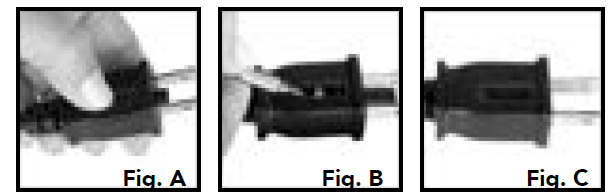
- Once the replacement is received, use a small flat-head screwdriver to slide open the fuse cover (located on the plug) (See next page, Fig. A).
- Remove the fuse by using the screwdriver to gently lift each end of the fuse (See next page, Fig. B).
- Install the replacement fuse by using the screwdriver to gently push each metal end of the fuse into the receptacle one at a time. Do not push on the center of the fuse—it is fragile and may break.
- Slide the fuse cover closed using the screwdriver. When closed, the cover should fit completely in the plug. No part of the cover should stick out (See Fig. C).
- Plug your appliance into the outlet and turn the power on.
- If the replacement fuse blows, a short-circuit may be present , , and the product should be discarded or returned to an authorized service facility for examination and/or repair.
BASE ASSEMBLY
Screwdriver required.
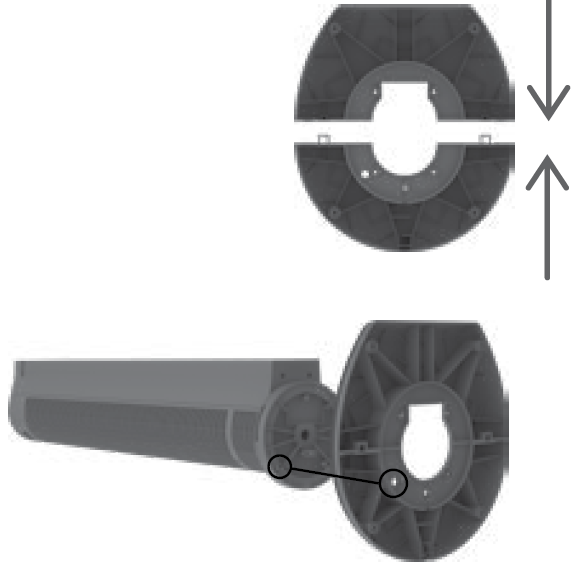
- Press the two base halves together until the halves are flush and you hear a slight click.
- Assemble the base at the bottom of the tower by aligning the pin on the bottom of the tower with the recess on the bottom of the base (marked with an arrow). Ensure the cord is routed properly through the hole on the base.
- The bases using the ing 4the screws provided.
- Route the cord through the path located at the bottom of the base.
HOW TO USE
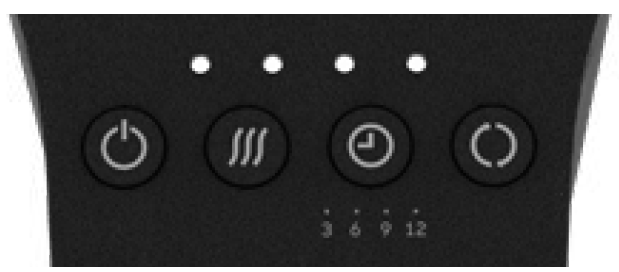
- Press (
 ) to power the unit on and off.
 - Select desired speed by pressing (
 ): Low, Medium, Medium-High, High. Speed is indicated by the number of lights illuminated.
 - Press (
 ) to activate the timer. The indicator lights will turn orange to indicate timer adjustment mode. While in this mode, select an amount of time in three-hour intervals by pressing ( ): 3, 6, 9,, or 12 hours. After a few seconds, the flashing orange lights will turn white.
 - To adjust timer settings, press ( ) to cycle through settings.
- To cancel the timer, cycle through the timer settings until off. You can also press and hold for 4 seconds. The indicator lights will flash and then of, indicating the timer is off.
- Press (
 ) to activate oscillation.
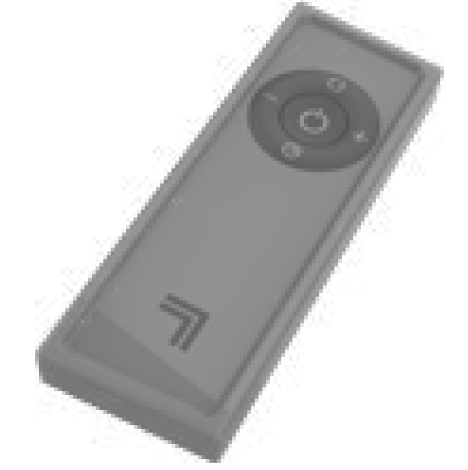
REMOTE CONTROL
- Press ( ) to power the unit on and off.
- Select the desired speed by pressing the -/+ button.
- Press ( ) to activate the timer.
- To adjust the timer setting, press ( ) to cycle through the settings or turn off.
- To cancel the timer, cycle through the timer settings until off.
- Press () to activate oscillation.
BATTERY REPLACEMENT
Your tower fan remote includes 1 coin-style 3V CR2032 battery. Battery comes pre-installed. Remove the battery pull tab before first use.
- For battery replacement, the remote requires one coin-style 3V CR2032 battery. Always use the correct size and grade of battery for this product.
- To replace the battery, open the battery door on the back side of the remote control (you will need to loosen the small screw on the door using a #1 Phillips screwdriver). If necessary, clean the battery contacts and also those of the device prior to battery installation. Remove any plastic protection from the battery and place it in the remote with the + side facing out. Ensure the battery is installed correctly with the polarity. Replace the battery door and screw.
TROUBLESHOOTING
WARRANTY
If you’re not satisfied with this product, let us know.
- Vornado Air, LLC warrants to the original consumer or purchaser that this Sharper Image® Fan (“Product”) is free from defects in material or workmanship for a period of two (2) years from the date of purchase. If any such defect is discovered within the warranty period, Vornado, at its discretion, will repair or replace the Product at no cost.
- For warranty or repair service: Call 833-800-8669 or email help@sihomecomfort.com to obtain a Return Authorization (“RA”) form. Please have or include your Product’s model number and serial number, as well as your name, address, city, state, zip code,, and phone number when contacting Vornado for warranty service.
- After receiving the RA form, ship your Product to: Vornado Air LLC,, Attn: Warranty & Repair,, 415 East 13th Street,, Andover, KS 67002. For your convenience, please have your model number and serial number when contacting Vornado with service inquiries.
- To assure proper handling, packages must be clearly marked with the RA number. Packages not clearly marked with the RA number may be refused at the receiving dock. Please allow 1-2 weeks for repair and return of your Product after the Product is received.
- Repairs not covered by the warranty or outside the warranty period will require a fee to cover the cost of materials, labor, handling, and shipping.
- This warranty does not apply to defects resulting from abuse of the Product, modification, alteration, mishandling, improper maintenance, commercial use,,e or repairrepair,r or service of the Product by anyone other than Vornado; damages which occur in shipment or are attributed to acts of God. Improper product use, which includes using an external device that alters or converts the voltage or frequency of electricity, or shipping a Vornado product to a country not intended for use,, will void all warranties.
- Any unauthorized product modification, repair by an unauthorized repair center, or use of non-approved replacement parts is not recommended, and any consequences will not be covered by support services or product warranties. The product warranty will be honored only on models that are being used in the country intended.
- REPAIR OR REPLACEMENT AS PROVIDED UNDER THIS WARRANTY IS THE EXCLUSIVE REMEDY OF THE CONSUMER. VORNADO SHALL NOT BE LIABLE FOR ANY INCIDENTAL OR CONSEQUENTIAL DAMAGES FOR BREACH OF ANY EXPRESS OR IMPLIED WARRANTY ON THIS PRODUCT. EXCEPT TO THE EXTENT PROHIBITED BY APPLICABLE LAW, ANY IMPLIED WARRANTY OF MERCHANTABILITY OR FITNESS FOR A PARTICULAR PURPOSE ON THIS PRODUCT IS LIMITED IN DURATION TO THE DURATION OF THIS WARRANTY.
- Some states do not allow the exclusion or limitation of incidental or consequential damages, or allow limitations on how long an implied warranty lasts, so the above limitations or exclusions may not apply to you. This warranty gives you specific legal rights, and you may have other rights that vary from state to state. The manufacturer assumes no responsibility for damage caused by failure to follow these instructions or improper product use. Any such actions will invalidate the product warranty.
Pros and Cons of the Sharper Image RISE OSCILLATING TOWER FAN
- Pros:
- Four distinct speed settings allow precise airflow control for various room sizes and cooling needs.
- Remote control with a magnetic storage slot ensures the remote is never misplaced, enhancing ease of use.
- Energy-saving timer function facilitates automatic shut-off, increasing efficiency and reducing electricity costs.
- Smooth 80-degree oscillation promotes even air distribution, improving overall cooling comfort.
- Lightweight design with integrated carry handle makes relocation effortless between rooms.
- Low noise levels at all speeds make it suitable for bedrooms and quiet environments.
- Cons:
- The illuminated indicator light at the top may be considered too bright for dark bedrooms by some users.
- Some customers report slight instability due to the tower’s narrow base, requiring cautious placement.
- Limited height adjustability, as the fan has a fixed height of 38.8 inches.
- Value for Money: Offers strong performance and features at an affordable price point with a solid warranty, making it a cost-effective choice compared to premium tower fans.
Customer Reviews and Feedback on the Sharper Image RISE OSCILLATING TOWER FAN
Users consistently praise the sharper image RISE OSCILLATING TOWER FAN for its strong airflow and quiet operation, making it well-suited for bedrooms and living areas. The convenience of the remote control with magnetic storage is frequently highlighted as a standout feature, simplifying control from across the room.
Common positive comments include its lightweight design and energy-saving timer, which enhance usability and efficiency. Several reviews note it works effectively for medium-sized rooms (100-300 sq. ft.) and appreciate the smooth oscillation for even cooling.
However, a few customers mention that the bright indicator light can be intrusive in dark environments, and some express concerns about the fan’s base stability, recommending placement on flat, stable surfaces to prevent tipping. The product currently holds an average rating of approximately 4.7 out of 5 stars, reflecting high satisfaction and strong purchase recommendations for those seeking a reliable oscillating tower fan.
Faqs
How do I set up the sharper image RISE OSCILLATING TOWER FAN for first-time use?
What should I do if my sharper image RISE OSCILLATING TOWER FAN is not oscillating properly?
Why is my sharper image RISE OSCILLATING TOWER FAN making excessive noise, and how can I fix it?
Can I use the sharper image RISE OSCILLATING TOWER FAN safely on carpeted or uneven floors?
How do I clean and maintain my sharper image RISE OSCILLATING TOWER FAN for long-lasting performance?
What should I check if the sharper image RISE OSCILLATING TOWER FAN blades do not spin even though the motor hums?
Does the sharper image RISE OSCILLATING TOWER FAN require any special electrical specifications or adapters?
How can I optimize the airflow and cooling efficiency of my sharper image RISE OSCILLATING TOWER FAN?
More sharper image manuals
- How to Use: Sharper Image PURIFY 3 AIR PURIFIER User Manual
- Usage: Sharper Image ULTRASONIC HUMIDIFIER Owner Guide
- How to Use: Sharper Image CANISTER STEAM CLEANER SI-380 Instruction Manual
- Setup & Usage: Sharper Image PURIFY 9 AIR PURIFIER Instruction Manual
- Setup & Usage: Sharper Image HANDHELD FABRIC STEAMER SI-428 User Manual
- How to Use: Sharper Image AIRBAR USB TOWER DESK FAN Instruction Guide
Leave a Comment