
How to Use: Sharper Image CANISTER STEAM CLEANER SI-380 Instruction Manual
Content
Sharper Image CANISTER STEAM CLEANER SI-380
Introduction
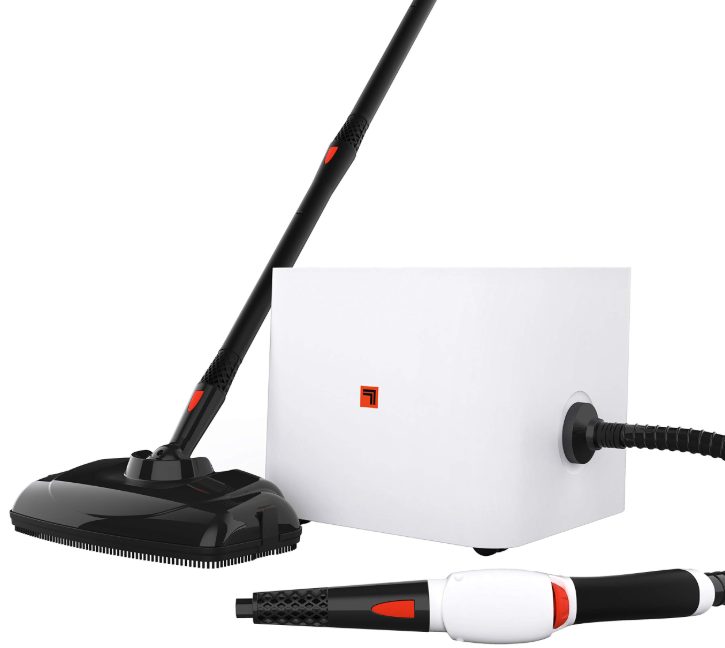
The Sharper Image CANISTER STEAM CLEANER SI-380 offers a powerful, chemical-free cleaning solution designed to tackle tough dirt, grime, and stains throughout your home. With professional-grade steam power and an extensive set of 15 versatile accessories, this canister steam cleaner is engineered for deep cleansing on a variety of surfaces, including floors, upholstery, tiles, and more. Its multi-functionality appeals to homeowners seeking an eco-friendly, effective, and low-wear-and-tear method to maintain a fresh and hygienic living environment without relying on harsh cleaning chemicals.
Ideal for busy families, pet owners, and allergy sufferers, the SI-380 excels in removing bacteria, grease, and stubborn stains while being gentle on delicate surfaces. Its ergonomic design, combined with easy-to-use controls and portability features like wheels and an 18-foot power cord, makes cleaning comfortable and convenient. Priced typically between $90 and $150, depending on retailer and promotions, the Sharper Image SI-380 is widely available through major online marketplaces such as Amazon, Bed Bath & Beyond, Walmart, and eBay.
Whether you need a dedicated steam mop, a fabric cleaner, or a multi-surface steam cleaning system, the SI-380 delivers professional-quality results that appeal to those looking for an all-in-one, reliable steam cleaner for household use.
PRODUCT INFORMATION
The following features are included with your Canister Steamer. Carefully inspect the packing material for all parts listed below. To obtain possible missing parts, contact (833.800.8669) or (help@sihomecomfort.com). .
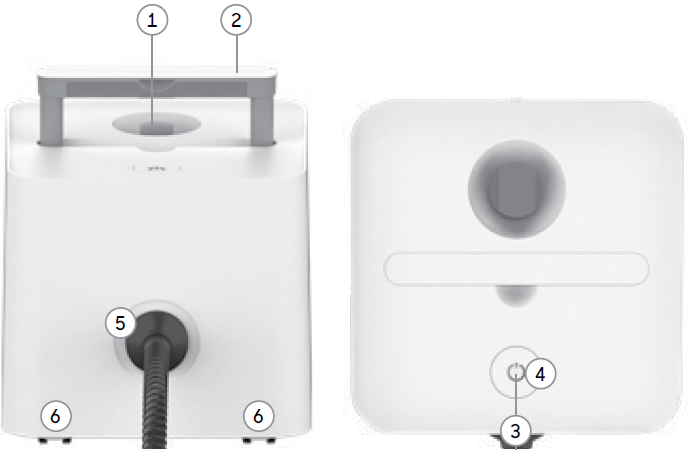
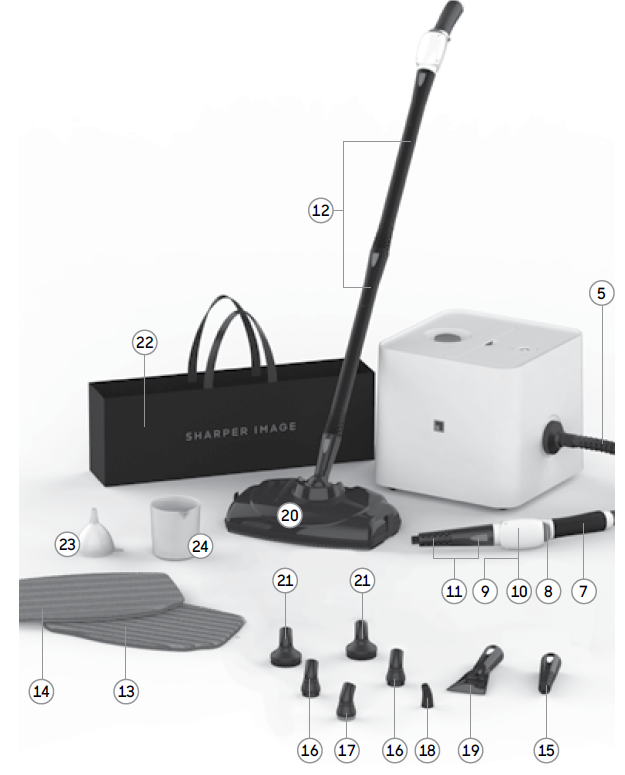
UNIT FEATURES & ACCESSORIES
- Water Reservoir Cap
- Carry Handle
- Heating Indicator Light
- Power Button
- Hose
- Wheel Casters (4)
- Handle Grip
- Adjustable Steam Knob
- Steam Trigger
- Steam Trigger Lock
- Steam Nozzle and Snap Lock
- Extension Wands (2)
- Scrubbing Mop Pad
- Microfiber Mop Pad
- Jet Nozzle
- Nylon Utility Brush (2)
- Brass Utility Brush
- Angled Nozzle
- Scraper
- Large Mop Head
- Round Brush (2)
- Storage Bag
- Funnel
- Measuring Cup
Specifications of the Sharper Image CANISTER STEAM CLEANER SI-380
- Model: SI-380
- Heating Time: Approximately 7 minutes to reach full steam
- Water Capacity: 54 oz (1.6 liters), providing up to 43 minutes of continuous steam
- Power: 1400 Watts, 120 Volts, 12 Amps, 60 Hz
- Power Cord Length: 18 feet with a 3-pin grounded plug for flexibility and safety
- Dimensions: 8.6 x 8.6 x 10.5 inches
- Weight: 10.62 lbs (4.8 kg)
- Accessories: Includes 15 attachments such as a steam mop head, brushes, nozzles for grout, fabric, and upholstery, and more
- Cleaning Capability: Chemical-free, professional steam power for multi-surface cleaning, including floors, upholstery, kitchen appliances, bathrooms, and carpets
- Features: Easy water refill with measuring cup, ergonomic ergonomic handle, wheels for portability, and low wear-and-tear operation
- Comparison: Offers similar power and accessory range as competitors like Dupray Neat and McCulloch Steam Cleaners, but at a slightly lower price point
- The Water Reservoir Cap is designed to safely contain steam inside the Reservoir, while providing easy access to the Reservoir’s fill hole.
- The Carry Handle is designed for convenient carrying up stairs and over obstacles.
- The Heating Indicator Light turns red when the unit is powered ON and the unit is heating. The Heating Indicator Light turns green when the unit is fully heated and ready to produce steam.
- The Power Button activates and deactivates the unit.
- The Hose directs steam flow from the main unit to the Steam Nozzle.
- The 4 Wheel Casters allow for easy transportation of the unit from one place to another.
- The Handle Grip is designed to stay cool while providing maximum grip and comfort.
- The Steam Knob adjusts the amount of steam produced by turning the knob in a clockwise direction.
- The Steam Trigger is pressed and held to start the flow of steam from the Steam Nozzle, then released when you wish to stop.
- The Steam Trigger Lock locks the Steam Trigger to the “On” position for continuous steam.
- The Steam Nozzle emits a flow of hot, penetrating steam whenever the Steam Trigger is pressed and held. The Snap Lock allows you to change accessories as needed.
- The Extension Wands connect to the Steam Nozzle and can be used with a mop attachment or for high or hard-to-reach places.
- The Scrubbing Mop Pad attaches to the Mop Head, and is designed for removing scuffs and stains from hard floors. The Pads are reusable and machine washable.
- The Microfiber Pad attaches to the Mop Head, and is designed for removing scuffs and stains from hard floors. The Pads are reusable and machine washable.
- The Jet Nozzle focuses the flow of steam from the Steam Nozzle, and serves as the base to which the brushes and Angled Nozzle connect.
- The Nylon Utility Brushes connect to the Jet Nozzle, providing extra scrubbing power for removing exceptionally tough dirt and stains.
- The Brass Utility Brush connects to the Jet Nozzle and is designed for removing tough, stuck-on grease and grime from durable surfaces such as ovens and grills.
- The Angled Nozzle is designed for reaching difficult angles and areas that the Straight Nozzle may not completely reach.
- The Scraper attaches to the Steam Nozzle to scrape off stuck-on grime.
- The Large Mop Head attaches to Extension Wands to clean floors, decks, or any other extra-large surface areas.
- The Round Brush connects to the Jet Nozzle to scrub especially tough stains. The Round Brush functions similarly to the Nylon Utility Brush, only designed to more efficiently scrub larger surface areas.
- The Storage Bag stores all attachments neatly in one convenient bag.
- The Funnel is designed to more easily direct the flow of water into the Reservoir.
- The Measuring Cup is used to fill the Reservoir without spills.
STEAM CLEANING ACCESSORIES
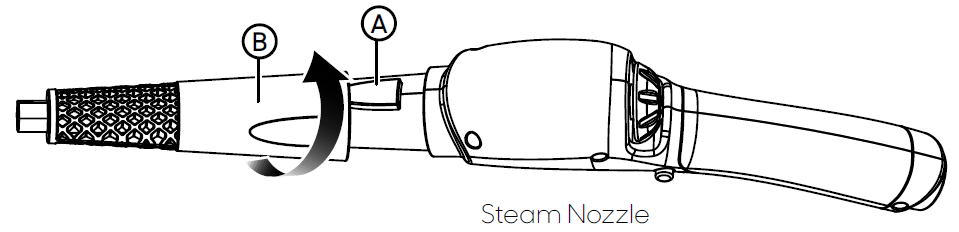
WARNING: Do not connect accessories while the unit is emitting steam. JET NOZZLE / SCRAPER
- Select Jet Nozzle or Scraper and push onto the Steam Nozzle (A).
- Rotate the accessory until the orange lock/release button snaps into the accessory hole (B).
NOTE: The Jet Nozzle and Scraper can be connected to the end of an Extension Wand for reaching high or difficult spots. Connect the Extension Wand (or Wands), then connect your desired accessory to the Wand in the same way as you would normally connect to the Steam Nozzle.
UTILITY BRUSHES / ANGLED NOZZLE
NOTE: Accessories connect to the Jet Nozzle, not the Steam Nozzle.
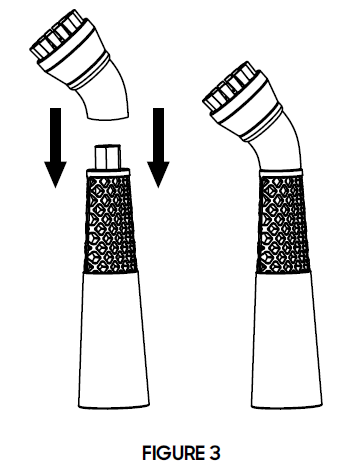
- Firmly press the accessory onto the tip of the Jet Nozzle. Press it on as far as possible to prevent steam leakage (See figure 3).
- To remove the accessory, simply grip it firmly and pull it off the Jet Nozzle.
HOW TO USE
STEAM CLEANING
NOTE: Be sure that the Reservoir has been filled and that all desired accessories are connected before following these steps.
- For first-time use, remove the protective plastic cover from the electrical plug. Plug the power cord into a convenient electrical outlet.
- Push the Power button. The Heating Indicator Light will illuminate red to show the unit is heating.
- After approximately 10 minutes (depending on how much water is in the Reservoir), the heating Indicator Light will turn to green, indicating that the unit is fully heated and ready to begin steaming.
- Direct the Steam Nozzle (and any connected accessories) towards the surface you wish to steam, and press the Steam Trigger.
CAUTION: Always be sure that the Steam Nozzle and any accessories are pointed in a safe direction (away from yourself, other people, pets, and plants) before pressing
Steam Trigger. - Hold the Steam Trigger down for a continuous flow of steam. You may also slide the Steam Lock Switch in the middle while pressing the Steam Trigger to lock it down. This will allow a continuous flow of steam without the need to hold the Steam Trigger down manually.
- Using a slight back-and-forth motion over the area you are steaming will further enhance the cleaning process. Wipe steamed areas with a clean cloth to remove loosened dirt and grime. Wiping the area while it is still wet is recommended, but use caution when wiping surfaces such as metal that may still be hot.
NOTE: During use, the Heating Indicator Light may turn from green to red. This is normal. If you notice a drop in steam pressure, release the Steam Trigger until the Heating Indicator Light turns green again. Proceed with steaming cleaning. - To effectively kill bacteria and other microorganisms, hold the Steam Nozzle (and any connected accessories) approximately 1/2 inch from the surface and press the Steam Trigger. Keep the Steam Trigger held and concentrate the steam on the same spot for at least 5 seconds.
- Once steaming tasks are complete, immediately press the Power Button to turn the unit OFF and unplug the grounded power cord from the electrical outlet. Follow the steps under the Proper Storage procedure on Page 16 of this manual.
STEAM MOPPING
NOTE: Be sure that the Reservoir has been filled and that all steam mopping accessories are connected before following these steps.
It is recommended to sweep or vacuum hard floors before mopping.
- Follow STEPS 1-3 of the Steam Cleaning section.
Refer to Page 11 for a listing of hard floor surfaces that are recommended for cleaning with the Canister Steam Cleaner. - For best results, use a steady back-and-forth motion over the floor surface, pushing the Mop Head away and pulling it back towards you. Work your way backwards over the floor, in order to avoid walking over freshly mopped areas.
NOTE: To avoid warping or damage caused by heat and moisture, do not use on unsealed hardwood or unglazed ceramic surfaces. Steam may remove the sheen from some floors that have been treated with wax. - To effectively kill bacteria and microorganisms, repeatedly mop a single small area (approximately 3’ x 3’ for best results) for at least 2 minutes.
- The Microfiber Pad will absorb dirt and moisture during mopping. However, when you are finished, you may find some residual moisture has been left behind. In this case, it is recommended to allow the floor time to air-dry. A fan may be directed towards the mopped area to facilitate drying.
STORAGE & CARE
PROPER STORAGE
Preparing your Canister Steam Cleaner for storage is quick and simple. When you have finished your streaming tasks, follow the steps listed below.
- Turn the unit “Off” and unplug the power cord.
- Allow unit to completely cool (at least 30 minutes).
- Press and hold the Steam Trigger to release all remaining steam.
- Remove all accessories from the unit.
- Carefully remove the Reservoir Cap.
- Drain any remaining water from the reservoir into a sink or tub – this will help to minimize mineral build-up and prevent over-filling during your next use. Replace the Reservoir Cap loosely.
- Store accessories in the storage bag included with the unit.
- Store Canister Steam Cleaner in a cool, dry location.
MINERAL BUILD-UP
A common maintenance need for steam appliances is the removal of build-up caused by high mineral content in many municipal water supplies. This mineral build-up may limit the effectiveness and reduce the life of your Canister Steam Cleaner.
The best way to minimize mineral build-up is to use distilled or de-mineralized water when using your Canister Steam Cleaner. If you are unable to use distilled water, it is recommended that the following procedure be followed monthly to remove any mineral build-up:
- Turn the unit “Off” and unplug the power cord.
- Allow unit to completely cool (at least 30 minutes).
- Press and hold the Steam Trigger to release all remaining steam.
- Remove all accessories from the unit.
- Carefully remove the Reservoir Cap.
- Drain water from the Reservoir into a sink or tub.
- Using A measuring cup, measure 8 oz. (237 ml.) of vinegar.
- Slowly pour vinegar into the Reservoir.
- Allow to stand for 40 minutes.
- Drain vinegar from the Reservoir.
- Rinse the reservoir with fresh water, drain, and repeat until the vinegar odor dissipates.
- Replace Reservoir Cap.
MICROFIBER PAD CARE
Machine wash warm, separately. Air or tumble dry low. No fabric softener or bleach. 80% polyester, 20% polyamide.
WARRANTY
- If you’re not satisfied with this product, let us know.
- Vornado Air, LLC warrants to the original consumer or purchaser that this Sharper Image® Steam Product (“Product”) is free from defects in material or workmanship for a period of one (1) year from the date of purchase. If any such defect is discovered within the warranty period, Vornado, at its discretion, will repair or replace the Product at no cost.
- For warranty or repair service: Call 833-800-8669 or email help@sihomecomfort.com to obtain a Return Authorization (“RA”) form. Please have or include your Product’s model number and serial number, as well as your name, address, city, state, zip code,, and phone number when contacting Vornado for warranty service.
- After receiving the RA form, ship your Product to: Vornado Air LLC, Attn: Warranty & Repair, 415 East 13th Street, Andover, KS 67002. For your convenience, please have your model number and serial number when contacting Vornado with service inquiries.
- To assure proper handling, packages must be clearly marked with the RA number. Packages not clearly marked with the RA number may be refused at the receiving dock. Please allow 1-2 weeks for repair and return of your Product after the Product is received.
Repairs not covered by the warranty or outside the warranty period will require a fee to cover the cost of materials, labor, handling, and shipping. - This warranty does not apply to defects resulting from abuse of the Product, modification, alteration, mishandling, improper maintenance, commercial uses,e or repair or service of the Product by anyone other than Vornado; damages which occur in shipment or are attributed to acts of God. Improper product use, which includes using an external device that alters or converts the voltage or frequency of electricity, or shipping a Vornado product to a country not intended for use,se will void all warranties. Any unauthorized product modification, repair by unauthorized repair center, or use of non-approved replacement parts is not recommended,ded and any consequences will not be covered by support services or product warranties.
- The product warranty will be honored only on models that are being used in the country intended. REPAIR OR REPLACEMENT AS PROVIDED UNDER THIS WARRANTY IS THE EXCLUSIVE REMEDY OF THE CONSUMER. VORNADO SHALL NOT BE LIABLE FOR ANY INCIDENTAL OR CONSEQUENTIAL DAMAGES FOR BREACH OF ANY EXPRESS OR IMPLIED WARRANTY ON THIS PRODUCT. EXCEPT TO THE EXTENT PROHIBITED BY APPLICABLE LAW, ANY IMPLIED WARRANTY
OF MERCHANTABILITY OR FITNESS FOR A PARTICULAR PURPOSE ON THIS PRODUCT IS LIMITED IN DURATION TO THE DURATION OF THIS WARRANTY. Some states do not allow the exclusion or limitation of incidental or consequential damages, or allow limitations on how long an implied warranty lasts, so the above limitations or exclusions may not apply to you. This warranty gives you specific legal rights, and you may have other rights that vary from state to state. The manufacturer assumes no responsibility for damage caused by failure to follow these instructions or improper product use. Any such actions will invalidate the product warranty.
Pros & Cons of the Sharper Image CANISTER STEAM CLEANER SI-380
- Pros:
- Strong steam output with a 1400W heating element provides efficient deep cleaning
- Multi-functionality with 15 versatile accessories covers most household cleaning needs
- Large 54 oz water tank means longer cleaning sessions without frequent refills
- Chemical-free operation is safe for families and environmentally friendly
- Portability enhanced by wheels and an 18-foot power cord
- Competitive pricing, often under $150, offers good value for a professional-grade steam cleaner
- Cons:
- 7-minute heat-up time is longer than some handheld or smaller steamers
- Relatively heavy at over 10 lbs, which may be less convenient for extended use
- Some users report occasional issues with steam pressure consistency over long sessions
- Assembly required, and a learning curve to effectively use all attachments
Customer Reviews of the Sharper Image CANISTER STEAM CLEANER SI-380
Customers generally rate the Sharper Image CANISTER STEAM CLEANER SI-380 positively, with an average rating of around 4.2 out of 5 stars across multiple platforms. Many users praise its powerful steam output and the convenience of the 15 accessory attachments, highlighting its effectiveness on floors, kitchen surfaces, and upholstery. Star testimonials appreciate the chemical-free cleaning benefits and the capacity to handle various tasks with one unit.
Common complaints include the initial heating time and the unit's weight, which some find cumbersome during prolonged use. A few users also mention difficulties with maintaining consistent steam pressure during extended cleaning, though this is not widespread. Several reviews recommend the SI-380 for value-conscious buyers who want professional-like results without the higher cost of premium steam cleaners.
Faqs
How do I properly set up the sharper image CANISTER STEAM CLEANER SI-380 for first-time use?
What should I do if the sharper image CANISTER STEAM CLEANER SI-380 is not producing steam?
Can I use the sharper image CANISTER STEAM CLEANER SI-380 on all types of hard floors?
How can I prevent mineral build-up and prolong the life of my sharper image CANISTER STEAM CLEANER SI-380?
What are the key features of the sharper image CANISTER STEAM CLEANER SI-380 that enhance cleaning efficiency?
How do I safely refill the water tank on the sharper image CANISTER STEAM CLEANER SI-380 during use?
What maintenance steps should I follow to keep my sharper image CANISTER STEAM CLEANER SI-380 in optimal condition?
Why does the heating indicator light on my sharper image CANISTER STEAM CLEANER SI-380 remain off, and how can I fix it?
More sharper image manuals
- Setup & Usage: Sharper Image HANDHELD FABRIC STEAMER SI-428 User Manual
- How to Use: Sharper Image PURIFY 3 AIR PURIFIER User Manual
- How to Use: Sharper Image CANISTER GARMENT STEAMER SI-470 User Manual
- How to Use: Sharper Image RISE OSCILLATING TOWER FAN User Guide
- How to Use: Sharper Image DUAL VOLTAGE TRAVEL IRON SI-755 Owner Manual
- Usage: Sharper Image ULTRASONIC HUMIDIFIER Owner Guide
Leave a Comment