
How to Use: Sharper Image DUAL VOLTAGE TRAVEL IRON SI-755 Owner Manual
Content
Sharper Image DUAL VOLTAGE TRAVEL IRON SI-755
Introduction
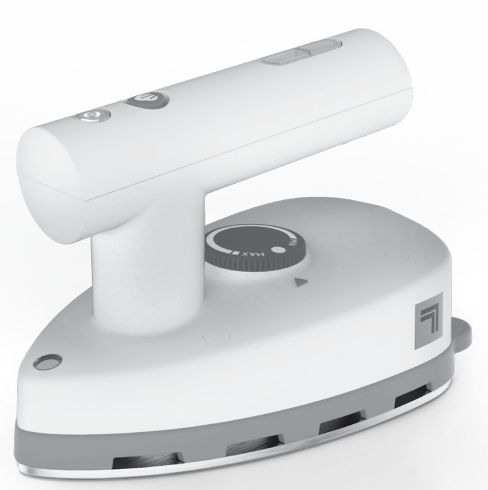
The sharper image DUAL VOLTAGE TRAVEL IRON SI-755 is a compact and versatile steam iron designed especially for travelers and professionals who require a reliable ironing solution on the go. Its dual voltage capability allows seamless use worldwide, supporting both 120V and 220V power supplies, making it ideal for international travel. This feature ensures that users can maintain crisp, wrinkle-free clothing regardless of their destination.
Weighing less than one pound and featuring a small footprint (approximately 5.28" x 3.04" x 3.74"), the SI-755 easily fits into carry-on luggage or travel bags without adding bulk. It heats up rapidly within one minute and offers three temperature settings to accommodate diverse fabric types, from delicate silks to heavy cottons. The non-stick soleplate provides smooth gliding over garments, while a 1.18-ounce water reservoir supports efficient steam ironing.
Targeted at frequent travelers, business professionals, and anyone who needs a practical, compact ironing tool, the SI-755 enhances travel convenience by eliminating the need to rely on hotel irons or laundromats. Retailing in the price range of approximately $25 to $35, it is widely available through major online retailers and department stores, often accompanied by promotional offers or free shipping.
Overall, the sharper image DUAL VOLTAGE TRAVEL IRON SI-755 combines portability, dual voltage flexibility, and effective steaming performance in a budget-friendly package, making it a smart choice for travelers worldwide.
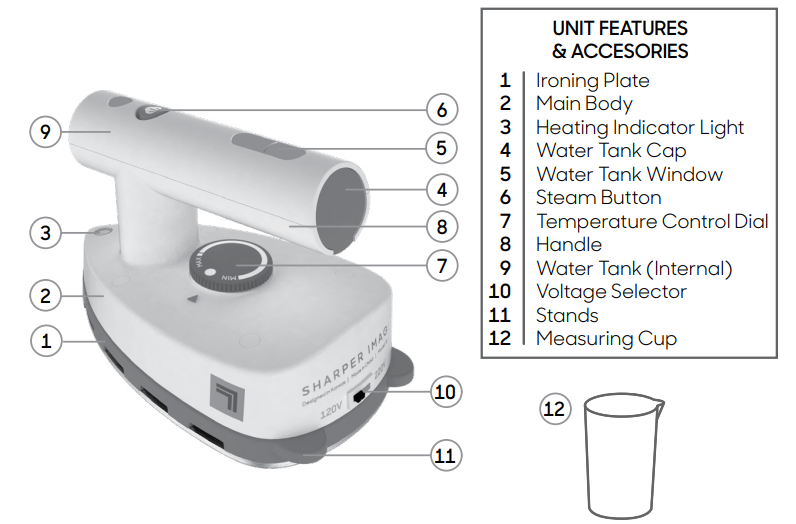
- The Ironing Plate is the heated, non-stick surface that is used to press fabrics, remove wrinkles, and create creases.
- The Main Body contains the unit’s internal heating components.
- The Heating Indicator Light illuminates when the Temperature Control Dial is set to one of the three heat settings.
- The Water Tank Cap covers the Water Tank fill hole. The Water Tank Cap is tethered to the unit, and cannot be completely removed.
- The Water Tank Window lets you monitor the level of water in the Water Tank. The unit must be sitting upright to correctly read the water level.
- The Steam Button is pressed to activate the unit’s steam function. Locking the Steam Button down disables steam; pressing the Steam Button releases it into the unlocked position, enabling steam.
- The Temperature Dial Indicator serves as the guide to which heat setting is currently active.
- The Handle is ergonomically designed for user comfort. The Hand Grip contains the unit’s Water Tank, and the base is specially designed for the power cord to be wrapped around for storage.
- The Water Tank, located inside the Handle, is designed to hold a maximum of 1.18 oz (34.90 ml.) of water.
- The Voltage Selector is the recessed switch that is used to set the unit to either 120V or 220V electrical voltage standards. By default,, the Voltage Selector is set to 120V.
- The Stands are the two supports located at the rear of the Main Body. The Stands are designed to support the unit in an upright position when the Ironing Plate is hot, to help prevent damage to surfaces.
- The Measuring Cup allows you to fill the Water Tank with minimal spillage.
HOW TO USE
IMPORTANT: This unit has no on / off switch. The unit must be plugged in to turn on and unplugged to turn off.
DRY IRONING
IMPORTANT: Make sure the Steam Button is locked in the lowered position before dry ironing. This will prevent any water from accidentally dripping.
- Plug the power cord into a standard electrical outlet.
- Turn the Temperature Control Dial clockwise so that the small arrow on the Hand Grip points to one of three heat settings on the Dial. The Heating Indicator Light will illuminate.
NOTE: It is recommended to start with lower temperatures first, as high settings designed for heavy materials can damage delicate fabrics. - When the Heating Indicator Light turns off, the Ironing Plate is heated and ready for use.
NOTE: During use, Hethe Heating Indicator Light will cycle on and off as the unit works to maintain a constant temperature. You may continue to iron while the Light cycles.
STEAM IRONING
- Plug the power cord into a standard electrical outlet.
- Turn Temperature Control Dial clockwise as far as possible to set unit to high temperature (MAX •••). The Heating Indicator Light will illuminate.
- When the Heating Indicator Light turns off, press the Steam Button. The button will lock into the raised position, and the unit will begin emitting steam from the steam vents on the Ironing Plate.
NOTE: Unit is designed to steam horizontally. Steam flow will stop whenever the unit is in a vertical upright position. - To stop the steam flow, press the Steam Button again to lock it into the lowered position.
Once all ironing tasks are finished, unplug the unit. Be sure that the Steam Button is locked in the lowered position - this will prevent water from accidentally dripping during the next use. Prop the unit upright on the Stands to cool. Refer to STORAGE & CARE guidelines on Page 15 of this manual for proper storage and maintenance procedures.
STORAGE & CARE
PROPER STORAGE
Preparing your Dual Voltage Travel Iron for storage is quick and simple. When you have finished your streaming tasks, follow the steps listed below.
IMPORTANT: Make sure the Steam Button is locked in the lowered position before storing. This will prevent any water from accidentally dripping.
- Unplug the power cord from the electrical outlet.
- Prop unit upright on Stands. Allow the Iron Plate to cool (30 minutes for complete cooling).
- Remove the Water Tank Cap. Drain any water remaining in the Tank into a sink or tub. Replace the Water Tank Cap.
- Wipe the Main Body and the Ironing Plate with a soft cloth lightly moistened with water.
- DO NOT clean the Ironing Plate with detergents or descalers.
- DO NOT clean the Ironing Plate with abrasive or corrosive products.
- DO NOT submerge the unit or hold the unit under running water.
- Wrap the power cord around the unit and store it in a cool, dry location.
MINERAL BUILD-UP
A common maintenance need for steam appliances is the removal of build-up caused by high mineral content in many municipal water supplies. This mineral build-up may cause the unit to spew water, limit the effectiveness, and reduce the life of your Dual Voltage Travel Iron.
The best way to minimize mineral build-up is to use distilled or demineralized water when using your Dual Voltage Travel Iron Steamer. In addition, it is recommended that the Reservoir be cleaned at least once a month to remove any deposits that form. This will help to extend the life of your unit and keep it functioning at its maximum potential.
MAINTENANCE
After EACH USE, allow the unit to cool, and add 1 oz. Water, shake to release mineral buildup and empty tank.
TO REMOVE MINERAL BUILD-UP:
- Follow STEPS 1-3 under PROPER STORAGE section above; however, leave Water Tank Cap open.
IMPORTANT: The Unit should remain unplugged during the cleaning procedure. - Make a mixture of 0.5 oz. Distilled water and 0.5 oz. Vinegar.
- Pour water-vinegar solution into the Water Tank. Close the Water Tank Cap.
- Follow normal steam ironing procedure, as outlined on Page 14. Allow the unit to steam out the full contents of the Water Tank. When finished, lock the Steam Button in the lowered position and unplug the unit.
- Allow to cool for 5 minutes, then refill the Water Tank with fresh distilled water. Repeat STEP 4 until the vinegar odor dissipates.
- Store unit as normal.
WARRANTY
If you’re not satisfied with this product, let us know.
- Vornado Air, LLC warrants to the original consumer or purchaser that ser the Sharper Image® Steam Product (“Product”) is free from defects in material or workmanship for a period of one (1) year from the date of purchase. If any such defect is discovered within the warranty period, Vornado, at its discretion, will repair or replace the Product at no cost.
- For warranty or repair service: Call 833-800-8669 to obtain a Return Authorization (“RA”) form. Please have or include your Product’s model number and serial number, as well as your name, address, city, state, zip code, email,, and phone number when contacting Vornado for warranty service. To file a contactless warranty claim,
- After receiving the RA form, ship your Product to: Vornado Air , LLC, ,, C,, Attn: Warranty & Repair,, 415 East 13th Street,, Andover, KS 67002. For your convenience, please have your model number and serial number when contacting Vornado with service inquiries.
- To assure proper handling, packages must be clearly marked with the RA number. Packages not clearly marked with the RA number may be refused at the receiving dock. Please allow 1-2 weeks for repair and return of your Product after the Product is received.
- Repairs not covered by the warranty or outside the warranty period will require a fee to cover the cost of materials, labor, handling, and shipping.
- This warranty does not apply to defects resulting from abuse of the Product, modification, alteration, mishandling, improper maintenance, commercial use,,se or repair,, or service of the Product by anyone other than Vornado; damages which occur in shipment or are attributed to acts of God. Improper product use, which includes using an external device that alters or converts the voltage or frequency of electricity, or shipping a Vornado product to a country not intended for u,se will void all warranties. Any unauthorized product modification, repair by unauthorized repair center, or use of non-approved replacement parts is not recommen,ded and any consequences will not be covered by support services or product warranties. The product warranty will be honored only on models that are being used in the country intended.
- REPAIR OR REPLACEMENT AS PROVIDED UNDER THIS WARRANTY IS THE EXCLUSIVE REMEDY OF THE CONSUMER. VORNADO SHALL NOT BE LIABLE FOR ANY INCIDENTAL OR CONSEQUENTIAL DAMAGES FOR BREACH OF ANY EXPRESS OR IMPLIED WARRANTY ON THIS PRODUCT. EXCEPT TO THE EXTENT PROHIBITED BY APPLICABLE LAW, ANY IMPLIED WARRANTY OF MERCHANTABILITY OR FITNESS FOR A PARTICULAR PURPOSE ON THIS PRODUCT IS LIMITED IN DURATION TO THE DURATION OF THIS WARRANTY.
- Some states do not allow the exclusion or limitation of incidental or consequential damages, or allow limitations on how long an implied warranty lasts, so the above limitations or exclusions may not apply to you. This warranty gives you specific legal rights, and you may have other rights that vary from state to state. The manufacturer assumes no responsibility for damage caused by failure to follow these instructions or improper product use. Any such actions will invalidate the product warranty.
- All company names and product names are trademarks of their respective owners. © All rights reserved. All technical information, data, and instructions for the installation, connection, and operation contained in these instructions for use correspond to the latest available information at the time of printing. The contents of this manual may differ slightly from the actual product. Observe any additional supplements.
- ©2022 Vornado Air LLC, Andover, Kansas 67002 USA.
- Specifications subject to change without notice.
- Sharper Image® name and logo are registered trademarks.
- Manufactured, marketed,, and distributed under license by Vornado Air LLC, Andover, Kansas 67002.
- Manufactured in China.
- U.S. Patents Pending.
- Sharper Image® Distributed under license by Vornado Air LLC, Andover, Kansas 67002.
Troubleshooting the Sharper Image Dual Voltage Travel Iron SI-755
Despite its user-friendly design, some common issues may arise when using the sharper image DUAL VOLTAGE TRAVEL IRON SI-755. Below are frequent problems and their solutions:
- Iron not heating: Verify the voltage selector switch is set correctly for your region (120V or 220V). An incorrect setting can prevent heating. Also, ensure the power cord is securely connected.
- Steam not emitting: Confirm there is sufficient water in the tank (max 1.18 oz). Use the included measuring cup for accurate filling. Clean the steam vents if clogged.
- Water leakage or dripping: Avoid overfilling the reservoir and do not tilt the iron excessively during use.
- Error codes: The SI-755 does not display electronic error codes but relies on manual troubleshooting based on symptoms.
Preventive measures include regular cleaning of the soleplate and steam vents, using distilled water to prevent mineral buildup, and always confirming the voltage setting before plugging in. The product generally comes with a limited warranty covering manufacturing defects; users should refer to the owner's guide for specific terms.
For further assistance, customers can contact Sharper Image customer support via their official website or call the support hotline listed in the product manual.
Pros & Cons of the Sharper Image Dual Voltage Travel Iron SI-755
Pros
- Dual Voltage Capability: Easily switches between 120V and 220V, perfect for international travel.
- Lightweight and Compact: Less than 1 lb in weight and a small size for effortless packing.
- Fast Heating: Ready for use in approximately one minute, saving time during busy travel schedules.
- Multiple Temperature Settings: Three adjustable heat levels suitable for various fabrics.
- Non-Stick Soleplate: Ensures smooth ironing and prevents fabric sticking or scorching.
Cons
- Small Water Capacity: The 1.18 oz reservoir requires frequent refilling during extended use.
- No Digital Display: Lack of error codes or electronic indicators may complicate troubleshooting for some users.
- Limited Steam Output: Suitable mainly for light steaming needs; not ideal for heavy-duty or frequent use.
- Voltage Selector Requires Manual Adjustment: Users must manually set the voltage with a tool, which could be inconvenient.
Compared to other portable travel irons, the SI-755 offers excellent value for money, especially given its dual voltage feature and compact design. While some competitors may offer larger water tanks or digital controls, the SI-755 remains a top choice for travelers prioritizing portability and versatility.
Customer Reviews of the Sharper Image Dual Voltage Travel Iron SI-755
Users rate the sharper image DUAL VOLTAGE TRAVEL IRON SI-755 highly for its convenience and travel-friendly features, with average star ratings around 4 to 4.5 out of 5. Many praise its quick heat-up time and consistent performance in diverse voltage settings, noting it as an essential travel companion for business trips and vacations.
Common praises include the iron’s lightweight design and effective wrinkle removal. However, some users mention that the small water tank necessitates frequent refills, and the manual voltage selector can be tricky to adjust.
Overall, customers recommend the SI-755 for those who prioritize portability and dual voltage functionality, especially at its affordable price point. Frequent mentions include seamless use across countries and the included measuring cup for easy water filling.
Faqs
How do I set up the sharper image DUAL VOLTAGE TRAVEL IRON SI-755 for use in different countries?
What should I do if the sharper image DUAL VOLTAGE TRAVEL IRON SI-755 is not heating up properly?
How do I use the steam function on the sharper image DUAL VOLTAGE TRAVEL IRON SI-755?
Can the sharper image DUAL VOLTAGE TRAVEL IRON SI-755 be used safely on delicate fabrics?
What maintenance is required to keep the sharper image DUAL VOLTAGE TRAVEL IRON SI-755 in good condition?
How do I change the voltage setting on the sharper image DUAL VOLTAGE TRAVEL IRON SI-755?
Is the sharper image DUAL VOLTAGE TRAVEL IRON SI-755 compatible with all international power outlets?
Why does the heating indicator light on the sharper image DUAL VOLTAGE TRAVEL IRON SI-755 cycle on and off during use?
More sharper image manuals
- Usage: Sharper Image 2-IN-1 STEAM IRON AND FABRIC STEAMER SI-770 User Manual
- How to Use: Sharper Image CANISTER GARMENT STEAMER SI-470 User Manual
- Setup: Sharper Image HANDHELD GARMENT STEAMER THREAD EXPRESS User Manual
- Setup & Usage: Sharper Image HANDHELD FABRIC STEAMER SI-428 User Manual
- Usage: Sharper Image HANDHELD GARMENT STEAMER THREAD PASSPORT User Manual
- How to Use: Sharper Image CANISTER STEAM CLEANER SI-380 Instruction Manual
Leave a Comment