
Setup: Shure MV51 USB Microphone User Manual
Content
Shure MV51 USB Microphone: Comprehensive Product Manual and Guide
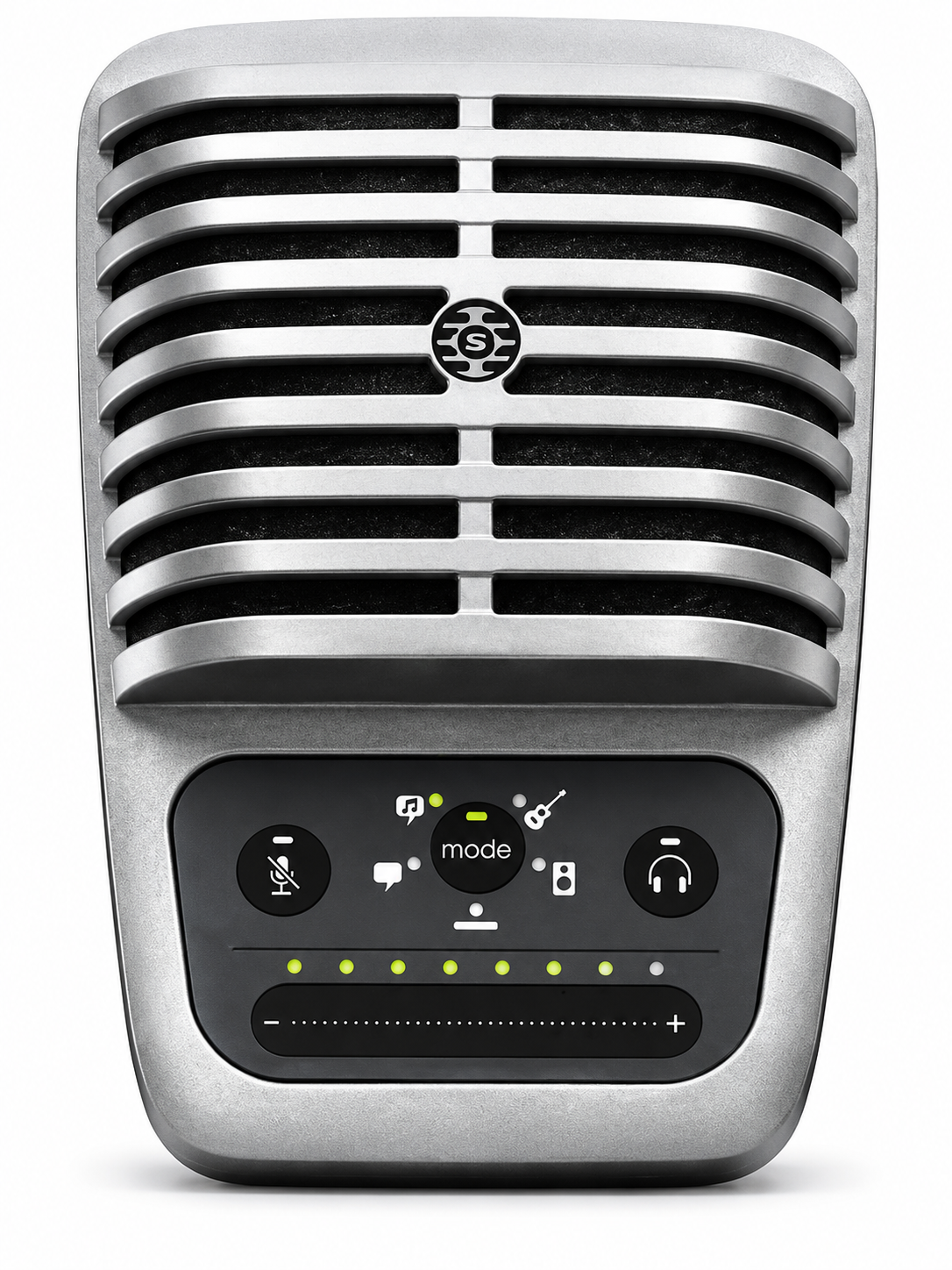
Introduction to the Shure MV51 USB Microphone
The Shure MV51 USB Microphone is a premium large-diaphragm digital condenser microphone designed for high-quality audio capture across multiple devices. Featuring a 1-inch (25mm) electret condenser capsule, cardioid polar pattern, and frequency response of 20Hz-20kHz, this versatile mic delivers professional-grade sound with a maximum SPL of 130dB, 16/24-bit depth, and sampling rates of 44.1/48kHz. Its standout feature is the five onboard DSP presets—Speech, Singing, Quiet & Acoustic Performance, Loud Music or Band, and Flat—automatically optimizing gain, EQ, compression, and limiting for podcasts, vocals, instruments, or live recordings.
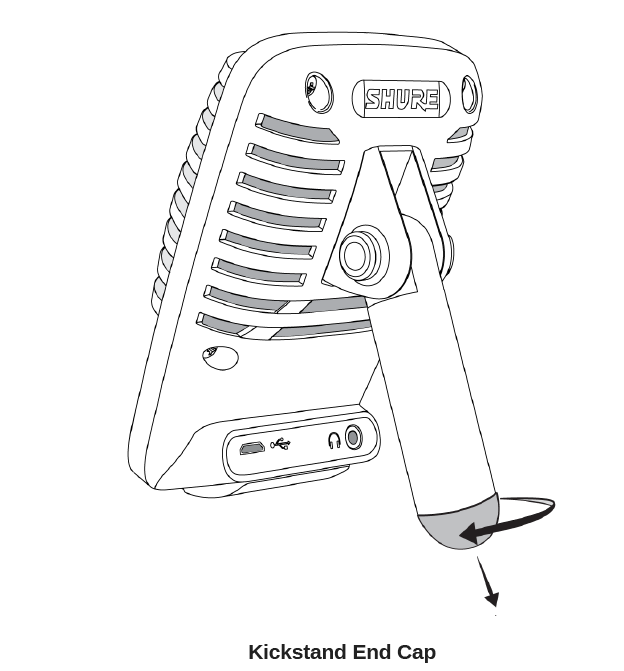
With plug-and-play USB and Lightning connectivity, the Shure MV51 USB Microphone works seamlessly with Mac, PC, iOS, and Android devices, including direct MFi-certified connection to iPhones and iPads without adapters. Front touch controls include a volume slider, LED metering, mute button, headphone volume selector, and mode button, while the rear offers a Micro USB/Lightning port and 3.5mm zero-latency headphone jack for real-time monitoring. The all-metal, vintage-inspired build includes an integrated kickstand and 5/8" thread adapter for desktop or stand use.
Ideal for podcasters, musicians, voice-over artists, and content creators, it excels in home studios, mobile recording, and video calls. Key benefits include exceptional build quality, low noise floor, and app integration via ShurePlus MOTIV for advanced control. Priced around $200-$250 (depending on retailers), it's widely available online and offers great value for a pro-level USB condenser mic. Whether capturing crisp speech or dynamic performances, the Shure MV51 sets a high standard for digital audio recording.
Specifications
- MFi certified: Yes
- DSP modes (presets): Speech/Singing/Acoustic/Loud/Flat
- Transducer type: Electret condenser (25 mm)
- Polar pattern: Unidirectional (cardioid)
- Bit depth: 16-bit/24-bit
- Sampling rate: 44.1/48 kHz
- Frequency response: 20 Hz to 20,000 Hz
- Adjustable gain range: 0 to +36 dB
- Sensitivity: -39 dBFS/Pa at 1 kHz [1] [2]
- Maximum SPL: 130 dB SPL [2]
- Headphone output: 3.5 mm (1/8″)
- Power requirements: Powered through USB or Lightning connector
- Mute switch attenuation: Yes
- Mounting stand: Built-in
- Stand adapter: 5/8-27 thread mount (standard mic stand mount)
- Housing: All metal construction
- Net weight: 574.7 g (20.27 oz.)
- Dimensions: 128 × 86 × 70 mm (H × W × D)
Features
- Easily adjust settings with the intuitive touch panel interface.
- Compatible with most iDevices (iPhone, iPad, and iPod) through Lightning interface.
- Compatible with most computers, tablets, and smartphones through USB interface.
- Large-diaphragm electret condenser microphone captures speech and music with excellent clarity.
- Sleek design includes all-metal housing for professional-grade durability.
- Headphone output allows real-time monitoring of the live signal and audio from the computer or device.
- Preset DSP modes include equalization and compression settings for specific applications.
- Desktop kickstand includes a removable tip for mounting onto a microphone stand.
Mounting and placement
- Desktop: Aim the microphone towards the sound source by adjusting the kickstand.
- Microphone stand: Unscrew the end cap to thread the kickstand onto a standard 5/8" microphone stand.
Setup
The MV51 is compatible with most devices that have a USB or Lightning connector.
- Connect the microphone: Connect the microphone to a computer or mobile device. Use the appropriate cable (USB or Lightning).
- Automatic driver installation: Drivers will be installed automatically. The touch panel illuminates to indicate a successful connection.
- Open sound control panel: Open the sound control panel and select the Shure MV51 driver.
- Adjust monitoring levels: Raise the level on both the MV51 product and the host computer for proper monitoring.
- Confirm audio device: Confirm that the MV51 is the selected audio device.
- Connect headphones: Plug headphones into the MV51 device audio output and play an audio track. If you can hear sound, the microphone is functioning properly.
- Check computer settings: If your computer settings default to another device, open the sound control panel and select the MV51 device.
- Adjust headphone volume: Adjust the headphone volume on the Shure MV51 device driver.
- Open MV51 driver: Open the MV51 driver from the sound control panel and raise the headphone volume from the playback or output tab.
- Select preset mode: Use the mode button to select the preset mode that fits your application.
- Adjust microphone gain: If the audio is too quiet or causes distortion, adjust the gain manually. Refer to the "Adjusting microphone level" topic in this guide for more details.
- Select input source: In your recording application, select the MV51 as the input source.
See your software user guide for information on assigning input sources.
Touch panel interface controls
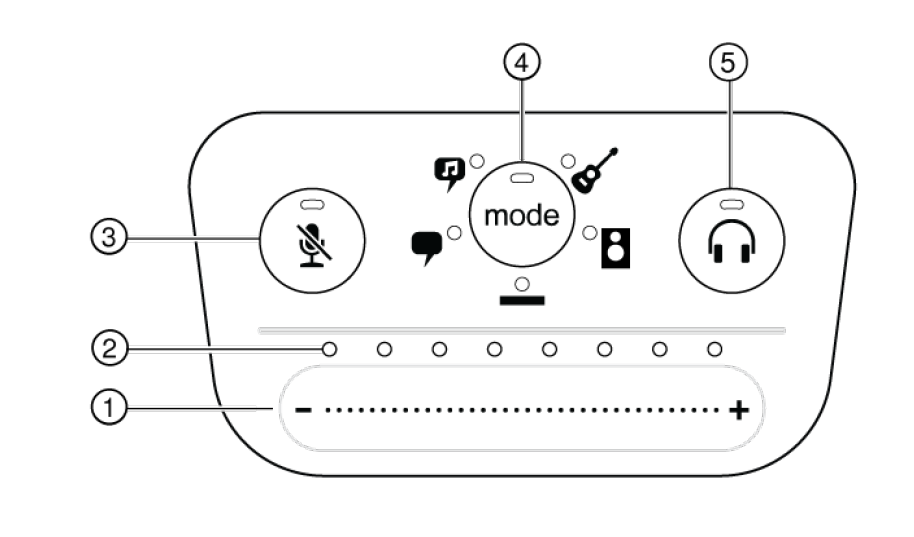
Volume control slider
Adjust microphone or headphone level by sliding your finger across the control surface.
- Press the mode button to activate microphone level.
- Press the headphone button to activate headphone volume.
LED bar
Displays microphone and headphone level. The LED color indicates the level being displayed or adjusted.
- Green: Microphone level.
- Orange: Headphone level.
Mute button
Press to mute and unmute the microphone.
Mode selector
Press to select preset mode.
Headphone volume selector
Press to select headphone level controls (orange LED bar). Then use the volume control slider to adjust headphone level. Press again to return to microphone level display (green LED bar).
Device setup
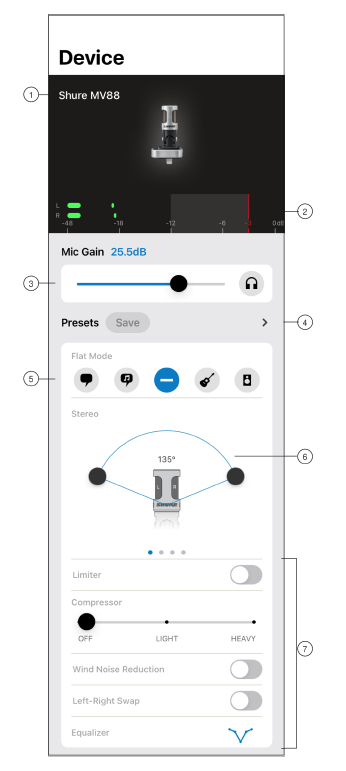
Connected mic status
Displays the name of the connected MOTIV microphone.
Input meter
Displays the strength of the input signal and whether that signal is mono or stereo. The loudest peaks should reach within the target range (indicated by the shaded region between -12 and 0 dB).
Microphone gain/monitoring
Adjust the gain slider to match the volume of the sound source. Tap the headphone icon to turn on the input monitor when making adjustments.
Custom presets
Tap the caret to quickly access your saved presets. Or tap the save button to save current settings as a new custom preset. See "Custom presets" for more information.
Preset modes
Select a mode to set stereo width, equalization, and compression for specific applications. Refer to the "Preset modes" topic for more details.
Polar pattern selection
Swipe to choose between stereo, mono cardioid, mono bidirectional, or raw mid-side pick-up patterns. Then adjust the width of the stereo microphone pickup area.
Advanced features
First select a preset mode, then use the advanced controls to fine-tune your audio recording and dial in your sound. Your settings will be retained in the microphone. See "Advanced features," "Wind noise reduction," and "Left-right channel swap" for more information on how these features work.
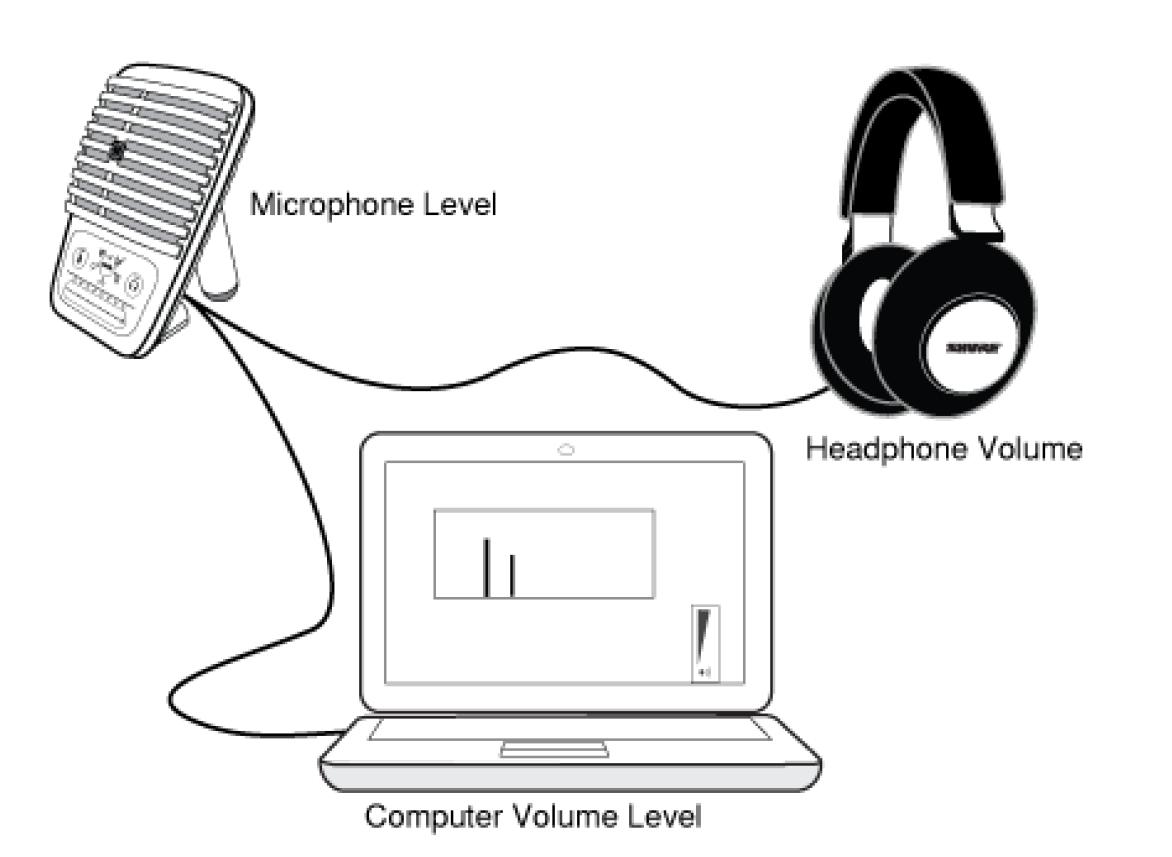
Adjusting headphone level
The headphone monitoring level is affected by the MV51 device level and the computer settings level. Raise your computer volume up and easily adjust headphones through the MV51 device headphone settings.
Troubleshooting the Shure MV51 USB Microphone: Common Issues and Fixes
Encountering problems with your Shure MV51 USB Microphone? Start with the basics: ensure USB/Lightning cables are securely connected and try swapping them, as faulty cables cause most recognition issues. If there's no audio input, verify device recognition in system settings (e.g., Sound preferences on Mac/PC) and select the MV51 as input; restart apps or devices if needed.
LED not lighting or no metering? Check power via USB/Lightning—it's bus-powered, so test different ports/devices. Mute button may be engaged (LED indicates status); toggle to unmute. Distorted audio? Switch to Flat mode or lower gain via the touch slider; DSP modes like Loud handle high SPL, but max at 130dB prevents clipping. Headphone monitoring silent? Confirm the 3.5mm jack connection and adjust the headphone volume selector.
For app-related errors in ShurePlus MOTIV, update to the latest version and grant permissions. Preventive measures: Use quality cables, avoid extreme volumes, and store in a dust-free environment. The 2-year warranty covers defects—contact Shure support at shure.com/support or 1-800-323-8357 for RMA. Download documentation from Shure's site for full diagnostics on Shure MV51 USB Microphone troubleshooting.
Pros and Cons of the Shure MV51 USB Microphone
Pros
- Exceptional build quality: All-metal construction with vintage design withstands heavy use, weighing 574g for stability.
- Versatile connectivity: USB and Lightning cables enable seamless iOS, Android, Mac, and PC use without adapters.
- Five DSP presets optimize for speech, singing, acoustic, loud, or flat recording, delivering pro results effortlessly.
- Superior sound: 24-bit/48kHz captures raw, studio-like audio with a low noise floor—beats the Blue Yeti in bit depth.
- Zero-latency monitoring via 3.5mm jack and intuitive touch controls for gain, mute, and volume.
Cons
- Heavy at 574g, less portable than lighter USB mics; no included carrying case or windscreen.
- Dated Micro USB/Lightning ports (no USB-C), limiting modern compatibility without adapters.
- No onboard storage or advanced app features beyond basics; requires DAW for post-processing in Flat mode.
- Higher price point ($200+) compared to entry-level USB mics, though value shines for multi-device pros.
Overall, the pros outweigh cons for serious users, offering better value than the Blue Yeti for Apple ecosystems and DSP flexibility.
Customer Reviews and Feedback on Shure MV51 USB Microphone
Users rave about the Shure MV51 USB Microphone, averaging 4.5/5 stars across reviews for its "studio-quality sound in a portable package". Podcasters praise the Speech preset for clear voice-overs with minimal noise, while musicians love Singing and Acoustic modes for vocals and guitars. A reviewer noted, "Sounds great on electric/acoustic/voice—low noise floor is a game-changer," rating it 8.8/10 overall.
Common praises include build durability and iOS compatibility: "Plug-and-play with iPhone perfection" (5 stars). Complaints focus on weight ("Too heavy for travel") and missing accessories like a case (3-4 stars). Testimonials highlight value: "Beats Blue Yeti with 24-bit and presets—solid for home studios and podcasts" (4.8/5). Most recommend it for professionals; address issues by using stands. Ideal buy for high-fidelity USB recording needs.
Faqs
How do I set up the Shure MV51 USB Microphone for the first time on a computer or iOS device?
What should I do if my Shure MV51 USB Microphone is not detected by my computer?
How do I use the touch panel controls on the Shure MV51 USB Microphone effectively?
Is the Shure MV51 USB Microphone compatible with iOS devices and what cables do I need?
How can I optimize audio quality when recording with the Shure MV51 USB Microphone?
How do I mount and position the Shure MV51 USB Microphone for acoustic guitar recording?
What maintenance is required to keep my Shure MV51 USB Microphone in top condition?
Why is there no audio output from my Shure MV51 USB Microphone headphones?
More shure manuals
- Setup: Shure PSM900 Wireless Personal Monitor System Owner Manual
- Setup: Shure PA805Z Passive Directional Antenna User Manual
- Setup: Shure SM87A Supercardioid Condenser Microphone User Manual
- Setup: Shure KSE1500 Electrostatic Earphone System User Manual
- Setup: Shure AD610 ShowLink Access Point User Manual
- Setup: Shure SE215M Sound Isolating Earphones User Manual
Leave a Comment