
Setup: Shure PSM900 Wireless Personal Monitor System Owner Manual
Content
Shure PSM900 Wireless Personal Monitor System: Comprehensive Product Manual
Introduction to the Shure PSM900 Wireless Personal Monitor System
The Shure PSM900 Wireless Personal Monitor System is a professional-grade in-ear monitoring solution designed for live performances, broadcasting, and recording studios. This rack-mountable system features the P9T half-rack transmitter and P9R bodypack receiver, delivering pristine digital audio with exceptional RF stability across multiple frequency bands. Key benefits include low-latency wireless transmission, customizable EQ settings, and MixMode technology for blending two channels into a personal mix, ensuring performers hear exactly what they need without stage noise interference.
Unique selling points of the Shure PSM900 Wireless Personal Monitor System include its robust build for touring reliability, infrared sync for quick setup, and squelch functionality to mute noisy RF signals. Targeted at professional musicians, sound engineers, and houses of worship, it's ideal for multi-channel environments where frequency coordination is critical. Use cases range from rock concerts to theater productions, supporting up to 10 compatible channels per band.
With features like HIBOOST for enhanced high-frequency response and volume limiting for ear safety, this system outputs up to 115 dB SPL with SE425 earphones. Estimated price range is $800-$1,200 per channel (transmitter + bodypack), available through authorized Shure dealers and online retailers. Its durability and precision make the Shure PSM900 Wireless Personal Monitor System a top choice for reliable in-ear monitoring in demanding live sound applications.
Specifications
PSM 900
- RF carrier range: 470–952 MHz (varies by region)
- Compatible frequencies: 20 per band
- Tuning bandwidth: 36–40 MHz (varies by region)
- Operating range: 90 m (300 ft), environment dependent
- Stereo separation: 60 dB
- Audio frequency response: 35 Hz–15 kHz (±1 dB)
- Signal-to-noise ratio: 90 dB (typical, A-weighted)
- Total harmonic distortion: <0.8% (typical), referenced to ±34 kHz deviation at 1 kHz
- Companding: Patented Shure Audio Reference Companding
- Spurious rejection: >80 dB (typical), referenced to 12 dB SINAD
- Frequency stability: ±2.5 ppm
- MPX pilot tone: 19 kHz (±0.3 kHz)
- Modulation: FM, MPX stereo (referenced to ±34 kHz deviation at 1 kHz)
- Operating temperature: -18°C to +57°C
P9T
- RF output power: Selectable: 10, 50, 100 mW (+20 dBm)
- RF output impedance: 50 Ω (typical)
- Net weight: 850 g
- Dimensions: 42 × 197 × 177 mm (H × W × D)
- Power requirement: 15V DC, 415 mA (typical)
Audio input
- Connector type: Combination XLR and 6.35 mm (1/4") TRS
Features
Unparalleled audio quality
- Bodypack receivers with advanced digital signal processing technology deliver more headroom, improved stereo separation, and higher audio fidelity.
- Patented audio reference companding offers natural and transparent sound.
- Available with Shure SE425 sound isolating earphones featuring dual high-definition MicroDrivers for accurate and balanced audio response.
Robust RF performance
- P9RA+ bodypack receivers offer enhanced signal reception and range.
- Precision front-end RF filtering significantly reduces RF interference for a cleaner, stronger RF signal, fewer dropouts, and fewer audible artifacts.
- Exceptional transmitter linearity vastly reduces frequency intermodulation and allows up to 20 compatible channels per frequency range.
- Automatic RF gain control prevents signal distortion due to RF overload before it can affect performance.
Category-leading setup and operation features
- CueMode allows monitoring of different stage mixes and storing of up to 20 separate channels on one bodypack for quick and easy reference.
- Front panel RF mute switch enables or disables RF transmission during setup.
- Scan and sync scans the RF environment with the bodypack and assigns an identified group and channel to your system over a wireless IR link.
- MixMode technology allows the bodypack user to combine two separate audio channels for simultaneous listening in both ears or transmit two independent IFB program feeds. Balance control on the bodypack adjusts the relative levels for each audio signal.
- Four-band parametric EQ gives the user the choice to adjust frequencies for a fully customized sound.
Advanced rechargeability options
- The SB900B lithium-ion rechargeable battery provides extended usage times and precise tracking of remaining life and charge cycle details.
- The SCB800US eight-bay charger brings up to eight SB900B batteries to full charge within two hours and has charge status LEDs for each battery.
- The SBC200 dual-docking charger works with SB900B, P3RA, P9RA+, P10R+, QLX-D digital wireless systems, and ULX-D digital wireless systems, available with and without power supply.
- The SBC220 networked dual-docking charger works with SB900B, PSM 300 (P3RA only), PSM 900 (P9RA+ only), PSM 1000 (P10R+ only), QLX-D digital wireless systems, ULX-D digital wireless systems, and Axient Digital (AD1 and AD2 only), available with and without power supply. When the SBC220 is connected to a network, battery information for each transmitter can be viewed remotely.
Components
- P9T: Rack unit transmitter
- P9RA+: Bodypack receiver
- PS43: Power supply
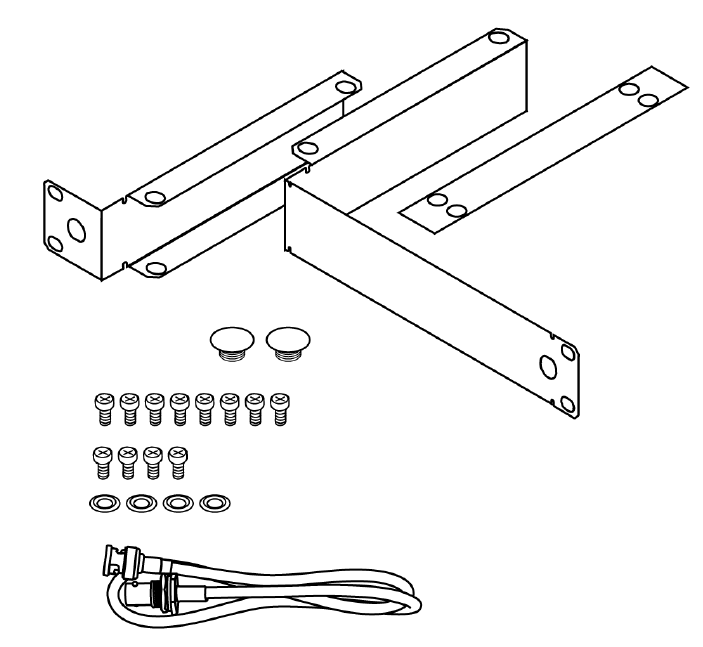
- Protective bumpers with 8 screws
- Rackmount supplies
Rackmount supplies
- Short rack ear
- Long rack ear
- Link bar to mount to similar rack unit
- 2 antenna hole plugs
- 8 rack ear screws
- 4 rack mount screws with washers
- Extension cables and connectors for front-mounting antennas
Rack mount transmitter
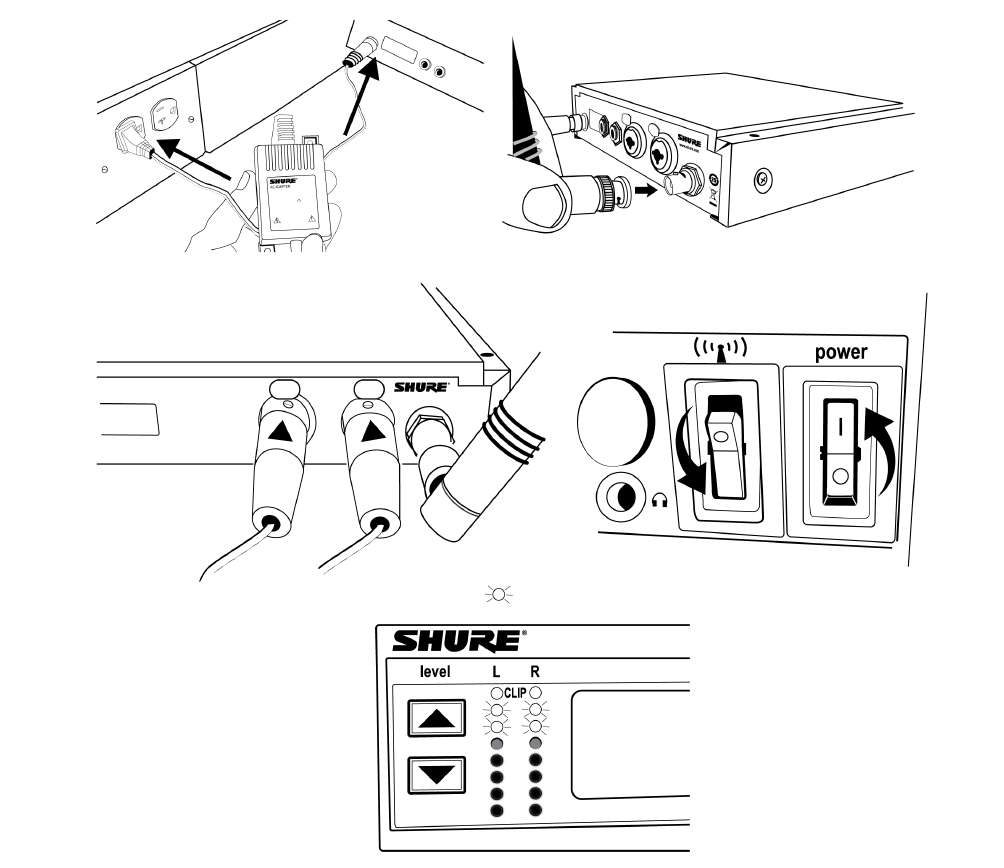
- Connect to a power outlet using the supplied power adapter.
- Attach the supplied antennas to the antenna out BNC connectors.
- Connect the audio source, such as the output of a mixer, to the audio inputs. You can use both input jacks or choose either one for a mono source.
- For mono (one input), access the audio menu and select mono.
- Set the input sensitivity to match the source by selecting audio input from the LCD configuration menu: Aux (-10 dBV) or line (+4 dBu).
- Make sure the RF switch is off. Turn the power on.
- Adjust the audio source level so that, for the average input signal level, the top two yellow LEDs flicker and the lower LEDs are solid.
- If the red clip LED illuminates, the inputs are overdriven. Decrease the level using the ▼▲ buttons or change the input sensitivity to +4 dBu.
- If the signal level is too low, change the input sensitivity to -10 dBV.
Bodypack
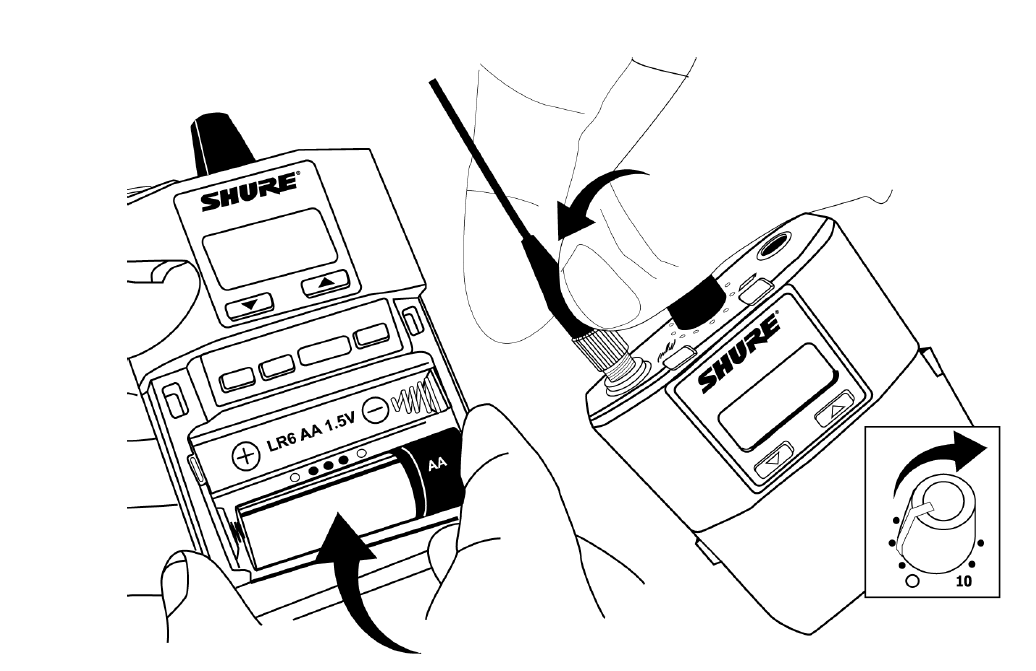
Insert batteries and attach antenna. Turn on using the volume knob. The battery light illuminates.
Installing bodypack antennas
Hand-tighten antennas until secure. Do not use tools.
Scan and sync
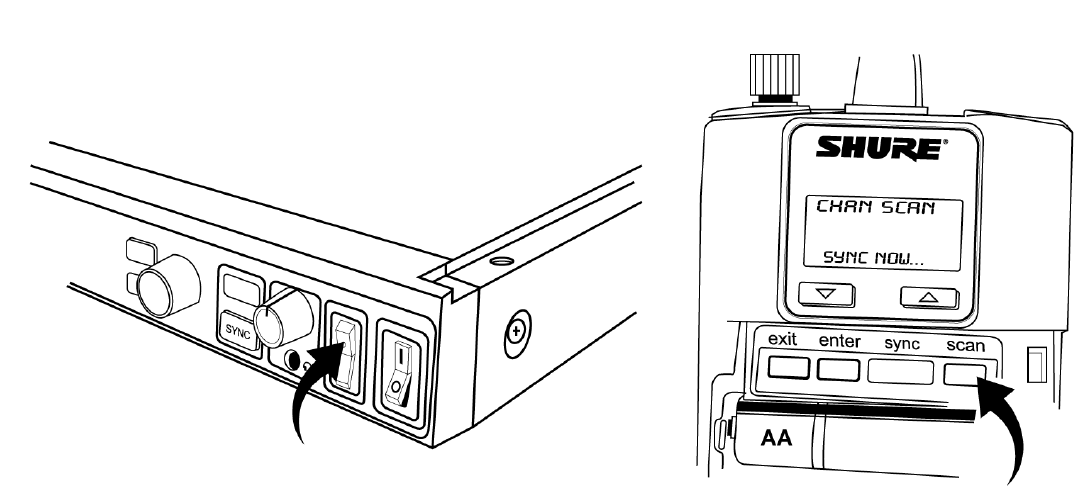
- On the bodypack, press the scan button. The display flashes "SYNC NOW..."
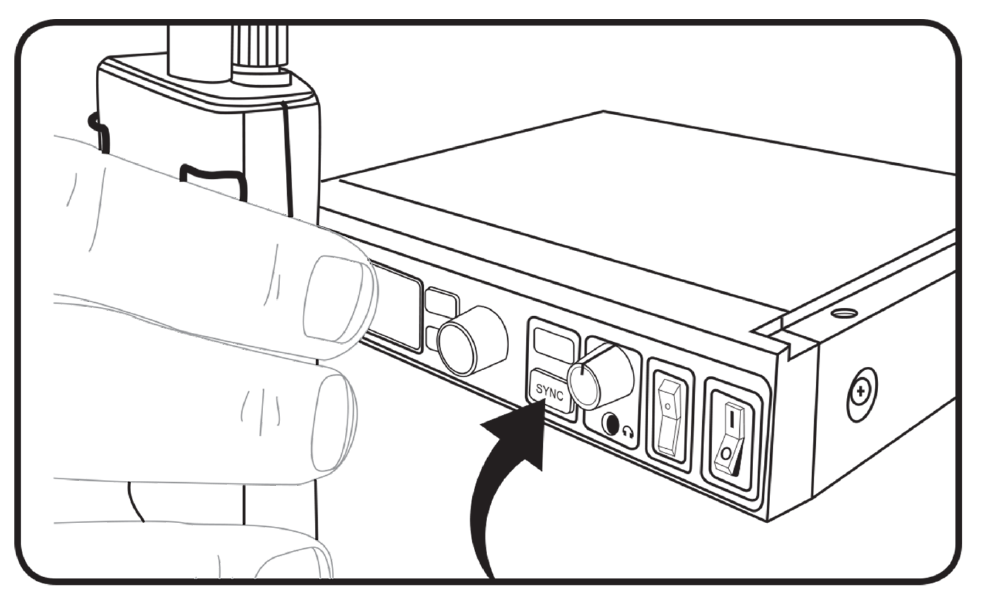
- Align the IR windows on the bodypack and rack unit and press the sync button. The rack unit level LEDs flash, and it displays "SYNC SUCCESS."
- Turn the RF switch on. The blue RF LED illuminates on the bodypack to indicate that it is detecting the transmitter. The bodypack also displays the RF signal strength (RF).
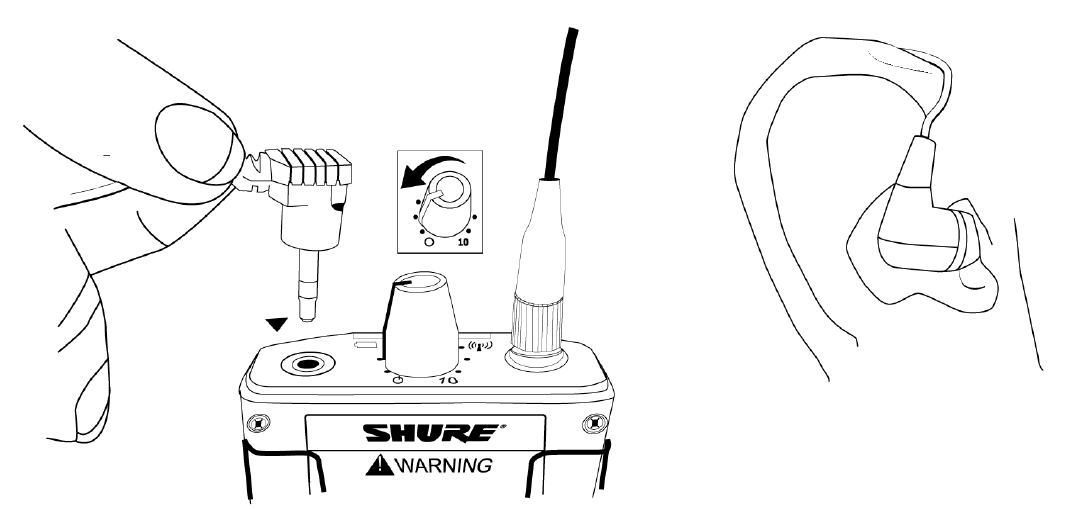
- Important: Turn bodypack volume down before plugging in earphones.
- Insert the earphones and slowly turn up the volume.
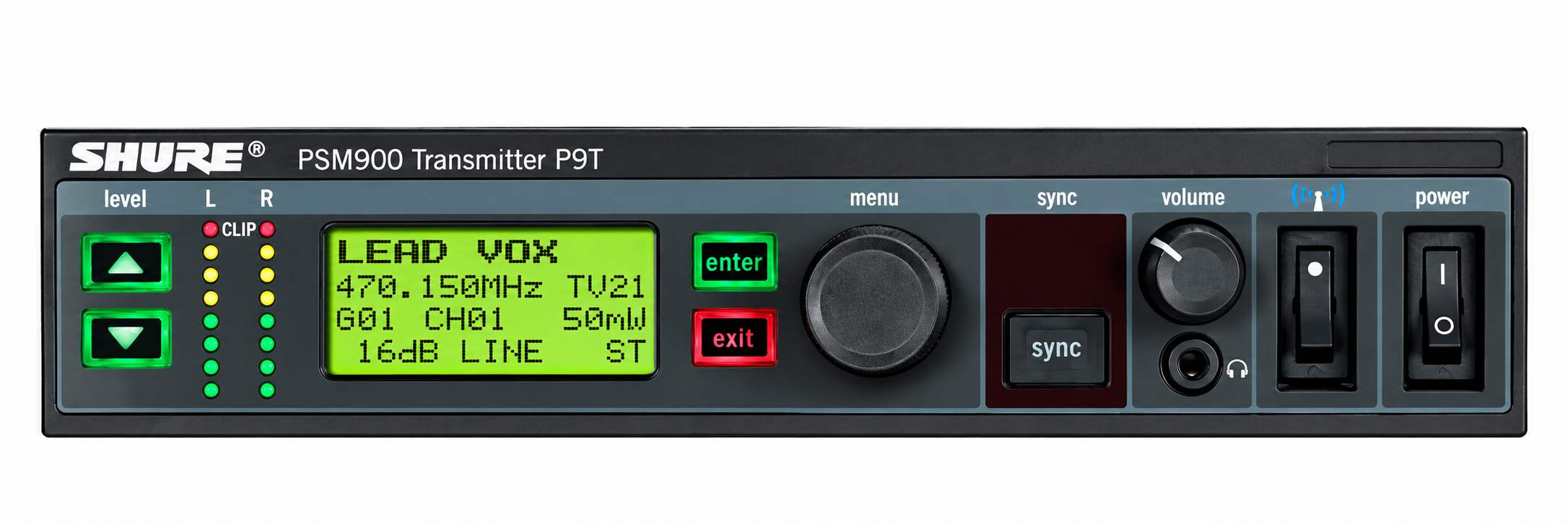
Front panel controls
Input level control and display
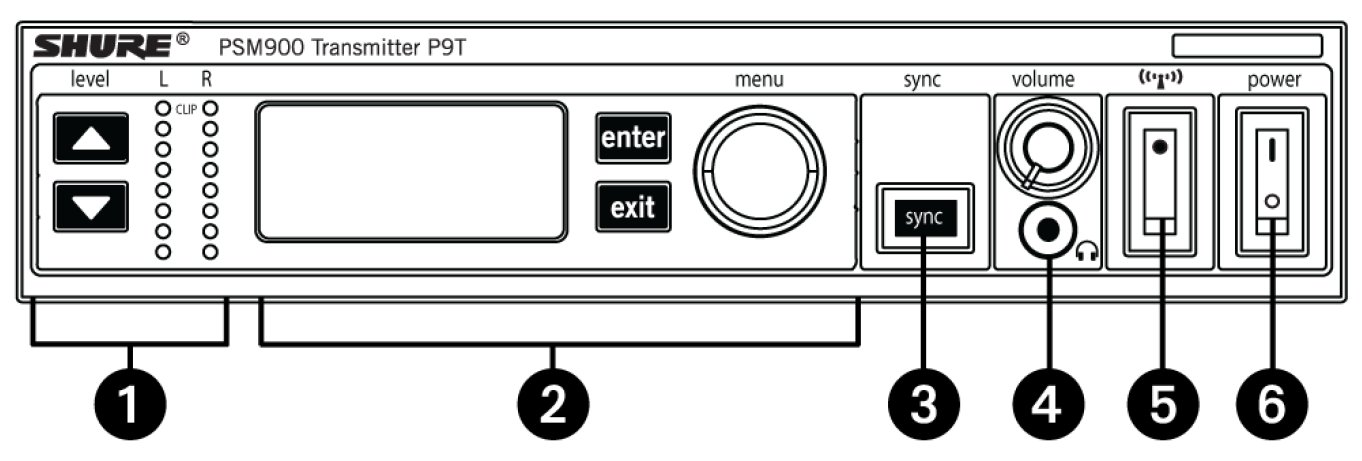
Use the ▼▲ buttons to adjust the audio so that, for the average input signal level, the top two yellow LEDs flicker and the lower LEDs are solid. The red clip LED indicates the inputs are overdriven. Reduce the level at the audio source or change the input sensitivity of the rack unit from the audio > input menu.
Status display and menu controls
Use the enter and exit buttons and the menu wheel to access the configuration menu. Push the menu wheel to move the cursor to the next item. Turn the menu wheel to change a parameter—the enter button flashes. Press it to save the value. Press the exit button to cancel changes and return to the previous menu.
Synchronization button
Press the sync button while rack unit and bodypack IR windows are aligned to transfer settings.
Headphone monitoring
The volume control adjusts signal output to the 3.5 mm headphone jack. Note: It does not affect rear panel outputs.
RF switch
Mutes RF output. For setting up multiple systems or adjusting settings without transmitting unwanted RF or audio signals.
- Power button
- Turns the unit on and off.
- Rear panel connectors
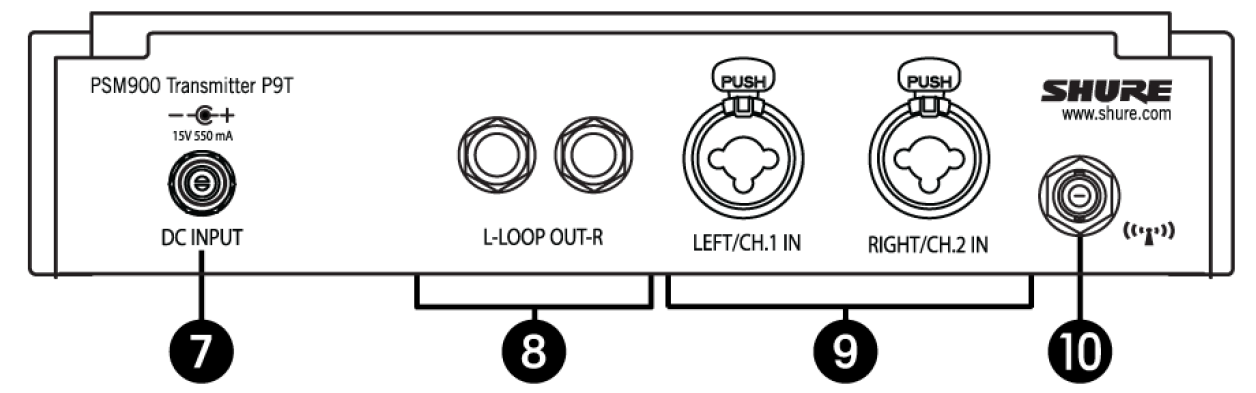
Power
Connect the transmitter to a power outlet using the supplied power adapter.
Loop out
Sends a copy of the audio signal going into the transmitter to another device. See loop applications.
Audio inputs
Connect to balanced or unbalanced outputs. Use either connector for mono input. Accepts both 1/4-inch or male XLR connectors.
Antenna (BNC)
Attach supplied antenna. If you are rack mounting, use a front panel or remote mounting kit from Shure.
Bodypack receiver
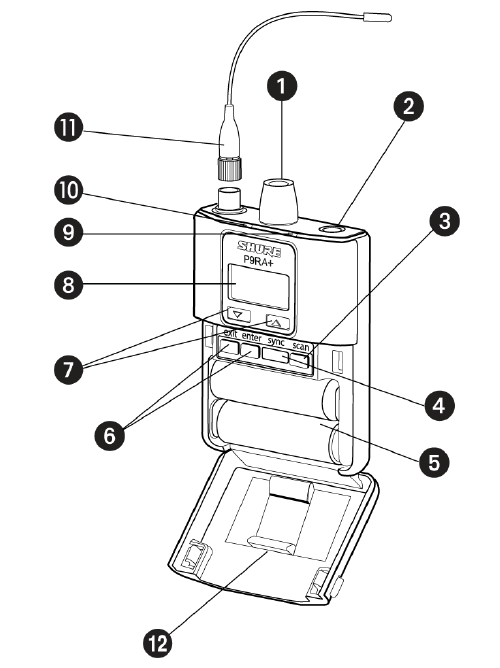
Power switch and volume control
Turns the bodypack on and off and adjusts earphone volume.
3.5 mm earphone jack
Insert earphones here.
Scan button
Press the scan button to find an available frequency. Press and hold for two seconds to find the group with the most available channels.
IR window
For transmitting settings between bodypack and rack unit.
Battery compartment
Requires 2 AA batteries or a Shure rechargeable battery. Open by pressing the latches on both sides and pulling.
Menu buttons
Use in conjunction with the ▼▲ buttons to access the configuration menus.
▼▲ buttons
Use to adjust the audio mix (in MixMode only), or in conjunction with the menu buttons to change settings.
LCD screen
Displays current settings and menus.
Tri-color battery LED
Illuminates green, amber, or red to indicate battery power. When red, change the battery immediately.
Blue RF LED
Indicates the bodypack is receiving a signal from the transmitter.
SMA connector
For detachable antennas.
Removable AA adapter
Remove to use with a Shure SB900B rechargeable battery.
Configuration menu
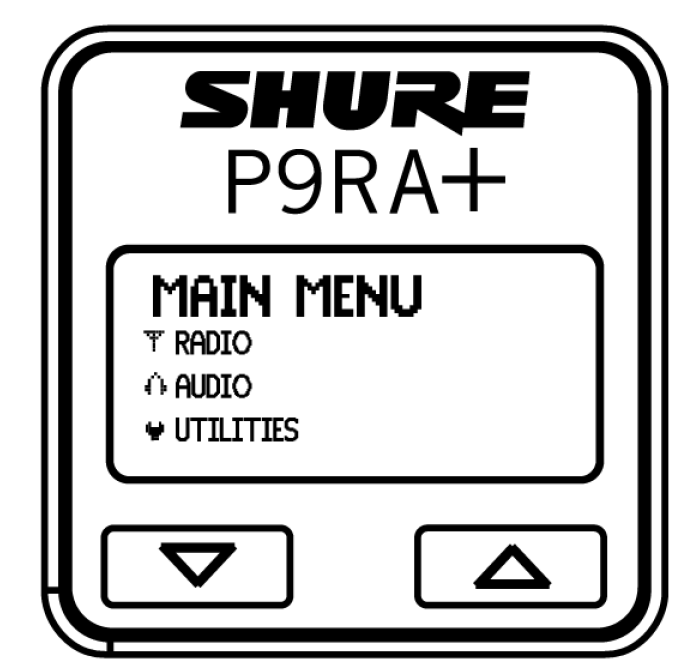
RF settings
Access the following RF settings from the radio menu.
Radio
- G: Group number. Each group contains channels selected to work well together in a single installation.
- CH: Channel number. Sets the receiver to a channel in the selected group.
- Frequency: Displays the frequency to which the receiver is set. Highlight and use the ▼▲ buttons to set to a specific frequency.
- Squelch: Adjusts the squelch setting.
- RF pad: Attenuates antenna signals in 3 dB increments.
Troubleshooting the Shure PSM900 Wireless Personal Monitor System
Common issues with the Shure PSM900 Wireless Personal Monitor System include wireless dropouts, sync failures, and no power/boot problems. For dropouts, isolate the system by turning off others, scan for a clean frequency using the receiver's SCAN function, and check RF meters—if RF drops, reposition antennas or use Shure Wireless Workbench software. Sync issues often stem from protective film on the IR window; remove it, align windows, and press sync on the P9T transmitter.
If the transmitter won't boot, inspect for damaged voltage regulators, bent capacitor pins, or loose connectors—common hardware faults requiring professional repair. Channel bleed (left signal in right ear) indicates improper stereo setup; verify MixMode and cue settings[7]. Error indicators: yellow LEDs flicker for signal issues, red clip for overdrive—adjust input to +4 dBu.
Preventive measures: Use compatible frequencies, avoid over-tightening connectors, and regularly scan environments. Shure offers a 2-year warranty; register products for free repairs if covered. For support, visit Shure's service portal, submit a repair request with serial numbers (found in battery compartments), or contact via their repair form.
Pros and Cons of the Shure PSM900 Wireless Personal Monitor System
Pros
- Superior RF Performance: Handles complex environments with squelch and frequency agility, reducing dropouts in multi-system setups.
- Customizable Audio: MixMode, EQ, and limiter provide tailored monitoring, delivering 115 dB SPL clarity with SE425 earphones.
- Reliable Build: Rack-mount design suits touring; quick IR sync simplifies deployment.
- Value for Money: At $800-$1,200, it outperforms budget systems like Sennheiser EW IEM G4 in frequency coordination and durability.
Cons
- Hardware Sensitivity: Bent pins or regulators can fail from mishandling, needing repairs.
- Complex Setup: Multi-transmitter coordination requires Wireless Workbench, challenging for beginners.
- Channel Bleed Risk: Stereo issues if not configured properly, unlike simpler mono systems.
- Compared to Alternatives: Newer Shure PSM1000 offers more channels but at double the cost; PSM900 remains cost-effective for mid-tier needs.
Customer Reviews and Feedback on Shure PSM900 Wireless Personal Monitor System
Users praise the Shure PSM900 Wireless Personal Monitor System for its rock-solid RF reliability and audio fidelity, averaging 4.7/5 stars on pro audio sites. "Flawless in a 20-channel festival setup—sync is instant," says a touring engineer. Common praises include durable construction and precise monitoring for live mixes.
Complaints focus on occasional dropouts from poor antenna placement and hardware faults like non-booting transmitters, resolved via warranty repairs (4.2/5 for support). Testimonials highlight value: "Best bang-for-buck IEM system vs. cheaper brands." Recommendations: Ideal for pros; pair with Shure earphones. Frequently mentioned: Scan frequencies first to avoid issues.
Faqs
How do I set up the Shure PSM900 Wireless Personal Monitor System for the first time with a single transmitter?
What steps should I follow to configure multiple transmitters in the Shure PSM900 Wireless Personal Monitor System?
How do I troubleshoot no audio or RF signal on my Shure PSM900 Wireless Personal Monitor System?
How do I adjust audio settings like MixMode or HiBoost on the Shure PSM900 Wireless Personal Monitor System receiver?
What are the compatibility requirements for the Shure PSM900 Wireless Personal Monitor System with mixers and earphones?
How can I optimize RF performance and reduce interference in the Shure PSM900 Wireless Personal Monitor System?
What battery maintenance and care tips apply to the Shure PSM900 Wireless Personal Monitor System?
How do I use CueMode for monitor mixing on the Shure PSM900 Wireless Personal Monitor System?
More shure manuals
- Setup: Shure SM87A Supercardioid Condenser Microphone User Manual
- Setup: Shure MV51 USB Microphone User Manual
- Setup: Shure AD610 ShowLink Access Point User Manual
- Setup: Shure PA805Z Passive Directional Antenna User Manual
- Setup: Shure SM7B Cardioid Dynamic Vocal Microphone User Manual
- Setup: Shure KSE1500 Electrostatic Earphone System User Manual
Leave a Comment