
How to Pair: Spytec Gps GL300 Tracker User Manual
Content
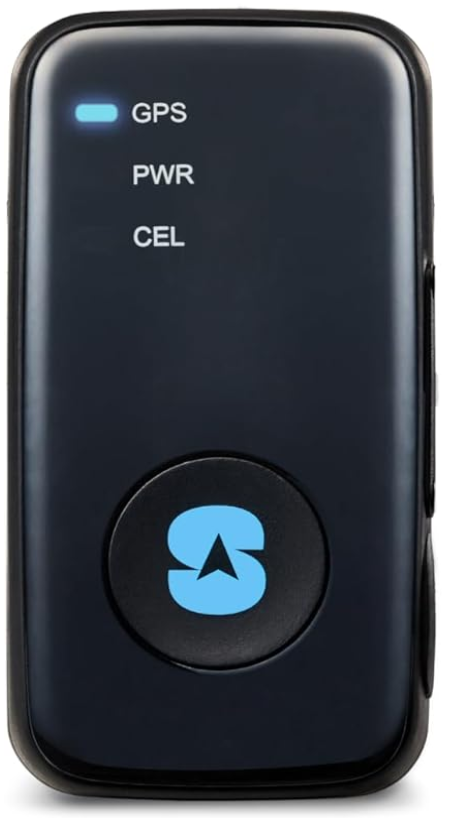
Spytec GPS GL300 Tracker
Introduction
The Spytec GPS GL300 Tracker is a versatile, compact device designed for real-time GPS tracking. It offers a range of benefits, including its lightweight and slim design, making it perfect for tracking vehicles, fleets, and valuable assets. The tracker features 4G LTE connectivity, providing seamless coverage across North America and worldwide. It is ideal for various use cases, such as monitoring cars, trucks, boats, RVs, and even children. The device is equipped with a weatherproof magnetic case for secure attachment to vehicles and is suitable for harsh weather conditions.
The Spytec GPS GL300 Tracker is available in a price range of approximately $20 to $30, depending on the retailer and any promotions. It is widely available online through platforms like Walmart and directly from Spytec. The tracker requires a subscription for real-time tracking services, but it is commitment-free, allowing users to manage their costs effectively.
In the Box
- Tracker with SIM card installed
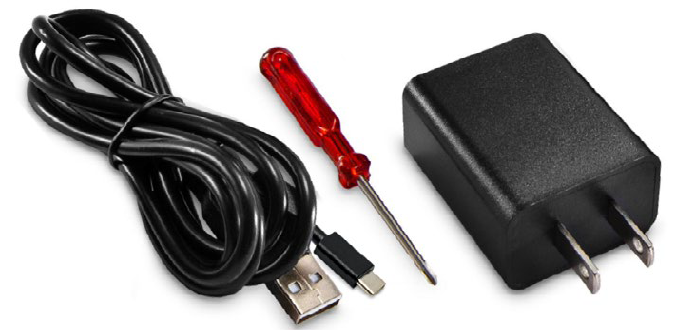
- USB Type-C charging cable
- AC adapter
- Screwdriver with two screws (User does not typically need to open the SIM compartment)
FEATURES
Specifications
INTERFACES
- Digital inputs: 2
- Digital output: 1
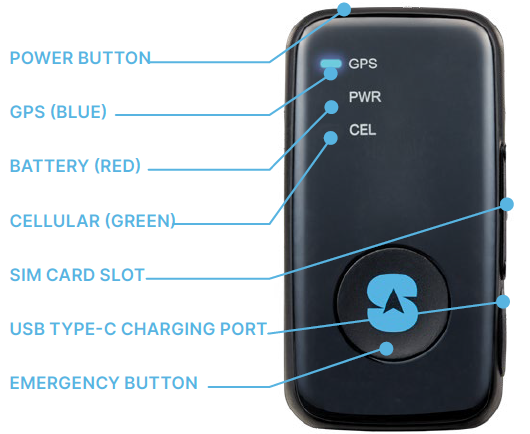
- Buttons: Power on/off, function for emergency alert or instant geo-fence
- Power/configuration connector: USB Type-C
- RF connector: MMCX for external GPS antenna
- LED indicators: GSM, GPS,, and battery status
ENVIRONMENTAL
- Operating temperature: -4°F ~ 131°F (-20°C ~ 55°C)
- Water resistance: IPX5 compliant
ELECTRICAL
- Charging voltage: 5V DC
- External battery voltage: 3.5 V to 4.2 V DC
- Battery: Lithium-polymer 2600 mAh
- Standby time without reporting: 5-25 days, depending on usage
PHYSICAL
- Dimensions: 1.635” x 3.15” x 1.145”
- Weight: 3.28 oz (93 g)
- USB charging cable length: 50˝ (1.3 m)
Charging
- Plug the n wall charger, then connect the charger to the GL300.
- Power LED will flash red while charging, and will turn solid red when fully charged.
- Charge for at least 8 hours, or until the red LED turns solid.
- Disconnect from charger. The red LED will go out.
Locate your IMEI
Locate the International Mobile Equipment Identity (IMEI) number on the bottom of your tracker. The number is 15 characters long. You will need to enter it to set up your account.
Create an Account & Login
- From a browser on a computer or smartphone, go to: www.spytec.com/gps-activation.
- Click on the “Activate a new tracker” tile.
- Fill out the entire multi-screen form.
- Your login details will be emailed to you. Please allow up to 24 hours for your tracker to be activated
- Once you log into your account, you will see the mapping platform where your GL300 will show its location.
Placement of the Tracker
- The GL300 needs to have as much access to the open sky as possible to retain its connection to the GPS satellites.
- Tracker cannot be surrounded by metal since it will block GPS signals. DO NOT hide the GL300 in metal enclosures. DO NOT place it in the middle of the undercarriage, the engine compartment, wheel wells, metal bumpers, the trunk, glove compartment, or in any closed/lidded compartment. The best position for the device within a vehicle is under the driver's or passenger's seat.
- When placing the GL300 under a vehicle, position it on a flat part of the frame towards the edge of the vehicle with the LEDs on the face of the device facing the pavement. When you get low to the ground, you should be able to see the device.
Important Facts
- Standard programming for the GL300 is to update every 3 hours when not moving and once a minute when moving.
- The more frequently the device is set to update, the faster the battery will be depleted. For example, 1-minute updates will result in approximately 2.5 weeks of battery life, while 30-second updates will result in approximately 14 days of battery life.
- When the device is on, the green LED will flash once every 3 seconds.
- When powering off, the red LED will remain on for up to 2 minutes, then power down.
Troubleshooting
If you encounter issues with your Spytec GPS GL300 Tracker, here are some common problems and solutions:
- Tracker Not Updating: Ensure the device is fully charged and that the SIM card is properly installed. Check if the device is in a location with good cellular coverage.
- Incorrect Location Data: Restart the tracker and ensure it is in an open area for better GPS signal reception.
Preventive measures include regularly updating your tracker's software and maintaining a clean environment around the device. The Spytec GPS GL300 Tracker comes with a lifetime warranty for added peace of mind. For further assistance, contact Spytec support via their website or by phone.
- Q: GPS platform says the device is in New Jersey (or was last read 1000 days ago). This isn’t accurate.
A: Make sure the green light is blinking once every 3 seconds and take it out for a drive that lasts at least 10 minutes. - Q: The GPS platform shows a blue screen or the coast of Africa.
A: This means the device has not yet locked onto a GPS signal. Take it outside for a 10-minute walk or drive, and its location should update. - Q: What should I do if my device says “last updated X days ago,” even if it’s been in use?
A: Verify that the green light is blinking every 3 seconds and the device is properly positioned. If the problem persists, email support@spytec.com - Q: My device has been turned on for some time, but it is not updating. Why?
A: If the green LED is blinking once every 3 seconds, take it out for a 10-15-minute drive. If the unit is still not updating on the platform, contact Tech Support.
Warranty
This Unconditional Lifetime Warranty applies to the GL300 GPS Tracker sold by Spytec GPS. This warranty covers any manufacturing defects to the device or accessories encountered during normal use, with an active Spytec GPS subscription. This warranty does NOT cover damages resulting from improper use of the device (including the use of incompatible accessories such as chargers, storage devices, etc.), unauthorized modifications to the device, negligence, any environmental or natural disasters, or loss or theft. This warranty does NOT cover water damage. This warranty requires proof of sale of the device from Spytec GPS or approved resellers only.
Devices that are covered will be repaired or replaced at the discretion of Spytec GPS. Devices requiring replacement will be fulfilled with a new or refurbished unit, or a similar unit if the original unit is no longer available.
To take advantage of our warranty, go to http://www.spytec.com/pages/returns and review our Returns Policy. If your device meets the above guidelines as well as the guidelines on our website, please click the button to proceed to the Return Authorization Form. If our online guidelines change, this warranty will supersede any newer changes. Once you have filled out the Return Merchant Authorization Form, please wait for instructions.
Pros & Cons
Pros
- Compact Design: Ideal for discreet tracking on various assets.
- Real-Time Tracking: Provides instant updates for efficient monitoring.
- Weatherproof: Durable enough for harsh environments.
- Flexible Battery Life: Offers up to 52 days of battery life depending on usage.
Cons
- No Standalone Mobile App: Users must access a mobile-friendly website for tracking.
- Geofencing Limitations: Setting geofences can be cumbersome and requires manual input.
Customer Reviews
The Spytec GPS GL300 Tracker has received mixed reviews, with many users praising its compact design and real-time tracking capabilities. However, some users have noted issues with the lack of a dedicated mobile app and the complexity of setting geofences. It averages a rating of 3.4 out of 5 stars. Users appreciate the device's versatility and value for money, making it a popular choice for fleet management and asset tracking.
More spytec gps manuals
Leave a Comment