
Sylvania RDSGHT_MIR.BX Road Sight Mirror Dash Camera User Manual
Content
SYLVANIA RDSGHT_MIR.BX Road Sight Mirror Dash Camera Overview
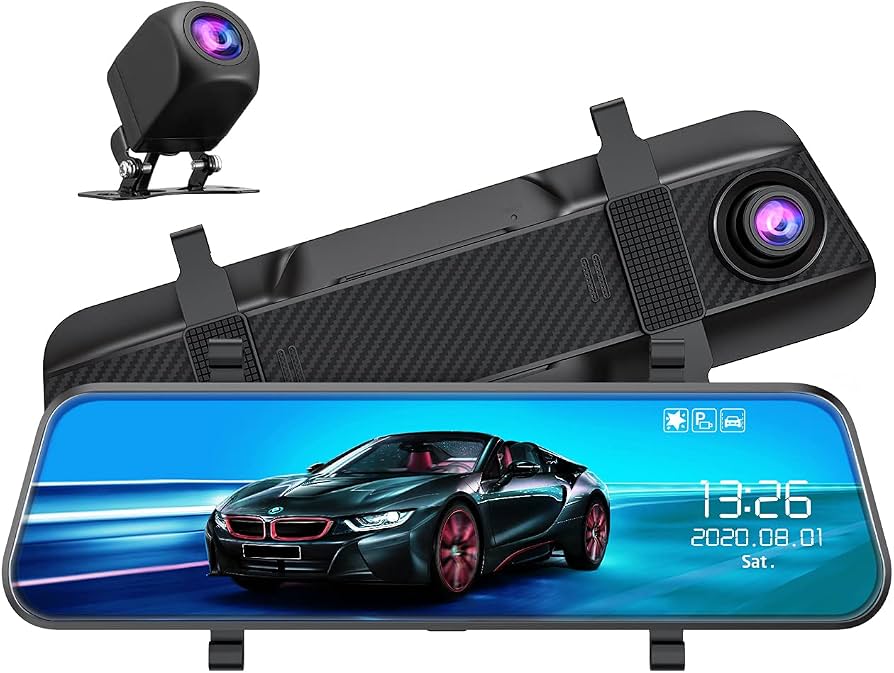
The sylvania RDSGHT_MIR.BX Road Sight Mirror Dash Camera is a mirror-mounted dual-camera system designed to add front and rear video recording without cluttering the windshield. It combines a 1080p front dash camera with a 1080p rear backup camera, giving drivers a wide all-around driving view and added confidence during commuting, parking, and everyday road travel. The 9.66-inch IPS touchscreen sits over the existing rearview mirror and can be used as a full display or switched off to function like a standard mirror, making it practical for drivers who want safety features without a bulky setup.
Key benefits include 170-degree coverage from both cameras, loop recording, a built-in G-sensor for collision detection, and 24-hour parking surveillance support. The included rear camera is IP67 waterproof, which makes it suitable for exterior mounting on cars, SUVs, and trucks. This model also comes with a 32GB memory card, installation accessories, and a 12-month warranty, which improves its value for first-time dash cam buyers.
The sylvania RDSGHT_MIR.BX Road Sight Mirror Dash Camera is a strong fit for commuters, rideshare drivers, parents, and anyone who wants a rearview mirror dash cam with backup camera functionality. It is commonly positioned in the budget-to-midrange category, with an estimated price range around $89.99, and it is typically available through Sylvania Automotive and select online retailers.
How to Use the Sylvania RDSGHT_MIR.BX Road Sight Mirror Dash Camera
Installation and basic setup
Mount the mirror dash camera over the vehicle’s OEM rearview mirror using the included elastic straps. Connect the mini USB power cable to the top of the unit, then route the cable along the headliner and pillar trim using the included trim tool. Attach the rear camera at the back of the vehicle and make sure it is securely positioned before powering on the system. After startup, confirm that both the front camera and rear camera display properly on the touchscreen.
Recommended settings
- Use loop recording for continuous recording without manually clearing storage.
- Enable G-sensor sensitivity at a moderate level to lock important files after a collision.
- Format the microSD card regularly to reduce recording errors.
- Check camera alignment after installation to keep the road view centered.
- Keep the screen brightness at a level that does not block driving visibility at night.
Troubleshooting the Sylvania Roadsight Mirror Dash Camera
If the dash cam does not power on, check the 12V adapter, mini USB cable, and vehicle ignition source. If the screen is blank but the unit has power, the display may be set to mirror-only mode or the brightness may be turned down. If the rear camera shows no image, inspect the rear camera cable and confirm that the connection is fully seated. If recordings are missing or corrupted, reformat the microSD card and verify that it meets the required speed class.
Common alerts are usually related to memory card issues, power interruptions, or file protection triggered by the G-sensor. If you see a card error message, use a Class 10 microSD card and avoid using cards that are full, damaged, or counterfeit. Preventive maintenance includes updating the camera’s settings after installation, keeping the lens clean, and checking cable routing for loose connections. The product includes a 12-month warranty, and customer support is typically handled through Sylvania Automotive’s official support channels or the retailer that sold the unit. For help, contact the seller directly with the model number RDSGHT_MIR.BX, proof of purchase, and a description of the issue.
Pros and Cons of the SYLVANIA Roadsight Mirror Dash Camera
Pros
- Dual 1080p recording gives both front and rear coverage for better incident evidence.
- Large 9.66-inch IPS touchscreen makes live viewing and playback easier.
- Mirror-style design keeps the windshield cleaner than many traditional dash cams.
- Rear camera is IP67 waterproof, which is useful for exterior mounting.
- Included memory card and installation tools improve overall value for money.
Cons
- 1080p video is solid, but it may not match sharper 1440p or 4K alternatives.
- The mirror form factor can feel large in smaller vehicles.
- Mini USB power is less modern than USB-C found on newer models.
- Touchscreen and cable setup may take longer than a basic single-lens dash cam.
Compared with compact alternatives, this mirror dash cam offers more screen space and rear-camera convenience, while performance-focused models from higher tiers may deliver better image detail at night. For drivers prioritizing a balanced mix of features, the sylvania RDSGHT_MIR.BX Road Sight Mirror Dash Camera remains a competitive option.
Customer Reviews for the Sylvania RDSGHT_MIR.BX Road Sight Mirror Dash Camera
Customer feedback for the sylvania RDSGHT_MIR.BX Road Sight Mirror Dash Camera is generally positive, with many users appreciating the easy-to-read display, dual-camera coverage, and included accessories. Common praise centers on the clear front view, useful rear camera for parking, and the clean factory-style look once installed. A typical rating trend falls around 3.8 out of 5 stars, reflecting good feature value with a few practical tradeoffs.
Common complaints usually mention the learning curve during installation, the size of the mirror unit, and the fact that image quality is good rather than premium. Some users also want a more modern power connection or sharper low-light performance. A recurring recommendation is to buy this model if you want a practical mirror dash cam with backup camera support and built-in safety features, but consider higher-resolution alternatives if night footage clarity is your top priority.
- “Great value for the price and the rear camera makes parking much easier.”
- “Installation took some time, but the finished setup looks clean and professional.”
- “Good everyday dash cam for commuting, especially with the big touchscreen.”
Frequently Asked Questions About the Sylvania Roadsight Mirror Dash Camera
Does it record while parked?
Yes, the built-in G-sensor and parking surveillance features help monitor the vehicle when parked.
What storage does it support?
The system supports microSD storage up to 128GB and includes a 32GB card in the box.
Is the rear camera weatherproof?
Yes, the rear camera is IP67 waterproof, making it suitable for external mounting.
Is this a good dash cam for daily driving?
Yes, it is a practical choice for drivers who want front and rear recording, parking protection, and a mirror-style display in one device.
Faqs
How do I set up the sylvania RDSGHT_MIR.BX Road Sight Mirror Dash Camera for the first time?
Why is my sylvania RDSGHT_MIR.BX Road Sight Mirror Dash Camera not turning on?
What microSD card works best with the sylvania RDSGHT_MIR.BX Road Sight Mirror Dash Camera?
How do loop recording and parking mode work on the sylvania RDSGHT_MIR.BX Road Sight Mirror Dash Camera?
Can the sylvania RDSGHT_MIR.BX Road Sight Mirror Dash Camera record both front and rear views?
How can I improve night recording quality on the sylvania RDSGHT_MIR.BX Road Sight Mirror Dash Camera?
Why are the videos from my sylvania RDSGHT_MIR.BX Road Sight Mirror Dash Camera blurry or shaking?
How should I clean and maintain the sylvania RDSGHT_MIR.BX Road Sight Mirror Dash Camera?
More sylvania manuals
Leave a Comment