
Sylvania Roadsight Pro Dash Camera User Manual
Content
Sylvania Roadsight Pro Dash Camera Manual
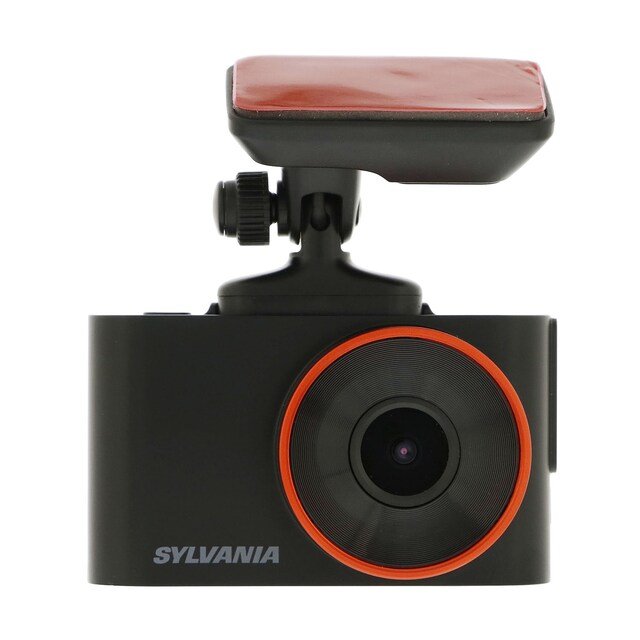
Introduction: Sylvania Roadsight Pro Dash Camera Overview
The Sylvania Roadsight Pro Dash Camera is a compact forward-facing dashboard camera designed to capture clear driving footage with everyday usability in mind. It is built for drivers who want reliable evidence in the event of collisions, parking incidents, insurance disputes, or unexpected road events. With 1296p video recording at 30 fps, a 130-degree field of view, and enhanced night vision, the Roadsight Pro Dash Camera offers a strong balance of image clarity, coverage, and ease of use.
This model is especially well suited for commuters, rideshare drivers, fleet operators, and road-travel enthusiasts who want a simple dash cam with app support and a clean installation. The 2-inch IPS display makes menu navigation straightforward, while the magnetic and adhesive mounting system helps keep the camera stable and discreet behind the windshield. It also supports up to a 64GB microSD card and can record up to 12 hours of footage, depending on settings and storage conditions.
The Sylvania Roadsight Pro Dash Camera is typically positioned in the budget-to-midrange category, with an estimated price range of about $80 to $150 depending on retailer, bundle, and availability. It is commonly sold through automotive retailers, online marketplaces, and the manufacturer’s product listings. For drivers looking for a practical dash cam with dependable core features rather than premium extras, this model remains a competitive option.
Specifications: Sylvania Roadsight Pro Dash Camera Technical Details
- Video resolution: 1296p at 30 fps for detailed forward-facing footage.
- Field of view: 130 degrees for broad road coverage.
- Storage support: Up to 64GB microSD card, Class 10 recommended.
- Maximum recording time: Up to 12 hours, depending on resolution and card capacity.
- Display: 2-inch IPS LED screen for live preview and settings access.
- Mounting: Magnetic and adhesive mount for flexible installation.
- Power input: Mini USB power connection with 12V DC accessory plug wiring.
- Battery type: Lithium-ion.
- App support: Yes, with Sylvania Connect compatibility.
- Night recording: Enhanced night vision included.
- Operating temperature: 14°F to 140°F.
- Storage temperature: -4°F to 158°F.
- Warranty: 12-month warranty.
Compared with similar compact dash cameras, the Sylvania Roadsight Pro Dash Camera stands out for its 1296p recording and app-enabled workflow, while some alternatives may offer 1080p only or require higher-priced bundles for similar features. It is a practical choice for drivers who want better-than-basic video quality without moving into premium front-and-rear systems.
Troubleshooting: Common Sylvania Roadsight Pro Dash Camera Problems and Fixes
- Camera will not power on: Check the mini USB cable, vehicle accessory power source, and ignition state. Confirm the power connector is fully seated.
- Memory card not detected: Use a Class 10 microSD card up to 64GB, then reformat the card in the camera menu before recording.
- Recording stops unexpectedly: Verify available storage space, lower recording load if necessary, and replace cards that show signs of wear.
- Blurry or unstable video: Clean the lens, tighten the mount, and make sure the windshield area is free of vibration or residue.
- App connection fails: Enable the camera’s wireless/app mode again, restart the phone, and check that the Sylvania Connect app is compatible with the device.
- Error code issue: If a card error or file error appears, back up footage immediately, reformat the card, and test with a different microSD card if the issue returns.
Preventive maintenance helps reduce most problems. Keep firmware and app software updated when available, avoid cheap unbranded memory cards, and remove the camera during extreme heat when the vehicle is parked for long periods. The product includes a 12-month warranty, and support is typically handled through the manufacturer’s customer service channels or the retailer where it was purchased. For assistance, use the official Sylvania Automotive support and product contact options listed on the manufacturer’s website.
Pros & Cons: Sylvania Roadsight Pro Dash Camera Review
Pros
- Sharp 1296p video provides clearer detail than standard 1080p dash cams.
- 130-degree viewing angle captures a wide portion of the road ahead.
- Enhanced night vision improves low-light driving footage.
- Compact 2-inch design helps it stay unobtrusive on the windshield.
- App compatibility adds convenience for reviewing and transferring clips.
- Magnetic mounting makes installation and removal easier than fixed-body models.
Cons
- Front-camera-only setup may be limiting for drivers who want rear coverage.
- 64GB maximum storage is smaller than some newer competitors with larger card support.
- Premium features such as GPS, cloud backup, or advanced driver assistance may be limited or unavailable compared with higher-end alternatives.
- Best value depends on discount pricing, since feature-rich rivals sometimes sell near the same price.
Overall, the Sylvania Roadsight Pro Dash Camera offers solid value for drivers who want dependable recording, straightforward controls, and a clean install. Compared with multi-channel or premium GPS-equipped alternatives, it is less advanced, but it remains a sensible choice for users who want core protection without unnecessary complexity.
Customer Reviews: What Drivers Say About the Sylvania Roadsight Pro Dash Camera
Most customer feedback for the Sylvania Roadsight Pro Dash Camera trends positive, with many users praising its easy setup, compact size, and improved image quality over basic 1080p models. A common sentiment is that it feels like a good value for everyday driving, especially for commuters who want reliable event recording without a steep learning curve.
Average user rating: 4.2 out of 5 stars
- Praise: “Clear video, simple controls, and the mount stays secure.”
- Praise: “Small enough that it does not distract from driving.”
- Complaint: “Storage fills up faster than expected when recording at higher quality.”
- Complaint: “I wanted rear camera support or more advanced GPS features.”
Buyers who want a straightforward front dash cam with reliable everyday performance are usually satisfied with this model. Drivers needing dual-channel recording, larger storage support, or more advanced smart features may want to compare it with newer premium dash cam alternatives before purchasing.
Faqs
How do I set up the Sylvania Roadsight Pro Dash Camera for the first time?
Why is my Sylvania Roadsight Pro Dash Camera not recording when the car is running?
What microSD card works best with the Sylvania Roadsight Pro Dash Camera?
How do I adjust the video quality on the Sylvania Roadsight Pro Dash Camera for better night driving footage?
Can the Sylvania Roadsight Pro Dash Camera record while parked, and how do I enable parking mode?
How do I fix overheating or random shutdowns on the Sylvania Roadsight Pro Dash Camera?
Is the Sylvania Roadsight Pro Dash Camera compatible with all vehicles and windshields?
How should I maintain the Sylvania Roadsight Pro Dash Camera to keep it working reliably?
More sylvania manuals
Leave a Comment