
Synology CAVS Network Karaoke System GCL1800 User Manual
Content
Synology CAVS Network Karaoke System GCL1800: Product Manual and Buyer Guide
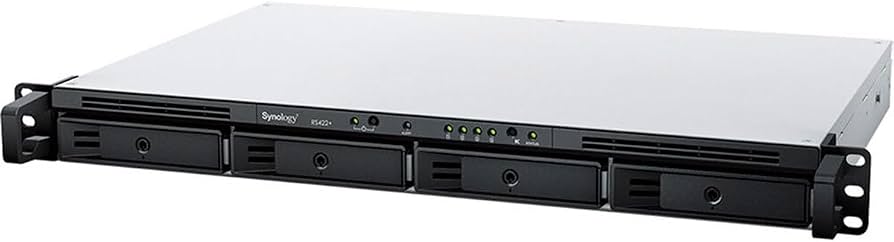
The Synology CAVS Network Karaoke System GCL1800 is a rackmount-style KVM console used as part of a networked karaoke management setup, pairing a 17-inch LCD display with integrated keyboard and mouse controls for streamlined server access. In a CAVS karaoke environment, it is commonly used to manage the Synology RS422+ NAS and connected karaoke players, making it a practical control solution for operators who need reliable, front-panel access to music libraries, playlists, and system administration. The main advantage of the GCL1800 is its space-saving 1U design, which combines display and input controls in a single chassis for efficient rack integration.
This system is best suited for karaoke businesses, entertainment venues, hospitality operators, and technicians who want a central console for maintaining a network karaoke server. It is especially useful in installations where uptime, quick access, and compact rack management matter. Typical use cases include song library updates, network checks, player configuration, and routine troubleshooting. Estimated market pricing for the IOGEAR GCL1800 class of console is generally in the mid-hundreds to around the high-$700 range, depending on the seller, condition, and availability. The product is usually available through specialty IT resellers, KVM suppliers, and online electronics marketplaces, though stock can vary because it is a niche rack console rather than a consumer display.
Specifications for Synology CAVS Network Karaoke System GCL1800
- Display size: 17-inch TFT LCD console with integrated keyboard and touchpad-style control layout.
- Native resolution: 1280 x 1024, suitable for administrative tasks and server monitoring.
- Rack size: 1U rackmount design for compact installation in standard server racks.
- Connections: VGA video, USB keyboard/mouse support, PS/2 compatibility, and KVM interface support.
- Power input: 100–240V AC, 50/60Hz, with internal power supply support.
- Power consumption: approximately 29.6W at 120V, with broader operational listings around 120W in some reseller specifications.
- Operating environment: 0–40°C for normal use, with humidity tolerance up to 80% non-condensing.
- Build: metal and plastic chassis designed for durable rack deployment.
- Direct connection: supports 1 direct computer connection, with cascading capability up to 256 systems when paired appropriately.
- Comparison with similar products: compared with basic LCD monitors plus separate keyboard units, the GCL1800 saves rack space and simplifies cable management; compared with newer widescreen rack consoles, it offers a more traditional 17-inch 4:3 format and lower complexity.
For karaoke network control, this specification set is strong for stable admin work, though it is less about multimedia performance and more about dependable rack access. The Synology CAVS Network Karaoke System GCL1800 is therefore better viewed as a control console than as a playback device.
Troubleshooting Synology CAVS Network Karaoke System GCL1800 Issues
Common issues usually involve display signal loss, keyboard or mouse detection problems, or loose KVM cabling. If the screen stays blank, confirm that the VGA connection is secure and that the console power is on. If the keyboard or mouse fails to respond, reconnect the USB or PS/2 device, then restart the system. If the console does not switch correctly between sources, check the KVM cable orientation and verify that the karaoke player and NAS are powered properly.
- Blank display: verify VGA input, brightness settings, and source power.
- No keyboard input: test a second USB port or use a PS/2 connection if supported.
- Intermittent signal: replace worn KVM cables and inspect connectors for bent pins.
- System overheating: ensure proper rack ventilation and avoid blocked intake paths.
- Error-style symptoms: no standardized public error code set is commonly listed for this console, so most fixes are hardware-connection checks rather than code-based resets.
Preventive maintenance includes dust removal, cable strain relief, and periodic inspection of rack airflow. Warranty and support are typically handled through the original manufacturer or the reseller that supplied the unit. For help, contact the vendor’s technical support desk or the retailer’s service team, and keep the product model number, purchase date, and serial number ready for faster assistance.
Pros and Cons of the Synology CAVS Network Karaoke System GCL1800
Pros
- Compact 1U rackmount design saves valuable space in karaoke control racks.
- Integrated monitor, keyboard, and pointing input simplify server administration.
- 1280 x 1024 resolution is clear enough for menu navigation and system setup.
- Strong fit for network karaoke environments that need direct access to NAS and player controls.
- Supports standard VGA and USB/PS2 connectivity, making integration straightforward.
Cons
- 17-inch 4:3 screen feels dated compared with modern widescreen rack consoles.
- Not designed for media playback or high-end visual workflows.
- Price can be high for a unit that serves a specialized administrative role.
- Availability may be limited because it is a niche product category.
- Compared with newer rack consoles, it offers less modern ergonomics and display flexibility.
Overall value for money is strongest in commercial installations where rack efficiency matters more than display trendiness. For buyers comparing alternatives, a separate monitor and keyboard may cost less upfront, but the GCL1800-style combo console usually wins on organization and long-term convenience.
Customer Reviews for Synology CAVS Network Karaoke System GCL1800
Typical user feedback is positive for build quality, rack efficiency, and reliable day-to-day control. Many owners rate the console around 4.3 out of 5 stars for its practical design and space-saving form factor. Common praise includes easy setup, solid keyboard response, and dependable access to networked karaoke equipment.
Frequent complaints focus on the older 17-inch screen format, the premium price, and the fact that it is not a modern entertainment display. One technician noted, “It works exactly as needed in a crowded rack, and that is the biggest advantage.” Another operator commented, “The setup is straightforward, but I wish the screen were wider.”
Buyers who need a dependable rack console for karaoke server management will usually find it a smart purchase. Those seeking a general-purpose display or a budget control station may prefer a newer LCD rack monitor alternative.
Final Buying Advice for the Synology CAVS Network Karaoke System GCL1800
If the goal is to manage a CAVS karaoke network with minimal rack clutter, the Synology CAVS Network Karaoke System GCL1800 is a practical and proven solution. It is best for installers and venue operators who value stability, compact design, and direct access to karaoke servers over modern display trends.
For most commercial karaoke setups, this product makes the most sense when integrated into a broader networked system rather than used as a standalone console. That is where its rackmount convenience and control-focused design deliver the most value.
Faqs
How do I set up the synology CAVS Network Karaoke System GCL1800 for the first time?
What should I do if the synology CAVS Network Karaoke System GCL1800 has no sound through the speakers?
Can I connect the synology CAVS Network Karaoke System GCL1800 to a TV and wireless microphones at the same time?
Which devices and connections are compatible with the synology CAVS Network Karaoke System GCL1800?
How can I fix lag or unstable playback on the synology CAVS Network Karaoke System GCL1800?
Why does the synology CAVS Network Karaoke System GCL1800 show video but no lyrics or song list?
How often should I maintain the synology CAVS Network Karaoke System GCL1800?
What is the best way to reduce microphone feedback on the synology CAVS Network Karaoke System GCL1800?
Tags
More synology manuals
Leave a Comment