
Telstra T-Lite 4G Mobile Phone T311A User Manual
Content
Telstra T-Lite 4G Mobile Phone T311A Review and User Manual Overview
Introduction
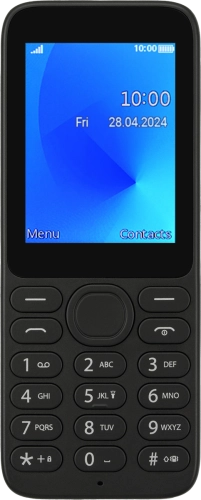
The Telstra T-Lite 4G Mobile Phone T311A is a compact feature phone designed for users who want simple calling, reliable 4G connectivity, and easy everyday operation without the complexity of a smartphone. Built by TCL and sold under the Telstra brand, this model focuses on essential communication, making it a practical choice for seniors, first-time mobile users, workers needing a backup handset, and anyone who prefers physical buttons over touchscreens.
Key strengths of the Telstra T-Lite 4G Mobile Phone T311A include its lightweight 80 g body, physical keypad, 1.77-inch display, 1030 mAh removable battery, Bluetooth 5.0, microSD support up to 128 GB, and Telstra Blue Tick certification for improved coverage in regional and rural areas. It also supports VoLTE and Telstra’s 4GX network bands, which helps deliver clearer voice calls on compatible networks. The device runs Mocor RTOS, a lightweight operating system built for fast, simple use.
This phone suits users who need reliable calling, SMS, FM radio, a basic camera, and long standby performance in a durable, pocket-friendly form factor. It is especially useful as a travel phone, emergency backup phone, or everyday communication device for older users. In Australia, the estimated price range is typically around AUD 59 to AUD 66, depending on retailer and stock availability. The Telstra T-Lite is usually available through Telstra and selected electronics and prepaid phone retailers.
Pros & Cons of the Telstra T-Lite 4G Mobile Phone T311A
- Pros: Simple physical keypad makes calling and texting easy for seniors and non-technical users.
- Pros: Telstra Blue Tick support is a major advantage for users in rural and regional areas.
- Pros: Compact, lightweight design is comfortable to carry and ideal as a backup phone.
- Pros: Removable 1030 mAh battery and low-power operating system help with efficient everyday use.
- Pros: microSD expansion, Bluetooth 5.0, 3.5 mm headphone jack, and FM radio add practical value.
- Pros: Good value for money if the goal is reliable voice calling rather than apps or media.
- Cons: Very small 1.77-inch screen is not ideal for users who want modern smartphone-style viewing.
- Cons: Basic 0.08 MP camera is suitable only for quick snapshots, not quality photos.
- Cons: Limited internal storage and modest memory mean this is not designed for heavy media use.
- Cons: No Wi-Fi, no NFC, and no advanced smart features reduce flexibility compared with budget smartphones.
- Cons: Best suited to basic communication, while alternatives like entry-level Android phones offer more apps and larger displays.
For buyers choosing between a feature phone and a low-cost smartphone, the Telstra T-Lite stands out for simplicity, battery efficiency, and stronger rural network focus rather than performance or multimedia features.
Customer Reviews and Common Feedback
Customer feedback for the Telstra T-Lite 4G Mobile Phone T311A is generally positive among users who want an easy-to-use button phone. Many buyers praise the clear calling experience, compact size, and straightforward menu layout. A common star rating trend is around 4 out of 5 stars for users who value simplicity over smart features.
Typical praise includes comments such as “perfect for my elderly parent,” “easy to set up,” and “great backup phone for travel.” Frequent complaints focus on the tiny screen, basic camera quality, and limited storage. Some users also note that the phone is best for calls and texts, not apps or web browsing.
Overall, the Telstra T-Lite is a strong purchase recommendation for seniors, minimalists, and regional users who need dependable voice coverage. It is less suitable for anyone expecting smartphone functions, high-quality photos, or large-screen convenience.
Telstra T-Lite 4G Mobile Phone T311A Specifications at a Glance
- Model: T311A
- Display: 1.77-inch QQVGA TFT, 128 x 160 pixels
- Storage: 128 MB ROM, 48 MB RAM, microSD support up to 128 GB
- Battery: 1030 mAh removable battery
- Network: 4G LTE with VoLTE support and Telstra Blue Tick certification
- Connectivity: Bluetooth 5.0, micro-USB, 3.5 mm headphone jack
- Camera: 0.08 MP rear camera
- Weight: 80 g
- Operating system: Mocor RTOS
- Colour: Black
Who Should Buy the Telstra T-Lite 4G Mobile Phone T311A?
This model is ideal for users who want a dependable Telstra feature phone with simple controls and long standby time. It is a strong fit for seniors, students needing a basic phone, workers wanting a spare handset, and users in regional Australia who need Blue Tick coverage. If the priority is simplicity, durability, and clear calls, the Telstra T-Lite 4G Mobile Phone T311A is a practical and affordable choice.
Faqs
How do I set up the telstra T-Lite 4G Mobile Phone T311A for the first time?
Why is my telstra T-Lite 4G Mobile Phone T311A not connecting to the 4G network?
What should I do if the telstra T-Lite 4G Mobile Phone T311A battery drains too fast?
Can the telstra T-Lite 4G Mobile Phone T311A work with any SIM card and carrier?
How do I improve call quality on the telstra T-Lite 4G Mobile Phone T311A?
How do I transfer contacts to the telstra T-Lite 4G Mobile Phone T311A?
What are the main features of the telstra T-Lite 4G Mobile Phone T311A for everyday use?
How should I clean and maintain the telstra T-Lite 4G Mobile Phone T311A to keep it working well?
More telstra manuals
Leave a Comment