
Telstra T431P 4G Smart Phone User Manual
Content
Telstra T431P 4G Smart Phone Overview
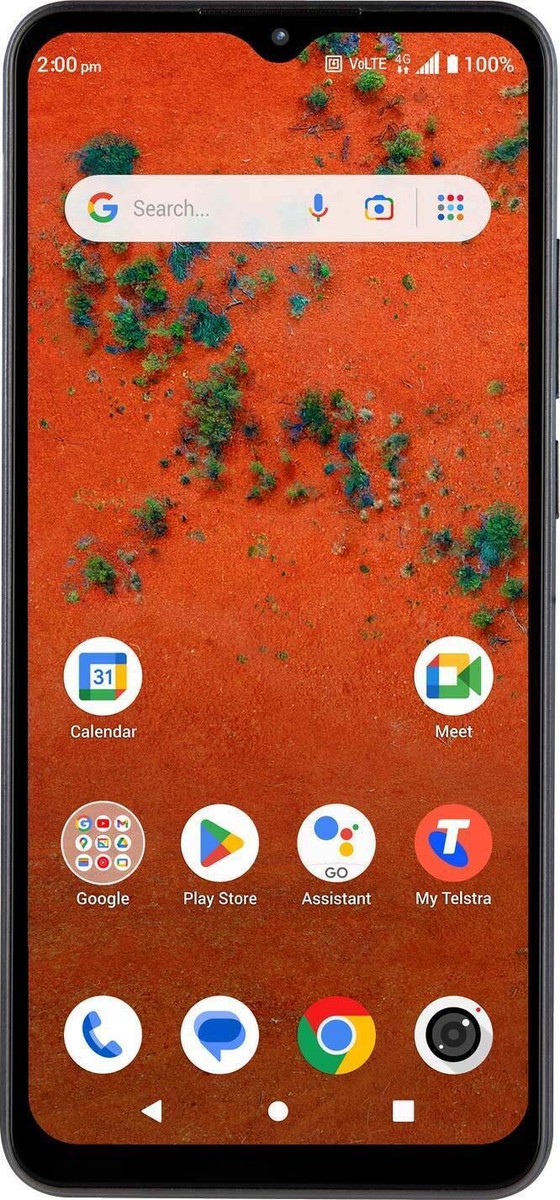
The telstra T431P 4G Smart Phone is a compact entry-level Android handset designed for everyday calling, messaging, browsing, and light app use. It is sold in Telstra channels under the Telstra T-Inspire name and is aimed at users who want a simple, affordable 4G smartphone with a large display, decent battery life, and essential smart features. With Android 13 (Go edition), the phone is built to keep core tasks fast and easy, especially for first-time smartphone owners, seniors, students, and budget-conscious users.
Key benefits include a 6.0-inch screen, 32GB of internal storage, microSD expansion up to 512GB, Bluetooth connectivity, Wi-Fi support, and a 3000mAh battery that is suitable for a full day of moderate use. The device also supports Telstra 4G bands and VoLTE-capable calling on compatible services, making it a practical option for users who mainly need reliable mobile coverage and basic multimedia use. Its lightweight design, 3.5mm audio jack, and simple Android interface improve day-to-day convenience.
The typical price range is around budget level, often seen between about AUD $80 and $130 depending on retailer, plan bundling, and promotions. Availability is generally through Telstra, selected electronics retailers, and online marketplaces. For users searching for a low-cost 4G mobile phone with easy setup and straightforward operation, the telstra T431P 4G Smart Phone remains a strong value option.
Specifications
- Model: Telstra T431P / Telstra T-Inspire
- Display: 6.0-inch IPS touchscreen, 480 x 960 resolution, 179 ppi
- Operating system: Android 13 (Go edition)
- Processor: MediaTek MT6761 chipset
- RAM: 2GB
- Storage: 32GB internal memory
- Expandable storage: microSD support up to 512GB
- Rear camera: 8MP main + macro camera
- Front camera: 2MP selfie camera with software upscaling to 5MP
- Battery: 3000mAh
- Talk time: Up to 20 hours on 4G
- Standby time: Up to 685 hours on 4G
- Connectivity: 4G, 3G, 2G, Wi-Fi 2.4GHz, Bluetooth 5.0
- SIM: Nano-SIM
- Audio: 3.5mm headphone jack
- Weight: 182g
- Dimensions: 159.2mm x 78.2mm x 9.6mm
In performance terms, this is a basic handset rather than a speed-focused smartphone. Compared with similar budget 4G phones, it offers comparable storage and battery life, but its low-resolution screen and 2GB RAM make it best suited to essential tasks rather than heavy gaming or multitasking. It is a practical alternative to other entry-level Android Go devices that prioritize affordability over advanced features.
Detailed Description
The telstra T431P 4G Smart Phone is designed to deliver core smartphone functions in a simple, easy-to-use package. The 6-inch display gives users plenty of space for reading messages, watching short videos, and navigating menus, while Android 13 (Go edition) helps reduce memory usage and improve responsiveness on modest hardware. The interface is straightforward, making it well suited to people who want a phone that does not feel complicated.
Its build is compact and practical, with a plastic body that keeps weight down while still feeling sturdy for daily use. The device’s 182g weight makes it easy to carry, and the large grip-friendly frame can be useful for users who prefer a more substantial phone. Real-world use cases include calls, SMS, email, navigation, social media, light streaming, and everyday photo capture. The 8MP rear camera is fine for casual snapshots, while the front camera is adequate for video calls and basic selfies.
Because it supports Telstra 4G bands, the phone works well for users who need access to a mainstream mobile network without paying premium prices. It is also useful as a first smartphone, a backup phone, or a simple device for seniors and students.
Setup Guide
Setting up the telstra T431P 4G Smart Phone is simple and can usually be completed in a few minutes. Start by inserting a nano-SIM card and charging the battery before first use. Power on the device, select your language, and connect to Wi-Fi when prompted. Sign in with a Google account to restore contacts, apps, and settings if needed.
- Insert the nano-SIM carefully into the SIM tray.
- Charge the phone fully before extended use.
- Follow the on-screen setup wizard for language, date, and privacy settings.
- Connect to Wi-Fi for faster app downloads and updates.
- Pair Bluetooth accessories such as speakers, headsets, or smart watches from the Bluetooth settings menu.
- Insert a microSD card if you need more storage for photos, music, or downloads.
For troubleshooting during setup, restart the phone if it freezes, confirm the SIM is inserted correctly, and check that your Wi-Fi password is entered correctly. Avoid using damaged charging cables or incompatible SIM adapters. Keep the device away from water and extreme heat, and use only approved accessories where possible.
Troubleshooting
Common issues with the telstra T431P 4G Smart Phone are usually easy to fix. If the phone will not turn on, charge it for at least 30 minutes and try a different charger. If mobile data is not working, confirm the SIM is active, mobile data is enabled, and the device is in an area with Telstra coverage. If apps run slowly, close unused apps, clear storage space, and restart the device to refresh memory.
- No signal: Reinsert the nano-SIM and check network settings.
- Slow performance: Remove unused apps and free up storage.
- Wi-Fi issues: Restart the router and reconnect to the network.
- Battery drains quickly: Lower screen brightness and disable unused background features.
- Camera not opening: Clear the camera app cache and reboot the device.
If you encounter persistent faults, check warranty coverage with the retailer or Telstra support. For help, contact Telstra customer service through the official support channels, visit a Telstra store, or use device support resources provided by the manufacturer. Keep proof of purchase and the IMEI number ready when requesting assistance.
Pros & Cons
Pros
- Affordable entry-level 4G smartphone with strong value for money.
- Easy-to-use Android 13 Go edition interface for beginners.
- Large 6.0-inch display improves readability for texting and browsing.
- Expandable storage up to 512GB is excellent for a budget device.
- Good battery endurance for calls, messaging, and casual daily use.
- Includes a 3.5mm headphone jack, which many users still prefer.
Cons
- 2GB RAM limits multitasking and heavy app use.
- 480 x 960 resolution is low by modern smartphone standards.
- Cameras are basic and best for casual photos only.
- No fast charging, so top-ups take longer.
- Not ideal for gaming or demanding productivity tasks.
Compared with higher-priced alternatives, the phone trades speed and display quality for affordability and simplicity. For buyers who need a dependable budget handset rather than a premium Android experience, it offers sensible everyday performance.
Customer Reviews
Customer feedback for the telstra T431P 4G Smart Phone is generally positive among budget-focused buyers. Many users rate it around 4 out of 5 stars for value, easy setup, and battery life. Common praise includes the large screen, simple menu layout, and reliable basics such as calls, texting, and Wi-Fi access.
- 4.5/5: “Perfect for basic use and easy to understand.”
- 4/5: “Good battery life and enough storage once I added a microSD card.”
- 3.5/5: “Fine for calls and messages, but the camera is average.”
Frequent complaints focus on limited speed, low display resolution, and the modest camera system. Buyers who expect premium gaming or photography performance may be disappointed, but those wanting a low-cost everyday phone usually consider it a worthwhile purchase. It is recommended for users who value reliability, affordability, and straightforward operation over advanced features.
Faqs
How do I set up the telstra T431P 4G Smart Phone for the first time?
Why is my telstra T431P 4G Smart Phone not connecting to 4G, and how can I fix it?
What are the main features of the telstra T431P 4G Smart Phone that users should know about?
Which SIM card and network settings are compatible with the telstra T431P 4G Smart Phone?
How do I improve battery life on the telstra T431P 4G Smart Phone?
What should I do if the telstra T431P 4G Smart Phone is frozen, slow, or crashing?
How do I safely clean and maintain the telstra T431P 4G Smart Phone?
Can I transfer contacts, photos, and apps to the telstra T431P 4G Smart Phone easily?
Tags
More telstra manuals
Leave a Comment