
Setup: Topdon BT300P 12V Battery Tester with Printer User Manual
Content
OPDON BT300P 12V Battery Tester
Introduction
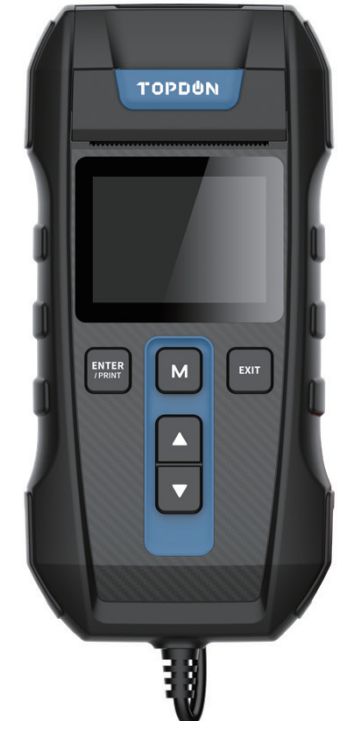
The TOPDON BT300P 12V Battery Tester with Printer is a professional-grade diagnostic tool designed to make battery testing simple, fast, and accurate for automotive professionals and DIY enthusiasts alike. This advanced battery analyzer provides a comprehensive assessment of 12V lead-acid batteries—including flooded, AGM, GEL, and EFB types—with a testing range of 100 to 2000 Cold Cranking Amps (CCA), making it suitable for most cars, trucks, motorcycles, and marine applications.
What sets the TOPDON BT300P apart is its built-in thermal printer, which instantly generates a test report for documentation, maintenance records, or customer proof of service. The device is engineered for ease of use, featuring a vivid 2.4-inch color display, intuitive step-by-step guidance, and multi-language support—ideal for both beginners and seasoned technicians.
The TOPDON BT300P delivers more than just battery health; it also tests the cranking and charging systems, providing a complete picture of your vehicle’s electrical health. With certified accuracy and compliance with major industry standards (CCA, JIS, EN, DIN, SAE, IEC), this tester is a reliable choice for garages, dealerships, and home workshops.
Target users include professional mechanics seeking efficient, shop-ready solutions and car owners wanting to monitor battery condition between services. The TOPDON BT300P is widely available through automotive retailers and online stores, with an estimated price range of $80–$90, offering excellent value for its feature set.
Specifications
- Battery Compatibility: 12V lead-acid (Flooded, AGM, GEL, EFB)
- CCA Range: 100–2000 CCA
- Standards: CCA, JIS, EN, DIN, SAE, IEC, BCI, MCA, CA, GB[2]
- Display: 2.4-inch color screen
- Printer: Built-in thermal printer (prints test results in seconds)
- Test Parameters: State of Health (SOH), State of Charge (SOC), CCA, Voltage, Internal Resistance, Rating
- Working Voltage: 9V–30V DC
- Cable Reach: 31.5 inches
- Working Temperature: -10°C to 55°C
- Storage Temperature: -20°C to 60°C
- Protections: Reverse polarity, spark proof, overvoltage
- Accessories: Wear-resistant storage bag, 3 rolls of standard printing paper
- Warranty: 1-year manufacturer warranty, 30-day money-back guarantee
Compared to similar battery testers, the TOPDON BT300P stands out for its integrated printer, color display, and comprehensive testing capabilities. While many competitors offer basic diagnostics, the BT300P provides a full suite of measurements and instant documentation—features typically found in higher-end professional tools.
WHAT'S INCLUDED
- TOPDON Battery Tester BT300P
- User Manual
- Carrying Bag
- 3 Rolls of Printer Paper
PRODUCT OVERVIEW
HOW TO USE
Battery Test (12V Only)
TOPDON BT300P will test each battery according to the selected actual system standard and rating marked on the battery, to get the accurate results.
Before Test
The engine and all other accessory loads must be OFF to have accurate results. Turn on the vehicle headlamps for 2~3 minutes until the battery voltage drops back to the normal value if the battery is just fully charged.
Steps
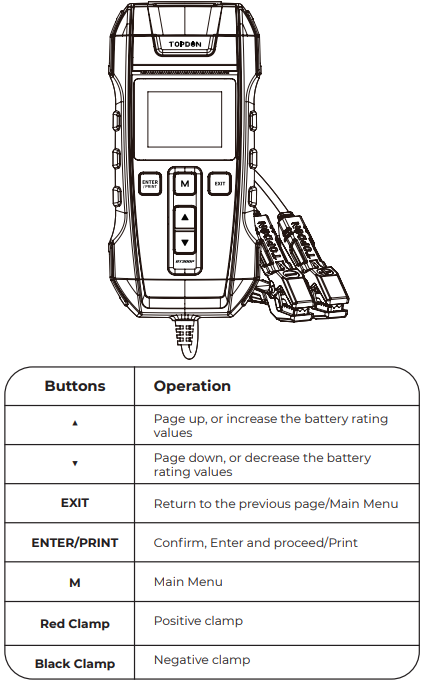
- The RED (+) Positive Battery Clamp is connected
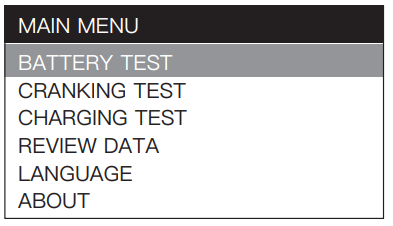
to the (+) positive battery terminal, and the BLACK (-) Negative Battery Clamp is connected to the (-) negative battery terminal. Ensure that the clamps have a firm, secure grip on the battery terminals for accurate results. The device will jump to the main menu automatically after 3 seconds, select "BATTERY TEST" and then press "ENTER/PRINT" to continue.
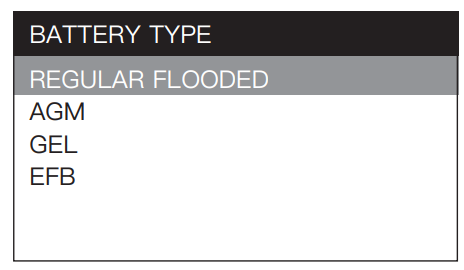
Press "▲" or "▼" to select the "BATTERY TYPE" (specified on the battery rating label), then press "ENTER/PRINT" to continue.
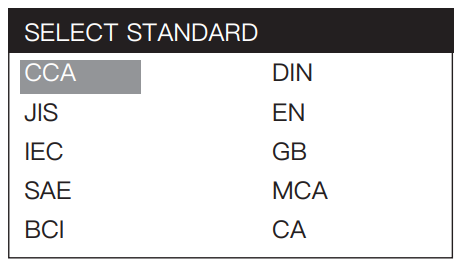
Press "▲" or "▼" to select the correct testing standard (specified on the battery rating label), then press "ENTER/PRINT" to continue.
Hold "▲" or "▼" to select the battery rating values (specified on the battery rating label).
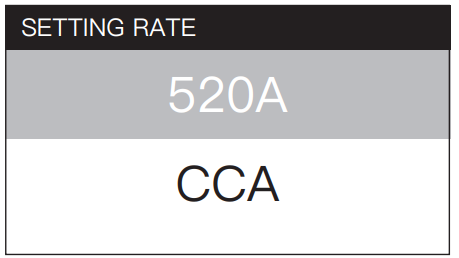
- Press "ENTER/PRINT" to start the battery test.
The test result is as follows:
For 12V Battery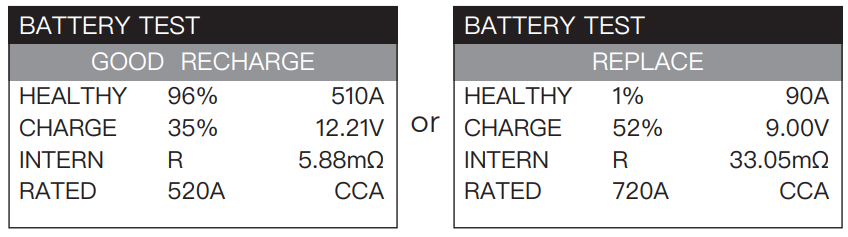
WARRANTY
TOPDON One-Year Limited Warranty
- The TOPDON Company warrants to its original purchaser that TOPDON products will be free from defects in material and workmanship for 12 months from the date of purchase (Warranty Period). For the defects reported during the Warranty Period, TOPDON will, according to its technical support analysis and confirmation, either repair or replace the defective part or product.
- The TOPDON shall not be liable for any incidental or consequential damages arising from the use, misuse, or mounting of the device. Some states do not allow limitations on how long an implied warranty lasts, so the above limitations may not apply to you.
This limited warranty is void under the following conditions: - Misused, disassembled, altered,d or repaired by a non-TOPDON technical repair specialist.
- Careless handling and violation of the f operation.
- Notice: All information in this manual is based on the latest information available at the time of publication,n and no warranty can be made for its accuracy or completeness.
- Topdon reserves the right to make changes at any time without notice.
Troubleshooting
Common Problems and Solutions
- Printer Not Working: Ensure the battery voltage is above 9.5V; check paper insertion direction and replace if empty.
- No Display or Power: Verify clamps are properly connected; check for blown fuses or low battery voltage.
- Inaccurate Readings: Clean battery terminals; ensure clamps have good contact; retest.
- Error Codes: Refer to the user manual for specific codes. Most errors relate to connection issues or out-of-spec inputs.
Preventive Measures
- Regularly check and replace printer paper.
- Store the tester in its protective bag when not in use.
- Keep battery terminals clean for accurate readings.
Warranty and Support
The TOPDON BT300P comes with a 1-year warranty and a 30-day money-back guarantee. For technical support, contact TOPDON customer service via their official website or your place of purchase. Always keep your receipt for warranty claims.
Pros & Cons
Advantages
- Built-in Printer: Instantly prints test results for records or customer proof—no need for separate documentation.
- Wide Compatibility: Tests all common 12V battery types and adheres to multiple international standards.
- Easy to Use: Color display and step-by-step guidance make it accessible for all users.
- Comprehensive Diagnostics: Assesses battery health, charge, cranking, and charging systems in one device.
- Portable and Durable: Lightweight, comes with a storage bag, and is built to withstand shop environments.
Limitations
- Voltage Requirement: Printer function requires battery voltage above 9.5V.
- Paper Replacement: Users must keep spare thermal paper rolls on hand.
- Price: Slightly higher than basic testers without a printer, but still affordable for the features offered.
Compared to alternatives, the TOPDON BT300P 12V Battery Tester with Printer delivers superior value for money, especially for users who need printed records or detailed diagnostics without investing in expensive shop equipment.
Customer Reviews
Users consistently praise the TOPDON BT300P for its accuracy, ease of use, and the convenience of the built-in printer. Many highlight the intuitive interface and the ability to quickly generate test reports for customers or personal records. The color display and step-by-step prompts are frequently mentioned as standout features, making the device accessible even for those new to battery testing.
Common complaints are rare but include the need to keep spare printer paper and the occasional learning curve for first-time users. Star ratings are typically 4.5/5 or higher, with specific testimonials noting the device’s reliability in professional settings and its value as a diagnostic tool for home mechanics. Purchase recommendations emphasize its suitability for both professional garages and serious DIYers who want accurate, documented results without the complexity of higher-end analyzers.
Long-Tail Keywords & Semantic Optimization
For optimal SEO, this manual naturally integrates keywords such as TOPDON BT300P 12V Battery Tester with Printer, car battery analyzer with printer, 12V battery diagnostic tool, automotive battery tester, thermal printer battery tester, and best battery tester for mechanics. These terms help improve search visibility for users seeking detailed, actionable information about advanced battery testing solutions.
Faqs
How do I connect and start using the TOPDON BT300P 12V Battery Tester with Printer for the first time?
What should I do if the TOPDON BT300P 12V Battery Tester with Printer is not printing my test results?
Can the TOPDON BT300P 12V Battery Tester with Printer test different types of 12V batteries, including AGM and GEL?
How do I change the printer paper in my TOPDON BT300P 12V Battery Tester with Printer?
Why does my TOPDON BT300P 12V Battery Tester with Printer display ‘Bad’ or high internal resistance, and what should I do next?
Can I use the TOPDON BT300P 12V Battery Tester with Printer to test 24V batteries, or is it strictly for 12V systems?
What maintenance steps should I follow to keep my TOPDON BT300P 12V Battery Tester with Printer in good working condition?
How can I interpret the test results printed by the TOPDON BT300P 12V Battery Tester with Printer, and what do key values like CCA and SOH mean?
More topdon manuals
Leave a Comment