
Setup: Tws Bluetooth Earbuds ZZ2ABH-31R User Manual
Content
Tws Bluetooth Earbuds ZZ2ABH-31R
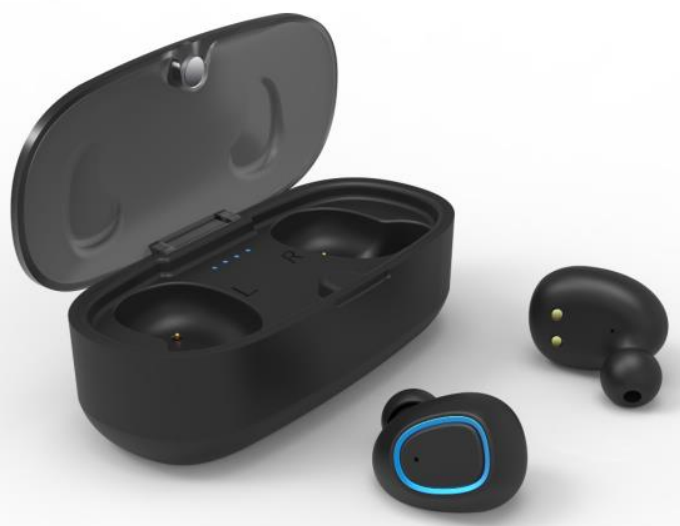
Introduction
Welcome to your comprehensive guide for the tws Bluetooth Earbuds ZZ2ABH-31R—an advanced, feature-rich wireless audio solution perfect for music lovers, commuters, professionals, and anyone seeking hassle-free connectivity. Designed for convenience and performance, these true wireless earbuds combine sleek aesthetics with cutting-edge technology, making them a standout in the crowded market of wireless audio devices.
The tws Bluetooth Earbuds ZZ2ABH-31R are engineered for users who demand both style and substance. Their key benefits include seamless Bluetooth 5.0 connectivity, stable wireless transmission up to 10–15 meters, and intuitive touch controls for effortless music and call management. The earbuds offer up to 5 hours of continuous music playback or talk time on a single charge, with the compact charging case providing additional charges for extended use, ideal for travel, workouts, or daily commutes. A standout feature is the automatic pairing, which ensures you’re connected to your device instantly, eliminating the frustration of manual setup.
Target users include students, office professionals, fitness enthusiasts, and anyone who values portability and ease of use. With a competitive estimated price range (typically $20–$40, depending on retailer and region), these earbuds deliver impressive value, rivaling more expensive alternatives. Availability is widespread through online retailers and electronics stores, making them accessible to a global audience.
Whether you’re streaming music, taking calls, or using voice assistants, the tws Bluetooth Earbuds ZZ2ABH-31R provide a reliable, high-quality audio experience for everyday life.
Specifications
Here’s a detailed look at the technical specifications and standout features of the tws Bluetooth Earbuds ZZ2ABH-31R:
- Bluetooth Version: V5.0
- Bluetooth Distance: 10-15M
- Earbuds Battery: 50mAh*2
- Charging Case Battery: 400mAh
- Charging Time: About 1.5 hour
- Music Playing Time: About 5 hours
- Calling Talk Time: About 5 hours
- Standby time: 200 hours hours
Compared to similar models, the tws Bluetooth Earbuds ZZ2ABH-31R offer competitive battery life, reliable Bluetooth 5.0 connectivity, and user-friendly touch controls—features often found in more expensive earbuds. While some variants may offer active noise cancellation or higher IP ratings, these earbuds strike an impressive balance between affordability and performance.
SAFETY CAUTION
- Use earbuds while driving, please observe the national and regional regulations.
- Please put all the equipment and accessories that can not be touched by the child or pet, which may cause suffocation and serious consequences.
- Please don't use the product under too hot or too low temperature environment. (Below -10 degrees centigrade or Above- 45 degrees centigrade)
- Extreme temperatures can cause deformations, reduce the charging capacity of the device, and shorten the service life.
- Do not use wet equipment, liquids that can cause severe damage to equipment.
- Please do not use wet hands when operating equipment; equipment damage caused by water is not covered under the warranty scope.
- If the earbuds play at high volume for a long time, your hearing may be hurt, and you should use the lowest volume on the phone.
TWS OPERATION INSTRUCTIONS
Initial Earbuds Set Up/Pairing
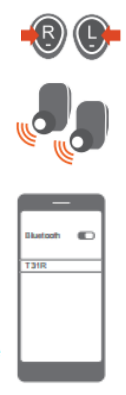
- Step 1: Once both earbuds are removed from the case, they will automatically power on, blue light in each earbud will be on.
- Step 2: Once the earbuds are turned on,, wait for the prompt “DuDu”; this confirms that the earbuds are synced. Once pairing between 2 earbuds, a blue and red light will start to flash in the left earbud, and a blue light will flash in the right earbud.
- Step 3: Go to the Bluetooth connection list on your smartphone or tablet and search for the “T31R” Bluetooth name on your device. Click to connect. Both earbuds flash a blue light, indicating tthatearbuds are connected to the Bluetooth device.
TWS OPERATION INSTRUCTIONS
- Auto Power On: Once both earbuds are removed from the case, they will automatically power on. A blue light on each earbud will turn on for about 1 second, a blue light on the left earbud will have 3 flashes at a time, and the connection process will start.
(Note: The case must be charged timely for the earbuds to automatically power on. If the case is not charged, the earbuds can be manually turned on.) - Manual Power On: Press and hold the main button on the R and L earbuds at the same time for about 3 seconds to power on. A blue light will turn on and begin to flash on the earbuds, followed by a “Power On” message through the earbuds.
- Auto Power Off: Place the earbuds back into the case and close the lid. Once they are put into the case, they will automatically power off and enter into the charged state when a red light flashes on each earbud.
- Manual Power Off: Press and hold the main button on the R and L earbuds at the same time for about 3 seconds to power off. A blue light will turn on and begin to flash on the earbuds,, followed by a “Power Off” message through the earbuds.
- Music Play/Pause: A Short press R or L button could play or pause music playing.
- Music Next/Previous: Double-press the main button of L earbud to go to the next song. Double-press the main button of the R earbud to go to the previous song.
- Answer Call: During an incoming call, once press the main button of the R or L earbud once to answer a call.
- End Call: During a call, once press the main button of Ror Learbud to end a call.
- Reject Call: During an incoming call, double-press the main button of the R or L earbud to reject a call.
- Cancel Call: During the dialing state, once press the R or L button to cancel a call.
- Low Battery Clarm: When the earbuds’ power is less than 20%, they flash a red light and are followed by a “Low Battery” message through the earbuds.
- Low Battery Shutdown: When the earbuds run out of battery power, they will automatically shut off.
- Automatic Connection: After the initial setup and connection, the earbuds will automatically connect to your device next time you turn them on. (Please ensure the Bluetooth is active on your device for automatic connection.)
- Restore Original Settings: Under power off status, press and hold the R and L buttons for about 10 seconds; both earphones can be restored to Factory Settings with alternating red and blue lights flashing on both earbuds . Then the earbuds can be reused by auto or manually powering on/off.
(Note: This function is suggested to be used when the earbuds can't connect to each other under the conditions of common use.)
Charging for Earbuds
Put R and L earbuds into the Charging Cases and close the lid to start the charging process. The charging earbuds will flash red lights until fully charged. Once fully charged, the red light will turn off.
Case Power Indicator
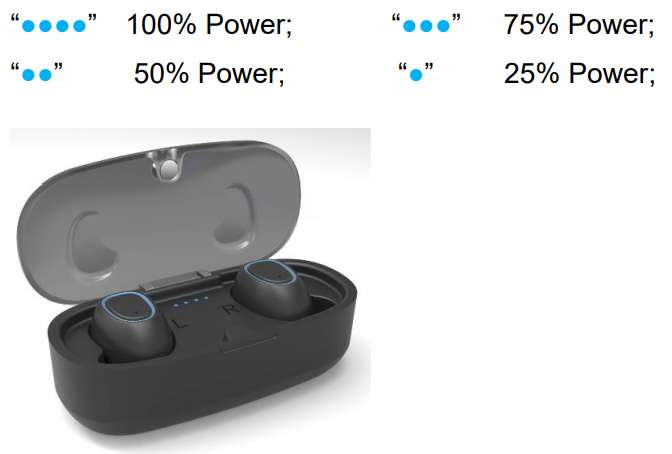
(Note: The normal Charging Case holds 400 mAh of battery power, which can charge the earbuds up to 3 times from no battery power before the case has to be charged.)
Troubleshooting
Encountering issues with your TWS Bluetooth Earbuds ZZ2ABH-31R? Here’s how to resolve common problems:
- Pairing Difficulties: Ensure Bluetooth is enabled on your device. Place earbuds in the charging case, then remove to reset and re-pair. If issues persist, clear the device’s Bluetooth cache or restart both devices.
- Short Battery Life: Fully charge the earbuds and case. Avoid leaving them discharged for extended periods. Regularly charging helps maintain battery health.
- Audio Dropouts: Stay within the 10–15 meter Bluetooth range. Move away from sources of wireless interference (Wi-Fi routers, microwaves).
- Touch Controls Unresponsive: Clean the touch area with a dry cloth. Ensure fingers are dry and free of lotion or sweat.
- Charging Issues: Use the provided cable and a reliable power source. Check for debris in the charging contacts and clean if necessary.
For preventive care, store your earbuds in the charging case when not in use, avoid extreme temperatures, and keep them dry. If problems are not resolved, consult the user manual or contact customer support. Most retailers offer a limited warranty. Check your purchase details for coverage. For further assistance, reach out to the seller or manufacturer directly.
Pros & Cons
Advantages
- Affordable Pricing: Delivers features found in more expensive models at a lower price point.
- Reliable Connectivity: Bluetooth 5.0 ensures stable connections with minimal lag or dropouts.
- Long Battery Life: Up to 5 hours of playback per charge, with the case providing multiple full recharges.
- User-Friendly Controls: Intuitive touch controls for music, calls, and voice assistants.
- Lightweight and Portable: Compact design ideal for on-the-go use.
Limitations
- No Active Noise Cancellation: Only passive noise reduction is available.
- Basic Water Resistance: Splash-resistant but not suitable for swimming or heavy rain.
- No App Integration: Lacks a companion app for EQ customization or firmware updates.
- Average Sound Quality: Suitable for everyday use but may not satisfy audiophiles.
Compared to alternatives, the tws Bluetooth Earbuds ZZ2ABH-31R offer excellent value for budget-conscious buyers seeking reliable performance without premium pricing.
Customer Reviews
Users consistently praise the tws Bluetooth Earbuds ZZ2ABH-31R for their easy setup, comfortable fit, and reliable Bluetooth connectivity. Many highlight the impressive battery life and the convenience of the charging case. The touch controls are noted as responsive, and the overall design receives positive feedback for being stylish and lightweight.
Common complaints include occasional pairing hiccups and a desire for active noise cancellation. Some users mention that while sound quality is good for the price, it may not match higher-end models. Star ratings typically range from 4 to 4.5 out of 5, reflecting strong satisfaction among budget-focused buyers.
Purchase recommendations emphasize these earbuds as a solid choice for students, commuters, and anyone needing affordable, reliable wireless audio. If you prioritize premium features like active noise cancellation or IPX7 water resistance, consider higher-priced alternatives,, but for everyday use, the tws Bluetooth Earbuds ZZ2ABH-31R deliver impressive value.
Faqs
How do I set up tws Bluetooth Earbuds ZZ2ABH-31R for the first time?
What should I do if tws Bluetooth Earbuds ZZ2ABH-31R is not connecting to my device?
Can I use tws Bluetooth Earbuds ZZ2ABH-31R with Android and iOS devices?
How do I check the battery level of tws Bluetooth Earbuds ZZ2ABH-31R?
What is the best way to maintain and care for tws Bluetooth Earbuds ZZ2ABH-31R?
How long does the battery last on tws Bluetooth Earbuds ZZ2ABH-31R?
How do I reset tws Bluetooth Earbuds ZZ2ABH-31R if they are malfunctioning?
What should I do if tws Bluetooth Earbuds ZZ2ABH-31R are causing audio interference?
Tags
More tws manuals
Leave a Comment