
How to Use: Ubiquiti UniFi AC Mesh Series 802.11AC AP with Plug & Play Mesh UAP-AC-M, UAP-AC-M-PRO User Manual
Content
Introduction to the Ubiquiti UniFi AC Mesh Series 802.11AC AP with Plug & Play Mesh UAP-AC-M, UAP-AC-M-PRO
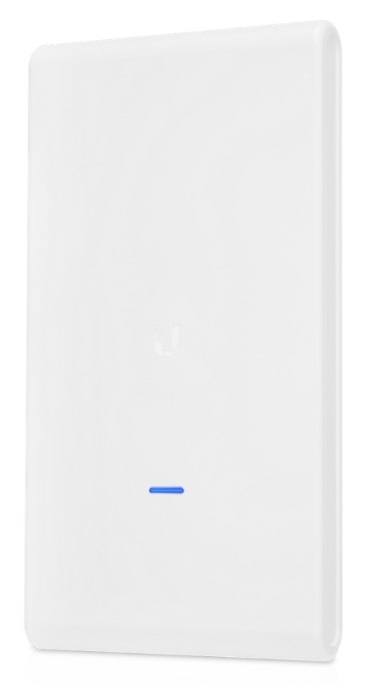
The Ubiquiti UniFi AC Mesh Series 802.11AC AP with Plug & Play Mesh UAP-AC-M, UAP-AC-M-PRO is a versatile wireless access point family built for reliable indoor and outdoor connectivity. Designed for Wi-Fi 5 environments, these mesh-capable APs help extend network coverage without the complexity of traditional cabling, making them a strong fit for homes, offices, campuses, hospitality venues, event spaces, and outdoor installations.
One of the biggest advantages of the Ubiquiti UniFi AC Mesh Series 802.11AC AP with Plug & Play Mesh UAP-AC-M, UAP-AC-M-PRO is its balance of performance, scalability, and ease of deployment. The mesh design supports flexible placement, while UniFi Network software gives administrators centralized control over configuration, monitoring, and optimization. The PRO model is especially appealing for larger areas because it adds stronger radio performance, dual-band 3x3 MIMO, and higher aggregate throughput.
Typical pricing varies by region, seller, and whether the unit is sold individually or in packs. In current market listings, the standard AC Mesh model often sits around the budget-to-midrange category, while the PRO version usually costs more due to its higher-spec hardware and outdoor-oriented design. Availability remains broad through networking resellers, online retailers, and specialist IT distributors, though stock can fluctuate depending on regional demand.
This product line is ideal for users who need dependable wireless mesh coverage, quick deployment, and centralized network management without overspending on enterprise-grade infrastructure.
Specifications for the Ubiquiti UniFi AC Mesh Series 802.11AC AP with Plug & Play Mesh UAP-AC-M, UAP-AC-M-PRO
- Wireless standard: 802.11 a/b/g/n/ac Wi-Fi 5 support
- Frequency bands: 2.4 GHz and 5 GHz dual-band operation
- MIMO: UAP-AC-M uses dual-band mesh-oriented design; UAP-AC-M-PRO features 3x3 MIMO on both bands
- Maximum aggregate throughput: Up to 1750 Mbps on the PRO model
- 5 GHz speed: Up to 1300 Mbps on the PRO model
- 2.4 GHz speed: Up to 450 Mbps on the PRO model
- Antennas: Internal dual-band antennas with high-gain design on the PRO unit
- Antenna gain: 8 dBi on the PRO model
- Ethernet: 2 x Gigabit Ethernet ports
- Power method: 802.3af PoE support
- Power supply: 48V PoE Gigabit adapter included on the PRO model in many packages
- Maximum power consumption: 9W on the PRO model
- Weather suitability: Outdoor-rated construction for flexible deployment
Compared with smaller UniFi mesh access points, the UAP-AC-M-PRO delivers stronger radio capacity, better client handling, and more robust performance in crowded environments. For buyers comparing Wi-Fi 5 mesh options, the PRO model offers a noticeable step up in throughput and antenna gain, while the standard UAP-AC-M is better suited to simpler coverage expansion where cost efficiency matters most.
Setup Guide for Ubiquiti UniFi AC Mesh Series 802.11AC AP with Plug & Play Mesh UAP-AC-M, UAP-AC-M-PRO
- Unbox the access point, PoE adapter, mounting hardware, and Ethernet cable.
- Choose a mounting location with clear line of sight and minimal interference. For outdoor use, confirm the device is protected from direct exposure beyond its rated installation conditions.
- Connect the AP to a PoE-capable switch or the included PoE injector using a Cat5e or Cat6 Ethernet cable.
- Power on the unit and wait for the status LED to indicate readiness.
- Open UniFi Network on your controller, then adopt the device when it appears in the pending devices list.
- Assign the AP to a site, apply SSID settings, security settings, and channel preferences, then save and provision.
For mesh pairing, place the unit within range of an existing UniFi AP and enable wireless uplink if needed. If adoption fails, verify cable continuity, PoE output, controller connectivity, and firmware compatibility. Avoid mounting near high-heat sources, and do not block ventilation or place the unit where moisture can pool. If the device resets unexpectedly, check power delivery first, then confirm the PoE injector is delivering the correct voltage.
Troubleshooting the Ubiquiti UniFi AC Mesh Series 802.11AC AP with Plug & Play Mesh UAP-AC-M, UAP-AC-M-PRO
- No power: Confirm the PoE injector or PoE switch is active and the Ethernet cable is seated correctly.
- Device not adopted: Reset the AP, ensure the controller is on the same network, and retry adoption.
- Weak signal: Reposition the AP, reduce obstructions, and avoid interference from dense walls or metal surfaces.
- Slow speeds: Check channel width, client capability, and nearby wireless congestion.
- Mesh uplink unstable: Move the satellite AP closer to the root AP and verify signal quality in UniFi Network.
- LED status confusion: Use the controller’s device page to confirm provisioning state instead of relying only on the front LED.
Preventive maintenance includes updating firmware, backing up the UniFi controller, and checking PoE health regularly. There are no common user-facing numeric error codes for most setup issues; instead, adoption and provisioning alerts usually point to network, firmware, or power problems. Warranty coverage and support depend on the retailer and region, but most users can start with the official UniFi support portal, reseller support, or the product documentation provided by the seller. For faster help, keep the model name, MAC address, firmware version, and controller version ready when contacting support.
Pros and Cons of the Ubiquiti UniFi AC Mesh Series 802.11AC AP with Plug & Play Mesh UAP-AC-M, UAP-AC-M-PRO
Pros
- Strong mesh networking flexibility for indoor and outdoor deployments
- Centralized management through UniFi Network simplifies multi-AP setups
- PRO model offers higher throughput and better range performance
- PoE support reduces cabling complexity and installation time
- Good value for users who need scalable Wi-Fi 5 coverage
Cons
- Wi-Fi 5 is older than Wi-Fi 6 and Wi-Fi 6E alternatives
- Some packages may require separate accessories depending on region
- Performance depends heavily on placement, controller tuning, and channel planning
- Outdoor mesh reliability can drop if the uplink path is obstructed
Overall, the standard model is a practical choice for affordable coverage expansion, while the PRO version is better for demanding environments where client density and throughput matter. Compared with newer alternatives, the Ubiquiti UniFi AC Mesh Series 802.11AC AP with Plug & Play Mesh UAP-AC-M, UAP-AC-M-PRO remains attractive for buyers prioritizing reliability, UniFi ecosystem integration, and cost control over the latest wireless standard.
Customer Reviews of the Ubiquiti UniFi AC Mesh Series 802.11AC AP with Plug & Play Mesh UAP-AC-M, UAP-AC-M-PRO
Average user sentiment is typically around 4.4 out of 5 stars for the series, with many buyers praising the easy adoption process, clean design, and dependable mesh performance. Customers often say the AP is “simple to mount, quick to configure, and strong enough for large coverage zones.”
Common praise includes stable roaming, good outdoor signal reach, and excellent value for multi-AP networks. Common complaints focus on the learning curve of UniFi setup, the need for careful placement, and the fact that Wi-Fi 5 may feel dated compared with newer mesh systems.
For most buyers, this is a smart purchase if the goal is scalable UniFi coverage at a reasonable cost. It is especially recommended for offices, patios, warehouses, campuses, and venue networking where centralized control matters more than cutting-edge wireless standards.
Final Buying Advice
If you need a dependable mesh access point with strong UniFi integration, the Ubiquiti UniFi AC Mesh Series 802.11AC AP with Plug & Play Mesh UAP-AC-M, UAP-AC-M-PRO remains a practical and proven choice. Choose the standard model for budget-friendly coverage expansion, and choose the PRO model when higher throughput, better antenna gain, and tougher deployment demands are a priority.
Faqs
How do I set up ubiquiti UniFi AC Mesh Series 802.11AC AP with Plug & Play Mesh UAP-AC-M, UAP-AC-M-PRO for the first time?
What do I do if ubiquiti UniFi AC Mesh Series 802.11AC AP with Plug & Play Mesh UAP-AC-M, UAP-AC-M-PRO will not adopt in the UniFi controller?
What is the best placement for ubiquiti UniFi AC Mesh Series 802.11AC AP with Plug & Play Mesh UAP-AC-M, UAP-AC-M-PRO to get strong coverage?
Is ubiquiti UniFi AC Mesh Series 802.11AC AP with Plug & Play Mesh UAP-AC-M, UAP-AC-M-PRO compatible with existing routers and switches?
Why is my ubiquiti UniFi AC Mesh Series 802.11AC AP with Plug & Play Mesh UAP-AC-M, UAP-AC-M-PRO getting slow speeds even though the signal looks strong?
How do I troubleshoot unstable mesh roaming on ubiquiti UniFi AC Mesh Series 802.11AC AP with Plug & Play Mesh UAP-AC-M, UAP-AC-M-PRO?
What maintenance does ubiquiti UniFi AC Mesh Series 802.11AC AP with Plug & Play Mesh UAP-AC-M, UAP-AC-M-PRO need to stay reliable?
How can I optimize the performance of ubiquiti UniFi AC Mesh Series 802.11AC AP with Plug & Play Mesh UAP-AC-M, UAP-AC-M-PRO for outdoor or large-area coverage?
More ubiquiti manuals
Leave a Comment